Octoprint: [bug] Octoprint stuck on 'saving' when uploading a file to print.
What were you doing?
Uploading file to OctoPrint.
What did you expect to happen?
File to be uploaded for printing.
What happened instead?
'Saving' stuck. Stays at Saving forever.
Did the same happen when running OctoPrint in safe mode?
Yes.
Version of OctoPrint
OctoPrint 1.3.12
Operating System running OctoPrint
OctoPi (0.17.0)
Printer model & used firmware incl. version
CR10s Pro. Stock Firmware
Browser and version of browser, operating system running browser
Chrome (Version 79.0.3945.130 (Official Build) (64-bit))
Link to octoprint.log
https://gist.github.com/Tob3ster97/9fc597102674e182477a956915367449
Link to contents of terminal tab or serial.log
n/a serial logging not enabled.
Link to contents of Javascript console in the browser
https://gist.github.com/Tob3ster97/9fc597102674e182477a956915367449
Screenshot(s)/video(s) showing the problem:
attached as comment
I have read the FAQ.
 Tob3ster97
All 23 comments

Tob3ster97
on 30 Jan 2020
Same problem here. The file will eventually be uploaded but after ~5 minutes stuck on Saving...
OctoPrint 1.4.0rc4 on win7 32bit, Ender 3 with Marlin 2.0.1
 Steeven9
on 3 Feb 2020
Steeven9
on 3 Feb 2020
Can both of you please share a file with which you can reproduce the behaviour?
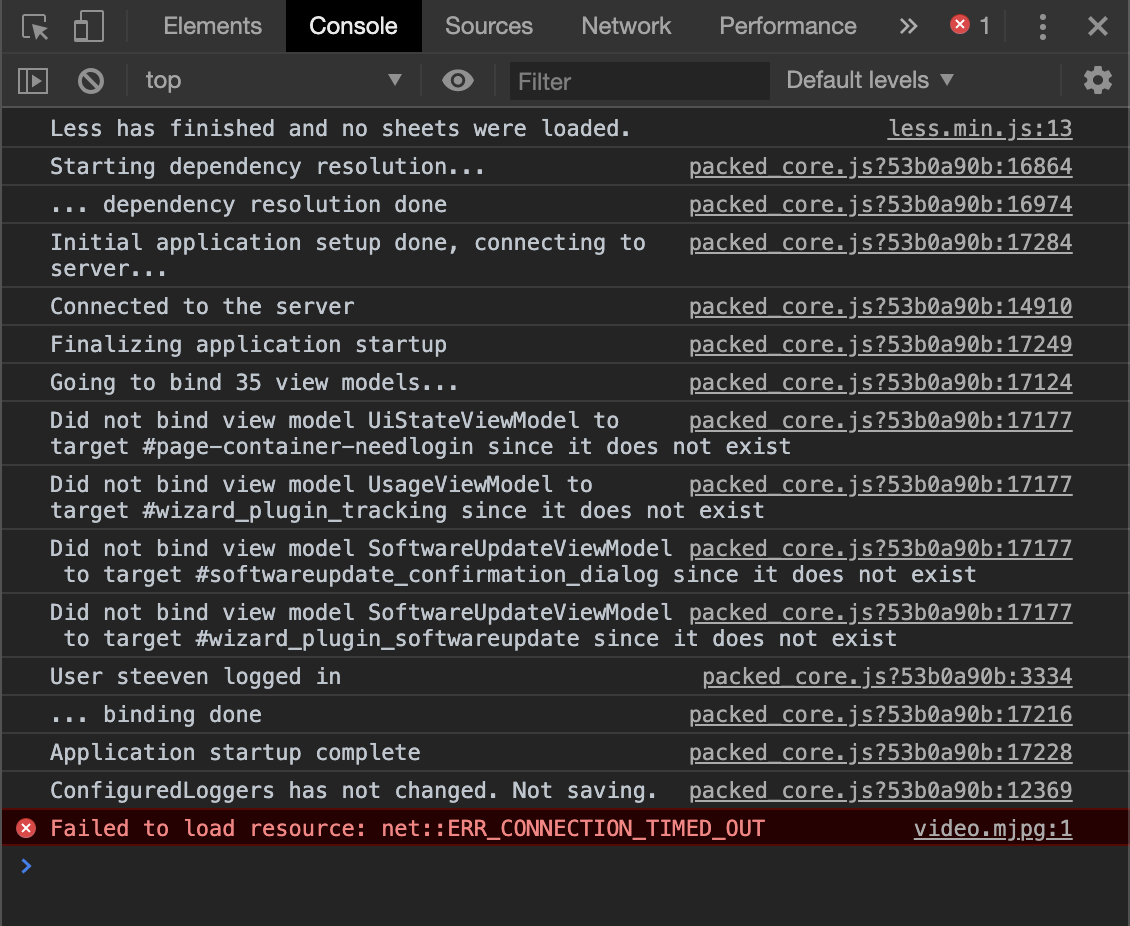
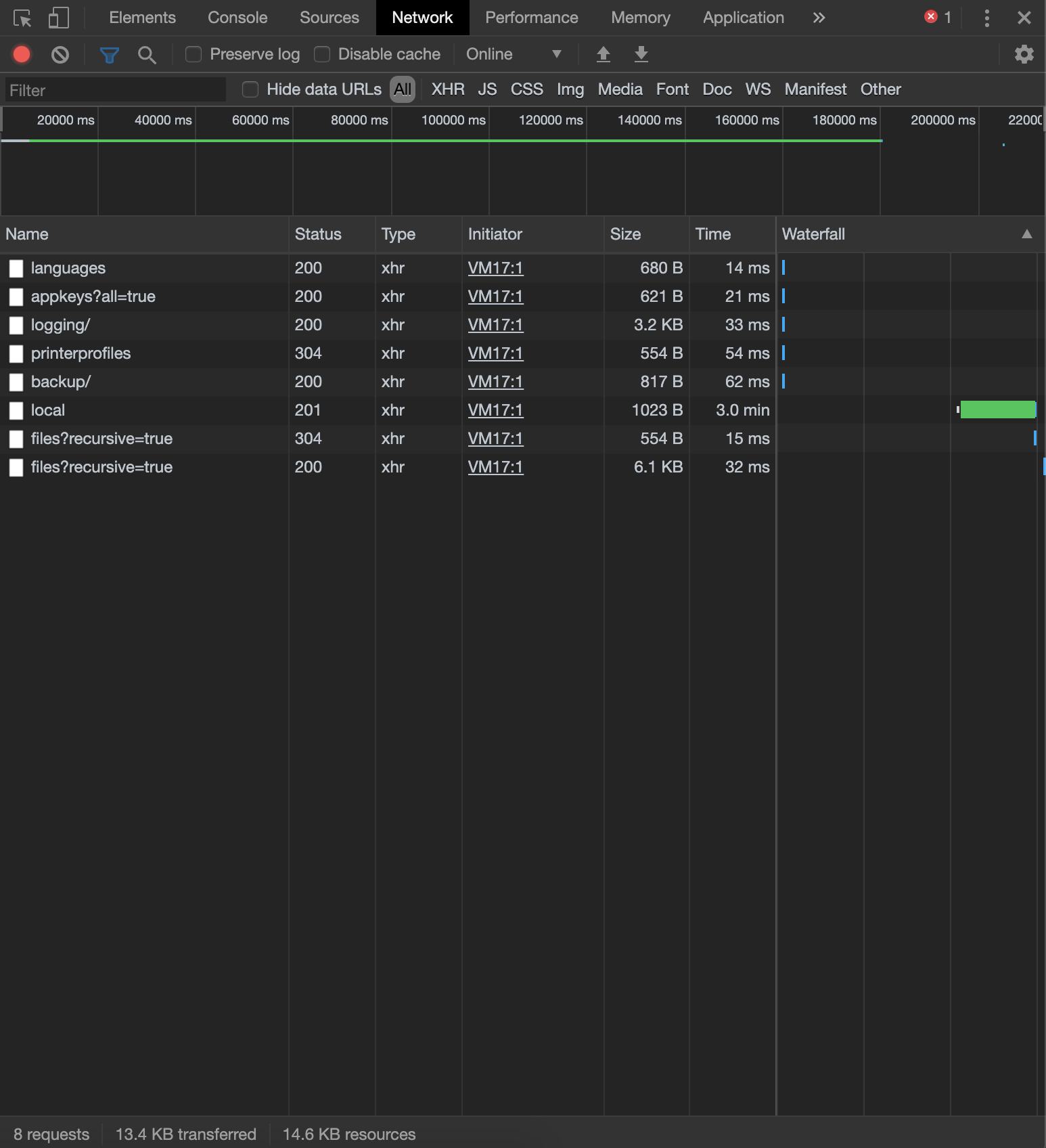
And can you @Steeven9 also share octoprint.log and the contents of your browser's error console as well as a screenshot of the network tab focused on the upload request?
 foosel
on 3 Feb 2020
Tob3ster97
on 3 Feb 2020
foosel
on 3 Feb 2020
Tob3ster97
on 3 Feb 2020
The attached file isnt the original one, howevever the same issue is seen. Stuck on saving and sometimes with eventually upload after 5+ minutes. Some files can take over 30 minutes when i leave it on. And i do have fast internet so i assume this isnt the issue.
Tob3ster97
on 3 Feb 2020
As for the file causing the issue, I tried with 10 different models and it happened with all of them, here's one: Phone_Stand03.txt (converted to txt since GitHub doesn't accept .gcode)
octoprint.log (canceled out IP addresses)
Browser console tab (Chrome Version 79.0.3945.130 (Official Build) (64-bit)):
Network tab while waiting:

Network tab when done:
Steeven9
on 3 Feb 2020
Also OctoPrint as a whole is extemely slow. can take 5-30 minutes to load the web interface and the same again to login.
Tob3ster97
on 3 Feb 2020
Also OctoPrint as a whole is extemely slow. can take 5-30 minutes to load the web interface and the same again to login.
Maybe it helps, maybe it doesn't, but since I updated to rc3 (and then rc4), the OctoPrint webpage on load shows "Loading OctoPrint's UI, please wait...", while it never did before on stable versions.
Could it be somehow realted to this?
Also perhaps it's worth noting that I had no issues whatsoever with Python 2.7 and the latest stable version. Then I updated to Python 3 and rc3 and this popped up
Steeven9
on 4 Feb 2020
+1 having same issue still. Happens for larger files. Uploading directly through FTP and refreshing octoprint does not cause it to lock up.
File example: https://www.dropbox.com/s/zfu1pptbewbea6z/Einsy-doors_0.2mm_PC_MK3S_1d4h21m.zip?dl=0
 xthedakmanx
on 5 Apr 2020
xthedakmanx
on 5 Apr 2020
+1 I have the same issue. Seems to happen randomly. I run multiple instances of octoprint on a single raspberry pi, and can upload the same file to multiple instances and it may hang on one instance but work on another. Does not seem to be file dependent.
 StevoP80
on 26 Apr 2020
StevoP80
on 26 Apr 2020
To everybody who has "the same issue", we need logs or we can not see what happened.
 fieldOfView
on 15 May 2020
fieldOfView
on 15 May 2020
As requested by @foosel above:
octoprint.log and the contents of your browser's error console as well as a screenshot of the network tab focused on the upload request
See this FAQ entry about where to find the logs:
https://community.octoprint.org/t/where-can-i-find-octoprints-and-octopis-log-files/299
fieldOfView
on 15 May 2020
The only thing I've been able to reproduce so far that looked familiar turned out to be caused by a test plugin I had written for something else. So... cannot reproduce, need more logs and test samples.
foosel
on 12 Jun 2020
I've experienced the same issue for a long time.
The cause for this on my install was the plugin DisplayLayerProgress.
This plugin seems to take quite a long time to process anything but the smallest file. Until it has finished, upload progress will remain 'saving...'
Can anyone else confirm that they have this plugin installed and, by disabling it, speed of upload is restored to normal?
 EddieGreen
on 22 Jun 2020
EddieGreen
on 22 Jun 2020
I recently pushed a performance fix for the wrapper that plugins like that one need to use for processing files on upload, so maybe that issue is now actually fixed as far as possible.
foosel
on 22 Jun 2020
Do you think that this adresses my concerns and potential fixes suggested over at DisplayLayerProgress?
EddieGreen
on 22 Jun 2020
It adds an optimization, however it still doesn't solve really bloody expensive processing inside a third party plugin, it can only optimize the stuff around that. DLP still probably should have that investigated.
I found that by switching one of my own plugins wrapping the file uploads from using regex matching to substring search and modifying the logic slightly I could significantly improve on performance.
foosel
on 22 Jun 2020
Thanks for this explanation.
For this and another issue - stalling prints during upload - it looks like OctoPrint gets the blame for processor intensive tasks within plugins and, like me, folks run around looking for bugs and fixes to OctoPrint.
Does OctoPrint's plugin interface require developers to allow its current tasks to complete and report before they take over? Or to require them to report the plugin's status such as starting, processing, and completion?
I don't see a status bar in the main interface but it could be implemented and made a requirement. Sure would reduce all the head-scratching in such cases as this.
EddieGreen
on 22 Jun 2020
Does OctoPrint's plugin interface require developers to allow its current tasks to complete and report before they take over? Or to require them to report the plugin's status such as starting, processing, and completion?
This interface doesn't. And adding that would also be non trivial.
In general, OctoPrint does have a safe mode precisely so that users can disable all third party plugins with one central switch and check if a problem persists in that mode. If it doesn't -> third party plugin issue, not core OctoPrint.
Sadly way too many people ignore this request in the bug template and also the debugging steps outlined on the forum.
foosel
on 22 Jun 2020
OctoPrint does have a safe mode...
Good point.
EddieGreen
on 22 Jun 2020
I recently had the same problem. Which happened after completing a print and starting the next.
I noticed that swap was being used so turned that off. (sudo swapoff -a)
That made little difference. The big problem seemed to be wifi connection. Pinging back to my computer (I was connected through ssh) took 450ms.
Giving up, I decide to reboot. (sudo shutdown -r now)
Which seemed to clear whatever error there was.
Back to normal now.
 iplayfast
on 5 Jul 2020
iplayfast
on 5 Jul 2020
Still unreproduced on my end, however, as mentioned 1.4.1 contains improvements in the upload pipeline that might solve this. Please test against the 1.4.1 RCs that are out already, if I don't hear anything about this still being an issue against the RCs I'll close this on release of 1.4.1.
foosel
on 22 Jul 2020
1.4.1 has just been released
foosel
on 4 Aug 2020
Related issues
 fake-name
·
4Comments
fake-name
·
4Comments
 dkingsjr
·
5Comments
dkingsjr
·
5Comments
 mrcg
·
5Comments
foosel
·
4Comments
mrcg
·
5Comments
foosel
·
4Comments
 Lino77
·
4Comments
Lino77
·
4Comments
Most helpful comment
Maybe it helps, maybe it doesn't, but since I updated to rc3 (and then rc4), the OctoPrint webpage on load shows "Loading OctoPrint's UI, please wait...", while it never did before on stable versions.
Could it be somehow realted to this?
Also perhaps it's worth noting that I had no issues whatsoever with Python 2.7 and the latest stable version. Then I updated to Python 3 and rc3 and this popped up