Octoprint: Deleting file via API doesn't work
What were you doing?
- Deleting (gcode) file via API
- Get files in location
What did you expect to happen?
The deleted file should have been disappeared.
What happened instead?
The deleted file was still there after deleting some files.
Deleting got me a status 204 - No Content, deleting again 404 - Not found. However it is still there when querying with GET api/files
Did the same happen when running OctoPrint in safe mode?
Yes.
Version of OctoPrint
1.3.12
Operating System running OctoPrint
OctoPi
Link to octoprint.log
~Unfortunately the logs are outdated. The last ones are from 2019-09-26.~
Update: My date/time on the raspberry was configured wrong. Here is a link to the log file.
I have read the FAQ.
 Wulfheart
All 15 comments
Same applies to creating a folder. It is shown correctly in the octoprint interface but not in the API call. I assume that there might be a problem with the GET api/files request.
Wulfheart
on 10 Jan 2020
I cannot reproduce this under 1.4.0rc3 nor 1.3.12:
$ curl -i -H "X-Api-Key: ..." -X GET http://localhost:5000/api/files | grep CaliCubeFromCura.fixed.gcode
  % Total    % Received % Xferd  Average Speed   Time    Time     Time  Current
                                 Dload  Upload   Total   Spent    Left  Speed
1      "display": "CaliCubeFromCura.fixed.gcode", 0:--  1:11:35 --:--:--     0
0 94925  100 94925    0     0     22      0  1:11:54  1:11:35  0:00:19  328k
      "name": "CaliCubeFromCura.fixed.gcode",
      "path": "CaliCubeFromCura.fixed.gcode",
        "download": "http://localhost:5000/downloads/files/local/CaliCubeFromCura.fixed.gcode",
        "resource": "http://localhost:5000/api/files/local/CaliCubeFromCura.fixed.gcode"

$ curl -i -H "X-Api-Key: ..." -X DELETE http://localhost:5000/api/files/local/CaliCubeFromCura.fixed.gcode
HTTP/1.1 204 NO CONTENT
Content-Length: 0
X-Robots-Tag: noindex, nofollow, noimageindex
X-Content-Type-Options: nosniff
Expires: -1
Pragma: no-cache
Cache-Control: no-store, post-check=0, max-age=0, no-cache, pre-check=0, must-revalidate
X-Clacks-Overhead: GNU Terry Pratchett
Content-Type: text/html; charset=utf-8
X-Frame-Options: sameorigin

$ curl -i -H "X-Api-Key: ..." -X GET http://localhost:5000/api/files | grep CaliCubeFromCura.fixed.gcode
  % Total    % Received % Xferd  Average Speed   Time    Time     Time  Current
                                 Dload  Upload   Total   Spent    Left  Speed
100 93769  100 93769    0     0     21      0  1:14:25  1:11:35  0:02:50  345k
Did I misunderstand the reproduction steps?
 foosel
on 13 Jan 2020
foosel
on 13 Jan 2020
I think it may be cache-related. /sa https://community.octoprint.org/t/deleting-file-via-api-doesnt-work/15096/2
 fieldOfView
on 13 Jan 2020
fieldOfView
on 13 Jan 2020
Ah... closing the forum thread, two locations with information are confusing AF ;)
The server side caching uses the file list on disk as part of cache evaluation, and as the above shows that seems to work. So I'm a bit confused now. Especially since OP stated it shows correctly in the browser but not the API call, and the browser literally uses the same API.
foosel
on 13 Jan 2020
@foosel Thanks for losing the forum thread. I was unsure to which location this post belongs.
I'm quite sure that the issue isn't related to API clients as it doesn't work on Postman nor axios(JS).
Could this issue be related to the usage of raspbian or octopi?
Wulfheart
on 13 Jan 2020
Bugs always belong in the bug tracker :)
Regarding your question, it shouldn't really. Maybe if the reverse proxy in front is a caching proxy and doesn't respect the headers, shouldn't be an issue though with haproxy as delivered on OctoPi.
Can you maybe share client code with which you can reproduce this? Maybe it's a case of that...
foosel
on 13 Jan 2020
I'm trying to get permission to share the project.
Wulfheart
on 13 Jan 2020
Alternatively a minimal but executable example piece of code would also work
foosel
on 13 Jan 2020
I will provide it tomorrow.
Wulfheart
on 13 Jan 2020
Here can a shareable (minimalized, quick and dirty) version be found.
Please note that an user apikey must be specified in the octoprint settings as well as CORS has to be enabled.
Instructions to run:
npm install
npm run serve if this command fails try npm install several times or reinstall the node_modules.
API client
The API calls to the files API may be found under src/views/Files.vue.
Wulfheart
on 14 Jan 2020
Thanks, I'll try to test with that ASAP!
foosel
on 14 Jan 2020
I'm looking forward to it.
Wulfheart
on 20 Jan 2020
Just a quick update, I'm currently knee deep in 1.4.0rc work, hence why there has not been progress here yet.
foosel
on 28 Jan 2020
@Wulfheart something appears to be wrong with the test code. First of all I had to patch `` in order to be even able to click on delete for a file:
diff --git a/src/components/modules/FileMenu.vue b/src/components/modules/FileMenu.vue
index aed73c5..12ca15e 100644
--- a/src/components/modules/FileMenu.vue
+++ b/src/components/modules/FileMenu.vue
@@ -47,7 +47,7 @@
         },
         computed: {
             disableDelete: function () {
-                return true
+                //return true
                 if (typeof this.staged.children == 'undefined') {
                     return false
                 } else if (this.staged.children.length > 0) return true
@@ -96,4 +96,4 @@
             }
         }
     }
-</script>
\ No newline at end of file
+</script>
Once I did that, all that clicking on it got me is
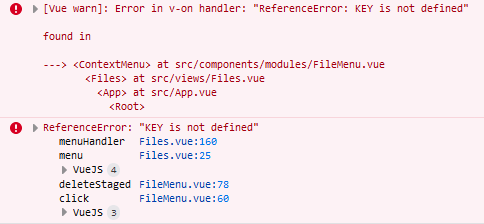
in the browser console.
With that being said though I can reproduce the bug by deleting a file from outside of the app and then having it reload the file list, so I can now investigate! On first look it indeed looks like a caching issue, caused by a wrong assumption about how the last modification date of a folder changes upon file deletion. I'll dig into it. Fix will not make it into 1.4.0 however, that's already frozen for anything but regression fixes.
foosel
on 7 Feb 2020
It should hopefully be fixed by the above commit, I'll give it some more testing though.
foosel
on 7 Feb 2020
Related issues
 LuisDiazUgena
·
4Comments
foosel
·
4Comments
LuisDiazUgena
·
4Comments
foosel
·
4Comments
 cp2004
·
4Comments
cp2004
·
4Comments
 coldtobi
·
4Comments
coldtobi
·
4Comments
 christianh17
·
5Comments
christianh17
·
5Comments