Octoprint: [Request] Allow disabling the GCODE analysis
What were you doing?
gcode visualizer runs even if disabled in settings which causes Raspberry PI Zero to come to a crawl after octoprint is restarted.
pi@delta01:~ $ ps -ef|grep octoprint
pi         342     1 57 12:23 ?        00:05:11 /home/pi/oprint/bin/python2 /home/pi/oprint/bin/octoprint serve --host=127.0.0.1 --port=5000
pi         862   342 33 12:24 ?        00:02:28 /home/pi/oprint/bin/python2 -m octoprint analysis gcode --speed-x=6000 --speed-y=6000 --max-t=10 --throttle=0.01 --throttle-lines=100 /home/pi/.octoprint/uploads/Body_Cover.gcode
 a few minutes later
pi        3400   342 42 12:38 ?        00:01:18 /home/pi/oprint/bin/python2 -m octoprint analysis gcode --speed-x=6000 --speed-y=6000 --max-t=10 --throttle=0.01 --throttle-lines=100 /home/pi/.octoprint/uploads/Wheel_extruder.gcode
````
#### What did you expect to happen?
gcode visualizer should not run if disabled

#### What happened instead?
gcode visualizer  is running

#### Did the same happen when running OctoPrint in safe mode?
no

#### Version of OctoPrint
OctoPrint 1.3.10

#### Operating System running OctoPrint
OctoPi 0.15.1

#### Printer model & used firmware incl. version
Marlin 2.x

#### Browser and version of browser, operating system running browser
chrome

#### Link to octoprint.log
```2019-01-18 12:23:57,672 - octoprint.startup - INFO - ******************************************************************************
2019-01-18 12:23:57,682 - octoprint.startup - INFO - Starting OctoPrint 1.3.10
2019-01-18 12:23:57,685 - octoprint.startup - INFO - ******************************************************************************
2019-01-18 12:23:57,957 - octoprint.util.connectivity_checker - INFO - Connectivity changed from offline to online
2019-01-18 12:24:01,501 - octoprint.startup - INFO - Blacklist processing done, adding 1 blacklisted plugin versions: roomtemp (any)
2019-01-18 12:24:01,753 - octoprint.plugin.core - INFO - Loading plugins from /home/pi/oprint/lib/python2.7/site-packages/octoprint/plugins, /home/pi/.octoprint/plugins and installed plugin packages...
2019-01-18 12:24:17,538 - octoprint.plugin.core - INFO - Found 30 plugin(s) providing 30 mixin implementations, 44 hook handlers
2019-01-18 12:24:18,098 - octoprint.server.heartbeat - INFO - Starting server heartbeat, 900.0s interval
2019-01-18 12:24:18,407 - octoprint.server - INFO - Intermediary server started
2019-01-18 12:24:18,416 - octoprint.plugin.core - INFO - Loading plugins from /home/pi/oprint/lib/python2.7/site-packages/octoprint/plugins, /home/pi/.octoprint/plugins and installed plugin packages...
2019-01-18 12:24:23,070 - octoprint.plugin.core - INFO - Found 30 plugin(s) providing 30 mixin implementations, 44 hook handlers
2019-01-18 12:24:23,399 - octoprint.filemanager.storage - INFO - Initializing the file metadata for /home/pi/.octoprint/uploads...
2019-01-18 12:24:27,082 - octoprint.filemanager.storage - INFO - ... file metadata for /home/pi/.octoprint/uploads initialized successfully.
2019-01-18 12:24:27,261 - octoprint.plugins.cancelobject - INFO - No beforegcode defined
2019-01-18 12:24:27,279 - octoprint.plugins.cancelobject - INFO - No aftergcode defined
2019-01-18 12:24:29,390 - octoprint.plugins.softwareupdate - INFO - Loaded version cache from disk
2019-01-18 12:24:41,935 - octoprint.util.pip - INFO - Using "/home/pi/oprint/bin/python2 -m pip" as command to invoke pip
2019-01-18 12:24:54,565 - octoprint.util.pip - INFO - Version of pip is 9.0.3
2019-01-18 12:24:54,575 - octoprint.util.pip - INFO - pip installs to /home/pi/oprint/lib/python2.7/site-packages (writable -> yes), --user flag needed -> no, virtual env -> yes
2019-01-18 12:24:54,583 - octoprint.util.pip - INFO - ==> pip ok -> yes
2019-01-18 12:24:54,602 - octoprint.plugin.core - INFO - Initialized 30 plugin implementation(s)
2019-01-18 12:24:54,782 - octoprint.plugins.psucontrol - INFO - Using GPIO for On/Off
2019-01-18 12:24:54,789 - octoprint.plugins.psucontrol - INFO - Using internal tracking for PSU on/off state.
2019-01-18 12:24:54,796 - octoprint.plugins.psucontrol - INFO - Running RPi.GPIO version 0.6.5
2019-01-18 12:24:54,804 - octoprint.plugins.psucontrol - INFO - Using GPIO for On/Off
2019-01-18 12:24:54,811 - octoprint.plugins.psucontrol - INFO - Configuring GPIO for pin 19
2019-01-18 12:24:54,894 - octoprint.plugin.core - INFO - 30 plugin(s) registered with the system:
2019-01-18 12:24:55,026 - octoprint.environment - INFO - Detected environment is Python 2.7.13 under Linux (linux2). Details:
2019-01-18 12:24:55,132 - octoprint.server - INFO - Reset webasset folder /home/pi/.octoprint/generated/webassets...
2019-01-18 12:24:55,255 - octoprint.server - INFO - Reset webasset folder /home/pi/.octoprint/generated/.webassets-cache...
2019-01-18 12:24:57,943 - octoprint.server - INFO - Shutting down intermediary server...
2019-01-18 12:24:58,151 - octoprint.server - INFO - Intermediary server shut down
2019-01-18 12:24:58,168 - octoprint.events - INFO - Processing startup event, this is our first event
2019-01-18 12:24:58,179 - octoprint.events - INFO - Adding 1 events to queue that were held back before startup event
2019-01-18 12:24:58,203 - octoprint.filemanager - INFO - Adding backlog items from all storage types to analysis queue...
2019-01-18 12:24:58,313 - octoprint.plugins.pluginmanager - INFO - Loaded plugin repository data from disk, was still valid
2019-01-18 12:24:58,847 - octoprint.plugins.discovery - INFO - Registered 'OctoPrint instance "Delta01"' for _http._tcp
2019-01-18 12:24:59,093 - octoprint.plugins.discovery - INFO - Registered 'OctoPrint instance "Delta01"' for _octoprint._tcp
2019-01-18 12:24:59,226 - octoprint.plugins.discovery - INFO - Registered OctoPrint instance "Delta01" for SSDP
2019-01-18 12:24:59,701 - octoprint.server - INFO - Listening on http://127.0.0.1:5000
2019-01-18 12:24:59,770 - octoprint.filemanager.analysis - INFO - Starting analysis of local:Body_Cover.gcode
2019-01-18 12:24:59,863 - octoprint.plugins.bedlevelvisualizer - INFO - OctoPrint-BedLevelVisualizer loaded!
2019-01-18 12:24:59,930 - octoprint.filemanager.analysis - INFO - Invoking analysis command: /home/pi/oprint/bin/python2 -m octoprint analysis gcode --speed-x=6000 --speed-y=6000 --max-t=10 --throttle=0.01 --throttle-lines=100 /home/pi/.octoprint/uploads/Body_Cover.gcode
2019-01-18 12:25:00,651 - octoprint.plugins.navbartemp - INFO - Broadcom detected
2019-01-18 12:25:01,220 - octoprint.plugins.pluginmanager - INFO - Loaded plugin repository data from disk, was still valid
2019-01-18 12:25:03,996 - octoprint.filemanager - INFO - Added 2 items from storage type "local" to analysis queue
2019-01-18 12:25:23,276 - octoprint.plugins.pluginmanager - INFO - Loaded plugin notices data from https://plugins.octoprint.org/notices.json
2019-01-18 12:25:25,340 - octoprint.plugins.pluginmanager - INFO - Loaded plugin notices data from https://plugins.octoprint.org/notices.json
2019-01-18 12:25:46,866 - octoprint.util.pip - INFO - Using "/home/pi/oprint/bin/python2 -m pip" as command to invoke pip
2019-01-18 12:25:46,879 - octoprint.util.pip - INFO - pip installs to /home/pi/oprint/lib/python2.7/site-packages (writable -> yes), --user flag needed -> no, virtual env -> yes
2019-01-18 12:25:46,905 - octoprint.util.pip - INFO - ==> pip ok -> yes
2019-01-18 12:25:48,636 - octoprint.server.preemptive_cache - INFO - Preemptively caching / (ui _default) for {'query_string': 'l10n=en', 'path': '/', 'base_url': 'http://delta01.local/'}
2019-01-18 12:26:26,576 - octoprint.server.util.sockjs - INFO - New connection from client: ::ffff:192.168.253.132
2019-01-18 12:26:33,326 - octoprint.server.util.flask - INFO - Passively logging in user dummy from ::ffff:192.168.253.132
2019-01-18 12:30:07,825 - octoprint.plugins.psucontrol - INFO - Switching PSU On
2019-01-18 12:30:12,456 - octoprint.util.comm - INFO - Changing monitoring state from "Offline" to "Opening serial port"
2019-01-18 12:30:12,792 - octoprint.util.comm - INFO - Changing monitoring state from "Opening serial port" to "Connecting"
2019-01-18 12:30:12,930 - octoprint.util.comm - INFO - M110 detected, setting current line number to 0
2019-01-18 12:30:13,082 - octoprint.util.comm - INFO - Changing monitoring state from "Connecting" to "Operational"
2019-01-18 12:30:13,210 - octoprint.util.comm - INFO - M110 detected, setting current line number to 0
2019-01-18 12:30:13,397 - octoprint.util.comm - INFO - Printer reports firmware name "Marlin bugfix-2.0.x (Github)"
2019-01-18 12:30:13,479 - octoprint.plugins.firmwareupdater - INFO - Got CONNECTED event
2019-01-18 12:30:13,530 - octoprint.plugins.firmwareupdater - INFO - Run postflash flag is not set
2019-01-18 12:31:36,828 - octoprint.server.preemptive_cache - INFO - ... done in 348.14s
2019-01-18 12:31:36,865 - octoprint.server.preemptive_cache - INFO - Preemptively caching / (ui _default) for {'query_string': 'l10n=en', 'path': '/', 'base_url': 'http://192.168.253.171/'}
2019-01-18 12:34:21,927 - octoprint.server.preemptive_cache - INFO - ... done in 165.06s
2019-01-18 12:38:16,962 - octoprint.filemanager.analysis - INFO - Analysis of entry local:Body_Cover.gcode finished, needed 797.19s
2019-01-18 12:38:18,103 - octoprint.filemanager.analysis - INFO - Starting analysis of local:Wheel_extruder.gcode
2019-01-18 12:38:18,138 - octoprint.filemanager.analysis - INFO - Invoking analysis command: /home/pi/oprint/bin/python2 -m octoprint analysis gcode --speed-x=6000 --speed-y=6000 --max-t=10 --throttle=0.01 --throttle-lines=100 /home/pi/.octoprint/uploads/Wheel_extruder.gcode
2019-01-18 12:39:18,145 - octoprint.server.heartbeat - INFO - Server heartbeat
Link to contents of terminal tab or serial.log
n/a
Link to contents of Javascript console in the browser
n/a
config.yaml settings
`pi@delta01:~/.octoprint $ more config.yaml
feature: {}
gcodeViewer:
enabled: false
plugins:
 nforceroh
All 17 comments
Hi @nforceroh,
It looks like there is some information missing from your bug report that will be needed in order to solve the problem. Read the Contribution Guidelines which will provide you with a template to fill out here so that your bug report is ready to be investigated (I promise I'll go away then too!).
If you did not intend to report a bug but wanted to request a feature or brain storm about some kind of development, please take special note of the title format to use as described in the Contribution Guidelines.
Please do not abuse the bug tracker as a support forum - that can be found at discourse.octoprint.org. Go there for any kind of issues with network connectivity, webcam functionality, printer detection or any other kind of such support requests or general questions.
Also make sure you are at the right place - this is the bug tracker of the official version of OctoPrint, not the Raspberry Pi image OctoPi nor any unbundled third party OctoPrint plugins or unofficial versions. Make sure too that you have read through the Frequently Asked Questions and searched the existing tickets for your problem - try multiple search terms please.
I'm marking this one now as needing some more information. Please understand that if you do not provide that information within the next two weeks (until 2019-02-01 18:50 UTC) I'll close this ticket so it doesn't clutter the bug tracker. This is nothing personal, so please just be considerate and help the maintainers solve this problem quickly by following the guidelines linked above. Remember, the less time the devs have to spend running after information on tickets, the more time they have to actually solve problems and add awesome new features. Thank you!
Best regards,
~ Your friendly GitIssueBot
PS: I'm just an automated script, not a human being, so don't expect any replies from me :) Your ticket is read by humans too, I'm just not one of them.
 GitIssueBot
on 18 Jan 2019
GitIssueBot
on 18 Jan 2019
updated template
nforceroh
on 18 Jan 2019
What you are seeing there isn't the GCODE visualiser or viewer in the front-end (which you disabled) but rather the GCODE analysis that's needed for estimating filament usage and print time that runs in the backend. Not a bug. Possibly a feature request to be able to disable analysis? If so please explain the motivation behind it.
Edit phrasing was backwards
 foosel
on 18 Jan 2019
foosel
on 18 Jan 2019
I know that Octoprint doesn't officially support RPi Zero but that analysis seems to run for every gcode file in the upload directory if you reboot, restart octoprint or when you upload a new file. That process is very resource intensive on the Zero because of it is one CPU core and will consume the CPU at 100% for around 5-10 minutes/file. As a gcode streamer, the RPi Zero is very capable but I usually will kill that process or wait a few minute before I start printing because it does affect GCODE streaming to the printer. Having the option to disable it would be great. Most slicers do report filament estimates so that feature is not very useful to me. I believe other RPI Zero Octoprint users would appreciate the option. Also maybe a check could be done on the gcode file itself, I know some slicers add stats to the gcode file like below. Maybe a simple regex to capture and present that data as the filament length in the UI, or have the option to use slicer info, ignore or force Octoprint's analysis
simplify3d adds at the end
; Build Summary
;   Build time: 0 hours 39 minutes
;   Filament length: 4400.8 mm (4.40 m)
;   Plastic volume: 10585.19 mm^3 (10.59 cc)
;   Plastic weight: 13.23 g (0.03 lb)
;   Material cost: 0.25
Slic3r adds to the end
; filament used = 5789.2mm (13.9cm3)
; total filament cost = 0.0
Cura adds to the top
;FLAVOR:Marlin
;TIME:2903
;Filament used: 3.69991m
;Layer height: 0.2
;Generated with Cura_SteamEngine 3.6.0
You might want to look into some of the newer plugins that can handle this a little better. I think PrintTimeGenius also has code to read in the estimates from gcode.
 jneilliii
on 18 Jan 2019
jneilliii
on 18 Jan 2019
that analysis seems to run for every gcode file in the upload directory if you reboot, restart octoprint or when you upload a new file
The analysis only runs for files for which it hasn't run yet and hence no analysis results are available.
As a gcode streamer, the RPi Zero is very capable but I usually will kill that process or wait a few minute before I start printing because it does affect GCODE streaming to the printer.
This process being quite CPU intense is why OctoPrint aborts the analysis process prior to starting a print. It will never run parallel to streaming a job on an unmodified OctoPrint for this exact reason.
Maybe a simple regex to capture and present that data as the filament length in the UI, or have the option to use slicer info, ignore or force Octoprint's analysis
As @jneilliii pointed out, there are plugins out there that utilize that information.
foosel
on 21 Jan 2019
Perhaps an alternative would be to specify the process priority of the analysis or limit the CPU usage. The OctoPrint web page fails to serve properly sometimes due to this, which means I can't even get a print to start (which is what pauses the analysis).
 zman97211
on 22 Mar 2019
zman97211
on 22 Mar 2019
The analysis only runs for files for which it hasn't run yet and hence no analysis results are available.
This process being quite CPU intense is why OctoPrint aborts the analysis process prior to starting a print. It will never run parallel to streaming a job on an unmodified OctoPrint for this exact reason.
I've run into this issue slowing down my print extremely. Admitted my setup is a little bit of an edge-case.
I'm running a beagleboard with two(!) octoprint instances simultaneously for my two 3d printers attached to it. Usually it works pretty nice, but upon reboot or when uploading big gcode files the octoprint analysis pretty much completely blocks my cpu and will NOT stop when starting a print (because of the two seperate octoprint instances)
My only way to get around that right now is a) Cleaning up my uploads before doing a restart and b) Checking (h)top after uploading a big gcode file before starting the print.
Honestly I've never used the information gathered from the analysis, so I would just disable it when given the option. Alternatively both suggestions by nforceroh and zman97211 seem reasonable to me.
 ForsakenNGS
on 30 Mar 2019
ForsakenNGS
on 30 Mar 2019
[ just an idea, do not crucify me ]
We could take the initiative to standardize the information provided slicers?
Today they provide the same data, but with different names, units and in different places.
We can request these changes for the most commonly used slicers and thus begin a standardization of the supplied header data.
If the analysis also addresses checking for a corrupted file, a checksum may be one of the data provided on header data.
 Alissonverd
on 11 Apr 2019
Alissonverd
on 11 Apr 2019
@zman97211
Perhaps an alternative would be to specify the process priority of the analysis or limit the CPU usage.
Good idea. Would need to be done in a platform agnostic way though (OctoPrint is not Linux-only). This looks like a potential approach.
@ForsakenNGS
Honestly I've never used the information gathered from the analysis
You might not have used it personally, but OctoPrint uses it internally, e.g. for print time estimation. If you think it's inaccurate with the metadata analysis results available, wait till you see how it performs if that data is not available.
However, I'm open to adding a switch for that somewhere in the advanced options or maybe just in the config. The last thing I want to do though is make disabling that an readily available and visible option, because I can already smell the tickets pouring in from people disabling it and then wondering why they no longer get filament usage and print time estimates out of their instances...
@Alissonverd
[ just an idea, do not crucify me ]
Not going to crucify anyone, regardless of the quality of the idea, and this one is even a very good one. The problem though is push back from the community. In my experience, trying to standardize even something as crucial for operation as the communication protocol to the printer only ends in enormous push back and outright hostility. If someone gets some people around a table, makes a suggestion for a centralized format with a proper spec, I'd be happy to implement that and then see if slicers do as well. But I won't do that coordination or specification part myself, I've already been burnt a couple of times in efforts like this and frankly have enough grey hair already.
foosel
on 24 Apr 2019
I never had this problem since I set up octopi 0.16 with 1.3.11, I get this uge cpu load for the analysis of the gcode. My pi model B+ V1.2 is unresponsive through the web interface. Once I started the print through telegram bot the cpu dropt for the python2 anaysis task
 sergio-daniels
on 9 Sep 2019
sergio-daniels
on 9 Sep 2019
same problem, and during a print, i uploaded some gcode, the cpu overheat, octopi decreased the CPU freq, and my print was destroyed.
 kakou-fr
on 16 Oct 2019
kakou-fr
on 16 Oct 2019
I'd like to disable it for a different reason.
My concern is related to #1488.
I help manage multiple printers and I'd like to have all associated Octoprint instances access GCODE files from one shared folder on the network. The fact that Octoprint recursively analyzes each GCODE file in the uploads folder makes this workflow problematic.
I understand the problems associated with different instances writing to the same .metadata.json file. That problem can potentially be avoided with the use of OverlayFS (i.e., lowerdir=/mnt/shared/). However, copying new files into the shared folder will cause OctoPrint to analyze each unseen files. When the shared folder introduces many files, each OctoPrint instance will load each unseen file and analyze it. It would be great if OctoPrint offer the ability to not do that.
Can OctoPrint's plugin system support the creation a plugin that offers a storage implementation that omits metadata creation / GCODE analysis?
 buddydvd
on 2 Nov 2019
buddydvd
on 2 Nov 2019
To avoid the gcode analysis in the octoprint machine I use a combination of https://github.com/malnvenshorn/OctoPrint-MetadataPreprocessor and https://github.com/hashashin/OctoWatcher but the second can be replaced with a post-slice script on many slicer programs.
Salud.
 hashashin
on 2 Nov 2019
hashashin
on 2 Nov 2019
I created a plugin to disable GCODE analysis.
You can find it here: https://github.com/buddydvd/octoprint-disable-gcode-analysis
Please check it out and let me know if you see anything wrong.
buddydvd
on 9 Nov 2019
There are now a bunch of related options added by #3337:
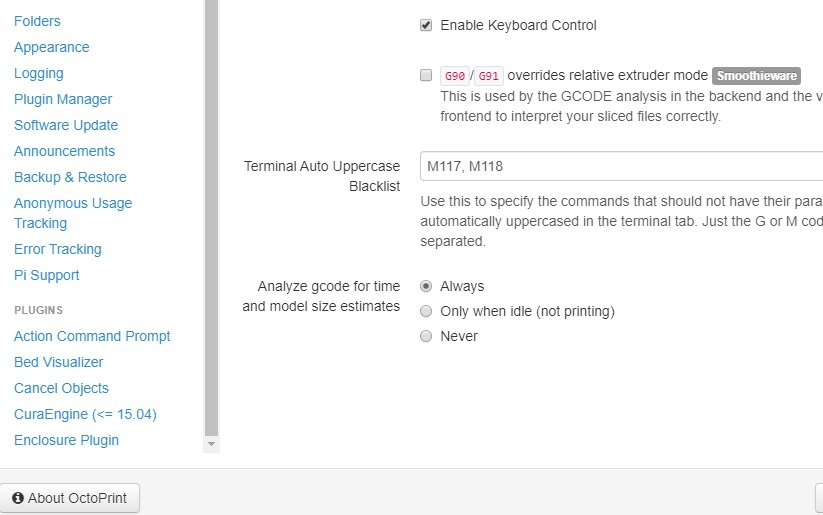
Merged and to pushed out with the next release.
foosel
on 13 Nov 2019
1.4.0 has been released.
foosel
on 4 Mar 2020
Related issues
foosel
·
4Comments
 FormerLurker
·
5Comments
FormerLurker
·
5Comments
 LuisDiazUgena
·
4Comments
LuisDiazUgena
·
4Comments
 gege2b
·
3Comments
gege2b
·
3Comments
 dkingsjr
·
5Comments
dkingsjr
·
5Comments
Most helpful comment
There are now a bunch of related options added by #3337:
Merged and to pushed out with the next release.