Octoprint: [Request] Add list of commands to ignore/not ever send to the printer (e.g. M1)
Is your feature request related to a problem? Please describe.
Most CNC controls interpret M1 as an optional stop which is only executed when a switch is set to enable them. 3D printer controls interpret it as a mandatory stop.
I have a start G code which gives the user the opportunity to clean the bed before resuming the print, but sometimes the bed is already clean, so I would like to ignore the M1 entirely (turn off optional stop).
Describe the solution you'd like
I'd like a check box to ignore M1 G-codes and neither stop nor send them to the firmware.
Describe alternatives you've considered
It is possible to use M118 and action commands to let the user in front of the printer resume the job, however Prusa-Firmware doesn't support them (Prusa3d/Prusa-Firmware#1381, Prusa3d/Prusa-Firmware#921). This still doesn't fix the case where the user simply doesn't want to pause in the first place.
Additional context
-
 lf-
lf-
All 11 comments
Instead of workflow specific workarounds I'd rather add a general "do not send these commands" list.
 foosel
on 10 Jan 2019
foosel
on 10 Jan 2019
I'd like to see it even more generic. How about something similar to Klipper's MACROs, where you can use any string as the name of a macro, including GCODE strings, and write scripts to be sent?
 lar3ry
on 1 Feb 2019
lar3ry
on 1 Feb 2019
@lar3ry that's something that a plugin can easily implement, but I don't want to bloat core functionality more than necessary.
foosel
on 8 Feb 2019
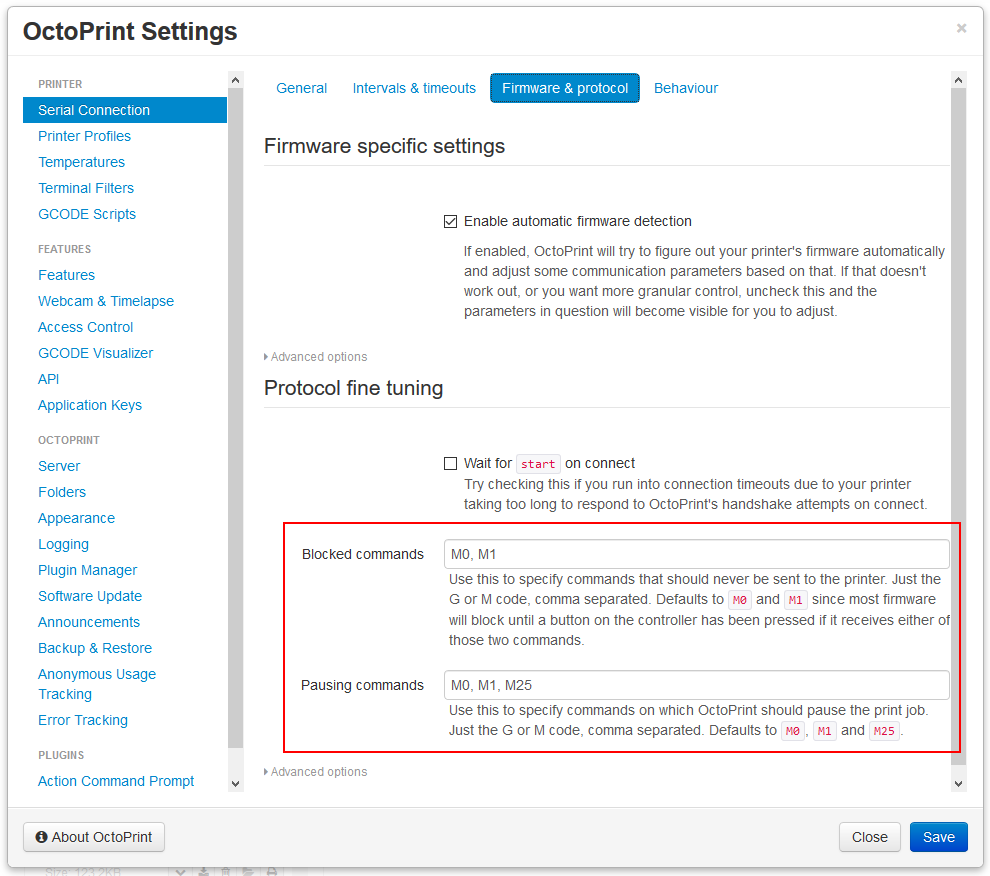
The above commit allows configuring a list of commands that never should be sent to the printer, and a list of commands on which OctoPrint should pause the print job.
If a command is in both (which M0 and M1 are by default) it will pause the print but not be sent to the printer.
Already on maintenance, soon devel, to be released with 1.3.11.
foosel
on 12 Mar 2019
Screenshot for good measure:
foosel
on 12 Mar 2019
Hi,
this is kind of a nice feature..... but should it have a default?
The other day I wanted to pause a print at a specific layer to add some magnets.
I researched who this is possible, and I found the M0 gcode, so I added it (with text and moves away and back).
I was not aware of this so the printer behaved very strange to me.
It moved not to the wanted location, .... no it did but then homed x/y waited.
I did not see the LCD message and was not able to continue from LCD as the M0 docu says.
And yes my PC was off that's what I have a octopi for, it does not have a screen too.
So it took me some time to figure it out and continue the print.
It would be nice to have no default here.
bye
 StefanIGit
on 18 Mar 2019
StefanIGit
on 18 Mar 2019
It would be nice to have no default here.
That would severely change the behaviour of OctoPrint compared to previous versions and probably break the workflow of a lot of people. The default is going to stay for this reason at least for the 1.x releases.
foosel
on 18 Mar 2019
Ah okay so this was like this before but just not configurable?
In this case I like the change very much 😁
StefanIGit
on 18 Mar 2019
It was configurable for a couple versions as in, you could disable that M0 or M1 weren't sent to the printer, but you couldn't configure pausing behaviour. That's now changed and extendable. Also the configuration migration takes into account whether you had enabled sending of these commands before via the old checkbox for that and if so will set the new command lists accordingly.
foosel
on 18 Mar 2019
1.3.11 was released yesterday.
foosel
on 15 May 2019
I noticed that when adding commands to these lists, the printer connection needs to be restarted or octo server needs to be restarted for them to take effect. This should probably be noted by the interface upon change.
 icanhazpython
on 4 Feb 2020
icanhazpython
on 4 Feb 2020
Related issues
 christianh17
·
5Comments
christianh17
·
5Comments
 coldtobi
·
4Comments
coldtobi
·
4Comments
 JohnOCFII
·
5Comments
JohnOCFII
·
5Comments
 fake-name
·
4Comments
fake-name
·
4Comments
 cp2004
·
4Comments
cp2004
·
4Comments
Most helpful comment
Instead of workflow specific workarounds I'd rather add a general "do not send these commands" list.