Octoprint: [Request] End the Feedrate / Flowrate confusion
related closed issue: #2093
I too suffer confusion of terminology and have to look it up every couple of weeks when the default setup does not give a great result rightaway.
It was no surprise to find a closed issue, given the amount of hits you get when searching for the combination of the terms flowrate and feedrate.
What people actually want is change "Speed" and "Extrusion factor".
I agree a standard terminology should not be changed.
May I suggest adding a tooltip or better an additional description to spare new and occasional users from googling so often? Would make a big difference in usability.
 ragflyer
All 16 comments
Give this a try https://github.com/ntoff/OctoPrint-Flowspeedrename You'll have to install it manually since it's not registered. It adds a page in octoprint's settings to let you change the buttons to whatever you want (not entirely sure how, or even if, it'll handle weird characters from languages other than english).

 ntoff
on 26 Nov 2018
ntoff
on 26 Nov 2018
Thanks, that works for me. Not sure about new users though.
ragflyer
on 1 Dec 2018
and an unintended consequence of not sanitising the input, you can put fontawesome icons in there too
eg <i class="fa fa-arrows"></i> Speed
ntoff
on 1 Dec 2018
A setup item which would match the terms with your slicer and/or firmware could make sense (kinda like the camera controls on Fusion 360), but that would still leave the most common "Marlin with Cura" with Feed Rate and Flow.
The iconography @ntoff added does look pretty spiffy though, maybe something like that could be implemented by default? Feed Rate could use a speedo/tachometer gauge, and Flow Rate is obviously Line Width, it even has a graphic for underextrusion :P !
Also, I quote foosel, as she does it exactly as I do:
I just remind myself that the only thing that flows is molten plastic, and that the stepper movements themselves are therefore the other thing ¯(ツ)/¯
 JohnEdwa
on 6 Dec 2018
JohnEdwa
on 6 Dec 2018
Are we stating that Feed rate does not affect extrusion speed (as implied by "movement speed")? Because I have seen elsewhere stated that it does. What fun when it seems that the people seeking to clarify for the confused themselves get things wrong (one way or the other).
If the feed rate indeed doesn't affect the extrusion speed, then can we have a unified slider that affects both? if you're in the middle of a print, you'll either be under or over extruding if you move one before the other.
Edit: It appears that it does. People, please take care in what you suggest so that you don't create more confusion than you are attempting to solve.
I just remind myself that the only thing that flows is molten plastic, and that the stepper movements themselves are therefore the other thing ¯(ツ)/¯
Neat, mnemonics. If only we were sitting in front of a general purpose device capable of managing huge amounts of information that could tell us what things mean. I guess we'll never drag ourselves out of the cave.
 RichyT
on 14 Mar 2019
RichyT
on 14 Mar 2019
It doesn't affect extrusion multiplier, aka flow rate, but it obviously changes the speed of the extruder as it has to turn faster to extrude the correct amount of plastic.
[EDIT] Which is obviously the whole idea of this issue, when you have feed and flow and speed and rate and multipliers and factors being thrown around it gets confusing and error-prone, fast.
JohnEdwa
on 14 Mar 2019
@JohnEdwa, OK. I get what you are saying but be careful with "flow rate". The slider is not specified as a rate but as a multiplier. It's not obvious that the flow increases with the XYZ speed from the layout of the buttons. I stopped writing because I totally agree with your edit.
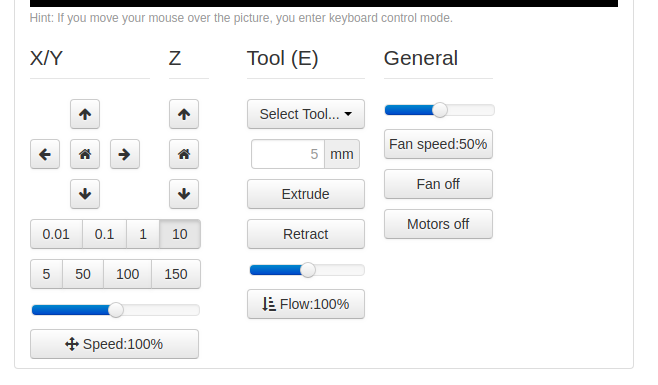
OK, just a little bit more. With all this in mind, the issue seems to be that the UI layout implies that the extruder speed is controlled separately from the axis motors. The most logical way to lay it out would seem to be to have the flow rate stay where it is with the extruder stuff but have the feed rate stuff extend all the way across under both the XYZ and Tool areas. This may not be enough but would be a start.
RichyT
on 14 Mar 2019
@RichyT The sliders in Octoprint are called "Feed rate: 100%" and "Flow rate: 100%", the ones that change the Feed Rate and the Volumetric Flow Rate, so to me it would be kinda odd to not call the slider called "Flow Rate" the "Flow Rate" slider...
JohnEdwa
on 14 Mar 2019
@JohnEdwa Ah, but 100% of what? Rate also has connotations of X per second. So the Feed rate increases the mm/s, wouldn't the flow rate increase the mm^3/s? Well no. And perhaps that should be obvious but as stated, the UI design visually associates the slider with the axis and not the extruder and so encourages confusion.
RichyT
on 14 Mar 2019
@RichyT Well yes. "Flow Rate" multiplies the desired output speed of the extruder so if you set the "Flow Rate" to 110%, it will move the extruder motor 10% faster (measured in mm/s) and therefore push roughly 10% more plastic through the nozzle, which is volume that is measured in mm^3/s.
And I don't see how the UI would "visually associate" Flow Rate with an axis, to me it is quite clear that "Feed Rate" is in the same block as "X/Y Z" and other movement options, while "Flow Rate" is under the "Tool (E)" section with the "Extrude" and "Retract" buttons. As can be seen in this screeshot.
I don't actually have an issue with Octoprint, the UI is clear to me and it could say "asf" and "Dsa" for all I care. The issue is when I use my printer directly as I need to use "Feed", "Flow" and "FR" with no UI context.
JohnEdwa
on 14 Mar 2019
I don't have anything against the flow rate button but its presence coupled with the Feed rate button being grouped under the axis controls invites one to not be sure that the feed rate effects the speed at which the extruder motor turns as well as the axis motors. To put it another way, why does the feed rate control not extend under the extruder control? There is no good reason but that it doesn't implies that there is a reason.
RichyT
on 14 Mar 2019
Unconfuse me: if I set the speed to 110% does the whole job go faster (movement AND extrusion) or is it just movement, so you are effectively _reducing_ the extrusion?
 yoyo42
on 14 Apr 2019
yoyo42
on 14 Apr 2019
If you set the speed (feed rate) to 110% then extrusion is automatically increased in proportion to the speed so that the correct amount is extruded. The flow rate control stays at 100%.
I tested this by only adjusting feed rate to 150 % and there was no under-extrusion
 Brandon2255p
on 29 Jul 2019
Brandon2255p
on 29 Jul 2019
If you set the speed (feed rate) to 110% then extrusion is automatically increased in proportion to the speed so that the correct amount is extruded. The flow rate control stays at 100%.
I tested this by only adjusting feed rate to 150 % and there was no under-extrusion
I feel like the interface needs to better reflect this, but I'm not sure the best way. I'm just glad it's clarified! Maybe "Print Speed" instead of "Feed rate"?
 PrestonL
on 16 Feb 2020
PrestonL
on 16 Feb 2020
is possible to increase feed rate range? I would like to change range up to 300 %.
 hedva92
on 8 Mar 2020
hedva92
on 8 Mar 2020
@hedva92 you can use G-Code to modify feed rate: https://marlinfw.org/docs/gcode/M220.html
 Theaxiom
on 9 Jul 2020
Theaxiom
on 9 Jul 2020
Related issues
 dm3942
·
49Comments
dm3942
·
49Comments
 ZhuDaHai
·
42Comments
ZhuDaHai
·
42Comments
 foulowl
·
58Comments
foulowl
·
58Comments
 foosel
·
67Comments
foosel
·
67Comments
 Givemeyourgits
·
76Comments
Givemeyourgits
·
76Comments
Most helpful comment
If you set the speed (feed rate) to 110% then extrusion is automatically increased in proportion to the speed so that the correct amount is extruded. The flow rate control stays at 100%.
I tested this by only adjusting feed rate to 150 % and there was no under-extrusion