Octoprint: Cura 3.6.0 makes a doubled gcode when printing to 1.3.10rc2
What were you doing?
- open STL in cura
- [adjust positions/speed/fill/etc]
- press "Print with OctoPrint"
What did you expect to happen?
correct file sent to OctoPrint
What happened instead?
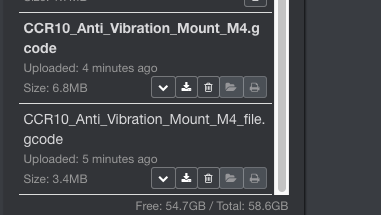
filesize is double comparing to just saved from Cura and uploaded manually
after model printed, printer started to print it again, dragging into heatbad :(
not reproduceable in safe mode, also, after returning to non-safe mode everything is fine
havent saved doubled file, shame on me
feel free to close ticket
Did the same happen when running OctoPrint in safe mode?
not reproduceable, also, after returning to non-safe mode everything is fine
havent saved doubled file, shame on me
feel free to close ticket
Version of OctoPrint
OctoPrint 1.3.10rc2 running on OctoPi 0.15.1
Printer model & used firmware incl. version
CR10 + TH3D U1.R2.4b (10/19/2018)
Browser and version of browser, operating system running browser
Mozilla/5.0 (Macintosh; Intel Mac OS X 10_14_1) AppleWebKit/537.36 (KHTML, like Gecko) Chrome/70.0.3538.102 Safari/537.36
Link to octoprint.log
Link to contents of terminal tab or serial.log
2018-11-18 09:25:16,631 - serial.log is currently not enabled, you can enable it via Settings > Serial Connection > Log communication to serial.log
2018-11-18 10:34:59,425 - serial.log is currently not enabled, you can enable it via Settings > Serial Connection > Log communication to serial.log
Link to contents of Javascript console in the browser
Screenshot(s)/video(s) showing the problem:
I have read the FAQ.
 dimkin-eu
All 2 comments
filesize is double comparing to just saved from Cura and uploaded manually
That sounds more like a bug in Cura than anything else really, if it works when uploaded through OctoPrint's own UI.
 foosel
on 19 Nov 2018
foosel
on 19 Nov 2018
It's a bug in v3.5.2 of the the Cura Octoprint plugin. Identified and will be fixed in 3.5.3.
 jarrodasmith
on 21 Nov 2018
jarrodasmith
on 21 Nov 2018
Related issues
 FormerLurker
·
5Comments
FormerLurker
·
5Comments
 cp2004
·
4Comments
cp2004
·
4Comments
 mrcg
·
5Comments
foosel
·
4Comments
mrcg
·
5Comments
foosel
·
4Comments
 JohnOCFII
·
5Comments
JohnOCFII
·
5Comments
Most helpful comment
It's a bug in v3.5.2 of the the Cura Octoprint plugin. Identified and will be fixed in 3.5.3.
https://github.com/fieldOfView/OctoPrintPlugin/issues/94