What were you doing?
- Logged in to OctoPrint with "Remember me" checked
- Started my print and checked the status from time to time
- OctoPrint exits my session and logged me out
What did you expect to happen?
Staying logged in into OctoPrint
What happened instead?
OctoPrint logs me out
Did the same happen when running OctoPrint in safe mode?
Yes. Safe mode doesn't change anything.
Version of OctoPrint
1.3.8
Operating System running OctoPrint
OctoPi 0.15.0
#### Printer model & used firmware incl. version
-
Browser and version of browser, operating system running browser
macOS 10.13.4 using Safari 11.1
Link to octoprint.log
https://gist.github.com/BNoiZe/2a7bfe258e1aafc8d230a3ea3b6ac8aa
Link to contents of terminal tab or serial.log
Does not matter if the printer is connected or not.
Link to contents of Javascript console in the browser
https://gist.github.com/BNoiZe/2a7bfe258e1aafc8d230a3ea3b6ac8aa
Screenshot(s)/video(s) showing the problem:
I have read the FAQ.
 BNoiZe
All 26 comments
Should not be applicable here
The reason safe mode is required is to rule out interference by 3rd party plugins, please repeat the tests in safe mode.
 ntoff
on 20 May 2018
ntoff
on 20 May 2018
@ntoff Tested it, it keeps happening in safe mode.
BNoiZe
on 20 May 2018
Is anything in this thread relevant to you? https://github.com/foosel/OctoPrint/issues/1792 Are you opening safari in a normal way or via any sort of web app or desktop page shortcut? Any browser extensions that might see OctoPrint's self signed https (assuming you're accessing it via https) certificate as "odd" and nuke any trace of your having been there?
ntoff
on 22 May 2018
I have the issue with both Safari and Firefox, either using HTTPS or plain HTTP. Seems to go away when accessing it by IP.
I'll try running it for a bit through a hosts record pointing to the IP as opposed to the avahi-discovered one to see if it makes a difference. Any other scenarios I could help with testing?
 c10l
on 22 May 2018
c10l
on 22 May 2018
It could maybe be caused by changing IP addresses. I recently fixed an issue there which made the "remember me" function not work properly as well. If you feel comfortable testing a development version, the fix is available on the maintenance branch. Otherwise wait until the first RC of 1.3.9.
 foosel
on 22 May 2018
foosel
on 22 May 2018
I can probably try it tomorrow. Perhaps that will also solve https://github.com/foosel/OctoPrint/issues/2658?
c10l
on 22 May 2018
Very much unlikely.
foosel
on 23 May 2018
@ntoff I had the problem with the self-signed certificate and with a LE certificate too. I tried disabling the browser extension, didn't solve the problem. I'm opening Safari in a normal way. #1792 doesn't seem relevant to me.
@foosel I'm using a fixed IP on OctoPrint.
BNoiZe
on 23 May 2018
@BNoiZe does this only happen with Safari or can you reproduce it also on another browser? Just yesterday I ran into yet another Safari-exclusive bug caused by not adhering to existing standards, and I'm honestly leaning towards declaring that browser as not supported by now due to all the issues it causes. Almost feels like it's the new IE.
foosel
on 23 May 2018
I don't think my IP changes either, and surely not 5 times within the space of a minute or two, which was probably the highest frequency of relogins I had to do so far. Even when not that bad, the lost sessions are quite common, happening at least a few times a day on a 24/7 connected system, which should never change IPs as its DHCP lease would be renewed frequently (and I'm almost sure I've frozen that allocation to the Pi's MAC but I might be wrong there).
About browsers, I'm using mostly Firefox but have had the same behaviour on Safari as well.
I don't do web development but I like Safari from the POV of a user, it's a good and performant browser. It saddens me to hear that it's deviating heavily from standards... :(
c10l
on 23 May 2018
It also happens in Firefox and Chrome for me.
BNoiZe
on 23 May 2018
This happens to me on macOS 10.13.4 with Safari, FF, and Chrome, and on Ubuntu 18.04 with FF and Chrome.
All browsers are current and up to date.
 anoldguy
on 25 May 2018
anoldguy
on 25 May 2018
Something that I just remembered when looking up the remember_me cookie commit (42fb4f47008c9168b1657f9a7a9ea6958228c530) - do all of you experiencing this run IPv6 in their home LAN? I remember running into an issue there with multi-homed Win10 machines, and in the current stable version there might also still be an issue with remote address detection that could explain session invalidation.
Anyone here reliably reproducing this capable and willing of testing the maintenance branch?
foosel
on 25 May 2018
Screenshots/more browser logs might help here - I'd like to know what "exits my session" looks like (what error/message/etc. is shown), and also network traffic from the browser:
2018-05-19 13:35:24,443 - octoprint.server.util.sockjs - INFO - Client connection closed: 2001:4bca:102:f794:215a:2e61:c329:a3e2
2018-05-19 13:35:24,873 - octoprint.server.util.sockjs - INFO - New connection from client: 2001:4bca:102:f794:215a:2e61:c329:a3e2
looks weird/too rapid. A screenshot at least of the network traffic could help, though some detailed responses for any that failed would be great too.
 joshwills
on 25 May 2018
joshwills
on 25 May 2018
Yes, I do run both ipv4 and ipv6. I’ll upgrade to the maintenance branch this weekend and see how it goes.
anoldguy
on 25 May 2018
I'm also running ipv4 and ipv6. I will upgrade to the maintenance branch now and report back.
BNoiZe
on 25 May 2018
It might also be interesting to enable the tornado access log since that will log all requests incl. their methods, paths, return codes and client ips:
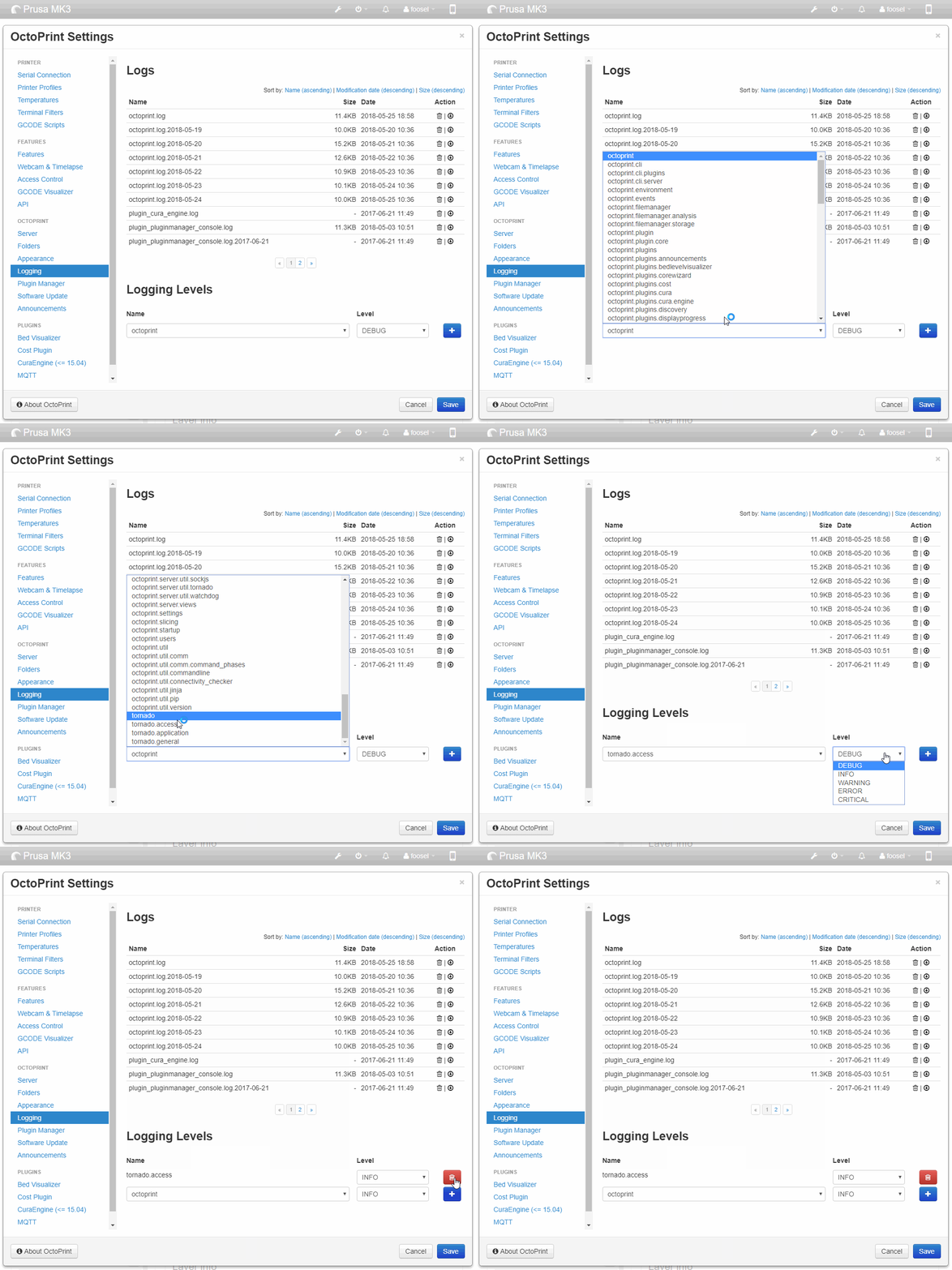
Especially the latter might help identify any IP toggling situations that would cause session invalidation (on 1.3.8). This is btw something anyone can easily try without having to switch to the maintenance branch.
foosel
on 25 May 2018
@foosel I switched to the maintenance RCs, but the problem persists. As you suggested I enabled the tornado.access logging. See https://gist.github.com/BNoiZe/6b2243ed2bb30a557282db0c5b0f95c0
BNoiZe
on 3 Jun 2018
@BNoiZe there's no maintenance RC out yet for 1.3.9, you'd have to manually switch to the maintenance branch to test if the changes I made there change the situation.
Looking at the log, I see that at least the connection on the web socket is made via IPv6 whereas the connection to the API is done via IPv4. That shouldn't cause any issues (I think!) but if the IP on the API would chance in between requests, that would show an issue. Then again, I'm not sure now after all this would display in the log here since you appear to be behind a reverse proxy (normal on OctoPi) and this version of OctoPrint doesn't yet properly log the client IP on the API in such situations.
foosel
on 4 Jun 2018
I updated my Mac to 10.13.6 beta just two days ago. Interestingly the issue is gone now. I can't really tell why, but it may have to do with Safari itself.
BNoiZe
on 19 Jun 2018
I am also having this issue when accessing the Octoprint instance from my Windows 10 machine with Chrome. Same scenario, regardless of if I choose remember me or not, after an unspecified amount of time I will be logged out.
On several occasions the UI will not even refresh to notify me that I have been logged out (i.e. I go to click Cancel Print and nothing happens, when I refresh the page, it shows me as logged out). There has also been occasions when I log back in and do not have access to any functions (i.e. the connection box appears, I click Connect and nothing happens; I have to refresh page again (Ctrl+Reload) to find I'm logged out again.
I have enabled the tornado.access logs and will post back when I capture something.
 shbatm
on 21 Jun 2018
shbatm
on 21 Jun 2018
I just checked this again. Safari keeped logging me out. After I upgraded to RC1 the problem dissolved into thin air.
BNoiZe
on 22 Jun 2018
Same for me. But RC1 broke my GCODE scripts... Off to fix that issue.
shbatm
on 23 Jun 2018
But RC1 broke my GCODE scripts
In what way?
foosel
on 25 Jun 2018
My GCODE Scripts for After Pause and After Cancelled seemed not to run at all. The print would cancel, but the script tells Z to raise and the bed to push forward, but nothing happened. Was going to dig in further and open a separate issue, but since had to leave town and haven't had a chance to follow up.
GCODE Scripts.txt
Edit: Here is a log snippet -- it looks like the Pause worked fine previously, it was the Cancel that didn't work because the position didn't get reported (everything in position object is 'None')
Log Snippit.txt
shbatm
on 25 Jun 2018
After testing the RC1 for some days it seems the problem is completely gone. Haven't been logged out since I installed the RC1.
Closing the problem as it seems to be solved. Tested in Safari, Firefox and Chrome.
BNoiZe
on 1 Jul 2018
Related issues
 christianh17
·
5Comments
christianh17
·
5Comments
 mdelecate
·
5Comments
mdelecate
·
5Comments
 dkingsjr
·
5Comments
dkingsjr
·
5Comments
 JohnOCFII
·
5Comments
foosel
·
5Comments
JohnOCFII
·
5Comments
foosel
·
5Comments
Most helpful comment
Something that I just remembered when looking up the
remember_mecookie commit (42fb4f47008c9168b1657f9a7a9ea6958228c530) - do all of you experiencing this run IPv6 in their home LAN? I remember running into an issue there with multi-homed Win10 machines, and in the current stable version there might also still be an issue with remote address detection that could explain session invalidation.Anyone here reliably reproducing this capable and willing of testing the
maintenancebranch?