Octoprint: [Request] Disable uploads when printing.
I think it could be a good idea to disable the upload feature, button and drag and drop, when the printer is printing. if several files are uploaded during a print, probably the pi will not be able to process everything and the print will suffer, usually a bad layer.
Of course we should see if the printer is running before uploading but thats not always easy to know so it wouldn´t hurt if it was possible to disable uploads during printing by option or by default.
 derfred33
All 9 comments
Hi @derfred33,
It looks like there is some information missing from your bug report that will be needed in order to solve the problem. Read the Contribution Guidelines which will provide you with a template to fill out here so that your bug report is ready to be investigated (I promise I'll go away then too!).
If you did not intend to report a bug but wanted to request a feature or brain storm about some kind of development, please take special note of the title format to use as described in the Contribution Guidelines.
Please do not abuse the bug tracker as a support forum - that can be found at discourse.octoprint.org. Go there for any kind of issues with network connectivity, webcam functionality, printer detection or any other kind of such support requests or general questions.
Also make sure you are at the right place - this is the bug tracker of the official version of OctoPrint, not the Raspberry Pi image OctoPi nor any unbundled third party OctoPrint plugins or unofficial versions. Make sure too that you have read through the Frequently Asked Questions and searched the existing tickets for your problem - try multiple search terms please.
I'm marking this one now as needing some more information. Please understand that if you do not provide that information within the next two weeks (until 2018-05-07 11:00 UTC) I'll close this ticket so it doesn't clutter the bug tracker. This is nothing personal, so please just be considerate and help the maintainers solve this problem quickly by following the guidelines linked above. Remember, the less time the devs have to spend running after information on tickets, the more time they have to actually solve problems and add awesome new features. Thank you!
Best regards,
~ Your friendly GitIssueBot
PS: I'm just an automated script, not a human being, so don't expect any replies from me :) Your ticket is read by humans too, I'm just not one of them.
 GitIssueBot
on 23 Apr 2018
GitIssueBot
on 23 Apr 2018
I'm fairly sure that if I were to do that, within seconds of pushing such a change a ticket would be opened that demanded reverting it. So that means that would have to be something that stays optional.
I have to admit that from my own personal workflow I'd be adverse to this kind of change myself. In the rare case that I decide to upload something while printing, I have a good reason for that, and I so far never observed any negative side effects of doing so (GCODE analysis is disabled while printing, so it really boils down only to the upload itself).
 foosel
on 24 Apr 2018
foosel
on 24 Apr 2018
Hello Gina,
Could be optional... This happens to me when I´m updating files on the octoprint folders, sometimes I don´t notice that I´m uploading to a working printer and end up dropping the files on it, could be a protection measure for people operating many printers.
derfred33
on 24 Apr 2018
And what issues do you experience when you drop files on it while printing? Replacing the file that's currently being printed should be disabled in any case and just uploading a file to a working instance shouldn't cause any issues. From your request I gather that you are experiencing issues, so it would help if you could share what kind of issues, it might be something that needs looked into instead of restricting uploads.
foosel
on 25 Apr 2018
Usually extrusion issues, I´m sending you an image of the last one, I still have the part but in the past I had worst issues at the level of motion and extrusion at the same time. I think its a mater of raspberry pi resources (pi3) it has to process the uploaded files and send the data to the printer and the data transmission is interrupted.
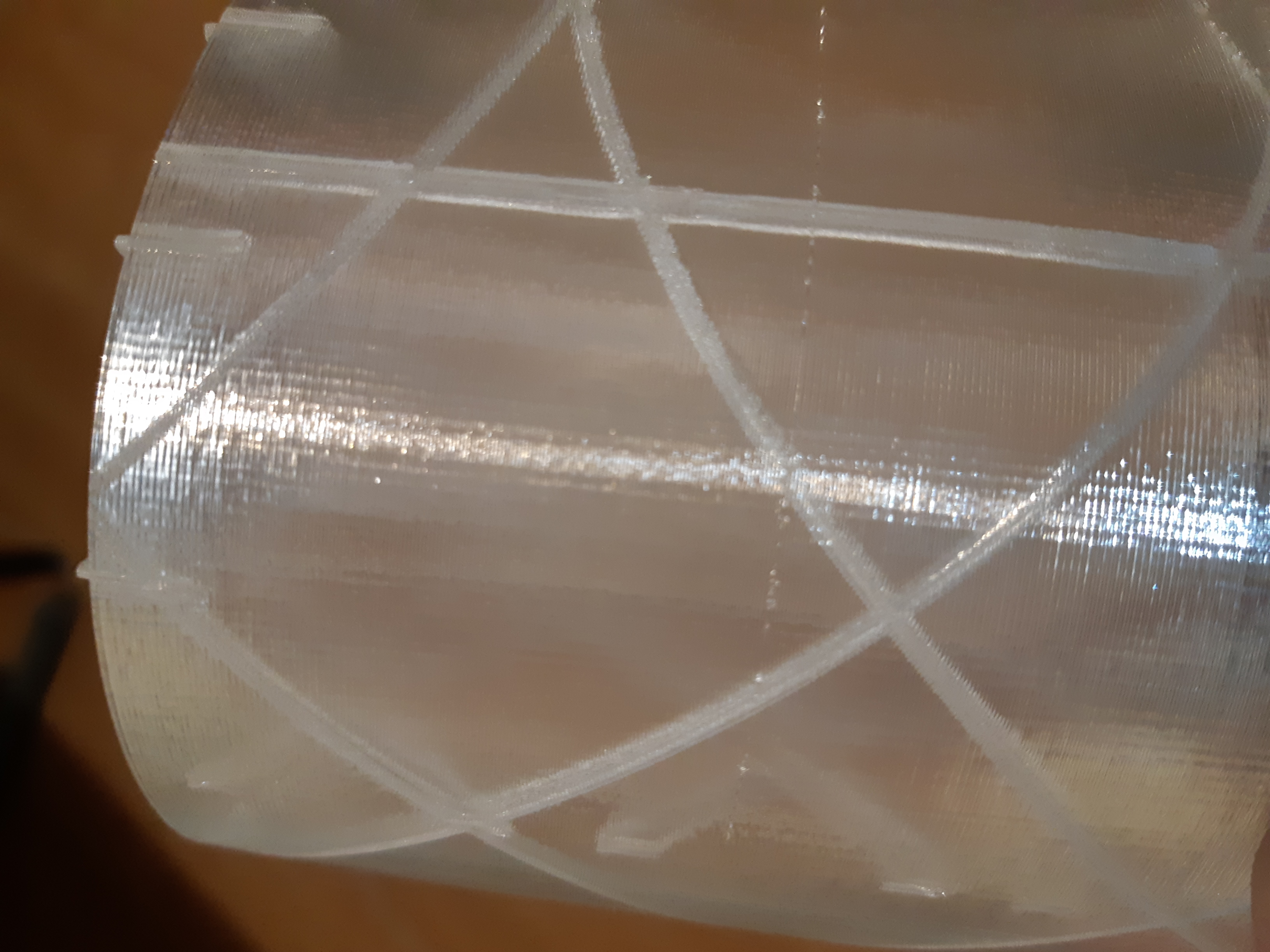
In this case I let the print finish because the issue was visible only in this part, the other one I could save but I saw when this happened and was a result of uploading like 150mb, 20 files or so to the raspberry pi.
derfred33
on 25 Apr 2018
I upload while printing and have not experience this. (Pi3 - not the plus)
I wonder if you might be having a comms issue with wifi. Something is causing the pi to have to stop and think at the expense of sending data to the printer.
•Can you reliably cause this?
I ask because maybe you can ssh into the pi and watch the process list to see what is spiking when it happens.
•Does this also happen if the Pi is connected via ethernet?
I had a weird issue with a nightly of OctoPi 0.15 that would cause the web server to stop responding. I could ssh in, upload via the API but not connect. No matter what I was messing with while connected the print would not stop or pause. It just kept working. So I'm thinking this is either a plugin, something else in the pi or a network issue.
 mvasilakis
on 25 Apr 2018
mvasilakis
on 25 Apr 2018
All of these are very good questions and I second them.
foosel
on 27 Apr 2018
I´ll have a look at the processes later but for now I can tell you that this happened when I had the pi´s connected via ethernet and now by wifi, the picture above is from a wifi connection.
The Pi doesn´t stops or pauses, it just becomes slower and the printer starts responding slower, specially when printing curves, the extrusion also suffers.
derfred33
on 27 Apr 2018
I agree - making this change would not go over well, in my opinion. I'm also not sure why this is needed in the first place. I'm currently running on a RasPi 3B and haven't encountered this issue. During my last few prints, I've uploaded just under 20 files without encountering this issue.
I would recommend checking your storage. Are you using a class 10 microSD card? If not, it could be a storage latency issue. The OS will literally lock up if it can't read from the storage fast enough.
 tylwright
on 31 May 2019
tylwright
on 31 May 2019
Related issues
 halxinate
·
4Comments
halxinate
·
4Comments
 JohnOCFII
·
5Comments
JohnOCFII
·
5Comments
 halkeye
·
4Comments
halkeye
·
4Comments
 fake-name
·
4Comments
fake-name
·
4Comments
 gege2b
·
3Comments
gege2b
·
3Comments
Most helpful comment
I'm fairly sure that if I were to do that, within seconds of pushing such a change a ticket would be opened that demanded reverting it. So that means that would have to be something that stays optional.
I have to admit that from my own personal workflow I'd be adverse to this kind of change myself. In the rare case that I decide to upload something while printing, I have a good reason for that, and I so far never observed any negative side effects of doing so (GCODE analysis is disabled while printing, so it really boils down only to the upload itself).