Octoprint: Pause and subsequent cancel causes UI to become unresponsive.
What were you doing?
Pausing and then canceling print
- Pause current print
- Cancel current print without resuming
- ...
What did you expect to happen?
I expect the print job to be cancelled successfully and the UI to go back to a ready state.
What happened instead?
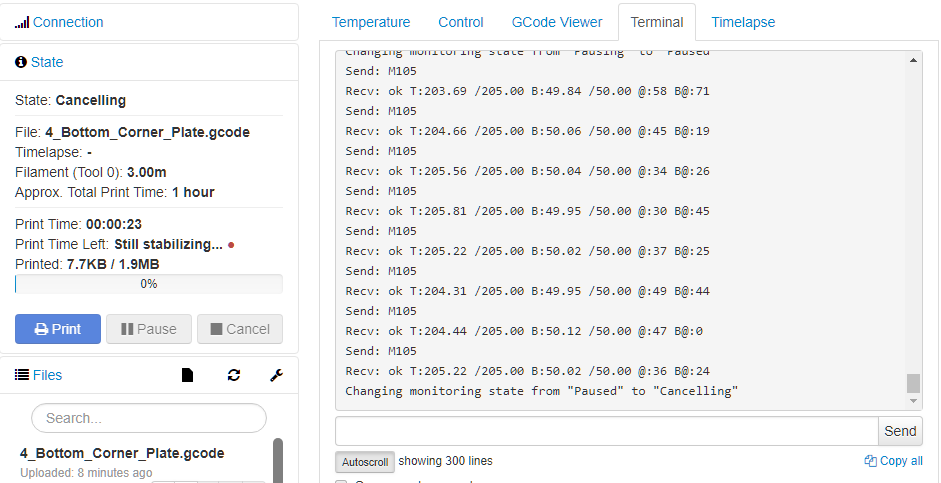
The UI hangs in a "Cancelling" state and is unresponsive unless I disconnect and reconnect. I cannot control my print with any of the buttons as they are all grayed out.
Did the same happen when running OctoPrint in safe mode?
Yes
Version of OctoPrint
Octoprint 1.3.8
Operating System running OctoPrint
OctoPi 0.14.0
Printer model & used firmware incl. version
Anet A8 running a MKS Gen 1.4 board loaded with Marlin 1.1.8.
Browser and version of browser, operating system running browser
Chrome Version 65.0.3325.181 (64-bit) running on Windows 10 Pro
Link to octoprint.log
Link to contents of terminal tab or serial.log
Link to contents of Javascript console in the browser
Screenshot(s)/video(s) showing the problem:
I have read the FAQ.
 ralxnder
All 11 comments
Please enable serial.log (Settings > Serial Connection > Log communication to serial.log), then reproduce the issue, then post the resulting log.
 foosel
on 16 Apr 2018
foosel
on 16 Apr 2018
I had the same issue with pausing my print.
I clicked on pause print, normally it should perform the custom GCODE which i added to the pause button,
which should raise the head from the object.
The status of the printer didnt change from printing to paused.
I wasnt able to send any commands to the printer.
Also for me, all buttons were grayed out
Ruined my 7hrs print.
 Serray
on 17 Apr 2018
Serray
on 17 Apr 2018
@Serray for you the same goes as for @ralxnder. I need logs. I can't reproduce this myself. I depend on logs to be able to debug this.
foosel
on 17 Apr 2018
Here is a serial.log. I was seeing the same as @Serray, buttons are grayed out.
ralxnder
on 17 Apr 2018
I also faced the same issue. To rework we have restart the octoprint. This issue is happening after the latest update.
 flashmani
on 17 Apr 2018
flashmani
on 17 Apr 2018
I found a workaround until the issue is resolved. When the pauseing gets stuck and the buttons are greyed out, then go to Terminal > Advanced Options > Fake Acknowledgement. Then the print status should be Paused
 NeroBurner
on 18 Apr 2018
NeroBurner
on 18 Apr 2018
Found and fixed by the above commit. Both this and #2581 had the same race condition as root cause. Until 1.3.9 is released (currently traveling, so can't look into this due to lack of a proper test environment) hitting "Fake Acknowledgement" as described above is a functioning work around.
foosel
on 18 Apr 2018
Just to make this easier to find...
foosel
on 25 Apr 2018
Just wondering if this bug could cause the following problem:
I use the filament run-out plugin "Filament Sensor Reloaded" by kontakt. This plugin will call the pause function in Octoprint when the lack of filament triggers a micro switch.
I have a GCODE script populated in the "After print job is paused" section of my configuration and have noticed that, in about 1 out of 3 times or so, when the pause is triggered, Octoprint crashes completely and I have to reboot the RPi.
 DrWatson
on 25 Jun 2018
DrWatson
on 25 Jun 2018
@DrWatson I doubt it. But it's hard to say without octoprint.log and serial.log and your settings ;)
foosel
on 25 Jun 2018
Thanks for the response. I think I am going to upgrade to 1.3.9rc1 and see if the problem goes away so at least I'm on the most recent code stream.
DrWatson
on 25 Jun 2018
Related issues
 ModischFabrications
·
3Comments
ModischFabrications
·
3Comments
 JohnOCFII
·
5Comments
JohnOCFII
·
5Comments
 christianh17
·
5Comments
christianh17
·
5Comments
 cp2004
·
4Comments
cp2004
·
4Comments
 mc2880
·
4Comments
mc2880
·
4Comments
Most helpful comment
Found and fixed by the above commit. Both this and #2581 had the same race condition as root cause. Until 1.3.9 is released (currently traveling, so can't look into this due to lack of a proper test environment) hitting "Fake Acknowledgement" as described above is a functioning work around.