Octoprint: Print time left completely inaccurate
What were you doing?
- Print any file locally (not from SD card) on a original Prusa MK2S, using Octoprint on a Raspberry PI 3.
- Watch the values output by "Time Left".
What did you expect to happen?
Any of my slicers (Cura, Simplify3D) are dead accurate, so I would expect OctoPrint to be at least somewhat close. You have the movement speeds, and the distances.
What happened instead?
The times are completely off - you might as well not show the timer at all, because as it is, it has no value. When Simplify3D says "9 hours and 15 minutes", Octoprint says 6 days. When OctoPrint says 2 hours left, it's really just 40 minutes.
I realize you are probably really proud of your estimation feature, where you made it draw values from here, and there, mixing and matching them into a huge conglomerate and magically coming up with a time. It's unnecessarily complex. Whether the dot is red or green, the times are always inaccurate. I know it's hard, but as a programmer you do come into the situation where the way you approached a problem just doesn't work out, and there's a simpler, cleaner way of doing it. Mixing values akin to a neutral-network-like oracle doesn't seem to be it.
There has been an issue before, and it was shot down with arguments like "well how are you going to take into account the time it takes the printer to process a command, then?" - you don't. Even if it's minutes off because you "didn't take into account how long the printer took to process a command", that's still better than being days off. You don't worry about number of cherries if you're still burning your cake every time.
I can easily live with an offset of minutes, with the timer being between 300% and 1500% off (depending on print duration), it's completely useless to me. I can't even interpolate it - as in, if it were a fixed factor off.
Another argument was that going through a gcode file was way too much work for a Pi. That's an excuse. A grep on the syslog regularly runs over way bigger files than the usual 1-10 MB print files without breaking sweat. You're essentially string matching and incrementing counters if you hit a line with movement information. If you do it at the start, after a temperature increasing gcode, there wouldn't be any delay, since you're waiting on the printer anyway. Not that it's even needed, running through a 10 MB file - here with a preg match - is very quick:
> time grep 'G1.* F[0-9]\+' Testfile.gcode
real    0m1.315s
user    0m1.280s
sys     0m0.020s
> ls -lh Testfile.gcode
-rw------- 1 pi pi 11M Mar 24 16:47 Testfile.gcode
On a nine-hour print I call even a 10 second delay quite acceptable. This was while printing.
I also don't call the estimation a niche feature - knowing when to come back to your printer is a very common use-case - especially when the main interaction is to drag a file into OctoPrint, hit start, and wait for the print to finish (while checking up on it every once in a while).
Did the same happen when running OctoPrint in safe mode?
Have not tried, no additional plugins are used.
Version of OctoPrint
OctoPrint 1.3.6 running on OctoPi 0.14.0
Operating System running OctoPrint
lsb_release -a
No LSB modules are available.
Distributor ID: Raspbian
Description: Raspbian GNU/Linux 8.0 (jessie)
Release: 8.0
Codename: jessie
Printer model & used firmware incl. version
Not printer specific, happens on my Prusa clone as well.
Link to octoprint.log
This was on the nine hour print where the estimate was a few days.
Relevant print starts at 16:46:01.
Link to contents of terminal tab or serial.log
No communication issues.
Link to contents of Javascript console in the browser
Print just now, from the screenshot below.
https://pastebin.com/WaL76Y12
Screenshot(s)/video(s) showing the problem:
Here's a print I just did. I didn't even have to try. Look at that nice green dot.
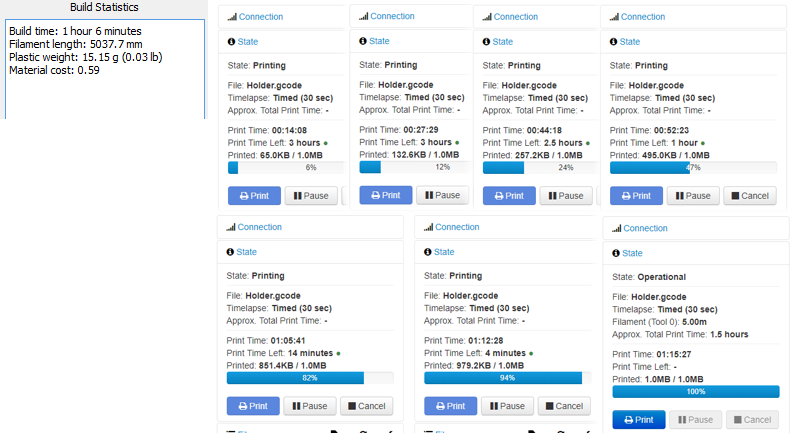
I call the Simplify3D estimate reasonable, even if it's a bit off (because of the 3 minutes the printer needed to heat up + the auto-calibration from the Prusa, and perhaps also delays accumulated from OctoPrint). The OctoPrint estimate, on the other hand, is completely unreliable - 3 hours - 1 hour - who knows how long it'll actually take.
I have read the FAQ.
 mhstar89
All 9 comments
I realize you are probably really proud of your estimation feature, where you made it draw values from here, and there, mixing and matching them into a huge conglomerate and magically coming up with a time. It's unnecessarily complex. Whether the dot is red or green, the times are always inaccurate. I know it's hard, but as a programmer you do come into the situation where the way you approached a problem just doesn't work out, and there's a simpler, cleaner way of doing it. Mixing values akin to a neutral-network-like oracle doesn't seem to be it.
I did it the simple way. It didn't work. I did it in various more or less complex ways. Didn't work.
Please send a PR with a way that works better without failing in cases of no initial analysis data being available, or when printing from the SD, or when the user fiddles around with feedrate multipliers from the printer controller.
I mean that. If you have an idea how to reliably improve this for everyone, share it.
 foosel
on 26 Mar 2018
foosel
on 26 Mar 2018
This G-Code Analyser (project) looks promising (and complicated :smile: )
 b-morgan
on 27 Mar 2018
b-morgan
on 27 Mar 2018
I've thought about this a bit and have scratched my head over some of the initial guesstimates. I just printed eight parts of a spool guide (reasonably identical) and each started with an ~ 20 hour estimate instead of the expected 4 hours. I babysat each of these parts and watched the screens like a hawk:
After the (solid) raft and the first three (solid) layers completed and it started its first 15% cubic infill layer (courtesy of Cura), that 20-hour estimate then began rapidly dwindling until it settled into the actual print time of 4 hours total. I suspect that the initial estimate might extrapolate from the first (solid) 6+3 layers in this case, doing a rudimentary multiplication by the total layer count.
It feels to me that your TimeEstimationHelper gains confidence the longer it runs. A possibly novel approach to this might be to simply apply a simple exponential growth multiplier to the output of average_total_rolling() before reporting it.
I just did this quickly in Desmos.com (ignore the slider for variable "a")...
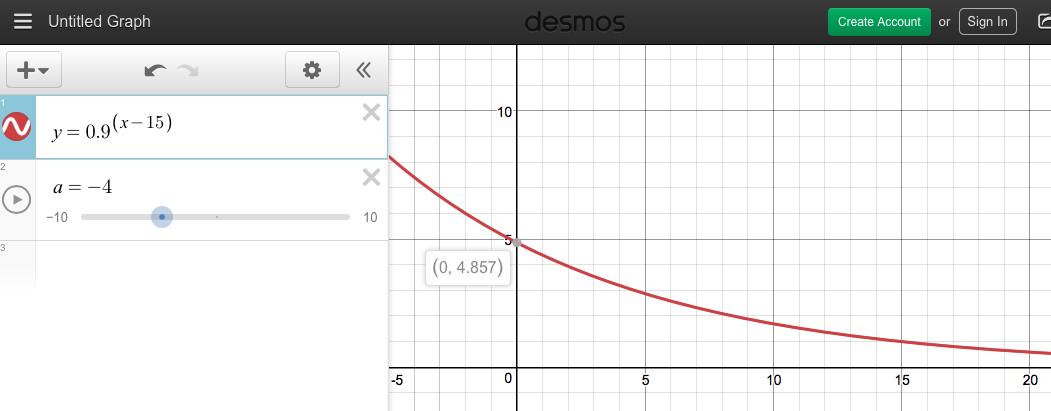
At print job startup (T=0), you'd divide your standard estimate by about 4, the output of the indicated function at X=zero. As the print job progresses, the value of Y decreases as we gain confidence in the normal output of your average_total_rolling() and these adjustments diminish.
It feels a little hack-ish but it should be easier than a total re-write of your original code. Every print I've done behaves this way and seems like it would point things in the right direction. In theory, then, those magic numbers in the exponential growth function could be tweaked with enough feedback from the community.
If you (@foosel ) can confirm that we're talking about average_total_rolling() I could make an attempt at a PR, noting that this would be my first for OctoPrint.
 OutsourcedGuru
on 19 Apr 2018
OutsourcedGuru
on 19 Apr 2018
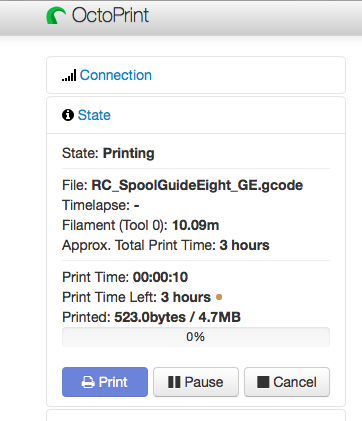
I stand corrected. With a fresh install of v1.3.8 and nothing written by Robo 3D, the estimate is behaving nicely. Almost immediately, it reports an estimated print time for this part of "approx 3 hours" which is quite acceptable for a startup guess. The problem appears to be a plugin by them and not OctoPrint itself.
OutsourcedGuru
on 20 Apr 2018
Please send a PR with a way that works better without failing in cases of no initial analysis data being available, or when printing from the SD, or when the user fiddles around with feedrate multipliers from the printer controller.
Is it really necessary to cover all cases perfectly? There are already limitations on what OctoPrint can do with SD card prints so I think it would make sense to say "time left estimates will be less accurate when printing from SD". I would be able to settle for "better than what we've currently got when printing from OctoPrint". Possibly (for smaller prints that fit into the gcode viewer) this could be added into the gcode viewer. The gcode viewer already estimates the time for each layer. Take the sum of all the estimated layer times as a first estimate, and then use
adjusted time left = ((estimated time for whole print) - (estimated time for layers 1-N)) * (actual time for layers 1-N) / (estimated time for layers 1-N)
...aaand doing it in the gcode viewer is fraught with peril because we can jump forwards and backwards in the gcode file. But something similar may be doable on the server side, maybe as a plugin. I'll have to take a look at how easy it would be to convert the gcode viewer's layer time estimation function to Python and implement this.
I _think_ this would greatly reduce the current behavior where the bottom layers of the print tend to cause the estimated duration to skew by a factor of 3x or more in some cases, since we'd be comparing an already long layer time estimate to a long duration.
 ManuelMcLure
on 20 Apr 2018
ManuelMcLure
on 20 Apr 2018
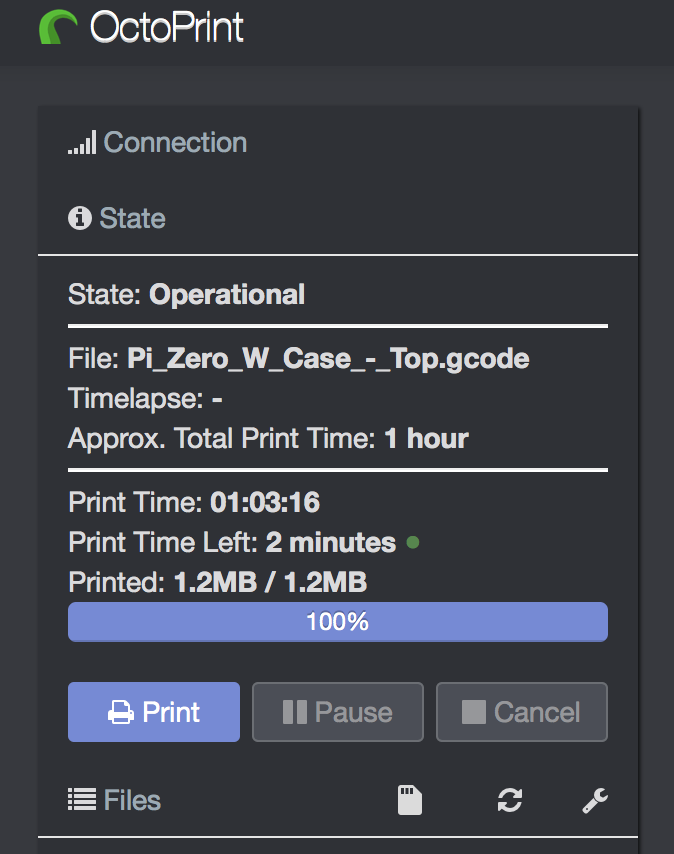
I would like to add that I thought the estimation time was pretty close with Octoprint Versions <1.38. After upgrading to 1.38 the time seems excessively overestimated. Additionally, it is strange that my print has finished but the estimated time left is 2 minutes.
 rullywowr
on 25 Apr 2018
rullywowr
on 25 Apr 2018
I generally find that the time estimate improves as the print progresses - usually when the print is about half done the estimate is quite good. The problem is at the beginning of the print when the bottom layers are being printed - the estimate can easily grow by a factor of 2 or 3x (a 6-hour print saying it's going to take 15 hours, for example) early in the print. That's the problem that needs solving.
ManuelMcLure
on 25 Apr 2018
OctoPrint 1.3.9 will ship with two new hooks octoprint.filemanager.analysis.factory and octoprint.printer.estimation.factory that will allow plugins to override both the initial gcode analysis implementation as well as the live print time estimation.
That should allow people to experiment with this stuff and find better but possibly more hardware/workflow/setup specific approaches that provide more accurate results than a stock option that has to always work can.
Knock yourselves out with this ;)
foosel
on 17 May 2018
1.3.9 has just been released.
foosel
on 25 Jul 2018
Related issues
 ModischFabrications
·
3Comments
ModischFabrications
·
3Comments
 fake-name
·
4Comments
fake-name
·
4Comments
 FormerLurker
·
5Comments
FormerLurker
·
5Comments
 dkingsjr
·
5Comments
foosel
·
5Comments
dkingsjr
·
5Comments
foosel
·
5Comments
Most helpful comment
OctoPrint 1.3.9 will ship with two new hooks
octoprint.filemanager.analysis.factoryandoctoprint.printer.estimation.factorythat will allow plugins to override both the initial gcode analysis implementation as well as the live print time estimation.That should allow people to experiment with this stuff and find better but possibly more hardware/workflow/setup specific approaches that provide more accurate results than a stock option that has to always work can.
Knock yourselves out with this ;)