Octoprint: [Request]Octoprint - Microsoft compatibilty
Good morning,
I'm actually working on a 3D printer project which works with octoprint.
So, here is the initial situation. I have a raspberry pi 3 on which I've installed Octoprint. My 3D printer is drived with an arduino 2560 running marlin firmware. With this configuration everything works well. I'm able to control my 3D printer from Octoprint webinterface without any problems ! But it's not the point of my question.
Here some information in order to located the problem.
Microsoft, with the microsoft IoT core OS and the 3D printer app allows users to control their printer directly from any 3D software( Such as the microsoft 3D builder software) by exposing the 3D printer (in fact this is the microsoft IoT core install on the raspbery pi and connected to the printer which is visible) over the network.
My question is, is there someone in the octoprint community working on a compatibility with microsoft which expose the octoprint server on the network (Just like the picture below) and than allows the user to control their printer directly from any 3D software as microsoft's OS do ?
Thanks,
Nicolas

 aragnac
All 10 comments
Hi @aragnac,
It looks like there is some information missing from your bug report that will be needed in order to solve the problem. Read the Contribution Guidelines which will provide you with a template to fill out here so that your bug report is ready to be investigated (I promise I'll go away then too!).
If you did not intend to report a bug but wanted to request a feature or brain storm about some kind of development, please take special note of the title format to use as described in the Contribution Guidelines.
Please do not abuse the bug tracker as a support forum - if you have a question or otherwise need some kind of help or support refer to the Mailinglist or the G+ Community instead of here.
Also make sure you are at the right place - this is the bug tracker of the official version of OctoPrint, not the Raspberry Pi image OctoPi nor any unbundled third party OctoPrint plugins or unofficial versions. Make sure too that you have read through the Frequently Asked Questions and searched the existing tickets for your problem - try multiple search terms please.
I'm marking this one now as needing some more information. Please understand that if you do not provide that information within the next two weeks (until 2018-03-29 08:10 UTC) I'll close this ticket so it doesn't clutter the bug tracker. This is nothing personal, so please just be considerate and help the maintainers solve this problem quickly by following the guidelines linked above. Remember, the less time the devs have to spend running after information on tickets, the more time they have to actually solve problems and add awesome new features. Thank you!
Best regards,
~ Your friendly GitIssueBot
PS: I'm just an automated script, not a human being, so don't expect any replies from me :) Your ticket is read by humans too, I'm just not one of them.
 GitIssueBot
on 15 Mar 2018
GitIssueBot
on 15 Mar 2018
is there someone in the octoprint community working on a compatibility with microsoft which expose the octoprint server on the network (Just like the picture below) and than allows the user to control their printer directly from any 3D software as microsoft's OS do ?
No, not to my knowledge.
 foosel
on 15 Mar 2018
foosel
on 15 Mar 2018
It's possible that somebody is working on a CUPS driver and then one would take this advice to introduce the server to Windows 10's printer interface as an IPP printer.
 OutsourcedGuru
on 19 Apr 2018
OutsourcedGuru
on 19 Apr 2018
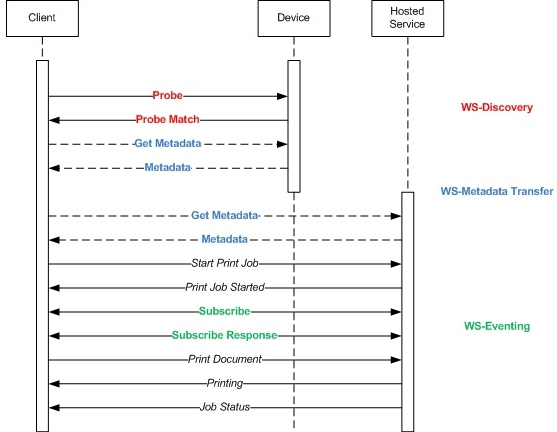
Doesn't seem like it would require much to make Octoprint visible as a Web Services Printer available to the likes of MS 3D Print on Windows 10
https://docs.microsoft.com/en-gb/windows-hardware/drivers/3dprint/enabling-wsprint-on-a-device
 CharlieTemplar
on 2 Apr 2019
CharlieTemplar
on 2 Apr 2019
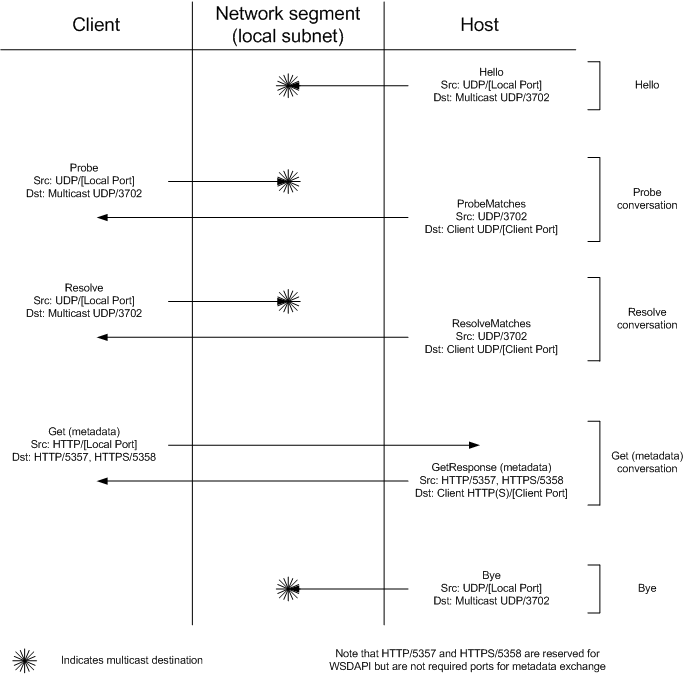
@CharlieTemplar do you have more references how the soap responses should look like? I'm playing with that for a day, my advertised service gets already a request from windows, but it does not show my "virtual device". The WSPrint 2.0 specification has absolutely no hints about 3d printing or I'm just to bad to find the references in the 138 pages specs.
 rekire
on 17 Dec 2019
rekire
on 17 Dec 2019
I think examining the 3D Printing "WSD sample app" is a good place to start:
https://docs.microsoft.com/en-gb/windows-hardware/drivers/3dprint/3d-printing-sample-wsd-app
It appears to be a locally installed web server demo which fakes a 3D printer written in .NET. Maybe you can learn the message pattern from the static printer (server) -side code or install Visual Studio and do the full build if you need to debug the message contents.
Installing Microsoft Message Analyzer, Fiddler or other popular HTTP capture tools are of course a more compact way of analyzing the problem from the Windows client perspective. Perhaps the best place to start before doing a full development tools install.
I guess you managed to get the WS-Discovery part working (you got a request) but then something in the metadata was invalid or out of sequence. The specific part of the documentation would then be:
 CodeChief
on 17 Dec 2019
CodeChief
on 17 Dec 2019
@CodeChief thank you for that links, with that links I was able to find more documentation. However it seems that the documentation for ws printing is outdated.
I was able to contact Microsoft for support, I'll keep you guys updated when I make some progress.
rekire
on 17 Dec 2019
Honestly, Microsoft has 70,000 employees. You'd think that they could write the driver or whatever is required to make their own product work with this.
OutsourcedGuru
on 19 Dec 2019
Honestly, Microsoft has 70,000 employees. You'd think that they could write the driver or whatever is required to make their own product work with this.
That's not realistic, the QA alone for every device ever made by "some company/group" would require that many employees and profits to pay for it. Actually they do most the work for people already by providing an open source class based driver system for which vendors mostly just need to edit and redistribute configuration files, write a shim or just hack around then recompile a sample.
But this thread is not for the discussion of whether people like MS and the idea of supporting Windows or not. The demand is there and there are enough people around to help get this implemented. They already wrote a standard G-Code driver so they have actually done what you expect as much as allowed by the very limited standards of 3D printing today.
The rest of the work to support individual printers is a difficulty created by the architecture (or lack of it) of 3D printer files and configuration. G-Code and the need to slice has to be replaced. But that's a long slow process which has to come from the community and popular hardware vendors. The presence of generalized controller software like OctoPrint and Klipper is the sign of this change.
In this case there appears to be no driver code to write for the clients, "just" a network printing protocol to support and some default configuration for the Microsoft G-Code driver. Once OctoPrint supports identification (discovery) and communication we can work out the latter part.
I'm interested to see how good the standard G-Code driver is (can be). As the Windows world is more plug-and-play I imagine later extensions to the core support could integrate/map more and more common OctoPrint settings (printer profile) and specific plug-in settings like Klipper to the metadata returned to Windows in more enhanced ways. I hope at least the first implementation is able to print pre-sliced files and potentially even directly from popular slicing software. But if the slicer developer didn't think about using the OS it runs on fully that might have to come later. I guess once people realize popular middleware like OctoPrint supports Windows it will follow-on or the community will give them a nudge.
Later I imagine somebody could write an enhanced OctoPrint specific driver which would then have the ability to present the status and control information native within the OS. MS have already standardized this into core printer drivers and optional "printer app" downloads the user is automatically prompted to install from the store. This avoids bloatware in the driver stack, minimizes updates and further streamlines the user experience.
It's an interesting path and there are people ready to help (myself included).
CodeChief
on 19 Dec 2019
Just to make clear that I really got a mail from Microsoft I'll quote the interesting part:
You should not need a custom driver if you use WSPrint. If the right handshake is made using WSDiscover, the printer will be available in the Connected printers menu. It will not show in Windows as an installed printer and that is ok.
Our SDK and documentation are out of date for this scenario. But I will be happy to help you work through it.
It will be great to have an open source project for this.
I'll keep you updated.
rekire
on 19 Dec 2019
Related issues
 thedoble
·
85Comments
thedoble
·
85Comments
 razerraz
·
88Comments
razerraz
·
88Comments
 ZhuDaHai
·
42Comments
ZhuDaHai
·
42Comments
 gregopti
·
81Comments
gregopti
·
81Comments
 LangBalthazar
·
163Comments
LangBalthazar
·
163Comments
Most helpful comment
Just to make clear that I really got a mail from Microsoft I'll quote the interesting part:
I'll keep you updated.