Octoprint: Login button in Octoprint not responding
What were you doing?
Ideally provide exact steps to follow in order to reproduce your problem:
- I opened octoprint as usual (wirelessly from the same wifi network)
- I downloaded a new plugin called AstroPrint Cloud
- I rebooted octoprint after the plugin successfully downloaded and now I can't log in or connect
What did you expect to happen?
I expected to be able to use the Astroprint plugin through octoprint.
What happened instead?
When I open the octoprint page, I cant click the Login button in the top right. Instead, I click it and nothing happens.
Did the same happen when running OctoPrint in safe mode?
I cannot access safe mode without logging in.
Version of OctoPrint
1.3.4
Operating System running OctoPrint
Windows 10 (google chrome)
Printer model & used firmware incl. version
Original Prusa i3 MK2
Browser and Version of Browser, Operating System running Browser
Google Chrome with Windows 10 x64
Link to octoprint.log
I typed the line to get to the logs into the raspberry pi and it said access denied. I am guessing I did it wrong. I did check the contributing guideline
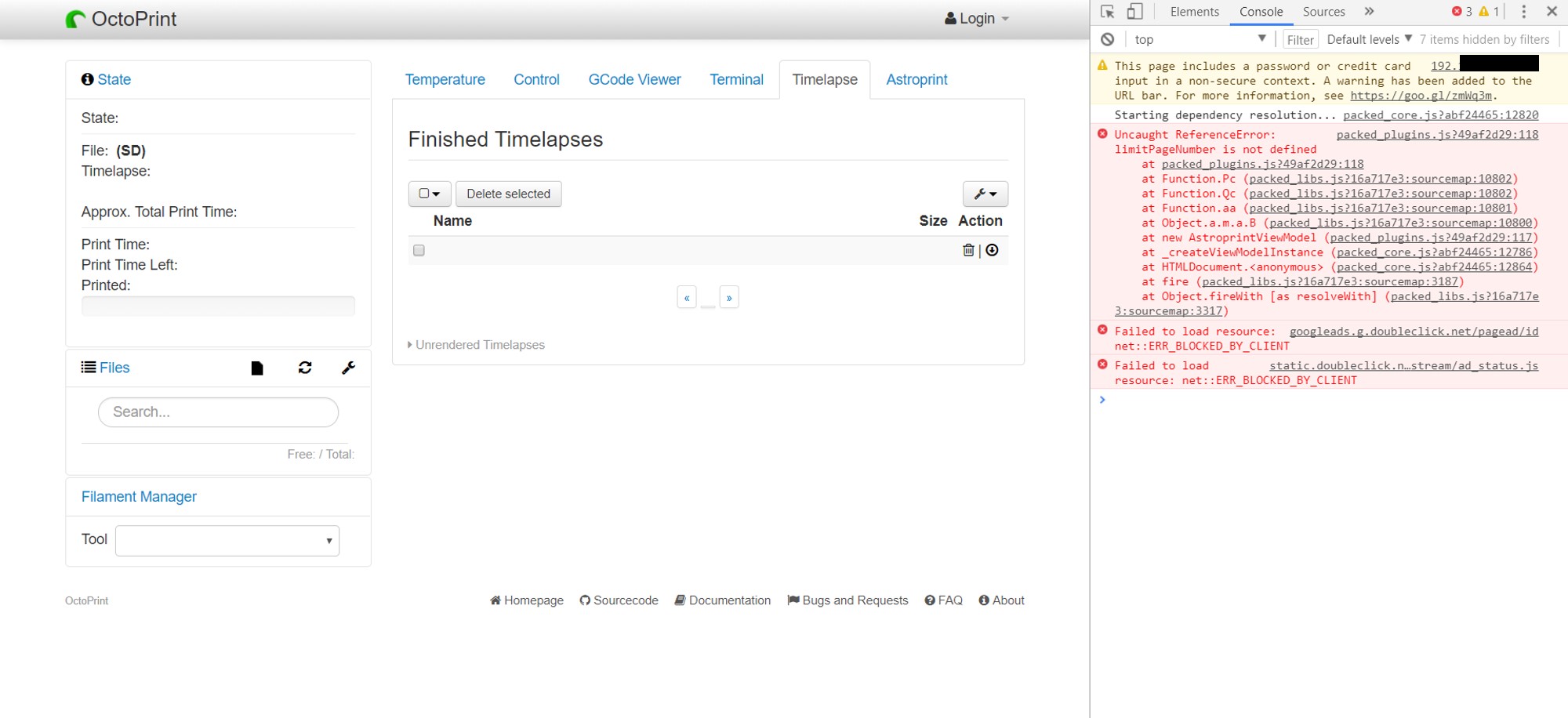
Link to contents of Javascript console in the browser
See attatched .jpeg
Screenshot(s)/video(s) showing the problem:
Thank you for your help!
Mitch T.
I have read the FAQ.
 PrintedAlaska
All 12 comments
If it stopped working after installing the astroprint plugin then it's probably safe to assume that plugin is to blame, might want to bring it up on their own issue tracker (if they have one).
To open octoprint in safe mode, close down octoprint and run it with octoprint serve --safe.
edit: wait..
I typed the line to get to the logs into the raspberry pi and it said access denied.
raspberry pi? you said you're running octoprint on windows 10
Operating System running OctoPrint
Windows 10 (google chrome)
so which is it? Are you running it on a raspberry pi using octopi, or windows 10 using a manual install?
 ntoff
on 26 Dec 2017
ntoff
on 26 Dec 2017
Safe Mode documentation can be found here. Once you are in Safe Mode please disable the AstroPrint plugin and restart. If functionality is restored then open a ticket with the plugin developer.
 kantlivelong
on 27 Dec 2017
kantlivelong
on 27 Dec 2017
@ntoff The raspberry pi is the one running the octoprint server, it is connected to the printer. My computer is just what I control it with wirelessly through chrome.
PrintedAlaska
on 27 Dec 2017
Then that is what you should put in the section where it asks for the device running octoprint (for future reference). Knowing how it's installed helps us determine whether it's a standard raspberry pi install or a custom install on some other OS, instructions differ based on install type.
Were you able to figure out how to enable safemode? If not, the basic steps are:
- SSH into the raspberry pi https://www.raspberrypi.org/documentation/remote-access/ssh/ (skip to step 4)
sudo service octoprint stopsource ~/oprint/bin/activateoctoprint serve --safe
and when you're done, you can either reboot the entire pi with sudo shutdown -r now or stop octoprint with ctrl + c and sudo service octoprint start to start the service back up again. Rebooting isn't strictly necessary after uninstalling a plugin.
ntoff
on 27 Dec 2017
@ntoff That worked great! I restarted octorprint after deleting the astroprint plugin in safe mode and now everything is back to normal. Thank you for your help
PrintedAlaska
on 27 Dec 2017
@PrintedAlaska You can open an issue with the plugin developer here.
Closing.
kantlivelong
on 27 Dec 2017
Sorry about this guys! It seems to be a javascript error in an edge case which prevents the rest of the javascript from being loaded. We're looking into it...
 CoDanny
on 28 Dec 2017
CoDanny
on 28 Dec 2017
This has now beed fixed in the plugin. Version 1.0.1 has this fix.
The cause of the problem was variables being used without first declaring them. This became a problem when "strict mode" was activated. Perhaps by another plugin.
CoDanny
on 28 Dec 2017
Thanks @CoDanny
kantlivelong
on 28 Dec 2017
@CoDanny https://octoprint.org/blog/2017/12/01/heads-up-plugin-authors/ Just in case you weren't aware, that "use strict" clause was also the reason some changes were made to the way plugins are loaded. In case you haven't seen it, there's a blog post about it.
ntoff
on 28 Dec 2017
for what reason is there a request to doubleclick.net in the picture above?
 gdachs
on 30 Dec 2017
gdachs
on 30 Dec 2017
for what reason is there a request to doubleclick.net in the picture above?
I'd like to know that too.
What plugins do you have installed @PrintedAlaska? Because that certainly isn't coming from stock OctoPrint and if a plugin out there is embedding ads, I'd like to know which one so I can shout a bit at the author.
 foosel
on 11 Jan 2018
foosel
on 11 Jan 2018
Related issues
 FormerLurker
·
5Comments
FormerLurker
·
5Comments
 gege2b
·
3Comments
gege2b
·
3Comments
 fake-name
·
4Comments
fake-name
·
4Comments
 cp2004
·
4Comments
cp2004
·
4Comments
 mc2880
·
4Comments
mc2880
·
4Comments
Most helpful comment
I'd like to know that too.
What plugins do you have installed @PrintedAlaska? Because that certainly isn't coming from stock OctoPrint and if a plugin out there is embedding ads, I'd like to know which one so I can shout a bit at the author.