Octoprint: Software Update fails with (near) full disk
What were you doing?
Attempted to run software update from the settings interface - without checking free space first. Space had been filled by timelapses.
What did you expect to happen?
Update to detect a lack of free space and stop, displaying a warning.
What happened instead?
Update attempted to run.
An update failure notice appeared but I attempted to restart octoprint anyway. Octoprint no longer starts fully (I receive a 503 Service Unavailable error via http) after this, even after clearing additional space.
OctoPrint is now no longer able to launch.
Did the same happen when running OctoPrint in safe mode?
I am unable to launch, even in safe mode. Cannot recreate.
Version of OctoPrint
Update attempted on 1.3.5rc3 (to 1.3.6)
Operating System running OctoPrint
OctoPi 0.12.0
Printer model & used firmware incl. version
Sunhokey i3 clone, Marlin (version unknown)
Browser and Version of Browser, Operating System running Browser
Chrome 62, Windows 10
Link to octoprint.log
https://gist.github.com/tonsofpcs/6cd777277af2bb5d76bbebb90b189600
I have read the FAQ.
 tonsofpcs
All 10 comments
Can you SSH into your OctoPi and run the following:
- > cd ~/OctoPrint
- > git fetch --all
- > git checkout master
- > git reset --hard origin/master
- > ~/oprint/bin/python2.7 setup.py install
- > sudo /etc/init.d/octoprint restart
 kantlivelong
on 22 Dec 2017
kantlivelong
on 22 Dec 2017
Update:
Spoke with @tonsofpcs on IRC. Issued compounded by the pip fix not being run for OctoPi 0.12. Resolved with:
- > rm -rf ~/oprint
- > python2.7 -m virtualenv ~/oprint
- > ~/oprint/bin/pip install --index-url https://pypi.python.org/simple --upgrade pip
- > printf -- "[easy_install]\nindex-url = https://pypi.python.org/simple\n" > ~/.pydistutils.cfg
- > ~/oprint/bin/pip install webassets --upgrade #See #1725
- > cd ~/OctoPrint
- > git fetch --all
- > git checkout master
- > git reset --hard origin/master
- > ~/oprint/bin/python2.7 setup.py install
- > sudo /etc/init.d/octoprint restart
edit by @foosel to add link to pip fix blog post for further information
kantlivelong
on 22 Dec 2017
Reproduced issue (to a lesser broken extent) running upgrade on a filesystem with 10MB free.
kantlivelong
on 22 Dec 2017
had plenty of storage space but, seems to have an issue which was unable to startup octopi, followed your steps after a full reboot and gave it some time it was able to boot up again. thanks
 StuckInLoop
on 21 Jan 2018
StuckInLoop
on 21 Jan 2018
This seems like something I could take on. Any objections into me looking at this?
 techfreek
on 3 Oct 2018
techfreek
on 3 Oct 2018
@techfreek go for it!
kantlivelong
on 3 Oct 2018
I'm finally looking at this again. Having a few difficulties, so I thought I might share my current thought on approach. This error came from update_script.py, which is called as a result of using the Update functionality in the webui.
My thought was that for each target we plan to update, we should figure out the size of that component (as a rough way of guessing how much extra space they may use during upgrade), and make sure the sum is less than the total amount of disk space remaining. In order to not add bloat elsewhere, I added this as a pre-check as I personally didn't think it made sense to allow some targets to update if we didn't have enough space to update all.
The problem I'm hitting is that I'm having trouble finding the installed path of the package. I have found the update_folder and checkout_folder, but it doesn't always seem set. I'm wondering the installed path doesn't normally matter. So maybe this is a case where I should add a get_path method to the different updaters so I can still maintain abstraction.
Let me know if you have thoughts on my (admittedly rambling) thoughts. Thanks!
techfreek
on 26 Dec 2018
Hi, thanks for your efforts in this issue.
HELP! I have unfortunately paranoia checked this problem hoping to confirm it wasn't one, AFTER starting a 9-DAY, 1.2 metre tall print. We are over 1.5 days in already and I really don't want to lose the work done already, let alone have it fail close to the end. Ideally I'd like to keep the timelapse photos as they are good, but that's secondary.
My Setup:
I have a generic clone Raspberry Pi CSI camera, and it is set to record a frame only on Z change, However I also have some GCODE at the Z layer change which does a little 0.5mm Z hop - which is the same as the layer height. So it could potentially be taking 2 frames per layer.
There are 2,338 layers so 4,676 photos potentially.
It's a 4Gb SD card, onto which I flashed the latest OctoPi 0.16 image - so it could be set lower than that.
-What is the best, light touch, approach to dealing with this?
I expect I will need to SSH into the Pi (using PuTTY from a local Windows 7 machine), find the photo storage and check how much each picture consumes, and how many it has taken so far and compare with the layer height.
From this extrapolate how many will be needed to complete the print and the storage needed
Work out the free space available on the system and compare the two.
If not enough to clear with some overhead, I will need to copy photos off the Pi and delete them or just delete them.
- is there a safest method to copy the photos in terms of not interfering with the running print?
- any tips for dealing with the situation in the lightest touch manner possible?
- How much free space is advisable to leave on the Pi to minimise risk of system issues?
 edumaker-limited
on 26 Feb 2019
edumaker-limited
on 26 Feb 2019
Since I haven't heard anything from @techfreek on this in over a year I guess it's ungrabbed again ;)
 foosel
on 31 Oct 2019
foosel
on 31 Oct 2019
Implemented by the above commit. Looks like this (obviously not the default minimum value, just set for purposes of the screenshot, default is 150MB):
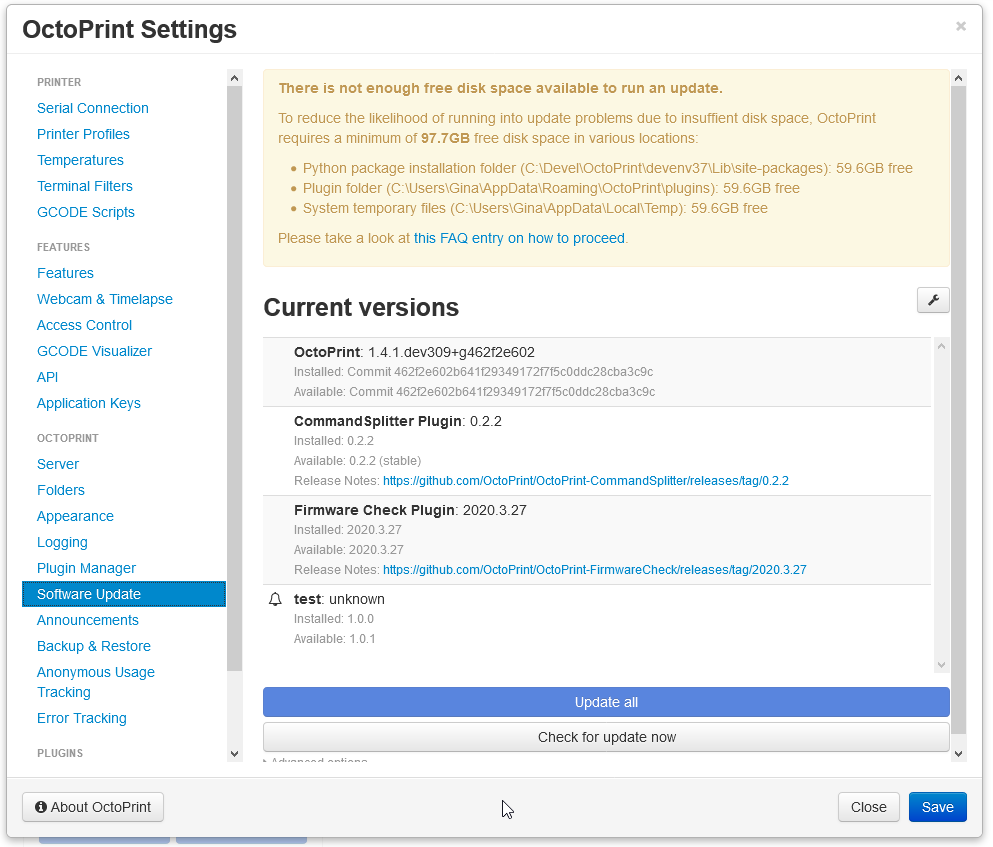
To be released as part of 1.4.1
foosel
on 18 Jun 2020
Related issues
 dkingsjr
·
5Comments
dkingsjr
·
5Comments
 mrcg
·
5Comments
mrcg
·
5Comments
 FormerLurker
·
5Comments
FormerLurker
·
5Comments
 halxinate
·
4Comments
halxinate
·
4Comments
 noahwilliamsson
·
5Comments
noahwilliamsson
·
5Comments
Most helpful comment
Update:
Spoke with @tonsofpcs on IRC. Issued compounded by the pip fix not being run for OctoPi 0.12. Resolved with:
edit by @foosel to add link to pip fix blog post for further information