Octoprint: [Request] Pressing "Disconnect" when a print is running/paused should throw up a confirmation dialogue
Like the dialogue when cancelling a print, there should be one when disconnecting the printer, since that cancels the job too.
 UnacceptableUse
All 22 comments
@foosel ok how about this?
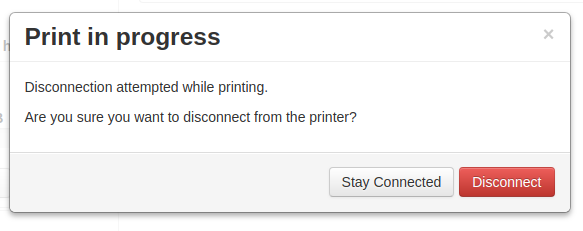
https://github.com/ntoff/OctoPrint/commit/badefffe6f07c21c4158c62197be46d3cfc9af23
 ntoff
on 15 Dec 2017
ntoff
on 15 Dec 2017
@ntoff Not 100% sure about the wording yet... Somehow it sounds a bit bumpy. Anyhow - I'll take another look at this in January, currently wrapping things up for the year 🎄, maybe with some fresh eyes I no longer will perceive it as bumpy ;)
 foosel
on 18 Dec 2017
foosel
on 18 Dec 2017
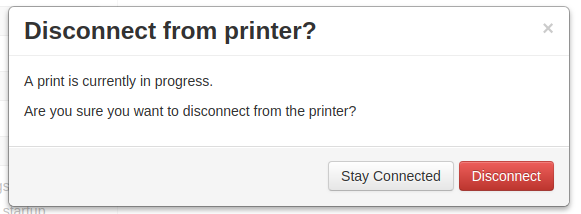
I guess I tried to keep it as short as possible and in doing so made it sound kind of robotic and not really "english".
What about the top line: You are trying to disconnect from the printer during an active print operation."
second line: Are you sure you want to proceed?
or
ntoff
on 18 Dec 2017
I like this better, maybe "Disconnecting from the printer will cancel the
current print. Continue?"
On Mon, 18 Dec 2017, 4:10 pm ntoff, notifications@github.com wrote:
I guess I tried to keep it as short as possible and in doing so made it
sound kind of robotic and not really "english".What about the top line: You are trying to disconnect from the printer
during an active print operation."second line: Are you sure you want to proceed?
—
You are receiving this because you authored the thread.
Reply to this email directly, view it on GitHub
https://github.com/foosel/OctoPrint/issues/2287#issuecomment-352473368,
or mute the thread
https://github.com/notifications/unsubscribe-auth/ABsFb4PdfPsE8-SAnCUYIV0a74cljaQ2ks5tBo59gaJpZM4RB7F6
.
UnacceptableUse
on 18 Dec 2017
Disconnecting from the printer will cancel the
current print. Continue?"
You would hope that it would be painfully and blindingly obvious that disconnecting the thing from your printer, that is controlling the printer, will cause the printer to stop working. The only time that wouldn't apply would be a print from an SD card in which case you'd want the warning to be "Warning: While disconnecting your printer during an SD based print may not cause your printer to stop, reconnecting it may reset your printer depending on its controller board and setup"
But how long do you really want the text in a popup dialog to be? Stuff like that (in my opinion) should be part of a user documentation, not something that many people will gloss over and not even read. The longer the text in the dialog is, the less likely anyone is to bother reading it. You ever bothered to read that EULA when you install software?
ntoff
on 18 Dec 2017
The confirmation dialogue's main purpose would be to prevent accidental presses, as with the cancel button's confirmation. People who pressed it accidentally don't need the text at all really, its more there for people who aren't sure and mightn't know how it works and that's why I think it'd be good to specify.
UnacceptableUse
on 18 Dec 2017
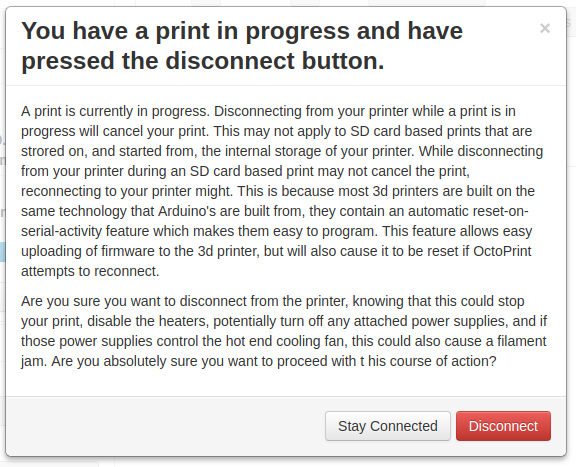
This informative enough? Did I leave anything out?
ntoff
on 18 Dec 2017
Very funny yes
UnacceptableUse
on 18 Dec 2017
Hmm, All jokes aside, I'd suggest simply having a dialog that says....
Print in progress. Please Cancel Print before Disconnecting
Then change the buttons to
- Stay Connected
- Cancel and Disconnect
But then I like things to be clean, simple, but still be clear for a near novice
 sbts
on 18 Dec 2017
sbts
on 18 Dec 2017
But disconnecting might not cancel it if it's an SD based print. I don't agree with changing the button text.
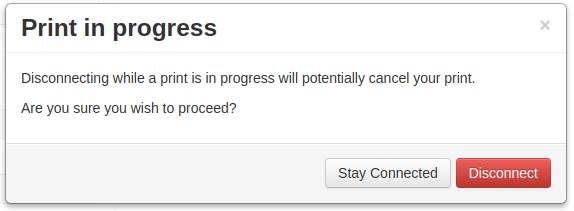
Jokes aside, I propose:
ntoff
on 18 Dec 2017
@ntoff Hmm. As octoprint knows if it's a direct or SD print, the "disconnect" button and text could be subtly customised.
For the SD variation perhaps something like.....
SD Print in progress. Reconnecting after Disconnect will probably cancel your print.
- Stay Connected
- Disconnect
sbts
on 18 Dec 2017
@sbts That is an elegant way of doing it but I also see what @ntoff is saying in situations with SD print. I personally do not use SD print at all so I'm curious, does OctoPrint know if a SD print is in progress if it was initiated from the printers LCD panel?
 kantlivelong
on 18 Dec 2017
kantlivelong
on 18 Dec 2017
What about the image I ninja edited into the post above yours?
Having too many ifs thens makes the code a bit messy. You don't want to end up with if sd print do this, if normal print do that, if not printing then this, and have your dialog buried 10 if's deep.
edit:
Does OctoPrint know if a SD print is in progress if it was initiated from the printers LCD panel?
As far as I know, no it doesn't. Printers are dumb, they don't tell the host what they're up to (well, repetier firmware does, sometimes, but not for everything).
ntoff
on 18 Dec 2017
I think a simple OK/Cancel dialog (with the option to disable) would be sufficient here as that is what is being done with a restart which results in a disconnect as well.
Message could be something like:
You are about to disconnect from the printer.
This action may disrupt any ongoing print jobs (depending on your printer's controller and general setup that might also apply to prints run directly from your printer's internal storage).
kantlivelong
on 18 Dec 2017
What about this?
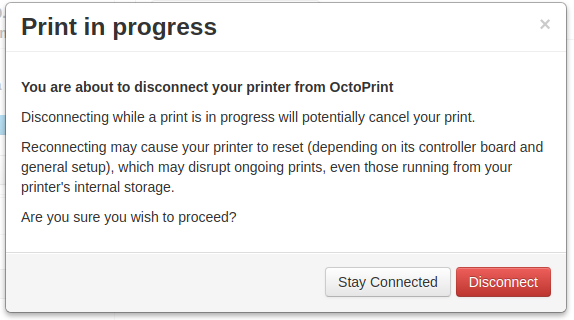
I think a simple OK/Cancel dialog
There was an ok/cancel dialog somewhere else that was a bit confusing. I think it was the cancel / abort dialog. Some people were a bit confused about whether "ok" meant ok to abort, or "ok, don't abort". I was trying to make it absolutely clear which button did what.
@UnacceptableUse what do you think to this version? p.s. yes that long winded one was just a joke, I hope it didn't seem like I was just being a jackass.
ntoff
on 18 Dec 2017
Yeah that works. Can always be adjusted in the PR if @foosel thinks otherwise.
@UnacceptableUse, does this satisfy the original request from your perspective?
kantlivelong
on 18 Dec 2017
If someone sends me a PR for this within the week I'll look into including it in 1.3.7. Otherwise this will have to wait.
foosel
on 7 Mar 2018
Thanks to the above PR by @ntoff this will be part of 1.3.7. Already merged to maintenance, soon devel.
foosel
on 7 Mar 2018
Closing as 1.3.7 was just released.
foosel
on 9 Apr 2018
Is there any way we can disconnect the OctoPrint while the print job is still running and the print job continues regardless of the OctoPrint ( raspberry pi ) status? My PI is disconnecting in between for some reasons ( still troubleshooting ), which also stops the printing. This will help doing some additional tasks on PI while not bothering about stopping the print..
 ramesh231
on 22 Apr 2019
ramesh231
on 22 Apr 2019
No, the pi directly controls the printer during the print so it would be
impossible to run the print without the pi
On Mon, Apr 22, 2019 at 5:54 AM ramesh231 notifications@github.com wrote:
Is there any way we can disconnect the OctoPrint while the print job is
still running and the print job continues regardless of the OctoPrint (
raspberry pi ) status? My PI is disconnecting in between for some reasons (
still troubleshooting ), which also stops the printing. This will help
doing some additional tasks on PI while not bothering about stopping the
print..—
You are receiving this because you were mentioned.
Reply to this email directly, view it on GitHub
https://github.com/foosel/OctoPrint/issues/2287#issuecomment-485324541,
or mute the thread
https://github.com/notifications/unsubscribe-auth/AANQK34M2V2WXP4YWQZBBZLPRVAIFANCNFSM4EIHWF5A
.
UnacceptableUse
on 22 Apr 2019
thank you for the response. A bit disappointed to learn the fact :-( . Is there any documentation how OctoPrint takes over the core functionality of the printer. My understanding was that OctoPrint sends the print job to the printer and printer motherboard does the rest of the job. Thank you for clarifying and clearing my confusion.
ramesh231
on 23 Apr 2019
Related issues
 FormerLurker
·
5Comments
FormerLurker
·
5Comments
 JohnOCFII
·
5Comments
JohnOCFII
·
5Comments
 Lino77
·
4Comments
Lino77
·
4Comments
 mrcg
·
5Comments
foosel
·
4Comments
mrcg
·
5Comments
foosel
·
4Comments