Octoprint: Can't login anymore, have TPLinkSmartplug Plugin installed
What were you doing?
Using the login on the octoprint main web GUI page
What did you expect to happen?
The system to log me in and allow me to control my printer as usual.
What happened instead?
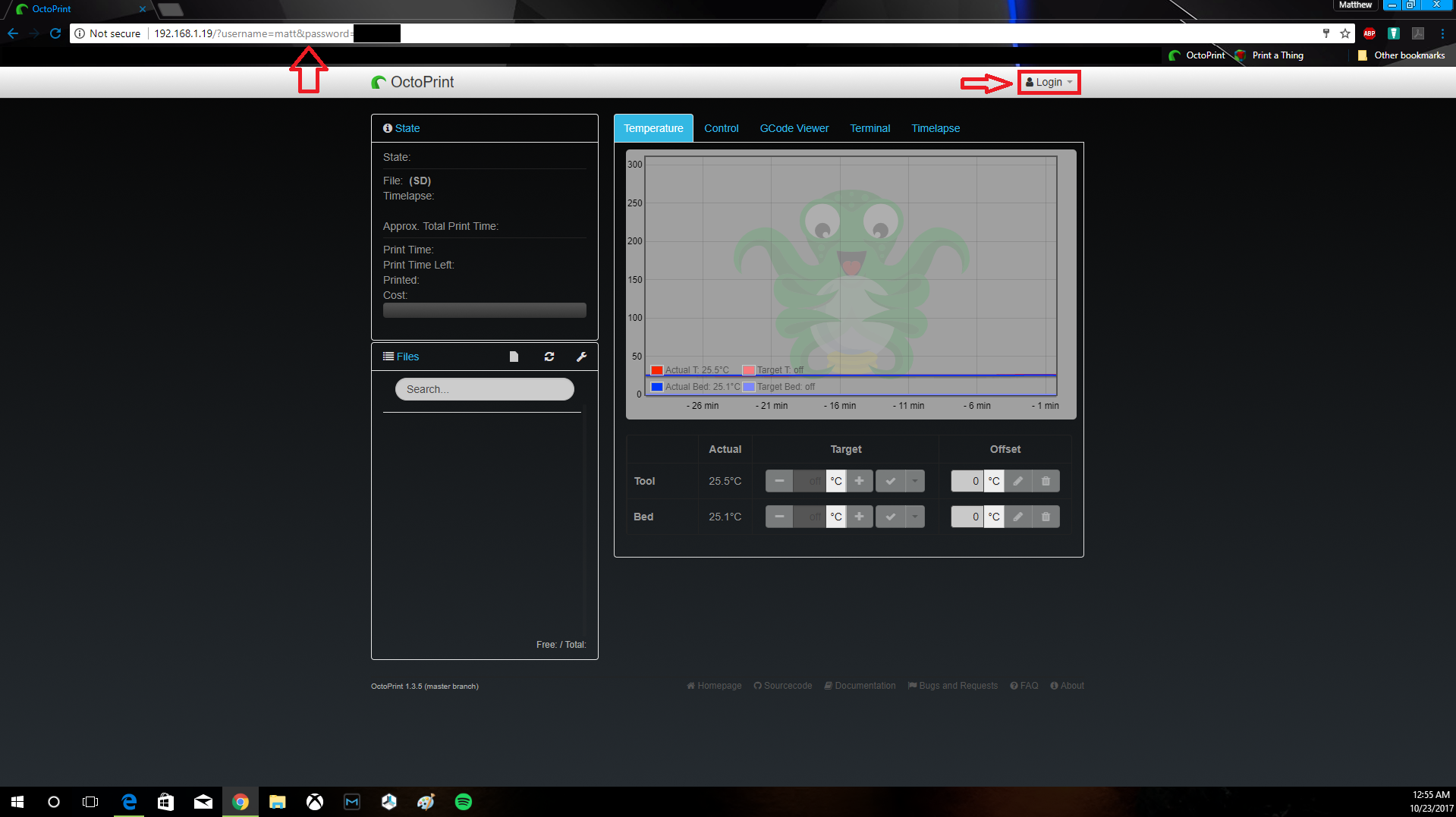
System thinks, then loads the octoprint GUI again and the url shows a login but the GUI will not enable controls and the tab still shows "Login" instead of "Logout" (See screenshot)
Did the same happen when running OctoPrint in safe mode?
Yes
Branch & Commit or Version of OctoPrint
OctoPrint 1.3.5 (master branch)
Operating System running OctoPrint
OctoP Jessie.
Printer model & used firmware incl. version
Prusa I3 w/ Repetier
Browser and Version of Browser, Operating System running Browser
Google Chrome Version 61.0.3163.100
Windows 10 Creators Update
Screenshot(s)/video(s) showing the problem:
I have read the FAQ.
 redsoxfn820
All 16 comments
try to SSH in and sudo service octoprint restart and then ctrl + F5 in your browser
also before anything can be looked into, you'll need to provide those logs that are requested (that you'll have to acquire via SSH since you can't log in), along with the javascript terminal in your browser.
The logs are in ~/.octoprint/logs while you're logged in via ssh
 ntoff
on 23 Oct 2017
ntoff
on 23 Oct 2017
Please provide _all_ requested information. Without that information this ticket cannot be looked into and will be closed. Thanks.
 foosel
on 23 Oct 2017
foosel
on 23 Oct 2017
I had the same problem. I checked my logs and find out that the problem be caused by the TPSmartplug-Plugin. I unistalled it by ssh and now all is working fine again.
 schnubbie
on 23 Oct 2017
schnubbie
on 23 Oct 2017
I could use some help on this with my plugin. I thought I had done the on_settings_migrate function correctly initially by setting a value to null in 0.7.0, but that didn't work, so I modified the latest master branch, version 0.7.1 to set the setting to the equivalent defaults using self._settings.set(['arrSmartplugs'], self.get_settings_defaults().arrSmartplugs). Please help @foosel.
 jneilliii
on 23 Oct 2017
jneilliii
on 23 Oct 2017
@schnubbie how did you uninstall it via ssh? what was the command?
redsoxfn820
on 24 Oct 2017
@schnubbie how did you uninstall it via ssh? what was the command?
https://github.com/foosel/OctoPrint/wiki/FAQ#i-installed-a-broken-plugin-how-do-i-uninstall-it-again
 iceblu008
on 24 Oct 2017
iceblu008
on 24 Oct 2017
Thanks for the help @iceblu008 and @schnubbie uninstalling TPLinkSmartplug has solved the issue.
redsoxfn820
on 24 Oct 2017
@jneilliii I just pinged you on your own ticket on this.
foosel
on 24 Oct 2017
@redsoxfn820 if uninstalling that plugin indeed solved your issue, you posted some misleading information:
Did the same happen when running OctoPrint in safe mode?
Yes
It's ok to write that you couldn't try safe mode due to this issue, but if you'd really started OctoPrint in safe mode you'd not been able to reproduce this issue there - which is very very important information to debug stuff like that. So please, if you get asked to try something in safe mode and you can't, say you can't, not that you tried and the issue was still showing there too.
In any case, this is a duplicate of #2168 and actually an issue with a third party plugin, not OctoPrint - see jneilliii/OctoPrint-TPLinkSmartplug#19. Since more people seem to run into this and 0.7.1 of the plugin also doesn't seem to solve this problem though, I'll leave this open for a bit so that people actually see it instead of opening new tickets about this all the time.
foosel
on 24 Oct 2017
@foosel , perhaps it's a good idea if we change event on the <form> of the post to something like this?:
<form id="loginForm" data-bind="event: {'submit': loginState.prepareLogin }" onsubmit="return false;">
This to make sure we can prevent posting the page with GET even if knockout fails
 BillyBlaze
on 24 Oct 2017
BillyBlaze
on 24 Oct 2017
@BillyBlaze see 0f8f4579d6bf5afdaaa1217975fd02bbb2da49ee :D Already prepped for 1.3.6.
foosel
on 24 Oct 2017
You're awesome! 👍
BillyBlaze
on 24 Oct 2017
@foosel yes that was my fault, it was a copy paste error. Sorry for the incorrect posting location as well!
Sounds good, Hopefully this will help others who installed the TPLinkSmartplug plugin
redsoxfn820
on 24 Oct 2017
Sorry for all the headaches guys...that's what I get for a being a hack programmer...lol.
jneilliii
on 24 Oct 2017
Is this resolved? Can this ticket be closed?
 kantlivelong
on 30 Nov 2017
kantlivelong
on 30 Nov 2017
Hey, good point... it can!
foosel
on 30 Nov 2017
Related issues
 gege2b
·
3Comments
foosel
·
4Comments
gege2b
·
3Comments
foosel
·
4Comments
 FormerLurker
·
5Comments
FormerLurker
·
5Comments
 mdelecate
·
5Comments
mdelecate
·
5Comments
 mc2880
·
4Comments
mc2880
·
4Comments