Octoprint: [RC Feedback] Feedback on the 1.3.5rc4 Release Candidate
Please provide general feedback on your experience with the 1.3.5rc4 Release Candidate here. An "All is working fine" is valuable feedback as well, because it tells me that people in fact are testing the RC and just not finding any problems. Thanks :)
If you run into any obvious bugs, please open a new ticket and follow "How to file a bug report".
 foosel
All 20 comments
Updated successfully. I'll comment again when I've printed something.
 b-morgan
on 4 Oct 2017
b-morgan
on 4 Oct 2017
Updated from 1.3.4 OK - Really nice software - thanks!
 thess
on 4 Oct 2017
thess
on 4 Oct 2017
Reordering the tabs seems to mess up the temperature graph legend, or is this just me?
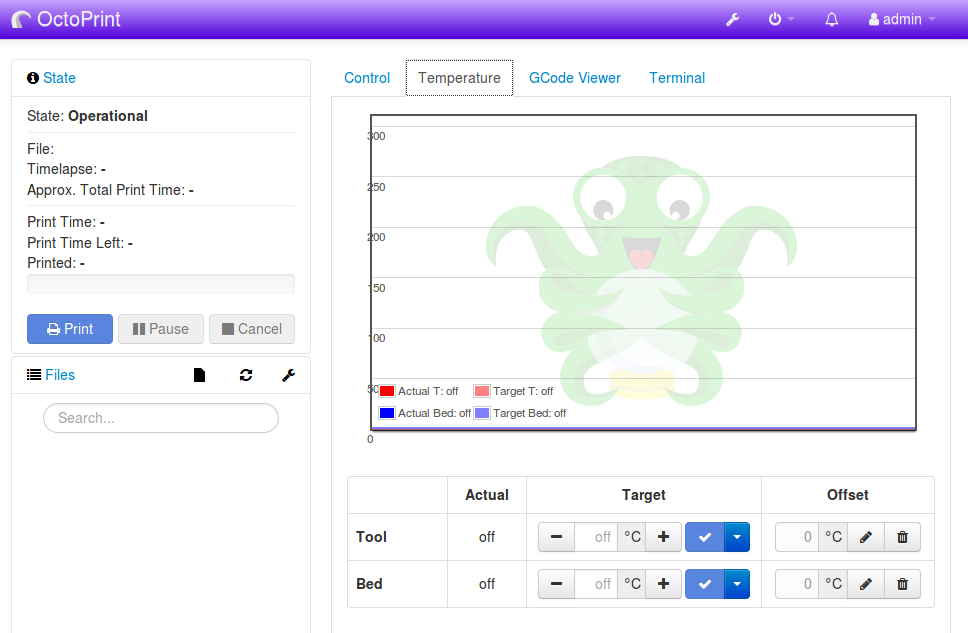
Seems to happen in safemode too
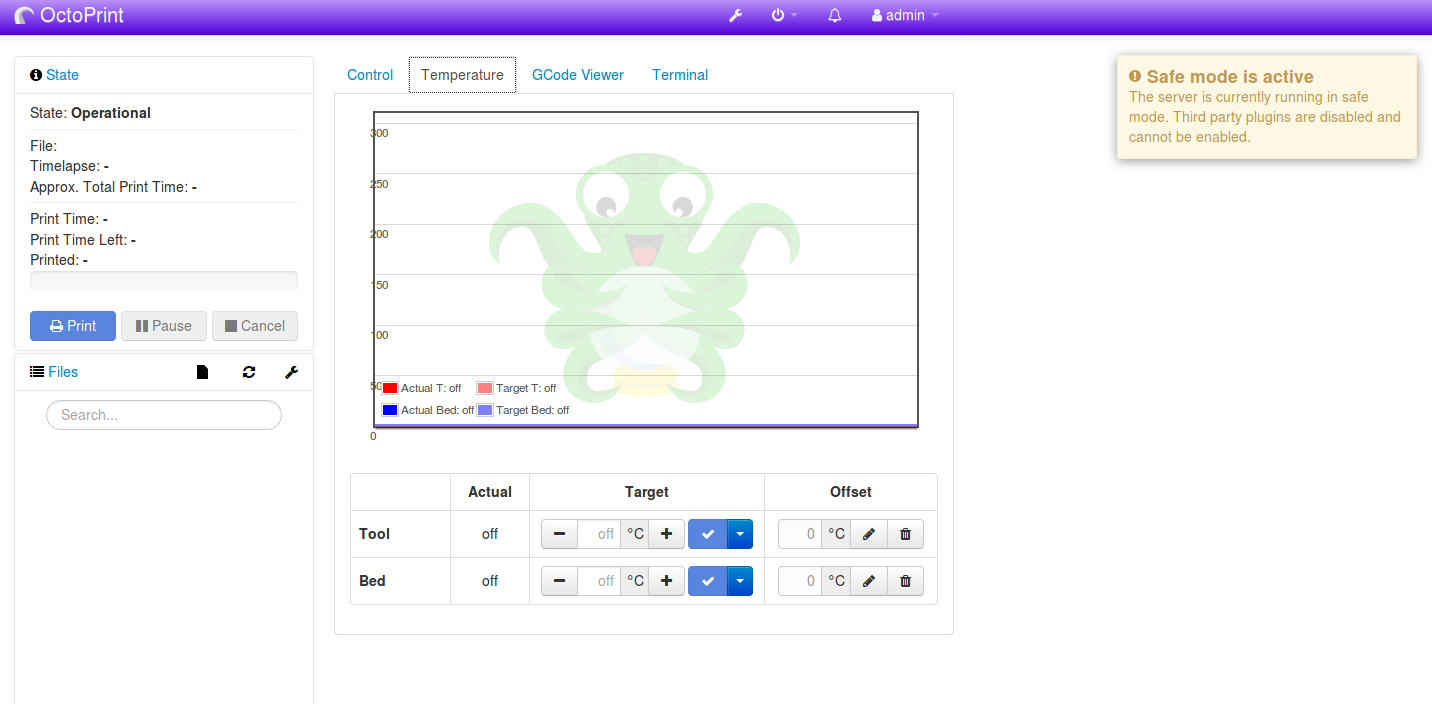
Throw this into config.yaml and watch the magic unfold, default order seems fine
appearance:
  color: violet
  components:
    order:
      sidebar:
      - state
      - files
      - connection
      tab:
      - control
      - temperature
Will do a proper bug report once I make sure it's not me breaking it (no plugins are installed and it seems to do this across windows and debian so I'm 20% sure it's nothing I've done).
 ntoff
on 6 Oct 2017
ntoff
on 6 Oct 2017
Updated successfully. prints went OK.
 oferfrid
on 6 Oct 2017
oferfrid
on 6 Oct 2017
Looking good here too.
 ctgreybeard
on 7 Oct 2017
ctgreybeard
on 7 Oct 2017
@foosel
octoprint.log
got this after update....may be my SD Card corrupt on my Pi3...
First time after reboot i try and give something like this.....OCTOPRINT STILL BOOTING, PLEASE WAIT, after long period of time im click just under.... DONT WAIT CLICK TO REBOOT....and i got this
Internal Server Error
The server encountered an internal error and was unable to complete your request. Either the server is overloaded or there is an error in the application.
and got same message each time i try log, but my display , before i got graphic like on my web page, now just text. i redownload the image for my Pi3 and start fresh, but lost my setting.
can i backup all my setting if append again..??
OUF...repair i check in wiki and i do this....cd ~/OctoPrint
git pull
~/oprint/bin/python setup.py clean
~/oprint/bin/python setup.py install
sudo service octoprint restart
and evrinthing look ok and offer me to install Version 1.3.4 (master branch), and look ok now except for my display on my Pi3 still only show text
 Neoolog
on 7 Oct 2017
Neoolog
on 7 Oct 2017
Upon attempted update from RC2:
Updating, please wait.
Traceback (most recent call last):
File "/home/pi/oprint/lib/python2.7/site-packages/OctoPrint-1.3.5rc2-py2.7.egg/octoprint/plugins/softwareupdate/scripts/update-octoprint.py", line 313, in <module>
main()
File "/home/pi/oprint/lib/python2.7/site-packages/OctoPrint-1.3.5rc2-py2.7.egg/octoprint/plugins/softwareupdate/scripts/update-octoprint.py", line 309, in main
update_source(git_executable, folder, args.target, force=args.force, branch=args.branch)
File "/home/pi/oprint/lib/python2.7/site-packages/OctoPrint-1.3.5rc2-py2.7.egg/octoprint/plugins/softwareupdate/scripts/update-octoprint.py", line 218, in update_source
raise RuntimeError("Could not update, \"git fetch\" failed with returncode {}".format(returncode))
RuntimeError: Could not update, "git fetch" failed with returncode 128
Python executable: '/home/pi/oprint/bin/python'
>>> Running: git diff --shortstat
> git diff --shortstat
>>> Running: git fetch
> git fetch
The update did not finish successfully. Please consult the log for details.
Update: Did a full reboot of the RPi and it installed correctly. I'd still consider that still not good, but probably impossible to track down the reason unless it's obvious in the logs (which I didn't seem to be). I supposed it could have been a transient issue connecting to github, but hard to believe the odds against given that I was actively here updating before/after.
 fiveangle
on 8 Oct 2017
fiveangle
on 8 Oct 2017
Just updated to 1.3.5rc4.
Aside from the coincidental failure of a USB cable (Now didn't that take some time to find
It looks good so far.
However, I did notice that having the temperature legend (the bit with the colored squares and text like...
Actual T: 27.0 at the bottom of the graph makes it really hard to read when things are cold as the trace obliterates the text.
It's perhaps better to start off with those at the top of the graph, and dynamically move them down into clear space once the temps rise above 250.
Either that, or simply display them at top and bottom
 sbts
on 8 Oct 2017
sbts
on 8 Oct 2017
There's a plug in that improves the temp grid function:
https://github.com/1r0b1n0/OctoPrint-Tempsgraph
fiveangle
on 8 Oct 2017
@fiveangle Thanks, I'll check that out.
Also, I'm having issues with the settings page.
The progress spinner in the save button is spinning from when I open the Settings screen and continues to spin, forever!
It also seems that settings may not be saved, as camera Flips didn't persist post reboot.
For some reason when I have cura running on a different device connected to octopi, I'm getting the following every 2 seconds in the logs....
2017-10-09 06:35:01,823 - tornado.access - WARNING - 409 GET /api/printer (127.0.0.1) 405.34ms
2017-10-09 06:35:03,610 - tornado.access - WARNING - 409 GET /api/printer (127.0.0.1) 228.64ms
2017-10-09 06:35:05,601 - tornado.access - WARNING - 409 GET /api/printer (127.0.0.1) 227.81ms
2017-10-09 06:35:07,530 - tornado.access - WARNING - 409 GET /api/printer (127.0.0.1) 160.34ms
When running on a Pi, that's not ideal for SD card wear.
sbts
on 9 Oct 2017
@Neoolog please provide octoprint.log.
@fiveangle
Re the git fetch issue, if it resolved itself it sounds like something indeed just hiccuped temporarily while attempting to fetch from Github. I really need to get away from depending on git for the updates though, it's causing too many issues like this (or problems with corrupted checkout folders) in the field.
Re the legend, could you provide a screenshot? Doesn't sound like a regression, but just to make sure...
Re the settings saving stuff, could you provide a full octoprint.log please, and also the contents of your javascript console and maybe also the network tab? I am not seeing this on my own instances here.
Re the log entries, that looks like something (Cura?) is attempting to query the printer status every 2s, but with wrong credentials. There's nothing I can do about that. You can set the log level of tornado.access to CRITICAL however if you don't want to get such warnings - I do not recommend that however since it might make debugging more tricky in case of any bug reports.
foosel
on 9 Oct 2017
Seems works for me
 alexxy
on 9 Oct 2017
alexxy
on 9 Oct 2017
@foosel octoprint.log doesn't seem to provide any clues at all.
I'm currently setting up a clean SD card with the released version to test and confirm everything works OK
Then I'll switch that to the RC, and see what happens.
If it works fine, then it's possibly an issue with plugin, not that I have many installed.
I'll report back with any extra info.
Ah, so you think the log entries are due to an invalid credential from cura.
I'll regenerate the API key and see if that solves it.
Some extra detail in that error message would be good though, perhaps some caller info, at least an IP address, or a verbose description of what a 409 is.
Of course it's possible that (127.0.0.1) is the caller from the API's perspective due to reverse proxying behind haproxy.
If that's the case, then I guess haproxy config needs to change to pass caller address through and possibly the API needs to be taught how to display that.
Here is a screenshot of the temperature graph legend.
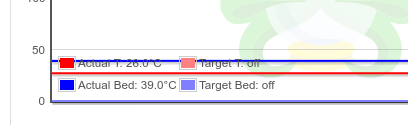
That was taken with a single extruder enabled for clarity, it's worse when you have dual extruders and are only using one of them.
sbts
on 9 Oct 2017
Re the git fetch issue, if it resolved itself it sounds like something indeed just hiccuped temporarily while attempting to fetch from Github.
Be aware that I attempted to run the update many times over approx 6 minutes without success - always the same failure messages. Only after rebooting (approx 120 seconds later) did it succeed on the first try. I think it wishful thinking to assume it was github back end being an issue.
Regardless, lower fruit to pluck, for sure...
fiveangle
on 10 Oct 2017
First of all apologies to @fiveangle and @sbts, for some reason I bunched up your reports yesterday.
@sbts
Ah, so you think the log entries are due to an invalid credential from cura.
Actually, I just realized my brain did a mixup there. Somehow I read the 409 as a 401 or 403 yesterday. 409 here means that the printer is not operational.
[127.0.0.1 instead of actual client IP in log]
If that's the case, then I guess haproxy config needs to change to pass caller address through and possibly the API needs to be taught how to display that.
haproxy already sends that information when option forwardfor is set (which it is by default on OctoPi). I so far thought that the stock tornado logging would also utilize that information but if those log entries come from Cura, it looks like it might not. I agree that changing that would make sense. Not a regression though.
[temperature graph legend]
Thanks for the screenshot.
octoprint.log doesn't seem to provide any clues at all.
Not even any HTTP error codes? Makes me wonder if the request even went through then. That's where the contents of the JS error console might help.
If it works fine, then it's possibly an issue with plugin, not that I have many installed.
For that reason: Please always try to reproduce bugs with safe mode enabled as well. Plugins in OctoPrint can do a LOT of stuff. That makes them very powerful but also able to break things. Not saying this is the case here, but I ask for reproduction tests under safe mode for a reason in the bug template - too many bad experiences ;)
@fiveangle
I think it wishful thinking to assume it was github back end being an issue.
You misunderstood. I didn't meant necessarily an issue with Github, I meant an issue while communicating with Github. That can have multiple causes. The problem is that I have never seen this problem myself so far during my update tests (of which I do a whole bunch before every single RC), so that is kinda tricky to debug. It could be anything from an actual Github backend issue (those I have seen, usually at the worst kinds of moments when I try to push something) to a network problem on the route there to some weird localized issue on the system OctoPrint is running under. And the only idea right now I have to tackling this is moving away from a git based update process in general, since there's simply too much that can go wrong there (corrupt file system, aforementioned network troubles, in general stuff completely outside of my control).
foosel
on 10 Oct 2017
Got it. Yes I misunderstood. Short of a complete R&R of git, I'll post an issue here iin the tracker if it happens again so you can direct me on how we might troubleshoot it (rather than just rebooting).
Re: video detailing the tries and tribulations of ensuring realtime Octoprint->Printer gcode streaming...
There will never be a "right" time to refactor/design the comms layer. Just like there is never the "perfect time" to buy a new Phone... but at some point you just have to do it because using what you have becomes too painful. I'll leave you to judge when that is ;)
I did notice that Prusa Research will have a header on the back of the EINSY RAMBo mini board they'll be shipping with their MK3 to mount a PiZeroW and calling it "Octoprint Ready". I'm not sure if they've done any optimizations for OP for their setup (possible, but haven't seen any fork on their gh) but if not, having run into occasional issues on my Pi2 with the MK2, I'd imagine a PiZeroW to be riding on the ragged edge of usability if any additional plugins are loaded (even the included GCode Viewer). But I guess we'll see. Perhaps they have dispensed with all of the serial translation and are doing direct GPIO communication to the EINSY, which certainly is one solution (unfortunately not a generic one).
We all love Octoprint so just want to keep using it :)
Thanks,
-=dave
fiveangle
on 10 Oct 2017
@fiveangle not entirely sure how we now got to serial comms layer but just fyi: I'm not "waiting for the right moment", I'm struggling to find the time to get back to actually look into this. Last year when the funding crisis hit I was mostly working on one specific branch on the second attempt of the new modular comm layer, then I suddenly had my hands full with other stuff, and since then I keep getting interrupted ;) This comm layer stuff is something I can't do in between, I need to be able to fully concentrate on it for some days, and trust me, it's horribly frustrating to simply not find the chance to do this with all the other stuff like maintenance and such demanding attention. Current plan: Once I've caught up a bit more with the past weeks that I spent forced into doing nothing by this nasty flu, I'll play hermit for a while to finally get back on track with this (that was actually what I was planning on doing after my vacation but then I turned into a sniffling mess). Wish me luck please :)
And to not make this derail even longer:
I'm currently planning the 1.3.5 stable release around early next week (monday or tuesday maybe). So far no regression has been reported that looks like a show stopper and I sincerely hope that stays this way (but if you find something, please report nevertheless, that's the whole point).
foosel
on 11 Oct 2017
I hope you feel better soon !
fiveangle
on 11 Oct 2017
I see the release just went out, but another note that the RC4 update went fine, and I did a successful file upload, print, and timelapse over the weekend.
 JohnOCFII
on 16 Oct 2017
JohnOCFII
on 16 Oct 2017
@JohnOCFII thanks anyhow :)
And yep, 1.3.5 was just (finally) released so closing this - thanks everyone for the feedback! Starting with this release I've also decided to include a special thanks to all who report back in the RC in the release notes and the announcement. Really appreciate the input and it helped a lot in making this release what I think is a very solid one :)
foosel
on 16 Oct 2017
Related issues
 gregopti
·
81Comments
foosel
·
67Comments
gregopti
·
81Comments
foosel
·
67Comments
 LangBalthazar
·
163Comments
LangBalthazar
·
163Comments
 lakay
·
44Comments
lakay
·
44Comments
 Smuk3D
·
47Comments
Smuk3D
·
47Comments