Octoprint: Timelaps renders scrambled / corrupt, webcam is ok? Octopi
What were you doing?
I have Octopi 0.14 running on a RB Pi Zero W and have trouble with a new webcam. The older webcam worked fine with timelapses but the new webcam has an issue. The video's renders all scrambled.
The webcam stream is correct, the snapshot also. The mjpg_streamer seems to run without any trouble and i see images collected in the tmp folder under the timelapse folder. The timelapse video is rendered and playable but the video looks all scrambled / corrupt. The length seems to be correct. It plays scrambled on both my PC (WIN10) and my android phone.
I use a resolution of 1920x1080 but other resolutions have the same issue.
I tried apt-get update / upgrade, reboot ect but the result is the same.
What did you expect to happen?
That a correct video is generated
What happened instead?
A scrambled video is generated
Did the same happen when running OctoPrint in safe mode?
Branch & Commit or Version of OctoPrint
I am running the 0.14 version from https://octopi.octoprint.org/
Operating System running OctoPrint
OctoPi 0.14 on Raspbain Jessie (from the https://octopi.octoprint.org/ image)
Printer model & used firmware incl. version
Na
Browser and Version of Browser, Operating System running Browser
Na
Link to octoprint.log
Will do later when at home
Link to contents of terminal tab or serial.log
Na (no avconf logging??)
Link to contents of Javascript console in the browser
Na
Screenshot(s)/video(s) showing the problem:
Will upload a corrupt video when at home
I have read the FAQ.
 RealTadango
All 24 comments
Timelapse example: 3DBenchy_20170809072530.zip
Snapshot: 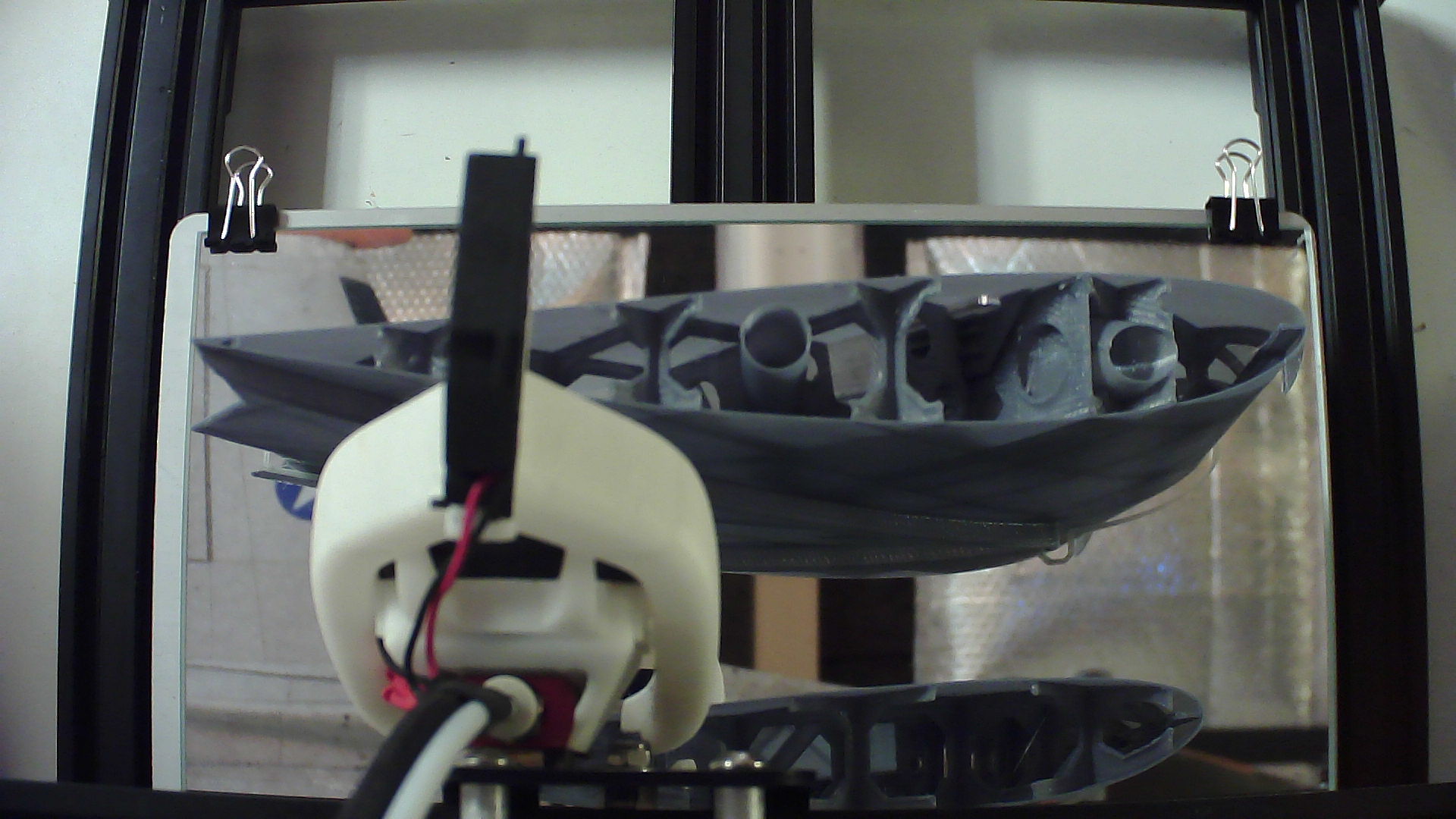
RealTadango
on 9 Aug 2017
Branch & Commit or Version of OctoPrint
Version of OctoPrint please, not OctoPi. The version can be found in the lower left of OctoPrint's UI and looks like "OctoPrint X.X.X (branch name here)"
I wonder if it's related to this issue https://github.com/foosel/OctoPrint/issues/1317 since if the webcam feed is fine, I suspect the issue is with the way avconv is rendering the video.
i see images collected in the tmp folder under the timelapse folder.
Can you save a few of those images and view them? Are they clean and free of errors? Or is that the screenshot you posted already? If the snapshots themselves are fine, then it's most likely an avconv issue.
 ntoff
on 9 Aug 2017
ntoff
on 9 Aug 2017
The image above is a manual snapshot taken from the mjpg_streamer (the same url as configured in the timelapse settings). I will try to get the images of the pi (i am a Windows guy, be patient ;)) and add the other info when i am home.
I can remember the octoprint version being 1.3.4?? It was installed one month ago from the download section.
Sounds like a bug with the avconv and the resolution can be the changing factor. The old camera was running as 320x240 only.... but the new cam at 1024x768 also is showing issues. Maybe the jpg file size is to large. I will try to do a conversion manually tonight, i kept a few jpgs in the tmp folder (reboot before timelaps render ;))
RealTadango
on 9 Aug 2017
Yes, all images in the tmp folder are good. Version is 1.3.4. I will now try to do a manual avconv
RealTadango
on 9 Aug 2017
pi@octopi:~/.octoprint/timelapse $ /usr/bin/avconv -r 25 -i /home/pi/.octoprint/timelapse/tmp2/3DBenchy_20170809162428-%d.jpg -c mpeg4 /home/pi/.octoprint/timelapse/test.mp4
avconv version 11.9-6:11.9-1~deb8u1+rpi1, Copyright (c) 2000-2017 the Libav developers
built on Apr 26 2017 06:57:28 with gcc 4.9.2 (Raspbian 4.9.2-10)
[mjpeg @ 0xce5d40] overread 8
Input #0, image2, from '/home/pi/.octoprint/timelapse/tmp2/3DBenchy_20170809162428-%d.jpg':
Duration: 00:00:00.68, start: 0.000000, bitrate: N/A
Stream #0.0: Video: mjpeg, yuvj422p, 1920x1080, 25 fps, 25 tbn
Output #0, mp4, to '/home/pi/.octoprint/timelapse/test.mp4':
Metadata:
encoder : Lavf56.1.0
Stream #0.0: Video: mpeg4, yuv420p, 1920x1080, q=2-31, 200 kb/s, 25 fps, 25 tbn, 25 tbc
Metadata:
encoder : Lavc56.1.0 mpeg4
Stream mapping:
Stream #0:0 -> #0:0 (mjpeg (native) -> mpeg4 (native))
Press ctrl-c to stop encoding
[mjpeg @ 0xce78a0] overread 8
Last message repeated 1 times
overread 81 fps= 0 q=10.3 size= 39kB time=10000000000.00 bitrate= 0.0kbits/s
error count: 67= 0 q=3.0 size= 156kB time=0.04 bitrate=31960.2kbits/s
[mjpeg @ 0xce78a0] error y=26 x=104
overread 83 fps= 0 q=4.1 size= 293kB time=0.08 bitrate=29987.7kbits/s
error count: 68= 0 q=6.1 size= 309kB time=0.12 bitrate=21122.9kbits/s
[mjpeg @ 0xce78a0] error y=124 x=71
overread 85 fps= 0 q=8.5 size= 392kB time=0.16 bitrate=20068.2kbits/s
mjpeg_decode_dc: bad vlc: 0:0 (0xce7e68)kB time=0.20 bitrate=18768.4kbits/s
[mjpeg @ 0xce78a0] error dc
[mjpeg @ 0xce78a0] error y=124 x=76
overread 87 fps= 0 q=13.9 size= 523kB time=0.24 bitrate=17842.1kbits/s
mjpeg_decode_dc: bad vlc: 0:0 (0xce7e68)kB time=0.28 bitrate=16686.6kbits/s
[mjpeg @ 0xce78a0] error dc
[mjpeg @ 0xce78a0] error y=100 x=78
error count: 72= 0 q=19.7 size= 625kB time=0.32 bitrate=16008.8kbits/s
[mjpeg @ 0xce78a0] error y=127 x=19
overread 80 fps= 0 q=22.7 size= 659kB time=0.36 bitrate=14988.2kbits/s
overread 81 fps= 0 q=25.7 size= 699kB time=0.40 bitrate=14322.3kbits/s
mjpeg_decode_dc: bad vlc: 0:0 (0xce7e68)kB time=0.44 bitrate=13848.2kbits/s
[mjpeg @ 0xce78a0] error dc
[mjpeg @ 0xce78a0] error y=127 x=87
overread 83 fps= 0 q=24.8 size= 778kB time=0.48 bitrate=13276.2kbits/s
overread 84 fps= 0 q=31.0 size= 815kB time=0.52 bitrate=12839.3kbits/s
overread 85 fps= 0 q=24.8 size= 848kB time=0.56 bitrate=12406.3kbits/s
frame= 17 fps= 0 q=31.0 Lsize= 933kB time=0.64 bitrate=11943.2kbits/s
video:932kB audio:0kB other streams:0kB global headers:0kB muxing overhead: 0.102989%
RealTadango
on 9 Aug 2017
h264 and mpeg4 codes have the same result. jpeg from the camera must be corrupt i guess?
RealTadango
on 9 Aug 2017
I did a short dummy print and captured some images, I used your command line /usr/bin/avconv -r 25 -i /home/pi/.octoprint/timelapse/tmp/my_first_print_20170810103952-%d.jpg -c mpeg4 /home/pi/.octoprint/timelapse/test.mp4 (obviously with the name of my dummy print) and the resulting video was fine.
I tried it at the default resolution for the raspberry pi camera and 1920 x 1080, both turned out fine, however I seem to be using an older version of avconv
avconv version 11.8-6:11.8-1~deb8u1+rpi1, Copyright (c) 2000-2016 the Libav developers
built on Oct  8 2016 02:37:00 with gcc 4.9.2 (Raspbian 4.9.2-10)
Do you have to use the -y flag with mjpeg streamer to make your webcam work?
ntoff
on 10 Aug 2017
No, the camera supports a native MJPG stream. That is the issue, because the jpg image is created on the camera. The old camera did not support mjpg and mjpg_streamer was converting the images to jpg, and that works fine.
RealTadango
on 10 Aug 2017
Must be the jpg itself. If i open and save it in an editor the video is generated correct. Other jpgs also result in a correct video / output jpg. So the quest is: Can mjpg_streamer doe anything about it?
RealTadango
on 10 Aug 2017
It is a camera issue for sure. Maybe a better jpeg reader would work ok but for now i give up en use the camera without the timelapse function.
RealTadango
on 15 Aug 2017
Is your camera one of the ones listed on the compatibility page? What kind of camera is it anyway? I have nothing much else to add, and also mjpeg streamer is a separate project https://github.com/jacksonliam/mjpg-streamer so maybe those people would have more info on your issue, I have no other helpful ideas though, I've only ever used "name brand" usb cameras (logitech and microsoft) and both of them worked. Sorry I can't be of more help.
Have you checked the wiki page for webcams to see if you need to set a specific fps or command line parameter?
https://github.com/foosel/OctoPrint/wiki/Webcams-known-to-work
I find it strange that the output image would be fine, yet the saved image would be corrupt. Have you tried another SD card?
ntoff
on 15 Aug 2017
It is a non branded camera, and mjpg_streamer is working perfectly. The issue is with the avconv MJPEG codec that has an issue with the way the mpeg frames are build. Every program reads them fine except avconv.... Not much to do about that. Maybe I will try FFmpeg one day but I don't have the time for that now.
RealTadango
on 15 Aug 2017
I am re-opening this because the solution probably lays in Octoprint for me. When i do a simple 'convert capture.jpg output.jpg' the resulting image can then be rendered correctly by avconv. So the simplest solution for would be to call a simple convert after the snapshot has been captured from the mpjg_stream.
So, how can i do this in the timelapse code?
RealTadango
on 21 Aug 2017
This indeed sounds a bit like a new variant of #1317. If it's a general bug with avconv there's not much I can do about here I fear. #1317 was a case of specific parameters causing trouble due to the input pixel format being not set correctly if a video filter was present for rotation, but as far as I understand you @RealTadango you are even seeing this issue when just doing a very vanilla conversion from your input images (which look themselves fine), no rotation or something like this involved?
If you could provide the raw images of a timelapse that renders wrong, it might be possible to narrow this down further.
 foosel
on 21 Aug 2017
foosel
on 21 Aug 2017
Sorry, just saw your update: you can't easily, and adding this generally is not a good idea (additional dependency on convert which is part of imagemagick if I remember correctly). My guess is rather that your input images are in some weird pixel format, and that's causing issues here, so maybe finding the correct parameter for that to provide to avconv (and allowing that through OctoPrint) would already solve the problem without any additional processing overhead and dependencies.
foosel
on 21 Aug 2017
Avconv simply cannot handle the "corrupt" file format. convert solves this issue. If i look at timelapse.py i can add a convert command after saving the capture to the filesystem. I just am not very good with phyton....
maybe just add:
call("convert {} {}".format(filename, filename), "")
below the write capture part in _perform_capture function?
RealTadango
on 21 Aug 2017
As I said, the file format probably is not "corrupt" (or it wouldn't display at all), but in a different format than what avconv expects based on its input parameters. So if you'd provide me with a set of "corrupt" input files (or even just one), that would allow me to take a closer look at that and solving the actual problem instead of trying to work around them by enforcing additional dependencies to external packages (convert).
foosel
on 21 Aug 2017
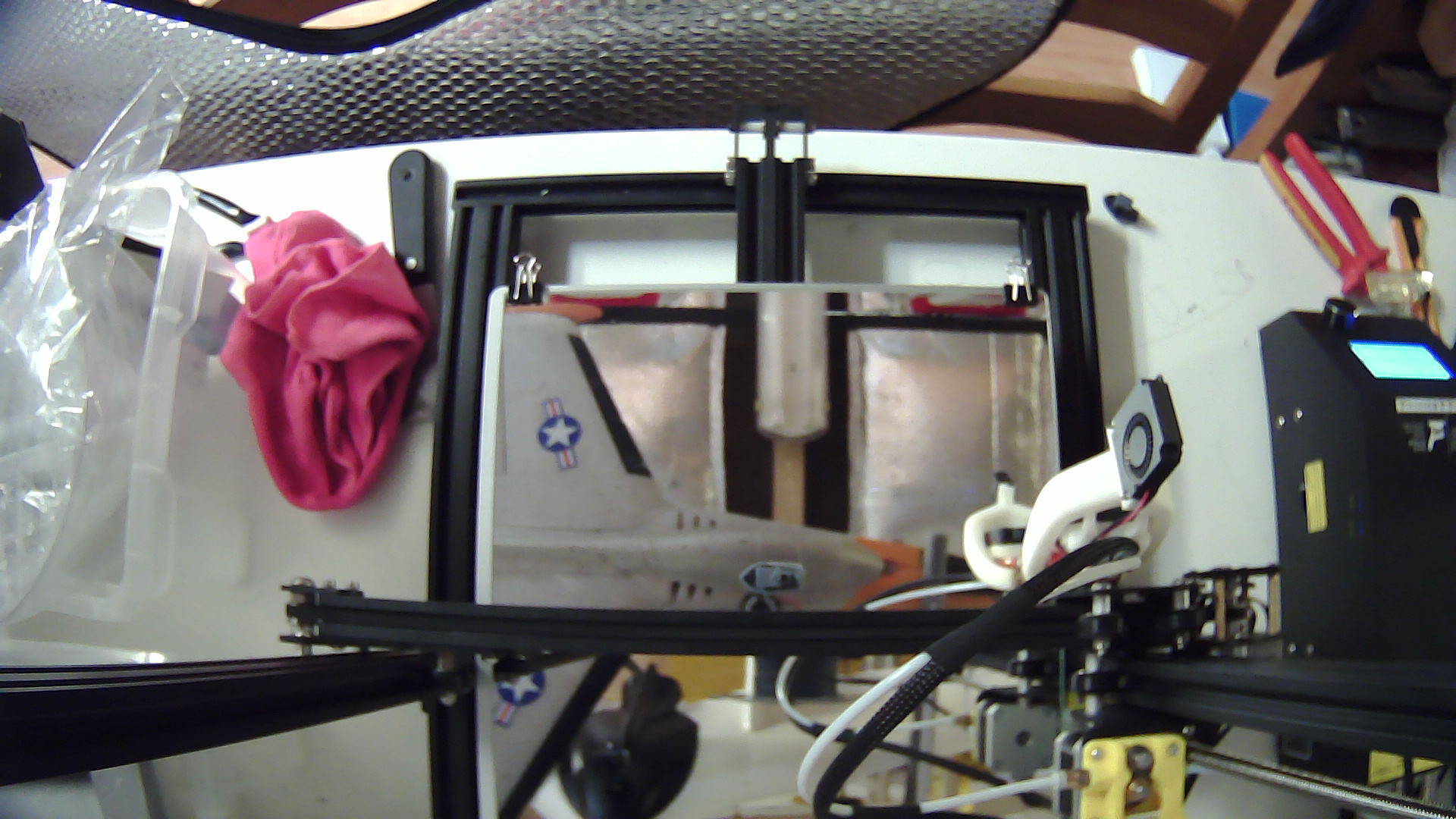
Go ahead but i have spent many hours trying to figure out why avconv does not recignise it. It thought it was a simple pixel format mismatch but i think it is simply a to big jpg file.
RealTadango
on 21 Aug 2017
Could you upload it to Google Drive or Dropbox or something? I want to make sure Github isn't converting stuff already, modifying the file.
foosel
on 21 Aug 2017
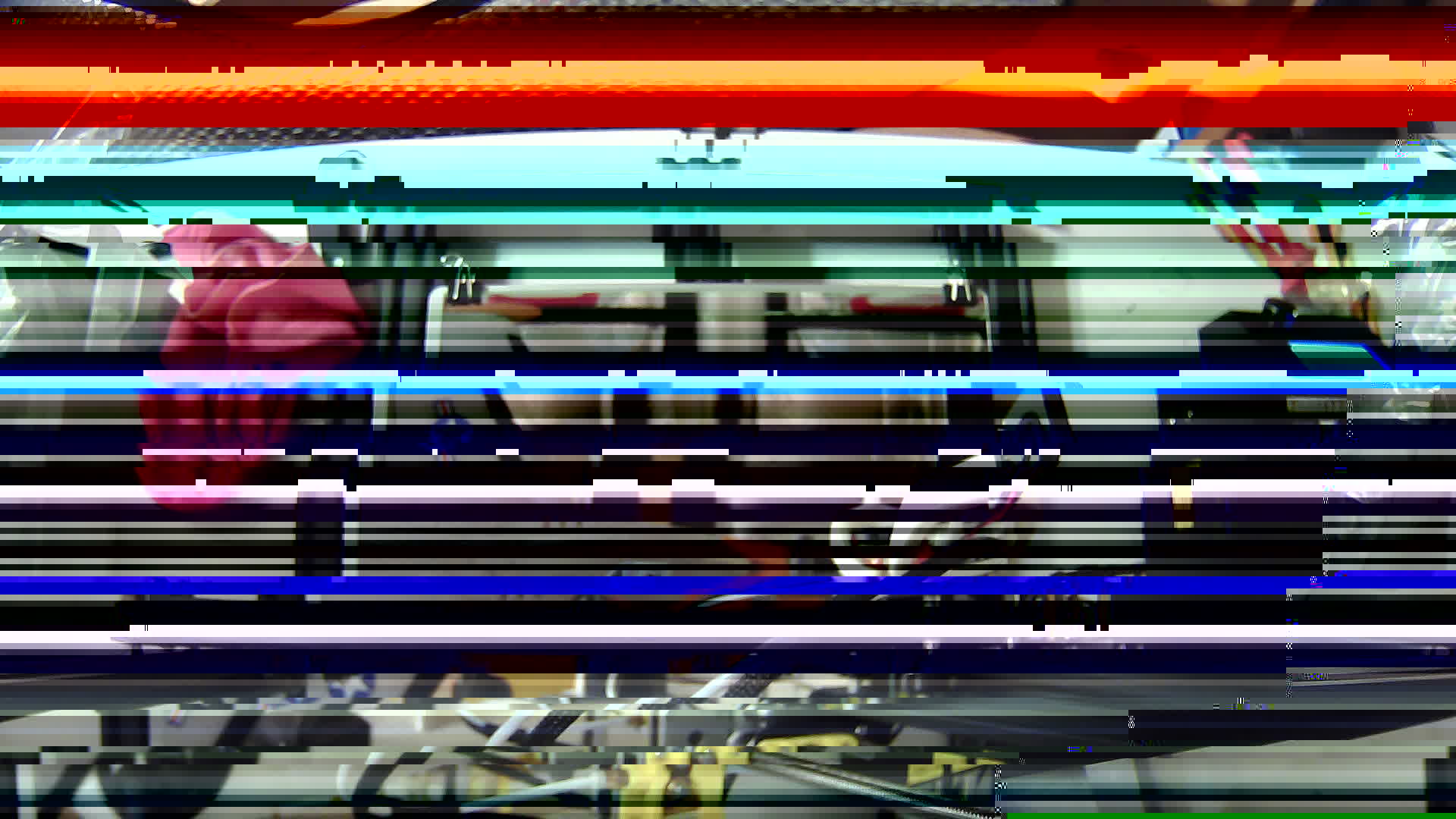
I have tested the downloaded jpg from github and it has the same issue so it is not modified. File size is identical also. A simple 'avconv sample.jpg output.jpg' will show the issue clearly.
RealTadango
on 21 Aug 2017
pi@octopi:~/.octoprint/timelapse/tmp $ avconv -i test3.jpg output3.jpg
avconv version 11.9-6:11.9-1~deb8u1+rpi1, Copyright (c) 2000-2017 the Libav developers
  built on Apr 26 2017 06:57:28 with gcc 4.9.2 (Raspbian 4.9.2-10)
[mjpeg @ 0x10fed40] overread 8
Input #0, image2, from 'test3.jpg':
  Duration: 00:00:00.04, start: 0.000000, bitrate: N/A
    Stream #0.0: Video: mjpeg, yuvj422p, 1920x1080, 25 tbn
Output #0, image2, to 'output3.jpg':
  Metadata:
    encoder         : Lavf56.1.0
    Stream #0.0: Video: mjpeg, yuvj422p, 1920x1080, q=2-31, 200 kb/s, 25 tbn, 25 tbc
    Metadata:
      encoder         : Lavc56.1.0 mjpeg
Stream mapping:
  Stream #0:0 -> #0:0 (mjpeg (native) -> mjpeg (native))
Press ctrl-c to stop encoding
[mjpeg @ 0x10ff4a0] overread 8
frame=    1 fps=  0 q=12.3 Lsize=       0kB time=10000000000.00 bitrate=   0.0kbits/s
video:101kB audio:0kB other streams:0kB global headers:0kB muxing overhead: unknown
[edited by @foosel to improve readability]
RealTadango
on 21 Aug 2017
Got a repro, and sadly it indeed looks like a bug or at least a lack of error resilience in avconv. Current ffmpeg versions do not show that behaviour and produce a correct image. avconv on the other hand gets confused, as also visible in your own output here:
[mjpeg @ 0x10fed40] overread 8
and here
[mjpeg @ 0x10ff4a0] overread 8
The only way around this I see currently is adding some kind of hook into OctoPrint to allow pre-processing the images prior to rendering a video from them - that could then be utilized by a plugin to e.g. run a mass convert on all input images prior to rendering.
But that will take a while as I'm currently working through a rather large vacation backlog.
Alternatively you might have luck with installing a full version of ffmpeg instead of avconv, e.g. just fetching the corresponding "Linux Static Build" from ffmpeg.org ("armhf" for Rpi3, "armel" for Rpi1, 2, 0 I think). With that static build I get the correct output in my test here:
pi@octopi3:~ $ wget https://johnvansickle.com/ffmpeg/releases/ffmpeg-release-armhf-32bit-static.tar.xz
--2017-08-21 10:30:32--  https://johnvansickle.com/ffmpeg/releases/ffmpeg-release-armhf-32bit-static.tar.xz
Resolving johnvansickle.com (johnvansickle.com)... 162.222.226.121
Connecting to johnvansickle.com (johnvansickle.com)|162.222.226.121|:443... connected.
HTTP request sent, awaiting response... 200 OK
Length: 14059104 (13M) [application/x-xz]
Saving to: ‘ffmpeg-release-armhf-32bit-static.tar.xz’

ffmpeg-release-armhf-32bit-static.tar.xz             100%[======================================================================================================================>]  13.41M  2.35MB/s   in 9.0s

2017-08-21 10:30:42 (1.49 MB/s) - ‘ffmpeg-release-armhf-32bit-static.tar.xz’ saved [14059104/14059104]
pi@octopi3:~ $ tar xf ffmpeg-release-armhf-32bit-static.tar.xz
pi@octopi3:~ $ ./ffmpeg-3.3.3-armhf-32bit-static/ffmpeg -i broken.jpg output.jpg
ffmpeg version 3.3.3-static http://johnvansickle.com/ffmpeg/  Copyright (c) 2000-2017 the FFmpeg developers
  built with gcc 6.4.0 (Debian 6.4.0-1) 20170704
  configuration: --enable-gpl --enable-version3 --enable-static --disable-debug --disable-ffplay --disable-indev=sndio --disable-outdev=sndio --cc=gcc-6 --enable-fontconfig --enable-frei0r --enable-gnutls --enable-gray --enable-libass --enable-libfreetype --enable-libfribidi --enable-libmp3lame --enable-libopencore-amrnb --enable-libopencore-amrwb --enable-libopus --enable-librtmp --enable-libsoxr --enable-libspeex --enable-libtheora --enable-libvidstab --enable-libvo-amrwbenc --enable-libvorbis --enable-libvpx --enable-libwebp --enable-libx264 --enable-libx265 --enable-libxvid --enable-libzimg
  libavutil      55. 58.100 / 55. 58.100
  libavcodec     57. 89.100 / 57. 89.100
  libavformat    57. 71.100 / 57. 71.100
  libavdevice    57.  6.100 / 57.  6.100
  libavfilter     6. 82.100 /  6. 82.100
  libswscale      4.  6.100 /  4.  6.100
  libswresample   2.  7.100 /  2.  7.100
  libpostproc    54.  5.100 / 54.  5.100
Input #0, image2, from 'broken.jpg':
  Duration: 00:00:00.04, start: 0.000000, bitrate: 47545 kb/s
    Stream #0:0: Video: mjpeg, yuvj422p(pc, bt470bg/unknown/unknown), 1920x1080, 25 tbr, 25 tbn, 25 tbc
Stream mapping:
  Stream #0:0 -> #0:0 (mjpeg (native) -> mjpeg (native))
Press [q] to stop, [?] for help
Output #0, image2, to 'output.jpg':
  Metadata:
    encoder         : Lavf57.71.100
    Stream #0:0: Video: mjpeg, yuvj422p(pc), 1920x1080, q=2-31, 200 kb/s, 25 fps, 25 tbn, 25 tbc
    Metadata:
      encoder         : Lavc57.89.100 mjpeg
    Side data:
      cpb: bitrate max/min/avg: 0/0/200000 buffer size: 0 vbv_delay: -1
frame=    1 fps=0.0 q=8.9 Lsize=N/A time=00:00:00.04 bitrate=N/A speed=0.187x
video:126kB audio:0kB subtitle:0kB other streams:0kB global headers:0kB muxing overhead: unknown
You'll just need to then reconfigure the path to ffmpeg in OctoPrint to use that instead of avconv and stuff should work.
foosel
on 21 Aug 2017
Ah, good to hear FFmpeg works correct. I will install that then.
RealTadango
on 21 Aug 2017
I can confirm that using the ffmpeg build armel works fine on my Pi Zero W. I now have good timelapse video's again :) Thanks for the help ;)
RealTadango
on 21 Aug 2017
Related issues
 mdelecate
·
5Comments
mdelecate
·
5Comments
 mc2880
·
4Comments
mc2880
·
4Comments
 halxinate
·
4Comments
halxinate
·
4Comments
 coldtobi
·
4Comments
coldtobi
·
4Comments
 christianh17
·
5Comments
christianh17
·
5Comments
Most helpful comment
I can confirm that using the ffmpeg build armel works fine on my Pi Zero W. I now have good timelapse video's again :) Thanks for the help ;)