Octoprint: Octoprint slow start w/o internet connection (softwareupdate)
Hi,
It seems that softwareupdate doesn't check if there is an internet connection before doing its business ... If there are only a few plugins installed, this would probably only be noticed as a slightly slower startup, but if there are many (in my case 23 third party plugins), it can take a long while for it to finish (in my case, up to 10 minutes).
What were you doing?
Start Octoprint on a raspbian instance with no internet connection (temporary situation)
service octoprint start
What did you expect to happen?
Octoprint to start
What happened instead?
If you open the web interface as octoprint starts, you get the message: Looks like something went wrong during startup, the server is gone again. You should check octoprint.log.
If you already have the interface opened (and get the Reconnect button), the interface is unresponsive (no commands can be sent to the printer).
In any case, after a very long time, when softwareupdate finishes to try to update every plugin (in my case approx 10 minutes) the interface becomes usable again.
Did the same happen when running OctoPrint in safe mode?
No: there are some failed connections in octoprint.log, but those are to the plugin repository (http://plugins.octoprint.org/plugins.json) and to the notice center (http://plugins.octoprint.org/notices.json). These do not significantly delay the start, but could fall under the same internet connectivity check.
Branch & Commit or Version of OctoPrint
OctoPrint 1.3.4 (rc/maintenance branch)
Operating System running OctoPrint
debian_version 7.11
Printer model & used firmware incl. version
N/A
Browser and Version of Browser, Operating System running Browser
N/A
Link to octoprint.log
https://gist.github.com/ziceva/3ebe18fff55638d6edd77a4ef6f142c0
Link to contents of terminal tab or serial.log
N/A
Link to contents of Javascript console in the browser
N/A
Screenshot(s)/video(s) showing the problem:
N/A
I have read the FAQ.
 ziceva
All 13 comments
Hm, this is tricky to solve...
It seems that softwareupdate doesn't check if there is an internet connection before doing its business
And this is the tricky bit. "Being online" is not that well defined. Some hosts might work, others won't. In your case, the hosts against which the update checks are performed (probably github.com for all of them) can't be resolved. But what if those are simply wrongly configured or down?
The software update mechanism is fully modular - each plugin decides on their own how to check itself for an update. If a plugin author decides to implement their own update check (which is perfectly valid and possible), how should I know if that requires connectivity, and if so to what host? How should I decide what constitutes a working internet connection in the first place? If it's just github that's down (which actually does happen from time to time) but you have some plugins that are hosted elsewhere, an update check should still work. Being able to resolve some arbitrary name like "google.com" also is no solid indicator - it might simple be resolving to an internal host.
The only way I have for figuring out if querying a version check is possible or not is actually querying it. If it falls on its face due to a missing internet connection - well, I won't know that before I try.
I agree though that it is a problem that the server is blocked while the (failing) checks are performed. To fix that though the whole update check needs to be switched to an asynchronous model. Not impossible, but also not something that can quickly be changed. I'll look into that though.
In the meantime, any suggestions on how to do an online check given the above limitations are welcome.
 foosel
on 18 Jul 2017
foosel
on 18 Jul 2017
Configurable IP to ping, if no reply is obtained, assume offline / internal network only operation and disable the update plugin? Or would that require a reboot?
 ntoff
on 18 Jul 2017
ntoff
on 18 Jul 2017
In the past, a common method was to use NTP with a reasonable distributed target for the NTP host to check (pool.ntp.org, for example). For non-essential services such as OPs plugin update, if the target doesn't immediately respond, assume offline during that check, log, and move on business as usual. If 5 checks fail in a row (let's say 5 days, if it checks for updates once/day) then present a "Cannot connect to Internet to check for updates" notice in the UI feedback so they can investigate.
Since those relative dark NTP ages, many have come to rely on the 2 google DNS hosts for this purpose (8.8.8.8 and 8.8.4.4) since they have proven as robust — if not more — than the community-ran ntp.org pool, only because it has resource$ poured into it to do so.
Anyway, those are simple ways many have historically checked for I'net connectivity.
 fiveangle
on 18 Jul 2017
fiveangle
on 18 Jul 2017
I have to admit that as I was writing down the issue, I was thinking of the Google DNS for simple connectivity check.
Of course, the async way of updating is by far better.
Another thing that could be done (at the very least) is to just report what is happening: I for one do not mind waiting if I know what I am waiting for ... so if the UI says "Please wait while plugins are being updated (maybe even say what plugin is being updated at the moment)" I would see it as a better situation than trying to figure out why my setup is not working anymore with no explanation whatsoever...
And yet another idea ... could the plugin system provide a way of setting (in config.yaml, next to the providers) which plugins should be checked and updated? I do not know if this could be done, but this will kind of solve the situation in which only some of the providers cannot be reached ...
ziceva
on 19 Jul 2017
I'm in the process of combining a bunch of things. Central connectivity check via Google DNS (configurable though). Better parallelisation of the checks using a thread pool. And also thinking on how to do an individual connection failure detection to then also apply to other version checks on the same host, but unsure yet how best to do that (the existing implementation of the software update doesn't make that trivial).
As a side note, it's not the updating that's taking long. It's checking if there is an update that's running into timeouts. What confuses me slightly btw is that a name resolution failure takes up the full timeout, I'd expected something like that to be pretty much instant. Odd.
if the UI says "Please wait while plugins are being updated (maybe even say what plugin is being updated at the moment)"
Checked, not updated - during update you already get that full progress reporting ;)
Thing is, update checks should be something in the background. Users won't be happy if they see "Now checking... for updates" every time that happens.
Another problem is the architecture here. The issue you are seeing is caused by the API call to perform the update check not being yet able to fall back on cached values (because during startup stuff also took too long and isn't finished yet). And thanks to Tornado (the underyling web server) being single threaded and the Flask framework on top (which is used for the API stuff) being synchronous that means trouble in paradise - the check request is effectively blocking everything else. That's something that's caused me trouble in other places as well, and something which has actually made me think here and there on dropping Flask completely, because then I could go fully async for the API implementations using Tornado's coroutine implementation. However, that's hugely invasive and I'd need a backward compatibility layer. Still, actively thinking about it because issues like that just hurt.
could the plugin system provide a way of setting (in config.yaml, next to the providers) which plugins should be checked and updated?
In a way it already does that, it's just not implemented in the UI in any way. I'll keep it in mind, but first let's get that lock up issue handled.
foosel
on 19 Jul 2017
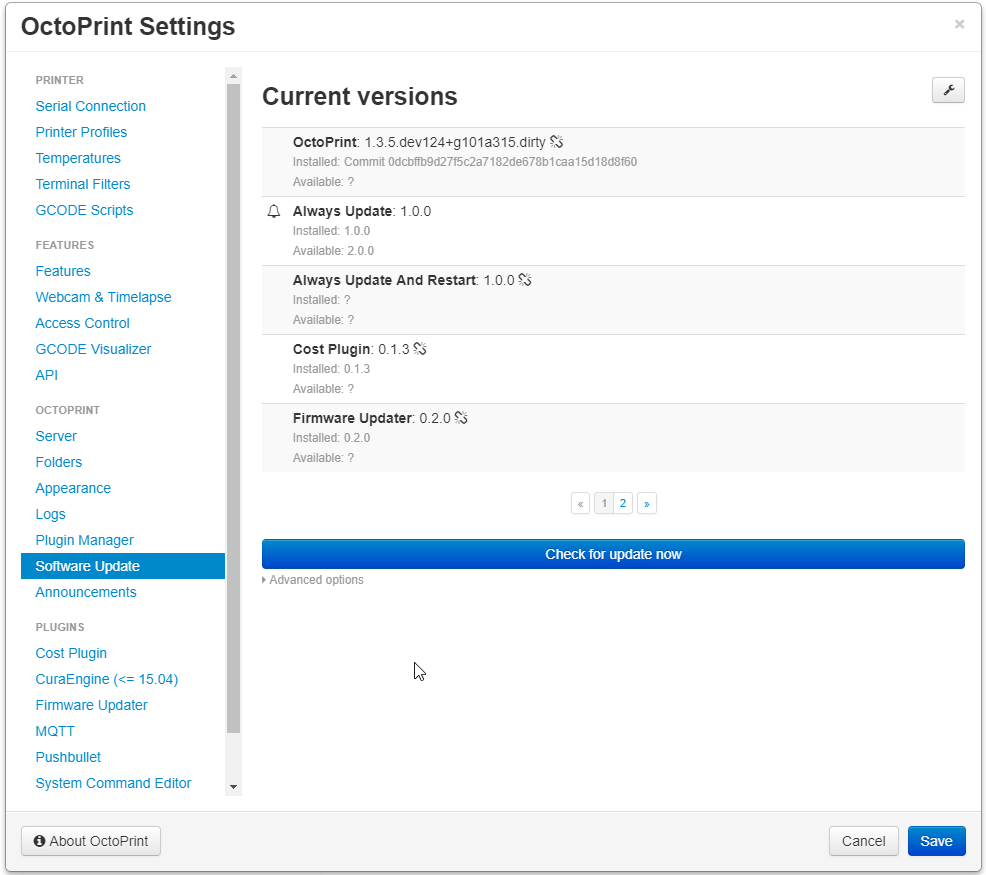
We now have a central online connectivity checker that also gets injected into plugins. Runs every 15min (configurable), attempts to create a connection to 8.8.8.8 port 53 (both configurable as well) and if that fails considers the whole application offline.
Offline state means that the software update plugin will skip all update checks that do not explicitly state that they work offline. It will also mark such entries with a broken link icon. It should also refuse to update anything that does not explicitly state that it runs offline.
Example:
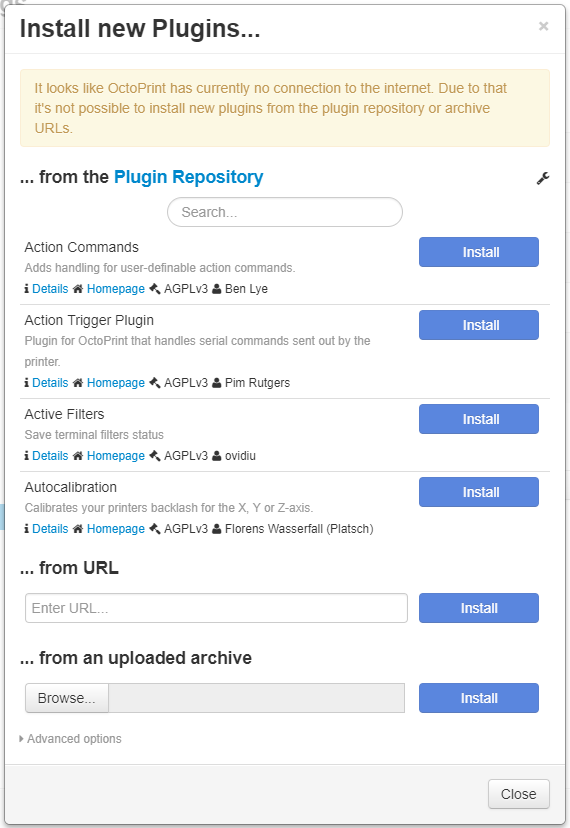
The plugin manager and announcement plugins will also refuse to even attempt to fetch data from remote. If data is still cached, that will be presented to the user (with the plugin manager also informing about the fact that installing from repository or archive URL won't be possible), otherwise you'll just get blank pages/placeholder images there.
Example:
I'm still not entirely happy with the "let's just ping 8.8.8.8 regularly" approach, but I hope that the configurability (including the option to just disable the whole check by setting things to 127.0.0.1:5000) will allow anyone whose network setup causes issues with that approach to easily solve them.
The above changes are pushed to maintenance, will soon also be merged to devel and will go out with 1.3.5.
foosel
on 19 Jul 2017
(including the option to just disable the whole check by setting things to 127.0.0.1:5000)
why port 5000? Do you specifically need to put the port octoprint listens on to disable it? (only asking because you know I'm going to test (and attempt to break) this.
ntoff
on 19 Jul 2017
ntoff, by using port 5000 the test result is guaranteed to be OK and "connected" (since port 5000 is already opened at this time by octoprint itself), so yeah, to disable the functionality you have to use the port that octoprint listens to (one could use any other port that is guaranteed to be opened, like lets say ssh 22 if you are on a linux disto and connect remotely, but the port that is absolutely and without doubt opened regardless of OS and other software installed is octoprint's port) ...
Since the check result is guaranteed to be "connected" no matter what the connectivity state actually is, the system should behave exactly like before, when no check was done and just did its job no matter the connectivity state.
Hope this helps ...
ziceva
on 20 Jul 2017
Slight change in plans due to voiced concerns regarding pinging Google's DNS out of the box.
I cannot provide an online host with the same ultra high availability and low latency as Google. It would simply not work out and eat way too much time thanks to administration and also the required redundancy would be too expensive.
What I can do however is make the connectivity check require an opt-in, also allowing to change the pinged host before anything ever gets pinged, and that's what I spent most of today on doing:
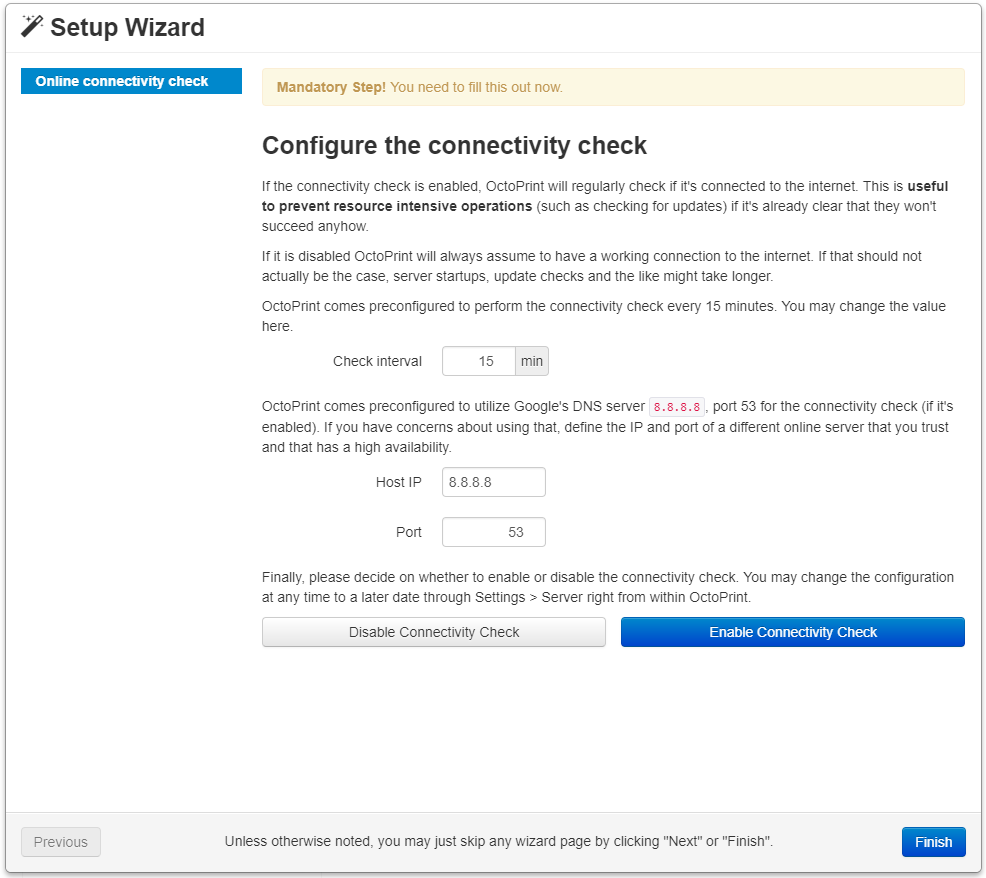
Unless you explicitly enable it there, no pings will be sent and the checker will simply return "yep, we are online" when queried. The very first server startup that way won't profit from the check potentially being available, so stuff might still experience slow downs in such cases. But it's the best I can do for now without making some people uncomfortable (which I btw completely respect).
Changes are pushed to maintenance.
I hope that's a compromise everyone can get behind.
foosel
on 20 Jul 2017
One small addition? A "test" button so when you enter your own IP address to test with, you can make sure the host responds, like the webcam url has the test button. Just a thought.
ntoff
on 20 Jul 2017
1.3.5 was released yesterday.
foosel
on 17 Oct 2017
@ntoff test button was added in 0b95894da13cb08bb906848b7ffe0e46f16fa795 and will be in 1.3.6
foosel
on 19 Oct 2017
You do such an amazing job, keep it up :D
ntoff
on 19 Oct 2017
Related issues
 dkingsjr
·
5Comments
foosel
·
4Comments
dkingsjr
·
5Comments
foosel
·
4Comments
 mc2880
·
4Comments
mc2880
·
4Comments
 Lino77
·
4Comments
foosel
·
5Comments
Lino77
·
4Comments
foosel
·
5Comments