Octolapse: Custom image settings not updating when switching to a new camera.
If this is a feature request describe it here
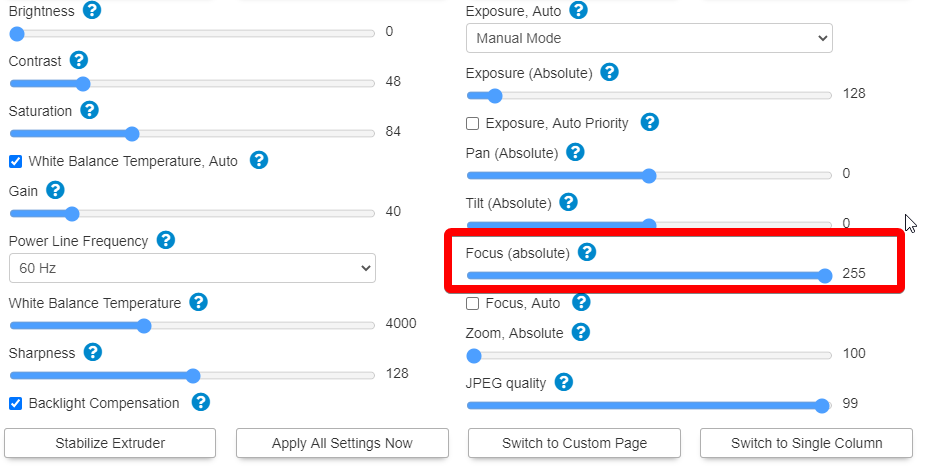
I was testing out a few different webcams, namely the Razer Kiyo and a generic USB Live Cam. While changing the fields there I noticed that some fields seemed to either have too much range with no effect or too little to support the full range of values. Example: Focus_Absolute by default goes from 0 to 255, however for this particular cam it ranged from 0 - 1024 cutting the focal range very short. I realize these will change from camera to camera, but fortunately, the range of values for a given camera is easily found via the webcam driver control application. I could be mistaken but when loading this form it seems like a trivial task to quickly fire off a few calls to this app and parse out the min/max values of each attribute.
Version of Octolapse
Octolapse Version: 0.4.0
Version of OctoPrint
OctoPrint Version: 1.4.2
 mordhau5
All 13 comments
Check http://{IP_OF_PI_HERE}:8080/input.json
That is where I get the available settings, min/max range, steps and options.
 FormerLurker
on 31 Oct 2020
FormerLurker
on 31 Oct 2020
Check http://{IP_OF_PI_HERE}:8080/input.json
That is where I get the available settings, min/max range, steps and options.
I see, well it seems then like there could be a potential bug as here is the range for focus:
{
"name": "Focus (absolute)",
"id": "10094858",
"type": "1",
"min": "1",
"max": "1023",
"step": "1",
"default": "240",
"value": "240",
"dest": "0",
"flags": "16",
"group": "1"
},
And here is how the form for this specific webcam shows:
mordhau5
on 31 Oct 2020
Hmm maybe the switch from one camera to the other isn't working for some reason. Try creating a new profile and see if that works.
Edit: not many ppl are switching cameras, so this isn't as tested as the other features.
FormerLurker
on 31 Oct 2020
I only have one currently registered to the PI, the other is a raspi-HQ I'm triggering raspistill from a script.
Edit: that was confusing, I mean to say I only have one webcam configured to stream.
mordhau5
on 31 Oct 2020
Can you try a new profile anyways? It could help debug since i don't have one of those cameras to test. Also, can you post the entire input.json file? I might be able to replicate it.
FormerLurker
on 31 Oct 2020
Yes of course, I'm in the process of grabbing it all now.
mordhau5
on 31 Oct 2020
Ok interesting, re-creating the profile populated the correct settings!
Input.Json (renamed as .txt, GH wouldn't accept the original file format):
input.txt
mordhau5
on 31 Oct 2020
Use gist.github.com to post. try going to the original profile and enable/disable custom image preferences. That should trigger a re-fetch of the json file. If that fails, I think I know where to look. Did you ever have another usb cam or picam plugged in?
FormerLurker
on 31 Oct 2020
Sorry for delay. Yes, today I was swapping USB cams to see their comparative image quality. With each one I did a webcamd restart and octoprint restart.
Just tried out your recommendation to swap custom image prefs, and that did trigger the fetch and settings show up appropriately.
mordhau5
on 31 Oct 2020
Ok, cool. I will see what I can do. In the meantime, just use a single profile per cam, and disable the one you are not using.
FormerLurker
on 31 Oct 2020
Will do. Also, hopefully not too annoying an ask to put it here, but I was wondering if I could be a guinea pig for testing h.264/5 encoding (iirc one of them is buggy). I thought I might be able to be helpful in that way since I have a pi4 4gb and possibly enough resources to render videos with it.
mordhau5
on 31 Oct 2020
Sure, both encoders are available within the rendering profile. If it fails, you can choose new settings and rerender in the 'failed renderings' popup (a red button will appear on the tab if any rendering fails).
FormerLurker
on 31 Oct 2020
Where would you like me to post findings about h.264 rendering? I've started testing it with my pi4.
mordhau5
on 3 Nov 2020
Related issues
 MetalTurtle18
·
4Comments
MetalTurtle18
·
4Comments
 ME-Marty
·
18Comments
ME-Marty
·
18Comments
 ulitiy
·
3Comments
ulitiy
·
3Comments
 systemik
·
14Comments
systemik
·
14Comments
 bradcozine
·
10Comments
bradcozine
·
10Comments