Octolapse: Unable to increase raspi cam v2.1 resolution
If this is a feature request describe it here
___REPLACE_THIS__FEATURE_REQUEST_DESCRIPTION_GOES_HERE
Version of Octolapse
Octolapse Version: V0.40
Version of OctoPrint
OctoPrint Version: V1.42
When you ran into the problem, did you have diagnostic logging enabled?
Diagnostic Logging was Enabled: No
What were you doing when the problem occurred
- Change line to: camera_raspi_options="-fps 10 -x 1280 -y 720" and uncomment = no effect.
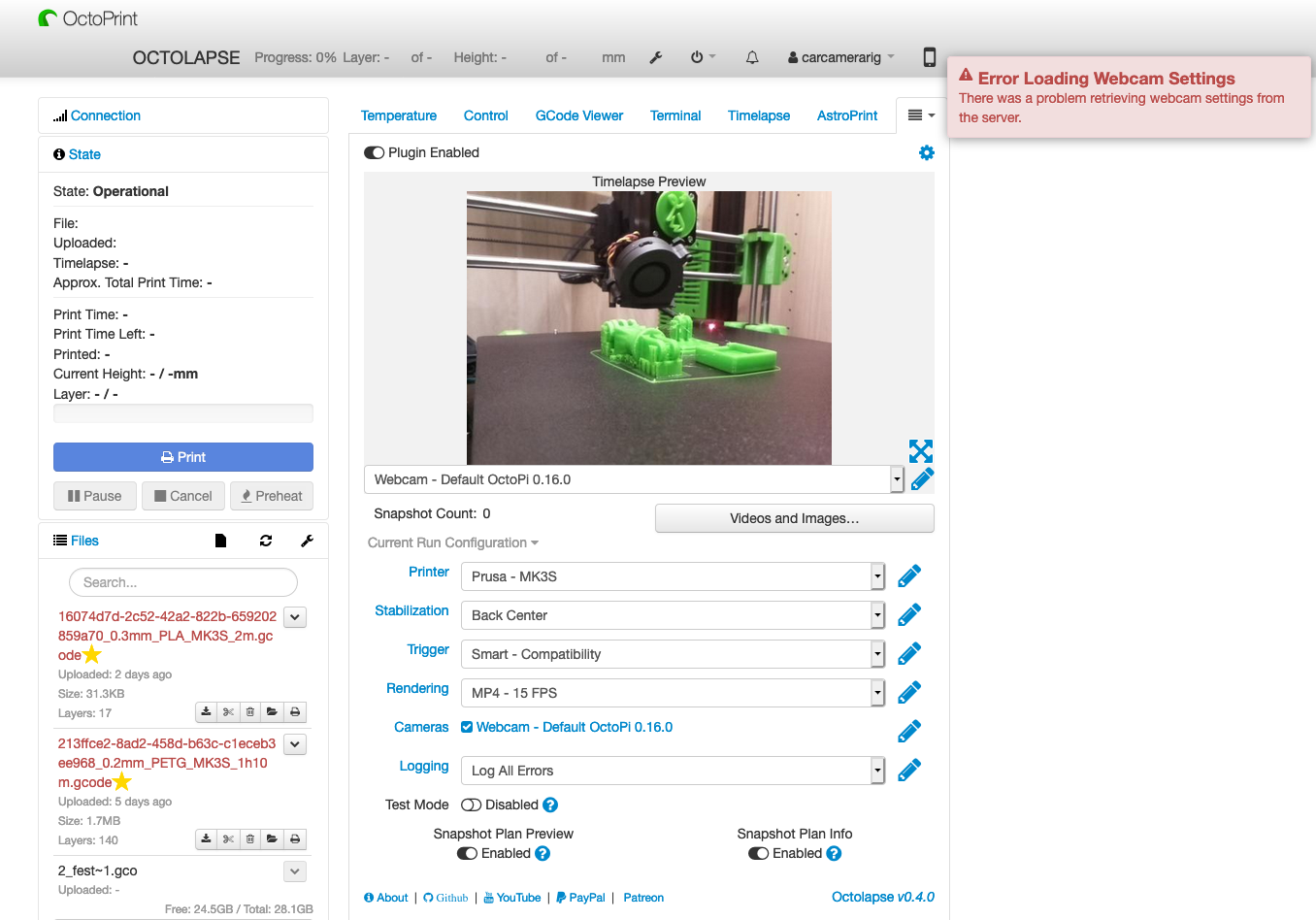
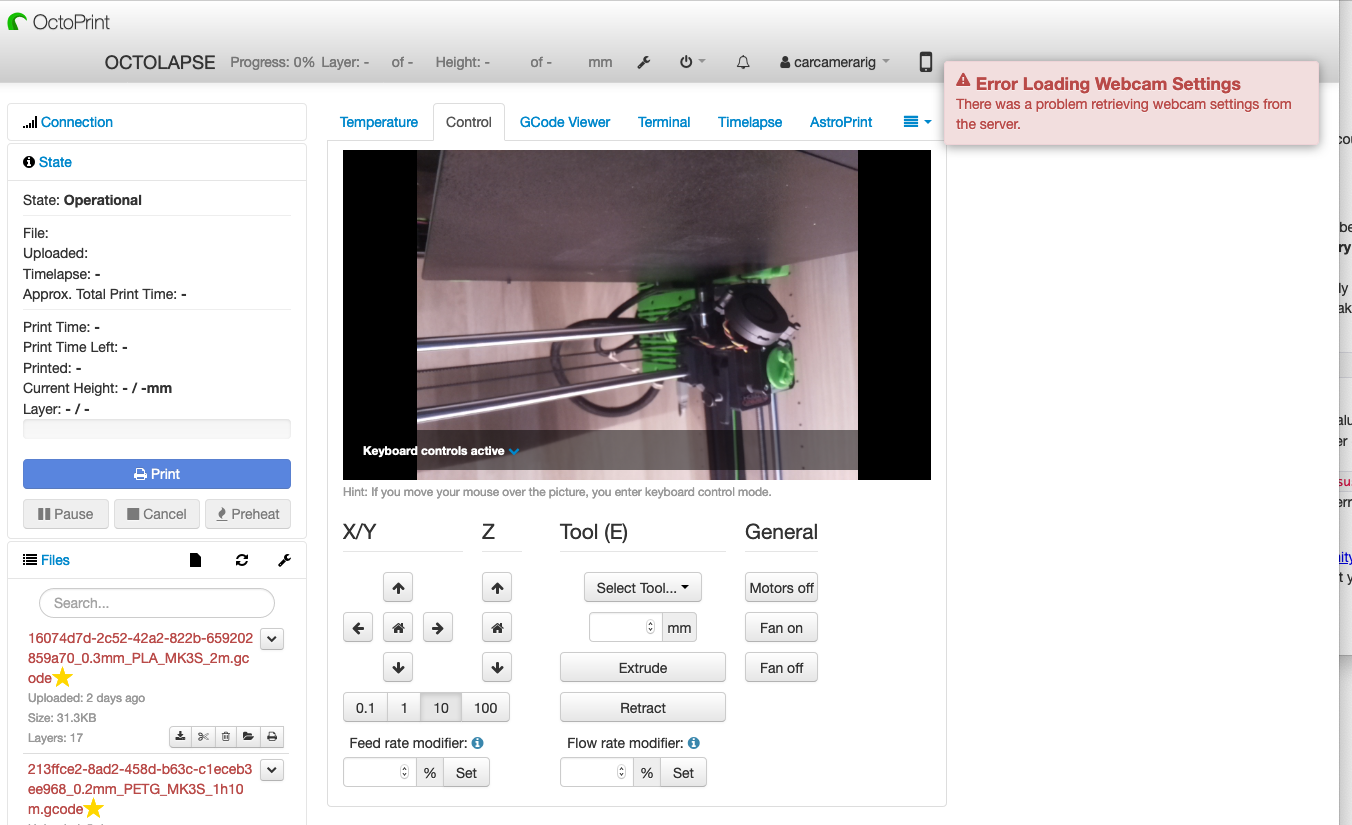
- change line: camera="raspi" and uncomment gives ERROR LOADING WEBCAM SETTINGS problem retrieving webcam settings.
- As above but with USB commands=unable to comunicate with webcam server.
What should have happened?
increased the resolution of the webcam feed and timelapse still images to render.
What happened instead?
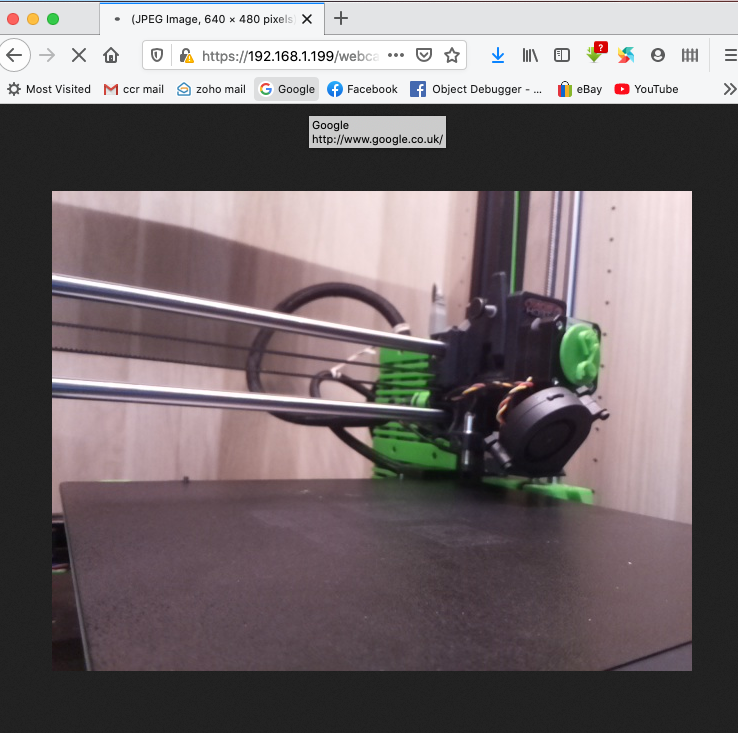
if i uncomment camera"raspi" (i tried camera"usb" also) i get the errors above, if i leave commented out anything i type into the camera_raspi_options ie. [camera_raspi_options="-fps 10 -x 1280 -y 720"] has no effect. The default resolution im getting is 640x480. (i also tried the usb command here also [camera_usb_options=“-r 3280x2464 -f 15”] which also had no effect and the same error above uncommenting camera"usb"
Operating System running OctoPrint and Octolapse
OS Name: Octopi
Os Version: V0.17.0
Printer model & used firmware incl. version
Printer Model: Caribou 420
Printer Firmware Version: caribou 3.91 BMMH
Browser and version of browser, operating system running browser
Browser: Firefox 80.0.1 (64-bit)
Browser OS: Mac os catalina 10.15.6
Link to the gcode file you were printing when the problem occurred
Link to Gcode File: ___REPLACE_THIS__GCODE_FILE_LINK_GOES_HERE
Link to settings.json
Link to settings.json with all passwords removed: ___REPLACE_THIS__SETTINGS_JSON_LINK_GOES_HERE
Link to plugin_octolapse.log
Link to plugin_octolapse.log: LINK_GOES_HERE
Link to octoprint.log
Link to octoprint.log: ___REPLACE_THIS__LINK_GOES_HERE
Link to contents of Javascript console in the browser
Link to javascript console output: ___REPLACE_THIS__LINK_GOES_HERE
Screenshots and/or videos of the problem:
Screenshot/Video Links:


Please consider becoming a patron
If you like this project, please support my work by becoming a patron, and consider adding a 'star' to the repository. It takes a lot of time and effort to maintain the project and respond to issues. The cost of test prints, software, cameras, printer parts, etc. can quickly add up, so every bit helps.
You can find various videos and tutorials by subscribing to my Youtube channel. You can also follow me on Twitter.
 carcamerarig
All 22 comments

carcamerarig
on 28 Sep 2020
This is not an Octolapse issue. There are numerous guides for adjusting the raspberry pi camera resolution (it is NOT the same as a usb camera.
Regarding the Octolapse error message, it looks like you are trying to enable custom image preferences. If so, did you follow the guide for enabling this for a Raspberry Pi Camera? There is even a video guide (linked to in the first image on the wiki). I believe I even have an example in there of setting the resolution to something more reasonable than the default, so check it out.
 FormerLurker
on 28 Sep 2020
FormerLurker
on 28 Sep 2020
Thanks so much for that, i literally have dozens of pages open in browser
re setting resolution and somehow i have missed your guide... i dont know
how but i did. Couldnt see the wood through the trees.
Turns out no one else mentions editing the modules file...
HUGE thanks im off to make some changes
🙏
Many Thanks
Justin Edgington.
Visit us: Car camera Rig http://www.carcamerarig.com
Email us: [email protected]
Follow us at: Facebook http://www.facebook.com/carcamerarig
https://t.yesware.com/tl/dad779841ffb3b81069864ab6998c13136d2450e/dcc8913a0f61ad65d65ebdfcba0ea0cc/6500a1c8ee38c6efce36ee12187ff131?ytl=http%3A%2F%2Fwww.facebook.com%2Fcarcamerarig
Call us: +44 (0) 7973 746192
On Mon, Sep 28, 2020 at 3:38 PM FormerLurker notifications@github.com
wrote:
This is not an Octolapse issue. There are numerous guides for adjusting
the raspberry pi camera resolution (it is NOT the same as a usb camera.Regarding the Octolapse error message, it looks like you are trying to
enable custom image preferences. If so, did you follow the guide for
enabling this for a Raspberry Pi Camera
https://github.com/FormerLurker/Octolapse/wiki/V0.4---Configuring-a-Raspberry-Pi-Camera?
There is even a video guide (linked to in the first image on the wiki). I
believe I even have an example in there of setting the resolution to
something more reasonable than the default, so check it out.—
You are receiving this because you authored the thread.
Reply to this email directly, view it on GitHub
https://github.com/FormerLurker/Octolapse/issues/601#issuecomment-700049527,
or unsubscribe
https://github.com/notifications/unsubscribe-auth/AIBQ45TDXEGD24A5WGAAMOTSICNVTANCNFSM4R4RFD3A
.
carcamerarig
on 28 Sep 2020
It might be me but I was looling to see how I missed your guide on your wiki, I just don’t see the link you sent to me configuring-a-raspberry-pi-camera. If it’s me I apologies for not looking hard enough.
Anyhow thanks again and I’ll be making a coffee donation ;)
Many Thanks
Justin Edgington
Visit us: Car camera Rig
Email us: [email protected]
Call us: +44 (0) 7973 746192
On 28 Sep 2020, at 15:38, FormerLurker notifications@github.com wrote:
This is not an Octolapse issue. There are numerous guides for adjusting the raspberry pi camera resolution (it is NOT the same as a usb camera.Regarding the Octolapse error message, it looks like you are trying to enable custom image preferences. If so, did you follow the guide for enabling this for a Raspberry Pi Camera? There is even a video guide (linked to in the first image on the wiki). I believe I even have an example in there of setting the resolution to something more reasonable than the default, so check it out.
—
You are receiving this because you authored the thread.
Reply to this email directly, view it on GitHub, or unsubscribe.
carcamerarig
on 28 Sep 2020
Turns out no one else mentions editing the modules file...
Well, this is only necessary if you want to configure your camera via Octolapse or mjpgstreamer. If you load the raspicam driver, you can use it as if it were a USB camera. Once you do that, the way you set the resolution changes. The reason why is historical. In the past no driver existed, which required a special mjpgstreamer output for the raspicam, which was written separately and uses some different configs. The raspi .so module for mjpgstreamer was written without support for control.htm (a page that allows you to tweak camera settings), so my guide is basically enabling the USB version, which allows one to change the raspicam settings via Octolapse (or control.htm), which is awesome! Unfortunately there are some issues with the USB driver, but a new one should be released at some point (been reading about this for a while).
TLDR: your resolution string was incorrect, but ONLY if you were using the raspicam version of mjpgstreamer (camera=raspi or camera=auto WITHOUT the driver). Nuts, but development is hard, and mjpgstreamer is free, so good trade :)
It might be me but I was looling to see how I missed your guide on your wiki, I just don’t see the link you sent to me configuring-a-raspberry-pi-camera. If it’s me I apologies for not looking hard enough.
It's linked to in the Getting Started Guide, and in the Enable Custom Image Preferences guide, and if you dig REALLY deep, it's listed in the 'All Files' view. However, you're right that it is not listed as a top level menu item. The main reason is I wrote all of the documentation for V0.4 (and migrated docs for 0.3.x) in about a week, and you'll notice that there is a HUGE amount of documentation. V0.4 took 1.5+ years to complete, and I've taken a bit of a break since it dropped and haven't cleaned up my mess 100%. I've got a collection of issues and enhancements (documentation included) that I've just started working on which will be included in V0.4.1 (or whatever the final version is). Hopefully I'll improve the wiki substantially. Typically I use the Issues and social media interactions to decide how the WIKI should be structured. I've had lots of time now, and believe I know what changes should be made so that answers to questions like yours are easier to find.
TLDR: You didn't see it because a link isn't listed directly in the top level menu items.
Anyhow thanks again and I’ll be making a coffee donation ;)
Much obliged! Development is fueled primarily via massive amounts of coffee :)
FormerLurker
on 28 Sep 2020
Thanks for that, much appreciated. Yes time is a tough one with hobbies,
for me also lol.
So i followed the guide letter for letter and still im struggling, ive
clicked the link provided in the troubleshootin guide but cant see where to
go with it??
Any ideas or who to go to for some help with it?
Many Thanks
Justin Edgington.
Visit us: Car camera Rig http://www.carcamerarig.com
Email us: [email protected]
Follow us at: Facebook http://www.facebook.com/carcamerarig
https://t.yesware.com/tl/dad779841ffb3b81069864ab6998c13136d2450e/dcc8913a0f61ad65d65ebdfcba0ea0cc/6500a1c8ee38c6efce36ee12187ff131?ytl=http%3A%2F%2Fwww.facebook.com%2Fcarcamerarig
Call us: +44 (0) 7973 746192
On Mon, Sep 28, 2020 at 5:24 PM FormerLurker notifications@github.com
wrote:
Turns out no one else mentions editing the modules file...
Well, this is only necessary if you want to configure your camera via
Octolapse or mjpgstreamer. If you load the raspicam driver, you can use it
as if it were a USB camera. Once you do that, the way you set the
resolution changes. The reason why is historical. In the past no driver
existed, which required a special mjpgstreamer output for the raspicam,
which was written separately and uses some different configs. The raspi .so
module for mjpgstreamer was written without support for control.htm (a page
that allows you to tweak camera settings), so my guide is basically
enabling the USB version, which allows one to change the raspicam settings
via Octolapse (or control.htm), which is awesome! Unfortunately there are
some issues with the USB driver, but a new one should be released at some
point (been reading about this for a while).TLDR: your resolution string was incorrect, but ONLY if you were using the
raspicam version of mjpgstreamer (camera=raspi or camera=auto WITHOUT the
driver). Nuts, but development is hard, and mjpgstreamer is free, so good
trade :)It might be me but I was looling to see how I missed your guide on your
wiki, I just don’t see the link you sent to me
configuring-a-raspberry-pi-camera. If it’s me I apologies for not looking
hard enough.It's linked to in the Getting Started Guide
https://github.com/FormerLurker/Octolapse/wiki/V0.4---Getting-Started,
and in the Enable Custom Image Preferences
https://github.com/FormerLurker/Octolapse/wiki/V0.4---Enabling-Camera-Controls
guide, and if you dig REALLY deep, it's listed in the 'All Files' view.
However, you're right that it is not listed as a top level menu item. The
main reason is I wrote all of the documentation for V0.4 (and migrated docs
for 0.3.x) in about a week, and you'll notice that there is a HUGE amount
of documentation. V0.4 took 1.5+ years to complete, and I've taken a bit of
a break since it dropped and haven't cleaned up my mess 100%. I've got a
collection of issues and enhancements (documentation included) that I've
just started working on which will be included in V0.4.1 (or whatever the
final version is). Hopefully I'll improve the wiki substantially. Typically
I use the Issues and social media interactions to decide how the WIKI
should be structured. I've had lots of time now, and believe I know what
changes should be made so that answers to questions like yours are easier
to find.TLDR: You didn't see it because a link isn't listed directly in the top
level menu items.Anyhow thanks again and I’ll be making a coffee donation ;)
Much obliged! Development is fueled primarily via massive amounts of
coffee :)—
You are receiving this because you authored the thread.
Reply to this email directly, view it on GitHub
https://github.com/FormerLurker/Octolapse/issues/601#issuecomment-700140906,
or unsubscribe
https://github.com/notifications/unsubscribe-auth/AIBQ45WHJCUJZ7YUCWBA7KTSIC2D5ANCNFSM4R4RFD3A
.
carcamerarig
on 28 Sep 2020
missed a screen grab apologies...
Many Thanks
Justin Edgington.
Visit us: Car camera Rig http://www.carcamerarig.com
Email us: [email protected]
Follow us at: Facebook http://www.facebook.com/carcamerarig
https://t.yesware.com/tl/dad779841ffb3b81069864ab6998c13136d2450e/dcc8913a0f61ad65d65ebdfcba0ea0cc/6500a1c8ee38c6efce36ee12187ff131?ytl=http%3A%2F%2Fwww.facebook.com%2Fcarcamerarig
Call us: +44 (0) 7973 746192
On Mon, Sep 28, 2020 at 6:48 PM justin edgington justin@carcamerarig.com
wrote:
Thanks for that, much appreciated. Yes time is a tough one with hobbies,
for me also lol.
So i followed the guide letter for letter and still im struggling, ive
clicked the link provided in the troubleshootin guide but cant see where to
go with it??
Any ideas or who to go to for some help with it?Many Thanks
Justin Edgington.
Visit us: Car camera Rig http://www.carcamerarig.com
Email us: [email protected]
Follow us at: Facebook http://www.facebook.com/carcamerarighttps://t.yesware.com/tl/dad779841ffb3b81069864ab6998c13136d2450e/dcc8913a0f61ad65d65ebdfcba0ea0cc/6500a1c8ee38c6efce36ee12187ff131?ytl=http%3A%2F%2Fwww.facebook.com%2Fcarcamerarig
Call us: +44 (0) 7973 746192On Mon, Sep 28, 2020 at 5:24 PM FormerLurker notifications@github.com
wrote:Turns out no one else mentions editing the modules file...
Well, this is only necessary if you want to configure your camera via
Octolapse or mjpgstreamer. If you load the raspicam driver, you can use it
as if it were a USB camera. Once you do that, the way you set the
resolution changes. The reason why is historical. In the past no driver
existed, which required a special mjpgstreamer output for the raspicam,
which was written separately and uses some different configs. The raspi .so
module for mjpgstreamer was written without support for control.htm (a page
that allows you to tweak camera settings), so my guide is basically
enabling the USB version, which allows one to change the raspicam settings
via Octolapse (or control.htm), which is awesome! Unfortunately there are
some issues with the USB driver, but a new one should be released at some
point (been reading about this for a while).TLDR: your resolution string was incorrect, but ONLY if you were using
the raspicam version of mjpgstreamer (camera=raspi or camera=auto WITHOUT
the driver). Nuts, but development is hard, and mjpgstreamer is free, so
good trade :)It might be me but I was looling to see how I missed your guide on your
wiki, I just don’t see the link you sent to me
configuring-a-raspberry-pi-camera. If it’s me I apologies for not looking
hard enough.It's linked to in the Getting Started Guide
https://github.com/FormerLurker/Octolapse/wiki/V0.4---Getting-Started,
and in the Enable Custom Image Preferences
https://github.com/FormerLurker/Octolapse/wiki/V0.4---Enabling-Camera-Controls
guide, and if you dig REALLY deep, it's listed in the 'All Files' view.
However, you're right that it is not listed as a top level menu item. The
main reason is I wrote all of the documentation for V0.4 (and migrated docs
for 0.3.x) in about a week, and you'll notice that there is a HUGE amount
of documentation. V0.4 took 1.5+ years to complete, and I've taken a bit of
a break since it dropped and haven't cleaned up my mess 100%. I've got a
collection of issues and enhancements (documentation included) that I've
just started working on which will be included in V0.4.1 (or whatever the
final version is). Hopefully I'll improve the wiki substantially. Typically
I use the Issues and social media interactions to decide how the WIKI
should be structured. I've had lots of time now, and believe I know what
changes should be made so that answers to questions like yours are easier
to find.TLDR: You didn't see it because a link isn't listed directly in the top
level menu items.Anyhow thanks again and I’ll be making a coffee donation ;)
Much obliged! Development is fueled primarily via massive amounts of
coffee :)—
You are receiving this because you authored the thread.
Reply to this email directly, view it on GitHub
https://github.com/FormerLurker/Octolapse/issues/601#issuecomment-700140906,
or unsubscribe
https://github.com/notifications/unsubscribe-auth/AIBQ45WHJCUJZ7YUCWBA7KTSIC2D5ANCNFSM4R4RFD3A
.
carcamerarig
on 28 Sep 2020
Sure. You can find it here. However, I'm not sure how much help it will be since I don't know what your issue is.
FYI, you can find ALL wiki pages here:
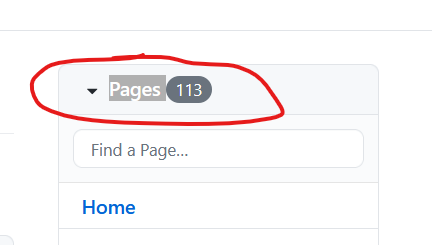
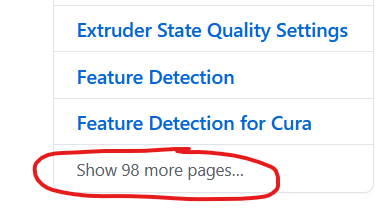
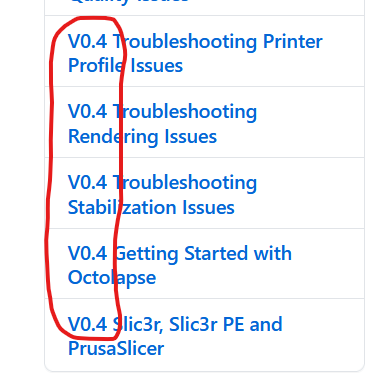
The documents for the version you are using all start with V0.4 like so:
Also, don't forget that there is a lot of help embedded directly within Octolapse:
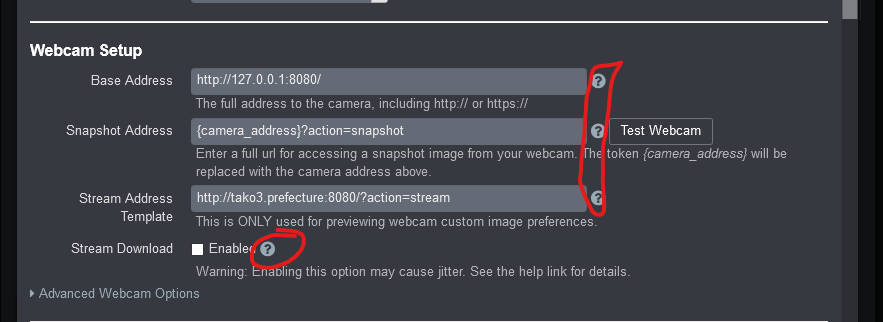
Note that those are just examples. All blue question marks can be clicked on to open help.
FormerLurker
on 28 Sep 2020
i figured out, i must make the same resolution settings as in octopi.txt
also in webcamd. Now it is working fine, thanks again for your help.
Many Thanks
Justin Edgington.
Visit us: Car camera Rig http://www.carcamerarig.com
Email us: [email protected]
Follow us at: Facebook http://www.facebook.com/carcamerarig
https://t.yesware.com/tl/dad779841ffb3b81069864ab6998c13136d2450e/dcc8913a0f61ad65d65ebdfcba0ea0cc/6500a1c8ee38c6efce36ee12187ff131?ytl=http%3A%2F%2Fwww.facebook.com%2Fcarcamerarig
Call us: +44 (0) 7973 746192
On Mon, Sep 28, 2020 at 6:53 PM justin edgington justin@carcamerarig.com
wrote:
missed a screen grab apologies...
Many Thanks
Justin Edgington.
Visit us: Car camera Rig http://www.carcamerarig.com
Email us: [email protected]
Follow us at: Facebook http://www.facebook.com/carcamerarighttps://t.yesware.com/tl/dad779841ffb3b81069864ab6998c13136d2450e/dcc8913a0f61ad65d65ebdfcba0ea0cc/6500a1c8ee38c6efce36ee12187ff131?ytl=http%3A%2F%2Fwww.facebook.com%2Fcarcamerarig
Call us: +44 (0) 7973 746192On Mon, Sep 28, 2020 at 6:48 PM justin edgington justin@carcamerarig.com
wrote:Thanks for that, much appreciated. Yes time is a tough one with hobbies,
for me also lol.
So i followed the guide letter for letter and still im struggling, ive
clicked the link provided in the troubleshootin guide but cant see where to
go with it??
Any ideas or who to go to for some help with it?Many Thanks
Justin Edgington.
Visit us: Car camera Rig http://www.carcamerarig.com
Email us: [email protected]
Follow us at: Facebook http://www.facebook.com/carcamerarighttps://t.yesware.com/tl/dad779841ffb3b81069864ab6998c13136d2450e/dcc8913a0f61ad65d65ebdfcba0ea0cc/6500a1c8ee38c6efce36ee12187ff131?ytl=http%3A%2F%2Fwww.facebook.com%2Fcarcamerarig
Call us: +44 (0) 7973 746192On Mon, Sep 28, 2020 at 5:24 PM FormerLurker notifications@github.com
wrote:Turns out no one else mentions editing the modules file...
Well, this is only necessary if you want to configure your camera via
Octolapse or mjpgstreamer. If you load the raspicam driver, you can use it
as if it were a USB camera. Once you do that, the way you set the
resolution changes. The reason why is historical. In the past no driver
existed, which required a special mjpgstreamer output for the raspicam,
which was written separately and uses some different configs. The raspi .so
module for mjpgstreamer was written without support for control.htm (a page
that allows you to tweak camera settings), so my guide is basically
enabling the USB version, which allows one to change the raspicam settings
via Octolapse (or control.htm), which is awesome! Unfortunately there are
some issues with the USB driver, but a new one should be released at some
point (been reading about this for a while).TLDR: your resolution string was incorrect, but ONLY if you were using
the raspicam version of mjpgstreamer (camera=raspi or camera=auto WITHOUT
the driver). Nuts, but development is hard, and mjpgstreamer is free, so
good trade :)It might be me but I was looling to see how I missed your guide on your
wiki, I just don’t see the link you sent to me
configuring-a-raspberry-pi-camera. If it’s me I apologies for not looking
hard enough.It's linked to in the Getting Started Guide
https://github.com/FormerLurker/Octolapse/wiki/V0.4---Getting-Started,
and in the Enable Custom Image Preferences
https://github.com/FormerLurker/Octolapse/wiki/V0.4---Enabling-Camera-Controls
guide, and if you dig REALLY deep, it's listed in the 'All Files' view.
However, you're right that it is not listed as a top level menu item. The
main reason is I wrote all of the documentation for V0.4 (and migrated docs
for 0.3.x) in about a week, and you'll notice that there is a HUGE amount
of documentation. V0.4 took 1.5+ years to complete, and I've taken a bit of
a break since it dropped and haven't cleaned up my mess 100%. I've got a
collection of issues and enhancements (documentation included) that I've
just started working on which will be included in V0.4.1 (or whatever the
final version is). Hopefully I'll improve the wiki substantially. Typically
I use the Issues and social media interactions to decide how the WIKI
should be structured. I've had lots of time now, and believe I know what
changes should be made so that answers to questions like yours are easier
to find.TLDR: You didn't see it because a link isn't listed directly in the top
level menu items.Anyhow thanks again and I’ll be making a coffee donation ;)
Much obliged! Development is fueled primarily via massive amounts of
coffee :)—
You are receiving this because you authored the thread.
Reply to this email directly, view it on GitHub
https://github.com/FormerLurker/Octolapse/issues/601#issuecomment-700140906,
or unsubscribe
https://github.com/notifications/unsubscribe-auth/AIBQ45WHJCUJZ7YUCWBA7KTSIC2D5ANCNFSM4R4RFD3A
.
carcamerarig
on 28 Sep 2020
Thanks for assistance in pointing the Pi cam doc out to me, hopefully it can help others if they arrive here too.
I'd like to say thanks to 'Dcsutom Carlin' too who found the bug with the webcamd file (has to mirror the settings in octopi.txt)
Im resolution is much much better and focusing is a big part of it also but i would really like to find out what the resolution of the still images is being used. i think personally the still images are a lower resolution and being put into a video framerate set out in mjp-streamer.
Thanks again
J
carcamerarig
on 28 Sep 2020
Does Octolapse use the video port or the camera port to grab the images from mjpg-streamer? Reason i ask is would i be right that if the still image port was used the images collected would be 3280 × 2464 pixels. If it does use the video port is there any way to force it to use the still image port? A framerate of 1 fps wouldnt be an issue as i believe most layers for the trigger would take much longer than 1 sec and the rendering encoder shouldnt have too much issue downscaling the stills to a managable size.
carcamerarig
on 30 Sep 2020
It uses whatever port the camera uses. Octolapse gets the images from a URL typically. Unfortunately grabbing a snapshot requires a direct connection to the camera, and the access is exclusive. Mjpgstreamer grabs snapshots from the camera stream, so the 'snapshot' capability isn't used. If I implement true snapshot capability, you wouldn't be able to use the monitoring capability in Octoprint. I've thought about doing this, but I think it will create problems for users who expect the webcam monitoring built into OctoPrint to work.
That being said, you COULD create a script to capture the image directly from the camera, but you'll need to make sure mjpgstreamer doesn't connect to the camera. Also, any script will need to initialize the camera, which takes some time.
I'll continue to think about this to see if there is a workaround that enables true snapshots.
FormerLurker
on 30 Sep 2020
I was reading this article https://picamera.readthedocs.io/en/release-1.3/fov.html regarding the 3 available ports 1, video port, 2, camera port and 3, preview port.
Reading about -usestills command (i tried it lol) defaults to the only resolution it can 3280x2464 for raspi cam which caused me to read mjpg-streamers thread https://www.raspberrypi.org/forums/viewtopic.php?f=43&t=45178 (all 10 pages of it lol). I dont really know anything about coding but read about the changes and still being able to pull images without overloading the cpu by using raspistill, that got me to thinking could you also incorporate the preview port at 640x480 with a low fps for preview in octo but for the timelapse images initialize the camera port. It would only need ot be 1fps if it could work. There wouldnt be a need to use the video port at all by my thinking, if its feasable it gets hi res output and low res preview, what i dont know is, is the low res preview good enough to set focus? if not could a seperate program be run one time just to set it? or could the preview in octo just pull a scaled down jpeg every second (must be fast enough for focusing?)
Anyway just the thoughts in my head as i was convinced by the resolution settings it is pulling still's from video and converting them which is never going to yield great quality which is a shame as the cheap little pi take great stills for its price point.
carcamerarig
on 30 Sep 2020
So, you can get a snapshot and a stream, but you have to control the camera (exclusive access). OctoPi uses mjpgstreamer, as you know, so it has exclusive control. The capability you are looking for would require one to change mjpgstreamer, or find an alternative streaming server that supports that capability.
Long story short, as far as I know there is no way to make two concurrent connections to the camera. Some other plugins (OctoPrint Anywhere, The Spaghetti detective) have created their own streaming servers, and they are not compatible with mjpgstreamer to my knowledge.
FormerLurker
on 30 Sep 2020
So if i understood that correctly the idea of using the camera port only is possible but only the camera port, would it be you that updates it or mjpg-streamer?
carcamerarig
on 30 Sep 2020
Looking a bit deeper and at the external camera configuration, is it possible for you to make the raspicam work the same as an external camera just like: https://github.com/FormerLurker/Octolapse/wiki/Configuring-an-External-Camera
This is all im after to be able to use the raspicam in the same manner as an external camera. I've been talking to Jacksonliam https://github.com/jacksonliam/mjpg-streamer/issues/267 who has said its definately not mjpg-streamer??
Is the camera configuration in the octolapse remit?
carcamerarig
on 4 Oct 2020
Did you manage to finish your project and get a chance to look into resolution?
carcamerarig
on 2 Dec 2020
Well, I'm trying to fix some issues with Octoprint 1.5.0 ATM. Totally broken. The code is ready, but I need testers using v1.4 (90% of the users are still on 1.4.x). Check out the latest RC in the releases if you want to help.
Regarding your original issue, there has been some movement. A 'high res' server is being developed by another user. Looks promising. I have several rendering pipeline/camera enhancements on my roadmap, and dealing with HQ is in there. Just got my Pi4, and will gift myself an HQ cam for xmas :) That should let me test all of the possible solutions.
Maybe we can create a new issue with an appropriate title, like 'Support Pi HQ cam in max resolution` or something like that and I'll add it to the milestones for 0.5.
FormerLurker
on 2 Dec 2020
By the way, you have been very patient, yet persistent. That's how you get your feature requests implemented :)
FormerLurker
on 2 Dec 2020
I got the notifications turned on for your hub and saw how busy you been lately, I'm impressed how you keep it all dialled in, excellent job. No clue if we can DM but if you send me your email I'll hook you up with a gift voucher for a cam to support the cause ;)
I am still very keen to be able to get hi res stills, I think it will reignite the amount of people using them too.
carcamerarig
on 2 Dec 2020
I don't check that every day (the extra security means I need to sign in every time my phone reboots, and sometimes I forget), but I try to keep up.
Thanks!
FormerLurker
on 2 Dec 2020
I don't check that every day (the extra security means I need to sign in every time my phone reboots, and sometimes I forget), but I try to keep up.
Thanks!
Sent you an email with voucher.
carcamerarig
on 10 Dec 2020
Related issues
 MetalTurtle18
·
4Comments
MetalTurtle18
·
4Comments
 ulitiy
·
3Comments
ulitiy
·
3Comments
 dgcntrk
·
18Comments
FormerLurker
·
4Comments
dgcntrk
·
18Comments
FormerLurker
·
4Comments
 brandonforty2
·
9Comments
brandonforty2
·
9Comments