Octolapse: Snaps start around 4 mm and stop around 6
When you ran into the problem, did you have diagnostic logging enabled?
Diagnostic Logging was Enabled: YES
What were you doing when the problem occurred
- Stated a tall skinny test print
- Noticed it didn't move to the snap position until around 4 mm
- Everything seemed to be working as expected, printer continued to move to snap position through the print until it finished.
- After the print was done I waited for the rendering to finish and then watched the video. I noticed right away that it started the snaps around 4mm and then stopped around 6mm. On the Octolapse screen it shows only 24 snaps counted for a 100mm tall model.
What should have happened?
Snap should have continued throughout the entire print
What happened instead?
Didnt start until 4 mm and stopped at 6mm out of 100mm
Operating System running OctoPrint and Octolapse
OS Name: Win10 Pro
Os Version: 1903 Build 18362.535
Printer model & used firmware incl. version
Printer Model: CR-10S
Printer Firmware Version: TH3D U1.R2.7 build of Marlin
Browser and version of browser, operating system running browser
Browser: Chrome
Browser OS: Windows?
Link to the gcode file you were printing when the problem occurred
https://gist.github.com/SmashedBeard/4dedafe1578527b1082b52e55635356d
Link to settings.json
Link to settings.json with all passwords removed: SETTINGS_JSON_LINK_GOES_HERE
Link to plugin_octolapse.log
Link to plugin_octolapse.log: LINK_GOES_HERE
Link to octoprint.log
Link to octoprint.log: LINK_GOES_HERE
Link to contents of Javascript console in the browser
Link to javascript console output: LINK_GOES_HERE
Screenshots and/or videos of the problem:
Screenshot/Video Links: LINKs_GO_HERE
Please consider becoming a patron
If you like this project, please support my work by becoming a patron, and consider adding a 'star' to the repository. It takes a lot of time and effort to maintain the project and respond to issues. The cost of test prints, software, cameras, printer parts, etc. can quickly add up, so every bit helps.
You can find various videos and tutorials by subscribing to my Youtube channel. You can also follow me on Twitter.
 SmashedBeard
All 31 comments
What version of Octolapse/Octoprint are you using? Also, can you export your settings.json and post it somewhere so I can take a look at the settings you are using? This kind of problem is usually printer profile settings related, but I'll be able to tell for sure once I take a look at your printer profile and snapshot(trigger) settings.
Also, there was a bug for some versions of marlin if G90/G91 affects the extruder in Octolapse 0.3.4 that could also be causing this problem. If you are seeing lots of blobs and quality issues in other prints when using Octolapse, that could be the problem. That particular issue has been resolved in 0.4 (still alpha).
Thanks for posting!
 FormerLurker
on 6 Jan 2020
FormerLurker
on 6 Jan 2020
Octoprint is 1.3.12 running on OCotPi 0.16.0 and using Octolapse version 0.3.4. Is the settings.json the Octolapse settings?
So far the print quality has been really great, so I think my extruding is working as it should.
SmashedBeard
on 6 Jan 2020
OK, that's good. You can export the settings by going into the OctoPrint settings (wrench/spanner icon)->Octolapse->Download Settings. Post it to gist.github.com and paste a link in here please. Thanks!
FormerLurker
on 6 Jan 2020
There we go, some reason it wouldn't download, but after a full reboot of Octoprint it downloaded
settings.json https://gist.github.com/SmashedBeard/f49a6454e85301b2693dca80411c6026
Also putting a copy of my start code just in case. I am using EZABL from TH3D so it has a little extra just before it. IF you think of anything else you need let me know and I'll pull it as quickly as possible.
Start G-Code https://gist.github.com/SmashedBeard/63df6e8b4a672014897a313ab92adea1
SmashedBeard
on 6 Jan 2020
I imported your settings and ran a test print with your gcode. Unfortunately it worked for me :( However, I'm running the beta of 0.4.
Since the only difference between my setup and yours is the octolapse version, it's probably a bug in 0.3.4. If you want I can help you upgrade to 0.4 so you can see if the bug is fixed in that version. I am in the middle of an update, but will be releasing 0.4.0rc1dev3 soon (I keep saying this, hopefully it is true this time), but dev2 is available. There are a few known issues in dev2, so keep that in mind.
Let me know what you think. I will be doing some upgrade tests in 0.3.4, so I will be able to test it in that version probably this coming weekend. If you don't want to bother with upgrading, I will do that instead.
FormerLurker
on 6 Jan 2020
Yeah, Im fine giving 0.4 a shot, and if that can help work out some bugs for release, I'm happy to help with that too.
SmashedBeard
on 6 Jan 2020
Great! Since I'm still working on dev3, I recommend trying dev2. There are some known rendering issues with script (DSLR) cameras as well as a few settings migration issues in that version, but based on your setup I don't think you'll have problems. I will let you know when dev3 is available. Dev3 contains some major fixes/changes to the rendering engine as well as some UX changes. There is a file browser for timelapses, snapshot archive (and download), failed rendering recovery and more. Hopefully that takes care of all of the rendering problems :)
I recommend you restore the default settings after you install and reboot (gear icon on the octolapse tab, then restore defaults), which should take care of any settings migration issues. Your printer has a pre-built profile that you can import by selecting the make/model, and it looks like your camera settings should be fine with the defaults. IN other words, setup will be (hopefully) relatively fast and painless.
Here are instructions for getting started with the new version . Use this link in the plugin manager to install the plugin: https://github.com/FormerLurker/Octolapse/archive/v0.4.0rc1.dev2.zip
Be sure to follow the extra steps for cura (add some simple comments to your start gcode) so you can use the new automatic slicer settings feature. Let me know how it goes!
FormerLurker
on 7 Jan 2020
First off, that was one of the easiest updates and setups I've had in a long time. And I just resliced my model and I'm running a Test Mode - Debug Issues run and it is running as I would expect.
Also. I love the new layout, the Snapshot Plan! The automatic slicer, that is huge! If you need anything specific to my setup tested, just let me know (CR10S, Cura 4.4.1, obviously Octoprint, and using a C920 cam)
SmashedBeard
on 7 Jan 2020
Oh man, does that make me happy! I usually only hear about problems people have, so it is really nice to get some positive feedback :)
Automatic slicer settings extraction and pre calculated snapshot plans are my favorite new features, btw.
FormerLurker
on 7 Jan 2020
I can see why, I'm assuming it should mean not having to tweak the Octolapse settings every time someone makes a change on the slicer settings?
SmashedBeard
on 7 Jan 2020
That is right. Tons of issues I see are because of data entry mistakes. I've done it myself several times. They are nasty to debug too.
Also, glad you like the new layout. One of my friends is a UX dev, and has helped me a bit over the last week. Hopefully there will be more improvements there too. I will post here again once it is finished.
FormerLurker
on 7 Jan 2020
They did a great job!
Seriously, if I can test anything just say the word!
SmashedBeard
on 7 Jan 2020
So...I ran a print while I was at work and it seems like if I cancel a print, I get a rendering with FAILED in the beginning of the title, but if I let it finish on its own, I dont get a rendering at all. Any thoughts?
Attaching what I believe is the debug log.
https://gist.github.com/SmashedBeard/f457a85ccfa3d14a3d66ae7b419f713d
Also including my .4 settings.json (just a heads up, it seems to want to put it into 1 line...)
https://gist.github.com/SmashedBeard/8ec83912e5db480c3c6f7aabb0bf8eb5
And my gcode, cause why not! lol
https://gist.github.com/SmashedBeard/d843c7a11efeba3133887bb2e32a773e
SmashedBeard
on 7 Jan 2020
Hmm. So maybe you hit some of the mysterious rendering problems with dev2 that others have seen. I will send you a link to the alpha of dev3 soon, hopefully within the next 24 hrs. The whole rendering pipeline is new. In the new version if there are rendering issues you can recover.
FormerLurker
on 8 Jan 2020
Sounds good
SmashedBeard
on 8 Jan 2020
Any chance the dev3 alpha is available?
SmashedBeard
on 9 Jan 2020
Got slammed with deployment issues at work, but I am close to a stable alpha. Will be working all day tomorrow and the weekend. Will send a link to you when I am satisfied that things work, but before dev3 is officially released, maybe later today.
FormerLurker
on 9 Jan 2020
Seems to be back up and working. Now to figure out the best retraction settings!
SmashedBeard
on 10 Jan 2020
So, been working all weekend, and finally got everything straightened out. There are a ton of changes, so it's quite possible there are a few bugs lurking about. In fact, I've fixed quite a few today :). Please don't use this version on any sensitive prints yet. I'll be printing all this week to try and verify the stability and eliminate any bugs I find.
Here is a link you can use to upgrade to dev3 alpha: https://github.com/FormerLurker/Octolapse/archive/devel.zip
I've dramatically simplified the tab, which I hope will lead to less confusion. I removed some of the more flashy and colorful elements that looked like buttons (when they weren't), and have rearranged several things. There is now a timelapse browser, an in-process rendering dialog, snapshot archive ability (look in the rendering settings under files and performance), and an unfinished rendering dialog. If you disable rendering, you will always get a .zip file containing all of the snapshots, which is available in the 'Videos and Snapshots' dialog (you will see this in the tab).
Let me know if you install it, and what you think of the new features! Thanks!
FormerLurker
on 13 Jan 2020
Well....I kicked off a 9 day print almost 24 hours ago lol
So far so good, only minor stringing in some of the larger moves, but none of the blobbing I was seeing before. And it seems to be keeping track of the snapshots, hopefully it renders at the end. During my retraction test prints it rendered all of those, so I am hopeful. As soon as it is done I'm happy to try out the newest versions you have on hand.
SmashedBeard
on 13 Jan 2020
So that print ended up failing (printer issue, nothing software related). How are things looking? Im willing to do some testing on things before kicking another big job off.
SmashedBeard
on 17 Jan 2020
I've pushed several important updates since your last install. Please upgrade with the same link and see what you think. I added rendering progress percentage and some other helpful things. Will respond in more detail when I get off of mobile.
FormerLurker
on 17 Jan 2020
Maybe a silly question, or maybe I need another cup of coffee...How do I update/install from the .zip file?
SmashedBeard
on 17 Jan 2020
Plugin manager, get more, paste the url into the from url box.
FormerLurker
on 17 Jan 2020
That makes perfect sense....Thanks
SmashedBeard
on 17 Jan 2020
OK, I'm back in front of my PC, so if you would like to do some testing, there are a few things I'd LOVE to get your feedback on:
- Timelapse File Browser - How does sorting, downloading, deleting, paging, and multi-selection work? How does the help button in the upper right hand corner work for you? When downloading, is the animated icon visible and useful (it is a bit dark when using themeify on my PC)? How about the page size drop down? It is snappy when changing pages? Is column sorting intuitive and performant?
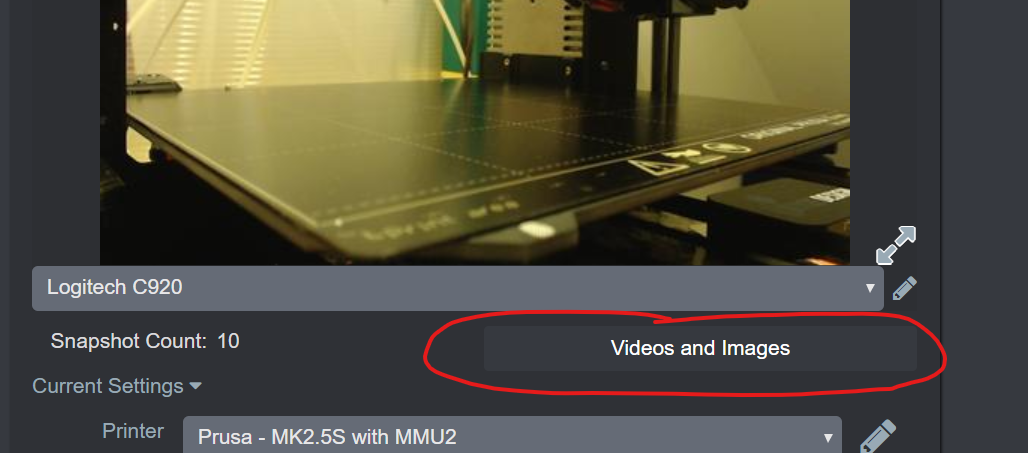
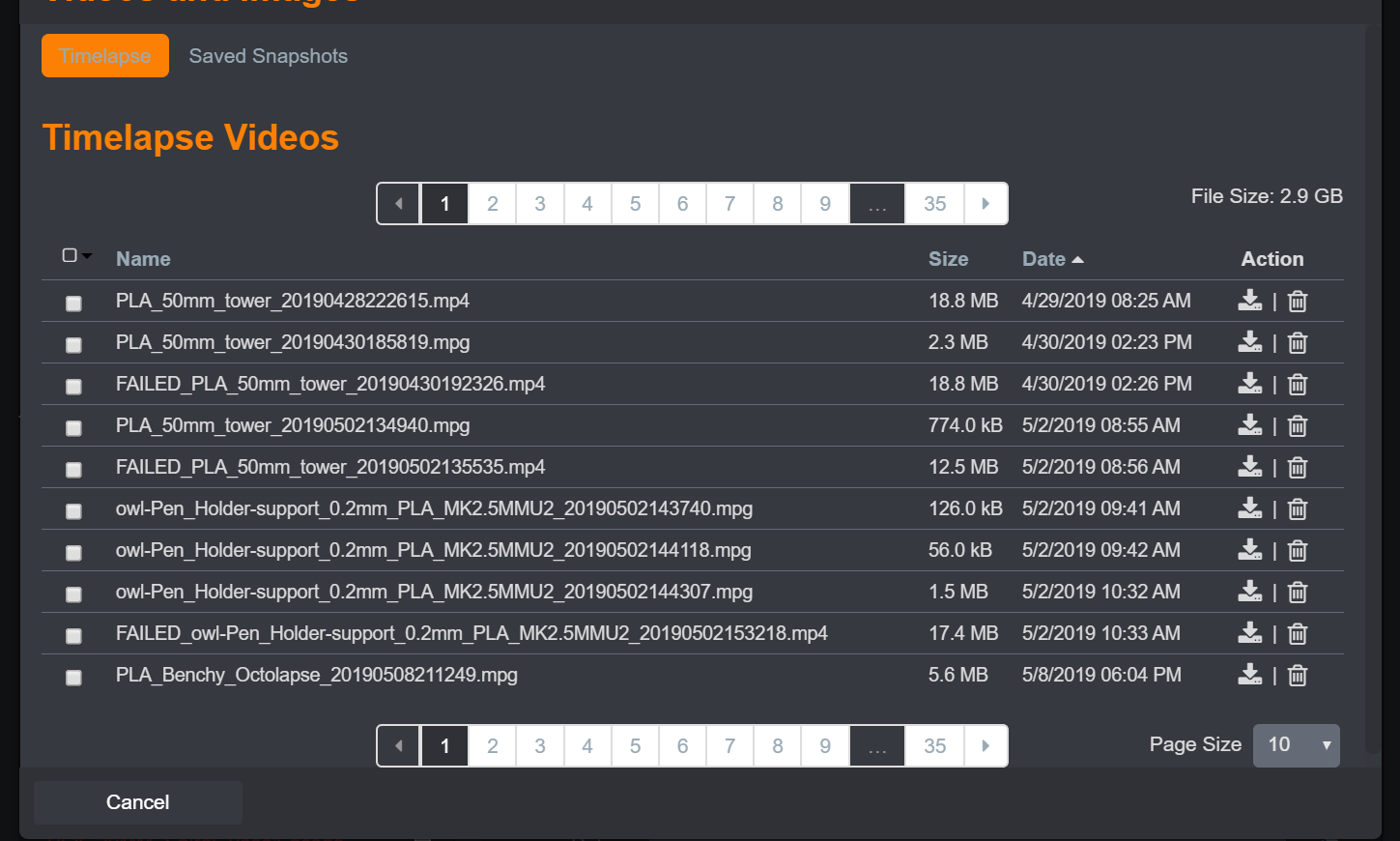
- Rendered Image Archiving - To enable this, edit your rendering settings and check the box next to 'Archive Snapshots After Rendering'
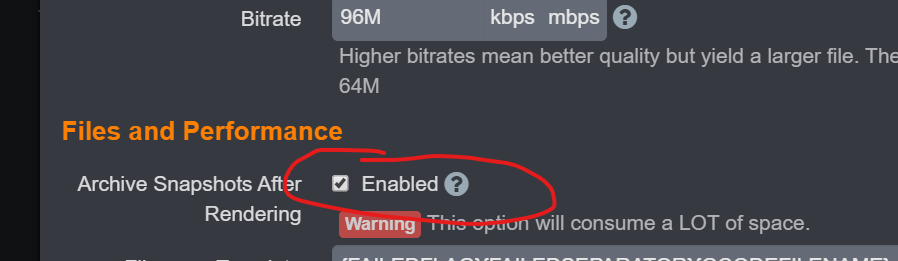
Alternatively, disabling rendering entirely will also produce a snapshot archive.
Run a short print (using the 'test mode' or 'prevent extrusion' debug profile is fine here), and see how the snapshot archive file browser works:
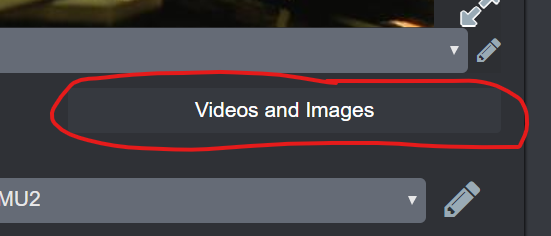
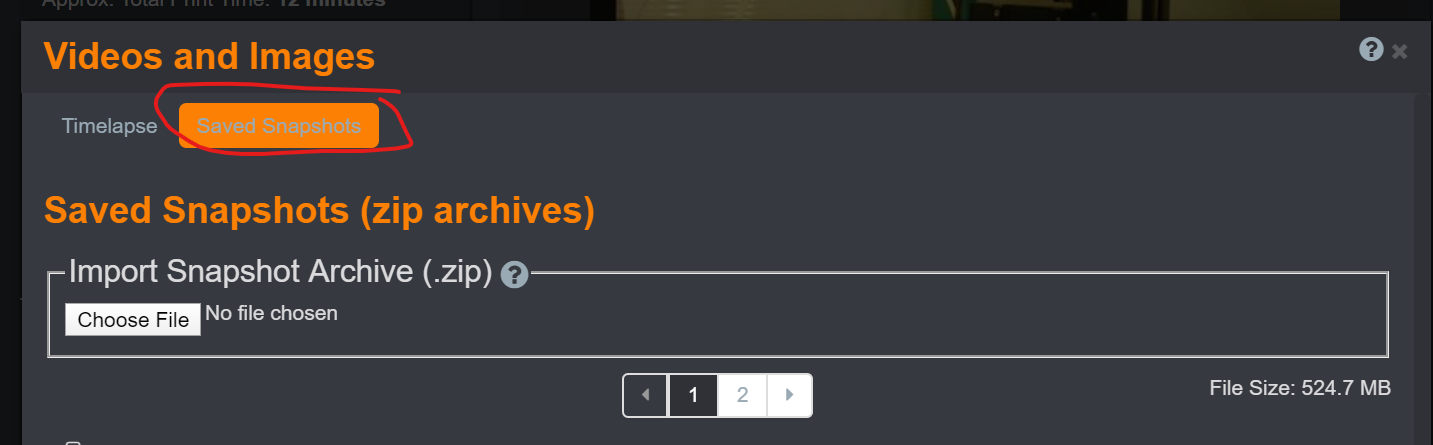
Try downloading the archive and browsing the files. Are your images there?
Next maybe try to import the archive you just downloaded via the 'Import Snapshot Archive (.zip)' control on that same tab. Did it import as expected?
Next you can try rendering the images contained in the archive. Click the 'Film' icon next to the archive like so:

You should see a couple pop-ups. Note that it might take a while for the archive to be added, it needs to be unzipped and moved, which can take a while (20-30 seconds for a 150MB archive I just tried).
Close the dialog and you'll see a new bright red button (Is it visible enough? I was a bit worried it would be hard to find, but couldn't think of a better place to put it).
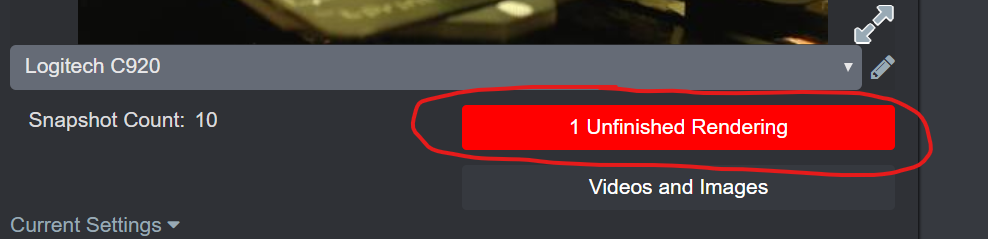
Now take a look at the controls in the Unfinished Renderings dialog and see if they make sense to you. Try starting the rendering process by clicking the film icon:
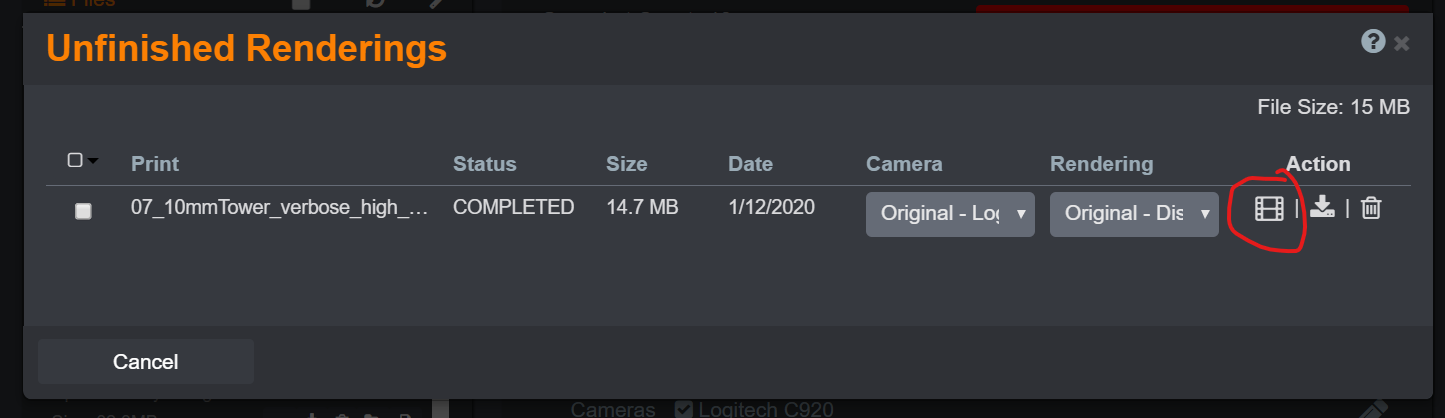
You should get a couple new popups. Quckly close the dialog and you should see a new button with an animated spinner indicating that Octolapse is rendering a timelapse:
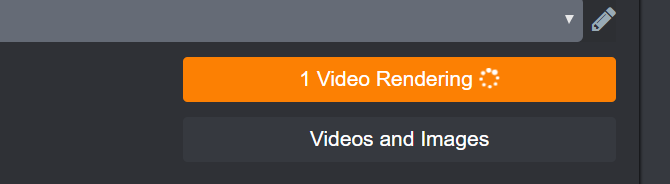
Click on the button and watch the progress:
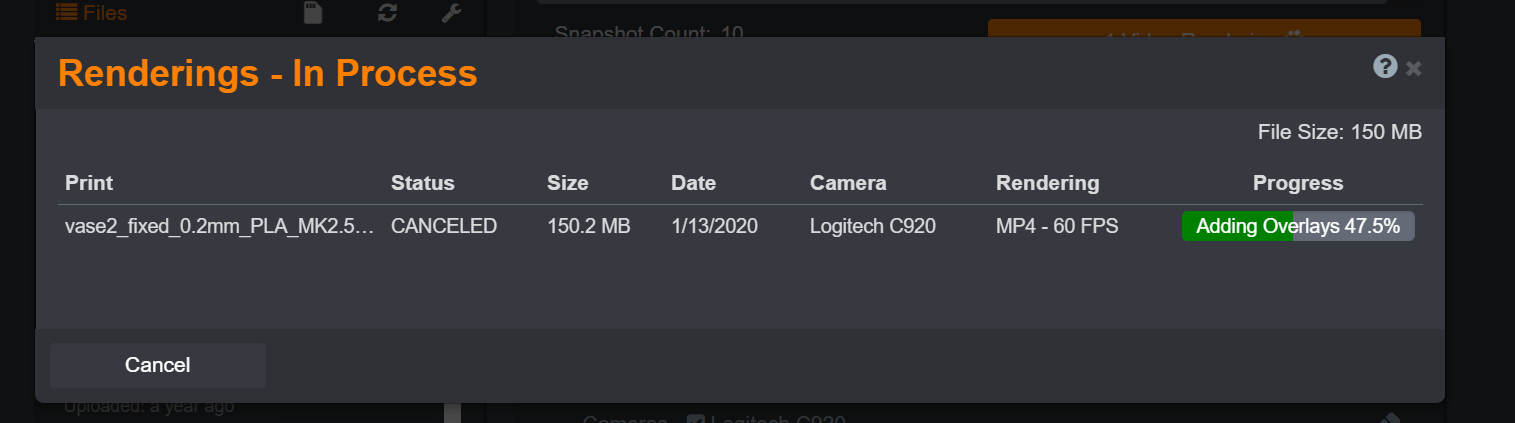
How does this screen look? Useful? Intuitive or not?
Once it's done rendering close the dialog. The rendering button should have gone away now.
That's the basic process. I'd love to hear what you think. I'm very interested in hearing about what you like, what you don't, and any suggestions you may have for improvement. Thanks in advance for taking the time to look at this!
FormerLurker
on 17 Jan 2020
I wasn't expecting so many improvements honestly. I ran some tiny test prints and everything went perfectly. I was able to find my videos right away. I really like the Unfinished Rendering button as well as the Videos and Images. Almost ALL of the blobbing is gone, not sure if you tweaked something or I got my settings tuned just right, either way its almost gone for me.
I also really like the slight change to the preview when you start the print, I said that before when I got the new version, but I noticed the buttons to watch the animation before accepting, if that was there before I must have just missed it.
I'll keep playing with it, but as of right now I can't think of anything I would add or change.
SmashedBeard
on 17 Jan 2020
Thanks for your initial thoughts! Feedback is extremely helpful.
I did add a ton of stuff over the last week or two. Most of the issues I've been hearing about recently in dev2 have been related to rendering, so I decided to change the whole pipeline so that rendering problems can be fixed. Or, at the very least, snapshots won't be completely lost in the case of errors, and retry/download is possible. This way, if people have issues there is a way to try again and debug after the fact. This was a huge change to Octolapse. Basically the entire rendering pipeline has been rewritten to make all of this possible.
I did make some enhancements to reduce artifacts. Some bugs were quashed for ppl running marlin with the default G90/G91 influences extruder option. If your firmware has this 'feature' enabled, you should get better results. There may be a bit more that can be done to reduce artifacts, but I think all of the relatively low-hanging fruit has been picked. That being said, if I can figure out a way to improve quality, I will implement it.
Yes, the buttons on the timelapse preview have been tweaked. I removed all of the indicator icons that looked like buttons because they were confusing to people (things that look like buttons should act like buttons, lol!). Because of this I had to find other ways to show when a snapshot was being taken, and when rendering was occurring. The snapshot indicator moved to the timelapse preview image, and the rendering indicator is now a real button that actually does something when you click on it :) You may still notice an issue with the timelapse preview if new snapshots are taken before the animation preview completes. Basically the newest snapshot gets put on top of the animation stack, but the animation still runs below it and blocks input. It's a tricky issue, but it only occurs when snapshots are taken in rapid succession, which isn't something that usually happens anyway. Regardless, I will try to fix that.
I'm also curious what you think of the 'Rendering In Progress' dialog (X videos rendering button). I'm very happy with the progress indicator, but I'd be happy to hear what you think.
Also, you may notice in the octolapse main settings (gear icon on the tab, then edit main settings) that you can now manually choose the where Octolapse stores archives and timelapses, and where the temp directory is located. I went to great lengths to ensure these could be changed at any time (even during a print), and the program will still behave as expected. I have NOT done a good job showing what the defaults are (empty settings for the directories mean the defaults are used), so I will add that soon and will let you know when that is complete). If you want to try choosing different folders, especially during a print (might be dangerous, fyi), I'd be appreciative.
Thanks for testing! It is most appreciated!
FormerLurker
on 17 Jan 2020
Oh, and I fixed H.264 rendering. If you didn't notice, that was quasi-broken before. I've been testing this a lot on very high bitrates (up to 96M), and it seems to work as expected. H.264 is superior to the standard MP4 in my experience, both for file size and quality.
FormerLurker
on 17 Jan 2020
I love the progress bar! Its always reassuring to know something is happening lol
SmashedBeard
on 17 Jan 2020
So, it seems like your issue has been solved. I'm going to go ahead and close it now. Thanks for your post!
Closed :)
FormerLurker
on 15 Feb 2020
Related issues
 Tjololo12
·
9Comments
FormerLurker
·
4Comments
Tjololo12
·
9Comments
FormerLurker
·
4Comments
 adcurtin
·
4Comments
adcurtin
·
4Comments
 brandonforty2
·
9Comments
brandonforty2
·
9Comments
 systemik
·
14Comments
systemik
·
14Comments