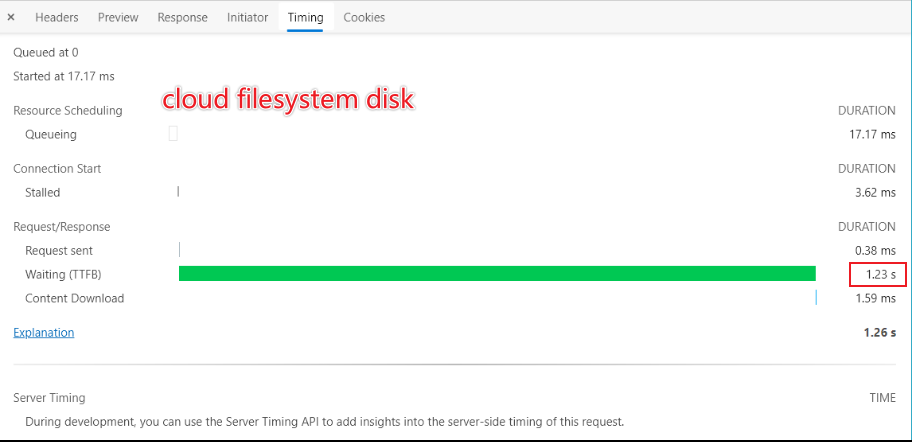
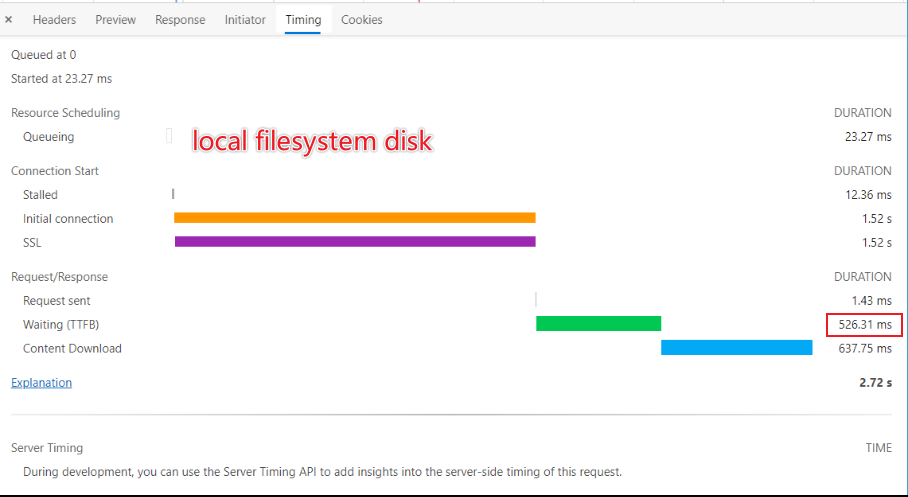
October: TTFB x2 up slowed after enable colud filesystem disk
- OctoberCMS Build: v1.1.1
- PHP Version: php7.4
- Database Engine: MySQL 8
- Plugins Installed:
Ompmega.MixHelper,
Martin.Forms,
Mohsin.txt,
VojtaSvoboda.TwigExtensions,
October.Drivers
Zaxbux.DOStorageDriver
Description:
I use Zaxbux.DOStorageDriver plugin to connect OctoberCMS to user digitalocean space service, but when I enable the cloud filesystem disk, I get some performance issue after some page load tests:
Steps To Reproduce:
 everyx
All 10 comments
@everyx you may need to get in touch with the plugin developer (@zaxbux) and determine if there is an issue there. If October is causing a problem with the plugin, then we can investigate further.
 bennothommo
on 17 Dec 2020
bennothommo
on 17 Dec 2020
@everyx My plugin doesn't really serve a purpose anymore, and I'll be updating it's documentation. You're probably better off using the built-in S3 driver, since DigitalOcean Spaces is compatible with the S3 API anyways. The only configuration change would be to your filesystems.php:
'disks' => [

    // ...

    's3' => [
        'driver' => 's3',                                    // Use the built-in S3 driver
        'key'    => 'XXXXXXXXXXXXXXXXXXXX',                  // DigitalOcean API key
        'secret' => '0123456789abcdefghijklmnopqrstuvwxyz',  // DigitalOcean API secret
        'endpoint' => 'https://xyz1.digitaloceanspaces.com', // DigitalOcean spaces endpoint
        'region' => 'xyz1',                                  // Should match your endpoint
        'bucket' => 'assets',                                // Your bucket name
        'visibility' => 'public',                            // Make uploads read-only for anonymous users
    ],

],
Run your test after making these changes and removing my plugin, see if it affects anything.
 zaxbux
on 17 Dec 2020
zaxbux
on 17 Dec 2020
@zaxbux Thanks for you comment :)
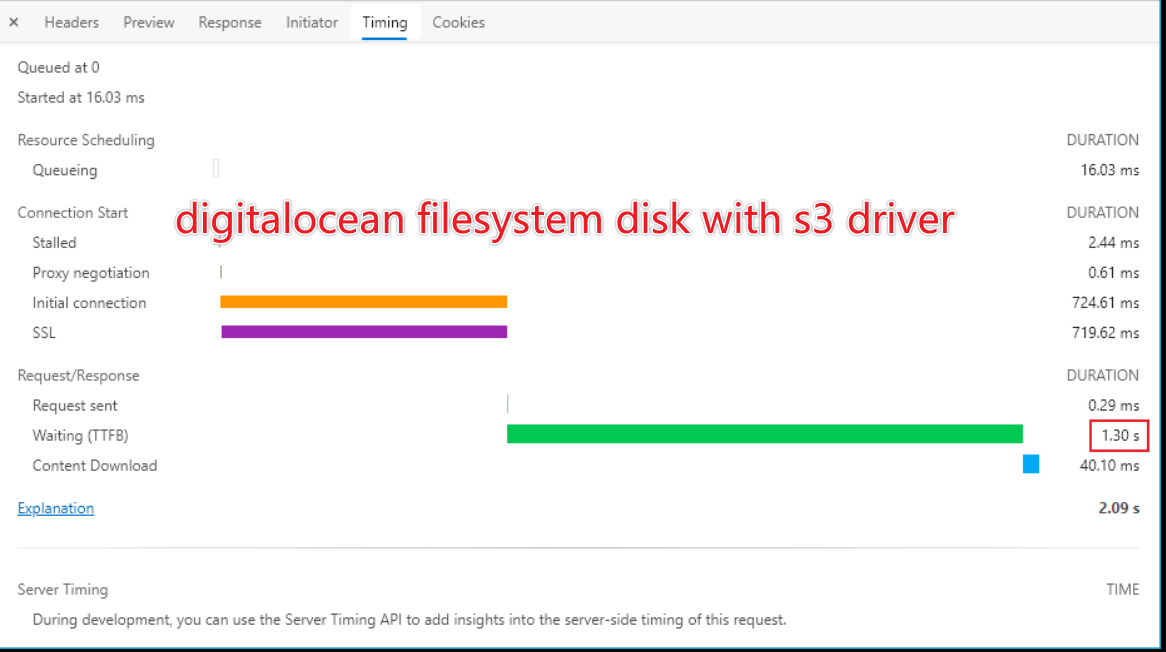
@bennothommo I just switch to the built-in S3 driver and have a test, this problem still exist, is it caused by checking whether the image file exists every time the page is generated?
everyx
on 17 Dec 2020
@everyx Did you disabled debug? There are some caching this enabled when debug is disabled.
 Samuell1
on 17 Dec 2020
Samuell1
on 17 Dec 2020
@everyx Did you disabled debug? There are some caching this enabled when debug is disabled.
@Samuell1 Yes, debug is disabled, maybe the issues is caused by the new core resize filter feature, I have many images resized by this filter.
everyx
on 17 Dec 2020
@everyx try changing $disk->exists($path); to true temporarily at https://github.com/octobercms/october/blob/develop/modules/system/classes/ImageResizer.php#L449 and report back on the performance difference. If it makes a big difference then we'll look at implementing a cache call at that point.
 LukeTowers
on 17 Dec 2020
LukeTowers
on 17 Dec 2020
@everyx try changing
$disk->exists($path);totruetemporarily at https://github.com/octobercms/october/blob/develop/modules/system/classes/ImageResizer.php#L449 and report back on the performance difference. If it makes a big difference then we'll look at implementing a cache call at that point.
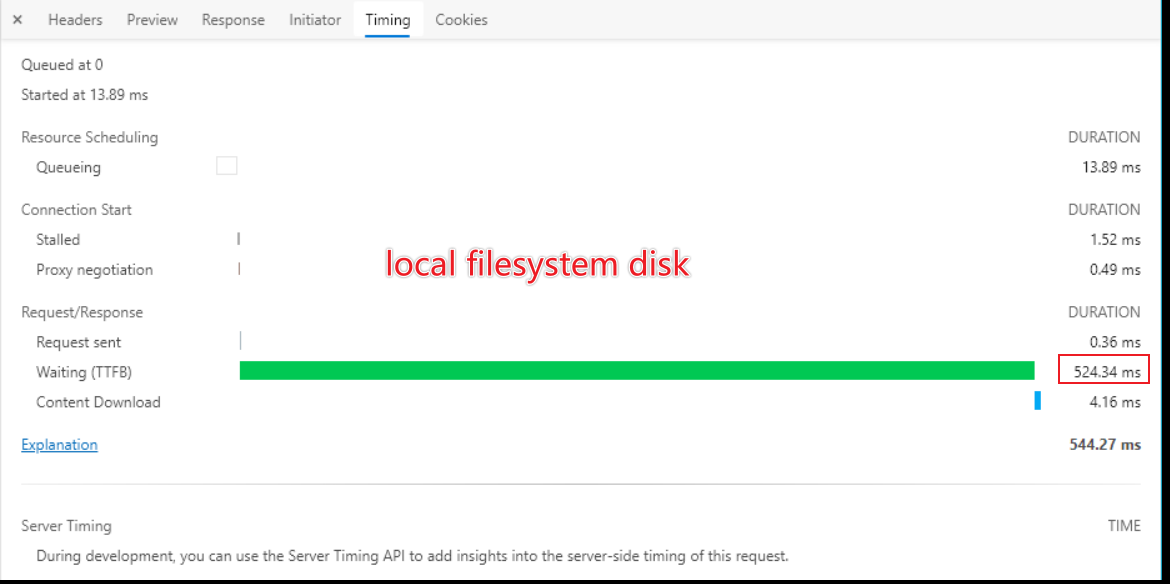
I have apply this change and have some test, looks like the this problem still exist, and I found that the local disk first request is also slowly, but after several times re-request, TTFB will decrease and stabilize at ~500-600ms.
everyx
on 18 Dec 2020
@everyx how many images are you resizing on a single page?
LukeTowers
on 18 Dec 2020
@everyx how many images are you resizing on a single page?
@LukeTowers about ~25 images on a single page.
everyx
on 18 Dec 2020
@everyx try installing the debugbar plugin and/or doing some profiling on your server to figure out where the bottlenecks are so that the TTFB can be reduced.
LukeTowers
on 18 Dec 2020
Related issues
 oppin
·
3Comments
oppin
·
3Comments
 Flynsarmy
·
3Comments
Flynsarmy
·
3Comments
 axomat
·
3Comments
axomat
·
3Comments
 mittultechnobrave
·
3Comments
mittultechnobrave
·
3Comments
mittultechnobrave
·
3Comments
mittultechnobrave
·
3Comments
Most helpful comment
@everyx My plugin doesn't really serve a purpose anymore, and I'll be updating it's documentation. You're probably better off using the built-in S3 driver, since DigitalOcean Spaces is compatible with the S3 API anyways. The only configuration change would be to your
filesystems.php:Run your test after making these changes and removing my plugin, see if it affects anything.