October: BackendAuth::register usage
I use the example code:
$user = BackendAuth::register([
    'name' => 'Some User',
    'login' => 'someuser',
    'email' => '[email protected]',
    'password' => 'changeme',
    'password_confirmation' => 'changeme'
]);
Location: https://octobercms.com/docs/backend/users#backend-auth-facade
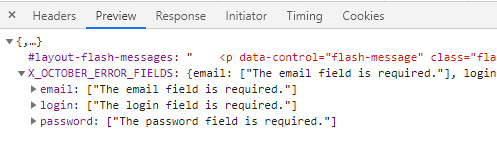
I got the following error:
 gergo85
All 29 comments
It's first_name & last_name not name, was recently updated in the docs on github: https://github.com/octobercms/docs/blob/master/backend-users.md#backend-user-helper
 LukeTowers
on 14 Oct 2020
LukeTowers
on 14 Oct 2020
I changed the code, but the error message is same.
October version: 1.0.469
gergo85
on 15 Oct 2020
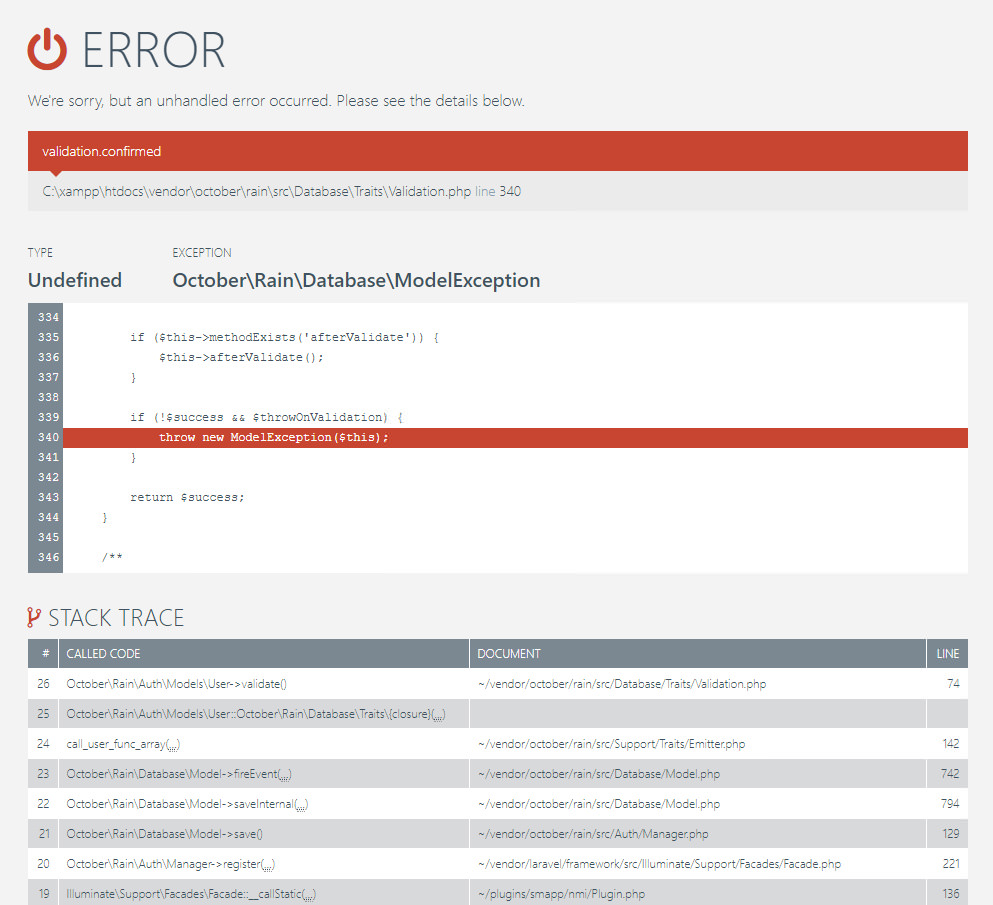
I use it in the beforeSave() method of my plugin. If I put it in the boot() method of Plugin.php I get the following error:
gergo85
on 15 Oct 2020
@gergo85 try using v1.1.0 via composer instead.
LukeTowers
on 15 Oct 2020
@gergo85 try using v1.1.0 via composer instead.
Updating via composer is throwing incompatible error
[InvalidArgumentException]
Package october/october at version 1.1.0 has a PHP requirement incompatible with your PHP version (7.0)
PHP Version 7.4.6
 bhargavy
on 16 Oct 2020
bhargavy
on 16 Oct 2020
How to update the website to v1.1.0 from v1.0.469?
gergo85
on 16 Oct 2020
@bhargavy @gergo85 you'll need to copy the updated composer.json file from here and apply that to your project - making sure to bring across any additional requirements you may have for your project (within require or require-dev). You should then be able to run composer update and get the necessary updates.
 bennothommo
on 16 Oct 2020
bennothommo
on 16 Oct 2020
@bhargavy sounds like your composer install or PHP CLI is running an older version of PHP than your web server.
LukeTowers
on 16 Oct 2020
I did it and I got the following error message:
Warning: require(C:\xampp\htdocs\vendor\composer/../october/rain/src/Parse/Assetic/Less/lessc.inc.php): failed to open stream: No such file or directory in C:\xampp\htdocs\vendor\composer\autoload_real.php on line 66
Fatal error: require(): Failed opening required 'C:\xampp\htdocs\vendor\composer/../october/rain/src/Parse/Assetic/Less/lessc.inc.php' (include_path='C:\xampp\php\PEAR') in C:\xampp\htdocs\vendor\composer\autoload_real.php on line 66
gergo85
on 19 Oct 2020
delete vendor, modules, & composer.lock, then run composer install using the proper version of PHP and the updated composer.json.
LukeTowers
on 19 Oct 2020
I deleted the folders and run the run composer install. The vendor/autoload.php file not generated.

gergo85
on 20 Oct 2020
if you're not using the tests folder then remove the require-dev dependencies and the references to the test cases from your composer file.
LukeTowers
on 20 Oct 2020
It works! Thank you very much!
How to update the database?
gergo85
on 20 Oct 2020
Unfortunately the issues are still there :(
gergo85
on 20 Oct 2020
@bennothommo are you able to take a look at the original issue report with the register method failing?
LukeTowers
on 20 Oct 2020
@LukeTowers found the issue - it's that "guarded" attributes change that Laravel added recently. The password_confirmation field is being dropped from the data before validation because it doesn't correlate to a column in the users table, which causes validation to fail. We had to convert the File model to use fillable attributes as opposed to guarded, but I'm not sure if we can do the same here because there's more likelihood that people are overwriting or extending the User model.
bennothommo
on 21 Oct 2020
@bennothommo would that affect them though if they weren't overriding the guarded / fillable attributes?
LukeTowers
on 21 Oct 2020
Is there any quick solution to solve this issue? I need it for an active project.
gergo85
on 22 Oct 2020
@bennothommo shouldnt be password_confirmation defined with purgeable? https://octobercms.com/docs/database/traits#purgeable
 Samuell1
on 22 Oct 2020
Samuell1
on 22 Oct 2020
@bennothommo I haven't heard anything from @taylorotwell or @driesvints on our request for the original security report, so I'd say revert their final fix and replace it with the arrow fix instead.
LukeTowers
on 22 Oct 2020
@LukeTowers just emailed you the original report.
 taylorotwell
on 22 Oct 2020
taylorotwell
on 22 Oct 2020
@gergo85 @bennothommo can you guys test https://github.com/octobercms/library/pull/533 and let me know if that resolves the issue?
LukeTowers
on 22 Oct 2020
I replaced the vendor/october/rain foldet to new version, but the issues are still there.
gergo85
on 26 Oct 2020
I replaced the vendor/october/rain foldet to new version, but the issues are still there.
What did you do exactly?
LukeTowers
on 26 Oct 2020
I deleted the files of vendor/october/rain folder and I copied the new version (github.com/octobercms/library) to this folder.
gergo85
on 27 Oct 2020
You should check the files changed in https://github.com/octobercms/library/pull/533 manually and verify that they contain the changes from that PR.
LukeTowers
on 27 Oct 2020
I use the fix/5313 branche, but the issue is same.
gergo85
on 29 Oct 2020
It seems to be working for @RomainMazB
LukeTowers
on 9 Nov 2020
bennothommo
on 10 Nov 2020
Related issues
LukeTowers
·
3Comments
 Flynsarmy
·
3Comments
gergo85
·
3Comments
Flynsarmy
·
3Comments
gergo85
·
3Comments
 EbashuOnHolidays
·
3Comments
EbashuOnHolidays
·
3Comments
 atrauzzi
·
3Comments
atrauzzi
·
3Comments
Most helpful comment
@LukeTowers just emailed you the original report.