October: Does the PHP code section of theme templates support traits?
This seems to be a strange problem, because an old project uses this framework, so I am learning to use it, but I am now encountering a very serious problem.
When I was developing the theme, I found that my development tool (PHPSTORM) was not well supported because this file was too complicated. It had declaration blocks, PHP code blocks, and twig template blocks. If I set the file type .htm of phpstorm to twig, it can format my twig code normally, but this will ruin my PHP code block, because his format is all messed up, so I To deal with it in an elegant way is to define a trait object Template, and then override the onStart method in this trait. I can even group more things here, like the following.
title = "Demonstration"
url = "/test"
layout = "default"
==
// Please note here
use October\Demo\Contract\Template;
==
<div>
    hello ,{{ name }}
</div>
However, I found that things are not so wonderful, because my use statement became the following after compilation.
<?php

use October\Demo\Contract\Template;

class Cms5f1da03a53c34871546283_073c680da975bfac81380a3d810f93aaClass extends Cms\Classes\PageCode
{

}
This is very bad. In my expectation, it should be included in the class, but now, the use statement loses its meaning.
So, can it become like this?
<?php

class Cms5f1da03a53c34871546283_073c680da975bfac81380a3d810f93aaClass extends Cms\Classes\PageCode
{
    use October\Demo\Contract\Template;

}
In this way he will work very well, and I can also write beautiful code in my template, as well as perfect code hints and highlights.
I have noticed that it seems that such support cannot be provided temporarily when parsing reorganized files.
- modules/cms/classes/CodeParser.php:122
    protected function rebuild($path)
    {
        $uniqueName = str_replace('.', '', uniqid('', true)).'_'.md5(mt_rand());
        $className = 'Cms'.$uniqueName.'Class';

        $body = $this->object->code;
        $body = preg_replace('/^\s*function/m', 'public function', $body);

        $codeNamespaces = [];
        $pattern = '/(use\s+[a-z0-9_\\\\]+(\s+as\s+[a-z0-9_]+)?;\n?)/mi';
        preg_match_all($pattern, $body, $namespaces);
        $body = preg_replace($pattern, '', $body);

        $parentClass = $this->object->getCodeClassParent();
        if ($parentClass !== null) {
            $parentClass = ' extends '.$parentClass;
        }

        $fileContents = '<?php '.PHP_EOL;
        foreach ($namespaces[0] as $namespace) {
            $fileContents .= $namespace;
        }

        $fileContents .= 'class '.$className.$parentClass.PHP_EOL;
        $fileContents .= '{'.PHP_EOL;
        $fileContents .= $body.PHP_EOL;
        $fileContents .= '}'.PHP_EOL;

        $this->validate($fileContents);

        $this->makeDirectorySafe(dirname($path));

        $this->writeContentSafe($path, $fileContents);

        return $className;
    }
Or here, can you judge the use statement ending with Trait and put it in the class.
Or, is there any other more elegant way to deal with php code blocks in template files?
 Yi-pixel
All 19 comments
We could potentially use the Reflection library to determine if the use case is for a class or if it's for a trait, and place the use case in the proper location.
 bennothommo
on 27 Jul 2020
bennothommo
on 27 Jul 2020
We could potentially use the
Reflectionlibrary to determine if theusecase is for a class or if it's for a trait, and place theusecase in the proper location.
Yes, This proposal is great. Using Reflection can more accurately determine a Trait. So, can this proposal be adopted? Maybe you can see it in a later version?
<?php
trait Template {
    function onStart(){}
}

$reflectionClass = new ReflectionClass('Template');
var_dump($reflectionClass->isTrait());
// true
If possible, the code will look like the following, more concise.
- plugins/october/demo/contract/Template.php
<?php


namespace October\Demo\Contract;

use Cms\Classes\Theme;

trait Template
{
    public function onStart()
    {
        /** @var Theme $theme */
        $theme = $this->controller->getTheme();
        $themeDir = $theme->getPath($theme->getDirName());
        $logicPath = $themeDir . '/logic/' . $this->page->getFileName() . '.php';
        if (file_exists($logicPath)) {
            return (require $logicPath)($this);
        }
    }
}
- themes/demo/pages/test/test.htm
title = "Demonstration"
url = "/test1.html"
layout = "default"
==
use \October\Demo\Contract\Template;
==
<div class="jumbotron">
    <div class="container">
        Hello, {{ name }}
    </div>
</div>
- storage/cms/cache/12/d0/test.htm.php (test.htm After compilation)
<?php


class Cms5f1e6281b8b34522396213_6b726849c17a668bf868f774aa8e8526Class extends Cms\Classes\PageCode
{
    use October\Demo\Contract\Template;
}
- themes/demo/logic/test/test.htm.php
<?php

use Cms\Classes\PageCode;

return function (PageCode $page) {
    // $this === $page
    $page['name'] = 'tom';
};
Now, I can call return an anonymous function in the file with the suffix .php corresponding to the template file under logic and call it in Trait, and in this function, I can also use $this realizes the decoupling from the template file.
Yi-pixel
on 27 Jul 2020
@WonlyCms Would you mind giving #5225 a try and see if that works better for you? You may need to make the edits directly to the October CMS files if you cannot check out the PR directly.
bennothommo
on 27 Jul 2020
@WonlyCms Would you mind giving #5225 a try and see if that works better for you? You may need to make the edits directly to the October CMS files if you cannot check out the PR directly.
Great, it works as expected, and the use statements related to trait will now be correctly written into class,As expected, it was perfect.
Now, I can use trait to better extend my templates, thanks!
- themes/demo/pages/home.htm:6
title = "Demonstration"
url = "/"
layout = "default"
==
use October\Demo\Contract\Template;
use \Cms\Classes\CodeParser;
==
<div class="jumbotron">
    <div class="container">
        Hello, {{ name }}
    </div>
</div>
- plugins/october/demo/contract/Template.php:1
<?php
namespace October\Demo\Contract;
trait Template{
    function onStart(){
        $this['name'] = 'Tom';
    }
}
- storage/cms/cache/a7/02/home.htm.php
<?php

use \Cms\Classes\CodeParser;

class Cms5f1e7e22ef357813747953_383cf685eb7656ff4ca3ef00ab975ce5Class extends Cms\Classes\PageCode
{
    use October\Demo\Contract\Template;
}
@WonlyCms This use case is pretty convoluted and I'm not sure we want to support it. PHP code sections in theme template files are meant for extremely simple / quick & dirty pieces of functionality that you don't want to bother creating a full component for.
Why do you want to structure your code in such a way instead of just using Components to begin with?
While the solution proposed by @bennothommo is quite interesting from a technical perspective, I feel that this would promote a bad developer practice and make the framework more opaque overall. Even just looking at your example should be setting off alarm bells:
use October\Demo\Contract\Template;
use \Cms\Classes\CodeParser;
That's combining two entirely different pieces of PHP (class imports & trait attachments) in a way that completely obscures what is actually happening unless each of those paths is investigated more thoroughly and the developer also has an understanding of how the PHP code section of the template is parsed and executed internally.
 LukeTowers
on 27 Jul 2020
LukeTowers
on 27 Jul 2020
@WonlyCms This use case is pretty convoluted and I'm not sure we want to support it. PHP code sections in theme template files are meant for extremely simple / quick & dirty pieces of functionality that you don't want to bother creating a full component for.
Why do you want to structure your code in such a way instead of just using Components to begin with?
While the solution proposed by @bennothommo is quite interesting from a technical perspective, I feel that this would promote a bad developer practice and make the framework more opaque overall. Even just looking at your example should be setting off alarm bells:
use October\Demo\Contract\Template;
use \Cms\Classes\CodeParser;
That's combining two entirely different pieces of PHP (class imports & trait attachments) in a way that completely obscures what is actually happening unless each of those paths is investigated more thoroughly and the developer also has an understanding of how the PHP code section of the template is parsed and executed internally.
The main reason for this is that the PHP code block capability is provided in template development, but existing development tools cannot handle this block correctly, and the code cannot be highlighted, prompted, checked, or formatted during development.
Therefore, it is hoped that the php code will be separated through the method of Trait, so that the php code block part can be written more easily.
Note that all this discussion is based on the domain of theme template development, not Plugin or Component.
However, this problem is as you just mentioned. At the same time, use, class and trait will make the code more confusing, but I think it can eliminate this doubt.
In addition, although I can write an onStart method in the PHP code block section to implement all the functions in the Trait above,
But this is back to what it was like at the beginning: "Code cannot be highlighted, prompted, checked, or formatted during development." Because of this, I hope to use shorter code (Trait) to avoid this discomfort .
Yi-pixel
on 27 Jul 2020
@WonlyCms Changing the framework merely to support a specific IDE is unacceptable. It's not impossible to write syntax highlighters for Octobers theme template files, see https://github.com/dqsully/octobercms-template-language for an example of one made for VS Code.
If you still absolutely must have a separate PHP file for this logic, then use components. That's what they're for.
LukeTowers
on 27 Jul 2020
@WonlyCms Changing the framework merely to support a specific IDE is unacceptable. It's not impossible to write syntax highlighters for Octobers theme template files, see https://github.com/dqsully/octobercms-template-language for an example of one made for VS Code.
If you still absolutely must have a separate PHP file for this logic, then use components. That's what they're for.
This plugin only provides the highlighting of PHP code blocks. At the same time, it loses format, verification, reminder, twig tag, and some common functions of template development, such as emmet, or even Including support for style and script.
If I use PHPSTORM for development and set the .htm of the template to twig, then I can get twig complete support for format, check, reminder, twig tag, emmet, style, script, etc. However, the PHP code block will be processed very badly here, because there is no suitable syntax to carry it out.
The purpose of using a separate PHP file on the template is for template development decoupling, and the change here can be said to be a perfect support for the trait feature of the php use statement.
On the contrary, if you are just starting to use this framework, perhaps the existing use statement will cause me confusion, because I just wrote the use statement above the function scope, but it has been promoted to the global, which is very inconsistent with the syntax.
The changes here will not cause compatibility interruptions. Existing templates do give it a lot of functions, resulting in great coupling. Routing, Layout, Logic, and Templates are all written in one file, which should probably be used as a kind of Development method, but it has such a bad development experience.
The discussion here is only considered as theme template development
Yi-pixel
on 28 Jul 2020
If you want "template development decoupling", then use components. You're trying to shove a full size engine onto a weed whacker by wanting to have the full suite of an IDE available in a template file that contains three separate languages at once.
I think even @nathan-van-der-werf who usually disagrees with me on the side of IDE support in October would probably agree with me on this (although feel free to add your thoughts @nathan-van-der-werf 😄)
LukeTowers
on 28 Jul 2020
Remember, October's core philosophy is "Back to basics"
LukeTowers
on 28 Jul 2020
Totally agree with you on this one @LukeTowers
I never use the PHP code block in themes. If you really need "logic" for your theme, I would just make a plugin for it. It will make your code structure better, since "logic" shouldn't even be in your themes.
 nathan-van-der-werf
on 28 Jul 2020
nathan-van-der-werf
on 28 Jul 2020
Totally agree with you on this one @LukeTowers
I never use the PHP code block in themes. If you really need "logic" for your theme, I would just make a plugin for it. It will make your code structure better, since "logic" shouldn't even be in your themes.
I am the author of this issue, and I just changed my Github username to the current one.
Yes, I agree with this view, "I never use the PHP code block in themes.", because in any framework, it is not recommended to use PHP code in the template, because it will make the template not so Easy to understand.
However, now I am working on an old project. My current job is more like a "theme developer". After seeing the source code of the project, I found that this problem is very serious. More than 80% of the template pages in the project have The logic code directly calls the Service through the Logic part, and then uses the template for rendering, without using Controller / Components at all.
All this is probably because: because this template file supports routing, PHP code blocks, and templates at the same time. So doing this can quickly create a page and call some packaged Service methods through PHP code blocks.
So during the development process, I discovered such a problem. The development tool completely lost its function in the entire template. I used the File Type function to force the .htm file to use the twig syntax, and then I got the twig Tips and formatting, but the PHP code block completely loses its meaning. Later, I searched through Google and found the VSCode Plugin [1] mentioned above, but when I actually used it, I found that it couldn’t solve the problem completely. , It just brings the highlight of PHP, everything else is gone, including formatting, etc., and HTML tags are a large part of the template, when I use VSCode as my development tool, I found VSCode Poor support for complex emment and other minor issues.
So I started looking for some simpler ways to solve the problems in the development caused by the PHP code block, and I thought of this, using Trait, because after simple debugging and processing, I found that it is feasible and costly The lowest solution.
I found that other people also encountered similar problems with the PHP code block part of the template during the development process. Just follow the link below, the VSCode Plugin I found here
In addition, It is recommended to remind future developers in the documentation to avoid using PHP code blocks in templates.
Yi-pixel
on 28 Jul 2020
@Yi-pixel
It is recommended to remind future developers in the documentation to avoid using PHP code blocks in templates
I don't feel it necessary to recommend that. The PHP code block is perfectly fine to use in certain circumstances, but as @LukeTowers and @nathan-van-der-werf mentioned, it's more clean to use components and plugins.
The only issue here is that you're not getting code colouring, autocompletion and other PHPStorm features, when editing templates. This is not something we have to resolve with October - you can certainly use the CMS editor in October which provides full code colouring for both the PHP and Twig portion of the templates.
bennothommo
on 29 Jul 2020
@Yi-pixel
It is recommended to remind future developers in the documentation to avoid using PHP code blocks in templates
I don't feel it necessary to recommend that. The PHP code block is perfectly fine to use in certain circumstances, but as @LukeTowers and @nathan-van-der-werf mentioned, it's more clean to use components and plugins.
The only issue here is that you're not getting code colouring, autocompletion and other PHPStorm features, when editing templates. This is not something we have to resolve with October - you can certainly use the CMS editor in October which provides full code colouring for both the PHP and Twig portion of the templates.
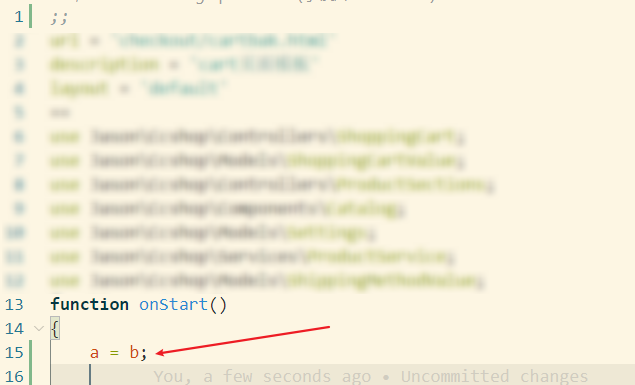
As I mentioned earlier, this Plugin only brings code highlighting, and only highlighting, even if there are obvious errors, they will not be displayed and processed.
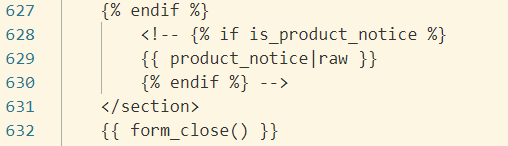
In addition, in my case, the twig tag does not seem to produce a highlight effect.
For this reason, the template development work has become extremely bad
Yi-pixel
on 29 Jul 2020
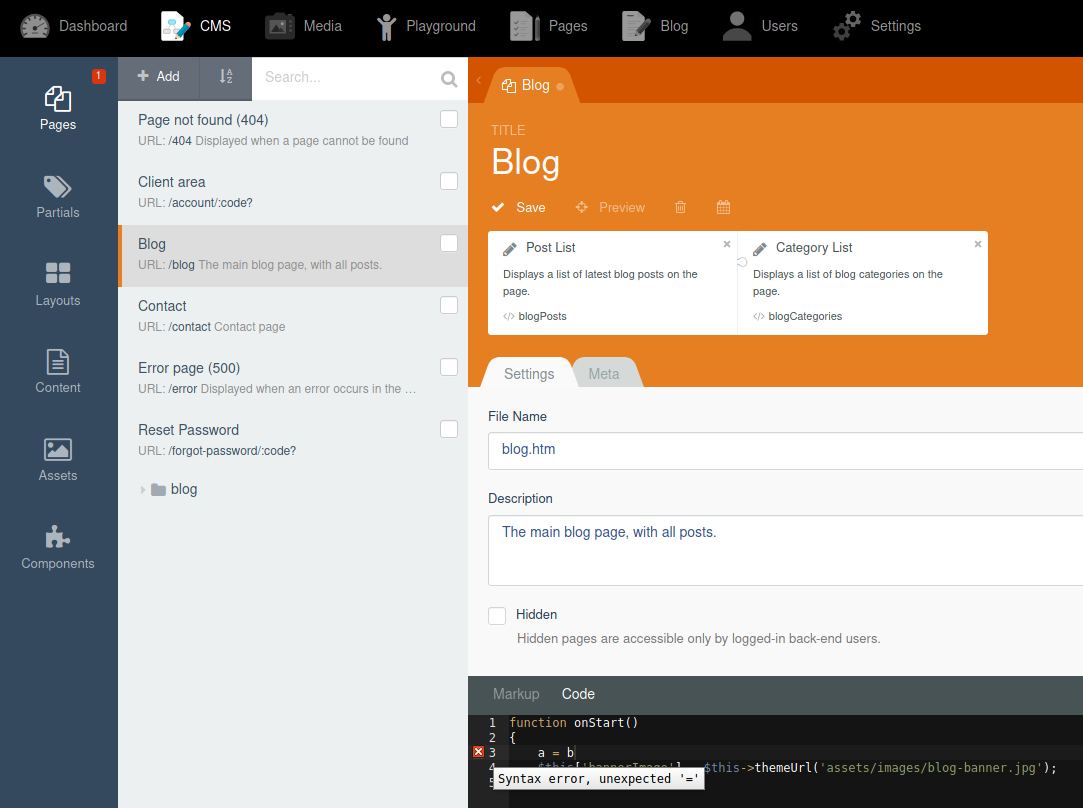
@Yi-pixel as I suggested though, the CMS editor does contain syntax checking:
bennothommo
on 29 Jul 2020
@Yi-pixel as I suggested though, the CMS editor does contain syntax checking:
I think this is not a good way to deal with it, it will make the theme development work more and more complicated.
Yi-pixel
on 29 Jul 2020
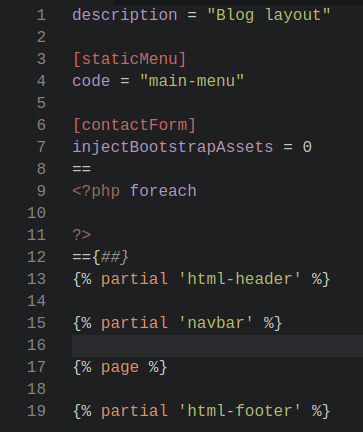
@Yi-pixel regarding the Twig highlighting, the October plugin for VSCode does state that you need to add {##} to the boundary of your Twig code block to get around a shortcoming with VSCode's grammar system:
bennothommo
on 29 Jul 2020
I'm going to close this issue now, as the discussion is veering away from anything productive. We're not going to change the core to better support a particular IDE, IDEs should change to better support the code that they interact with.
LukeTowers
on 29 Jul 2020
Related issues
 EbashuOnHolidays
·
3Comments
EbashuOnHolidays
·
3Comments
 SeekAndPwn
·
3Comments
SeekAndPwn
·
3Comments
 oppin
·
3Comments
oppin
·
3Comments
 Flynsarmy
·
3Comments
Flynsarmy
·
3Comments
 d3monfiend
·
3Comments
d3monfiend
·
3Comments