October: Scoreboard truncates with too many items
- OctoberCMS Build: ### 464
- PHP Version: 7.4.2
Description:
When adding too many items to a scoreboard, the fourth item is pushed up against the elements below and fifth and onwards are truncated and hidden all together:

Steps To Reproduce:
Add the following HTML to your page:
<div class="scoreboard">
    <div data-control="toolbar">
        <div class="scoreboard-item control-chart" data-control="chart-pie">
            <ul>
                <li>One <span>1</span></li>
                <li>Two <span>2</span></li>
                <li>Three <span>3</span></li>
                <li>Four <span>4</span></li>
                <li>Five <span>5</span></li>
                <li>Six <span>6</span></li>
            </ul>
        </div>
    </div>
</div>
Proposal
- Items on the right should vertically center
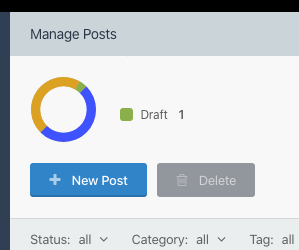
- Chart on the left should vertical center and truncation removed

 Flynsarmy
All 17 comments
@Flynsarmy looking at all the examples in the docs, I think it was intended to only be used for a small number of items, but nonetheless, I agree it should be flexible. Please feel free to submit a PR if you are interested in fixing it.
 bennothommo
on 11 Mar 2020
bennothommo
on 11 Mar 2020
I suggest to use something like simple-scrollbar.js https://github.com/buzinas/simple-scrollbar. "Very simple and lightweight vanilla javascript library for creating a custom scrollbar cross-browser."
I use it like this:

 danielbidala
on 31 Mar 2020
danielbidala
on 31 Mar 2020
@danielbidala Looks good - did you want to have a crack at a PR that implements that?
bennothommo
on 31 Mar 2020
Realistically, I think you can just use pure CSS with overflow: auto.
bennothommo
on 31 Mar 2020
@bennothommo is correct, this should be achievable with pure CSS. We won't be accepting a PR that adds any extra JS dependencies for this.
 LukeTowers
on 31 Mar 2020
LukeTowers
on 31 Mar 2020
@bennothommo, yes we can use pure css but the browser's built in scrollbars looks ugly (at least for me) when used for things like this.
@LukeTowers I understand that there is no need to add another dependency to core. Anyone can implement Simple-scrollbar.js or any other scroll library for a plugin in no time if needed.
danielbidala
on 31 Mar 2020
Personally I don't think it should be scrolled at all, I think it should just take up more vertical space.
LukeTowers
on 31 Mar 2020
It doesn't seem obvious at first glance that it even could scroll. On mobile having that extra small scroll area could cause issues too.
Flynsarmy
on 1 Apr 2020
@Flynsarmy Mobile doesn't show scrollbars by default (unless you use overflow: scroll) - they generally only appear when someone actually scrolls.
@danielbidala scrollbars may look ugly (especially in such a small location), but they do give a visual indicator that something is scrollable. I am, however, leaning towards @LukeTowers' opinion of just making it just extend vertically without scrolling. If people want a huge number of options, I feel that is the trade-off they'll have to accept for what is supposed to be just a small, simple summary in graph form.
bennothommo
on 1 Apr 2020
yes we can use pure css but the browser's built in scrollbars looks ugly
You can change the look of scroll bar by pure css.
 FlusherDock1
on 19 May 2020
FlusherDock1
on 19 May 2020
Not showing scrollbars by default on mobile is an even bigger argument for them being a bad idea here. It won't be obvious the box is scrollable. Even if you made them always visible, scrolling in vs out of a smaller scrollable area isn't a good UI experience IMO.
Flynsarmy
on 19 May 2020
I think scoreboard should be reworked to fully use flexbox first because now its using table and floats and its weirdly setting for example font size to 0.
 Samuell1
on 19 May 2020
Samuell1
on 19 May 2020
If anyone has a better idea, feel free to submit a PR to fix it. Note that we do still support IE11, and we will not be accepting a JS "fix" for this.
LukeTowers
on 19 May 2020
This issue will be closed and archived in 3 days, as there has been no activity in the last 60 days.
If this issue is still relevant or you would like to see it actioned, please respond and we will re-open this issue.
If this issue is critical to your business, consider joining the Premium Support Program where a Service Level Agreement is offered.
![github-actions[bot] picture](https://avatars.githubusercontent.com/in/15368?v=4&s=40) github-actions[bot]
on 19 Jul 2020
github-actions[bot]
on 19 Jul 2020
This issue will be closed and archived in 3 days, as there has been no activity in the last 60 days.
If this issue is still relevant or you would like to see it actioned, please respond and we will re-open this issue.
If this issue is critical to your business, consider joining the Premium Support Program where a Service Level Agreement is offered.
github-actions[bot]
on 18 Sep 2020
This issue will be closed and archived in 3 days, as there has been no activity in the last 60 days.
If this issue is still relevant or you would like to see it actioned, please respond and we will re-open this issue.
If this issue is critical to your business, consider joining the Premium Support Program where a Service Level Agreement is offered.
github-actions[bot]
on 18 Nov 2020
This issue will be closed and archived in 3 days, as there has been no activity in the last 60 days.
If this issue is still relevant or you would like to see it actioned, please respond and we will re-open this issue.
If this issue is critical to your business, consider joining the Premium Support Program where a Service Level Agreement is offered.
github-actions[bot]
on 18 Jan 2021
Related issues
 ChVuagniaux
·
3Comments
ChVuagniaux
·
3Comments
 lukaszbanas-extremecoding
·
3Comments
lukaszbanas-extremecoding
·
3Comments
 m49n
·
3Comments
m49n
·
3Comments
 axomat
·
3Comments
axomat
·
3Comments
 EbashuOnHolidays
·
3Comments
EbashuOnHolidays
·
3Comments
Most helpful comment
Personally I don't think it should be scrolled at all, I think it should just take up more vertical space.