October: Add error handling for upper and lower case filename mistakes
Today I wasted many hours bug hunting to see why my custom plugin was not showing up in October CMS.
To make things really hard, October CMS didn't show any errors at all - which made the bug hunting go on so long!
After checking every single line of code in all the files, the issue was the following:
Here's a screenshot of the issue:
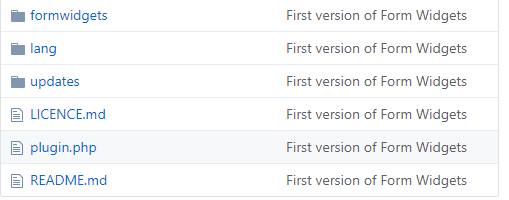
Hard to see, you probably say nothing is wrong!
The issue is the following:
plugin.php is incorrect and wrong.
Plugin.php is correct.
It needs to be a Capital P at the beginning. So this is the same as a Phishing Attack and the reason Phishing Attacks are so effective is because they are _hard to spot_.
Solution
Can we add some basic error detection and flag such errors! I could of saved 3 hours of my life, if October gave me an error message! Instead it was blank and the whole plugin didn't show up at all. Error event logs were blank as well.
Moving on to another example, to demo this issue:
Add the following file: Routes.php to your plugin and your routes will not work at all. Again October will give you no error messages why or what the problem is. You will probably waste a lot of time and effect checking each line of your Routes.php file, yet the code inside is 100% fine.
In this case the answer would be to rename the file to routes.php note the lower case r. Then the routes will work.
Hopefully other developers can agree this is an issue with October CMS and it should flag these types of errors and let us developers know of such issues. Instead of keeping us in the dark and allowing us to waste stupid amounts of time, wondering what has gone wrong, when a simple pop-up message telling us the error.
 ayumi-cloud
All 11 comments
80% of the time when I have to troubleshoot bugs in someone else's plugin, it turns out to be case issues in some file name. +1
 josephcrowell
on 5 Feb 2020
josephcrowell
on 5 Feb 2020
It's because of how php autoloads files :) on Windows case does not matter, but on unix it does.
 filipac
on 5 Feb 2020
filipac
on 5 Feb 2020
@LukeTowers Is it ok to add the help wanted label to this issue. I'm not exactly sure how to write the pr for it. Maybe the admins can suggest the best method.
ayumi-cloud
on 5 Feb 2020
@ayumi-cloud To be completely honest, I'm not a fan of this idea. I can totally sympathise with wasting a great deal of time on what ended up being a trivial change, but I think it's pretty clearly stated here:
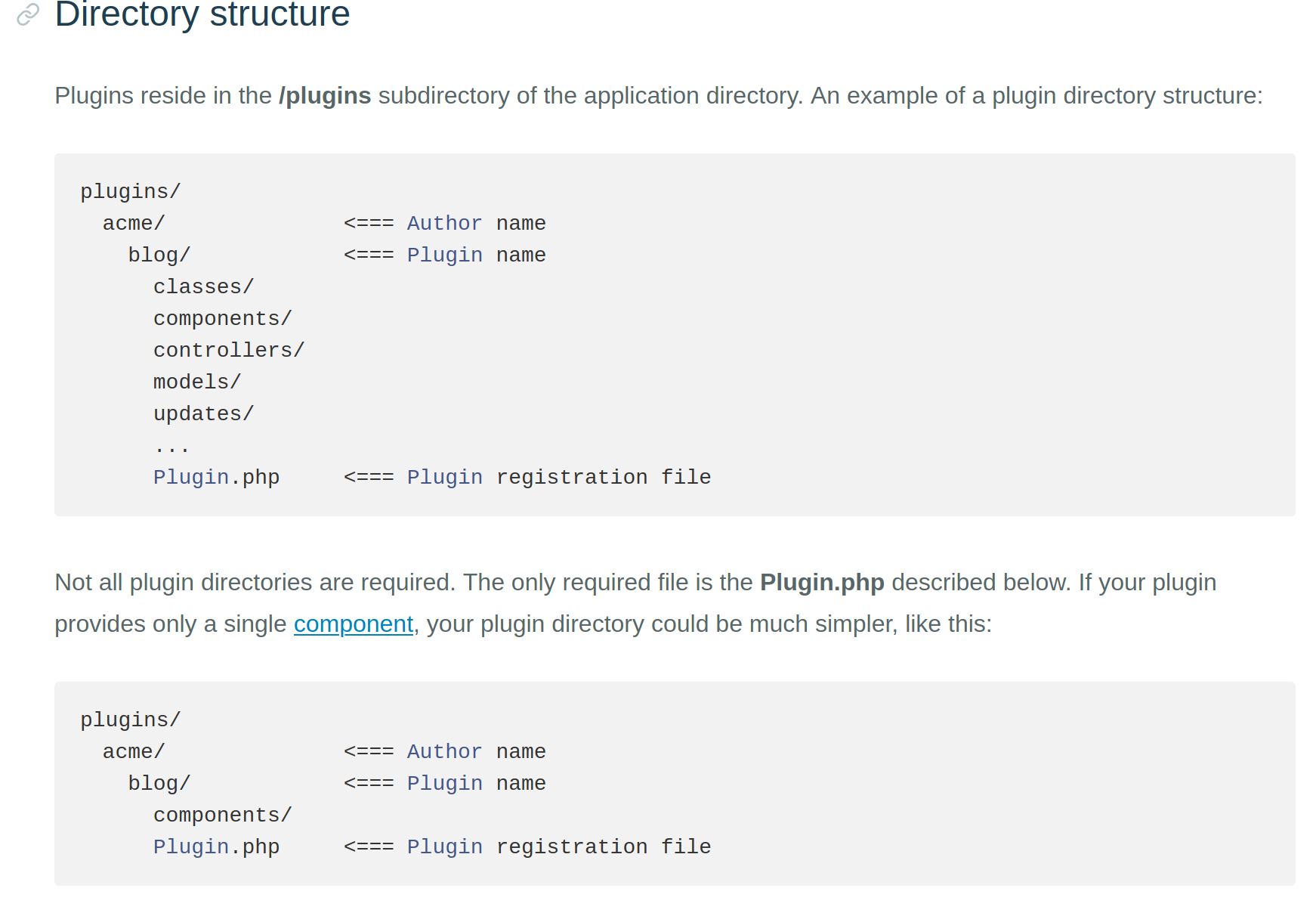
and here:
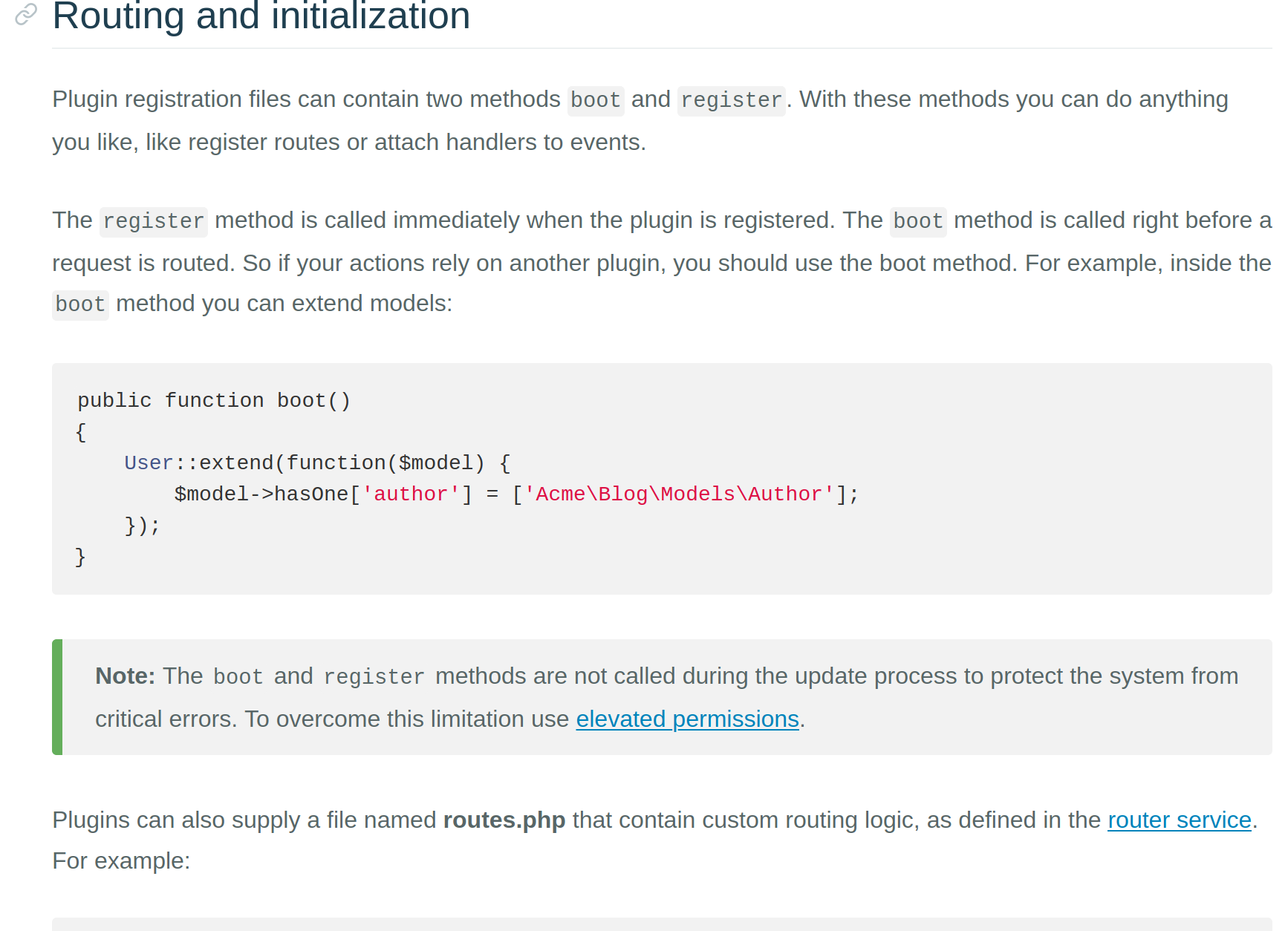
that the files are meant to be Plugin.php and routes.php.
The issue with trying to cover mistakes like this is determining at what point do these sort of checks end. Sure, we can cover your particular case, but what happens if someone decides to use PlugIn.php or route.php or Plugins.php or router.php - you can understand then that trying to cover every single common mistake is likely to become impossible to do.
 bennothommo
on 6 Feb 2020
bennothommo
on 6 Feb 2020
Hopefully other developers can agree this is an issue with October CMS
With all due respect, the issue is YOUR code, not October.
bennothommo
on 6 Feb 2020
@bennothommo perhaps an argument could be made for detecting invalid directories within the plugins_path and throwing a more generic error message (i.e. "plugins/author/plugin was detected but no Plugin.php was present") as a non-exception-triggering error that just gets logged instead. This would cover all the variations of Plugin.php as well as the random times when Composer and Git decide to partially eat some of my plugins that are installed via composer. (Since the essential bits get eaten by git but then composer doesn't bother reinstalling it because the folders are still there)
 LukeTowers
on 6 Feb 2020
LukeTowers
on 6 Feb 2020
On windows it doesnt matter if its Plugin.php or plugin.php like @filipac said.
 Samuell1
on 6 Feb 2020
Samuell1
on 6 Feb 2020
@LukeTowers that's fair, but that would only cover the Plugin.php issue - it wouldn't cover the routes.php issue.
bennothommo
on 6 Feb 2020
Yeah, that one is a bit less common and I'm fine with devs just having to suffer through wondering why it doesn't work until they read the docs. Perhaps we could make it more clear in the docs too
LukeTowers
on 6 Feb 2020
I take it @bennothommo you are using a mac and not a pc. As @filipac and @Samuell1 are saying windows treats Plugin.php and plugin.php as one file. The only reason I could see that error was when I looked at the nginx server. Note running a Windows 10 computer and using localhost October CMS even runs plugin.php it's only when the plugin was uploaded to the server that it stopped working.
I feel this is important to state - as it's a big issue for Windows users!
+1 for updating the doc's to be clearer.
+1 for adding a generic error as Luke said.
ayumi-cloud
on 6 Feb 2020
We won't be including any safety nets for what is a simple naming convention. Feel free to add further clarification to the developer guide in the docs, something to document the class loader:
Folders - lower case
PHP classes - SentenceCase (namespaced scope)
PHP helpers - lower case (global scope)
A generic error is a waste of computational resource. This problem occurs due to PEBKAC and has no limits to possible failings. Programming is a precise science, the solution here is to take a look around at your environment, you should notice the convention at a glance. The documentation already covers the structure of a plugin.
@ayumi-cloud FWIW, looking at that screenshot, I can spot the issue right away.
 daftspunk
on 6 Feb 2020
daftspunk
on 6 Feb 2020
Related issues
 SeekAndPwn
·
3Comments
SeekAndPwn
·
3Comments
 Flynsarmy
·
3Comments
Flynsarmy
·
3Comments
 oppin
·
3Comments
oppin
·
3Comments
 gergo85
·
3Comments
gergo85
·
3Comments
 jvanremoortere
·
3Comments
jvanremoortere
·
3Comments
Most helpful comment
We won't be including any safety nets for what is a simple naming convention. Feel free to add further clarification to the developer guide in the docs, something to document the class loader:
Folders - lower case
PHP classes - SentenceCase (namespaced scope)
PHP helpers - lower case (global scope)
A generic error is a waste of computational resource. This problem occurs due to PEBKAC and has no limits to possible failings. Programming is a precise science, the solution here is to take a look around at your environment, you should notice the convention at a glance. The documentation already covers the structure of a plugin.
@ayumi-cloud FWIW, looking at that screenshot, I can spot the issue right away.