October: Froala Custom Buttons not working
- OctoberCMS Build: 464
- PHP Version: 7.2.19
- Database Engine: MySQL
Description:
Hello,
i'm trying to add some personalized buttons to the RichEditor Widget. To help me, i've read many october issues (mainly #2078 ) on this repo, but unfortunately, after many tries, it does not work.
Steps To Reproduce:
I have made a plugin for my site, and i have added this snippet in the boot() function
Plugin.php
RichEditor::extend(function($widget) {
      $widget->addJs('/plugins/*****/******/assets/js/test.js');
});
test.js
+function ($) {
  var Plugins = {
      init: function () {
          $.FroalaEditor.DefineIcon('buttonIcon', {NAME: 'star'})
          $.FroalaEditor.RegisterCommand('myButton', {
              title: 'My Button',
              icon: 'buttonIcon',
              undo: true,
              focus: true,
              refreshAfterCallback: true,
              callback: function () {
                  console.log(this.html.get());
              },
              refresh: function ($btn) {
                  console.log(this.selection.element());
              }
          })

          $.oc.richEditorButtons.push('myButton')

      }
  }

  $(document).on('render', function () {
      Plugins.init()
  })
}(jQuery)
please do not focus on file names, or functions, i'm just trying to add the button first, then i will make my functions.
Does somebody have any solutions ?
Best,
L.
 Ladylain
All 13 comments
This is a working implementation: https://github.com/gergo85/oc-paste-content/blob/master/assets/js/froala.paste.plugin.js
 gergo85
on 23 Jan 2020
gergo85
on 23 Jan 2020
@gergo85 Thanks for your answer, i've just tried this and it works BUT only if you don't fill in this field in the settings area
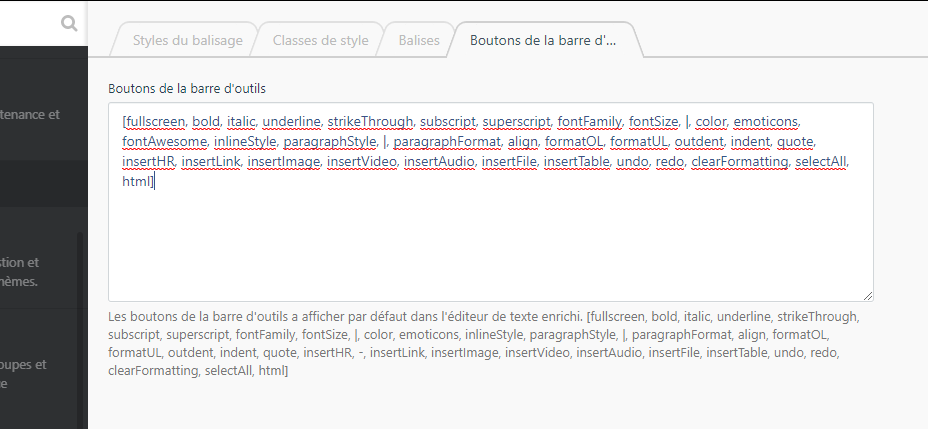
Do you have any solution that works with this configuration ?
Best,
Ladylain
on 23 Jan 2020
I tried it. Indeed, it is a bug.
gergo85
on 23 Jan 2020
@w20k can you look into this?
 LukeTowers
on 23 Jan 2020
LukeTowers
on 23 Jan 2020
@LukeTowers sure-sure!
 w20k
on 23 Jan 2020
w20k
on 23 Jan 2020
Probably you need to add myButton to this config list?
 alxy
on 24 Jan 2020
alxy
on 24 Jan 2020
Sorry but i've already tried this, and it does not fix this
Ladylain
on 24 Jan 2020
This issue will be closed and archived in 3 days, as there has been no activity in the last 30 days.
- If this issue is still relevant or you would like to see it actioned, please respond and we will re-open this issue. - If this issue is critical to your business, consider joining the Premium Support Program where a Service Level Agreement is offered.
![github-actions[bot] picture](https://avatars.githubusercontent.com/in/15368?v=4&s=40) github-actions[bot]
on 24 Feb 2020
github-actions[bot]
on 24 Feb 2020
Hello there,
is there any infos about this fix ?
Thx
Ladylain
on 20 Mar 2020
@Ladylain look at the source code, that explains why this is not working:
modules/backend/formwidgets/richeditor/assets/js/richeditor.js
When something is defined in settings it gets assigned to this.options.toolbarButtons through the widget's markup.
 mjauvin
on 20 Mar 2020
mjauvin
on 20 Mar 2020
maybe extending this in your plugin:
$buttons = "your buttons here";
$.extend($.FE.DEFAULTS {toolbarButtons:$buttons, toolbarButtonsXS:$buttons, toolbarButtonsSM:$buttons, toolbarButtonsMD:$buttons});
That is a pure guess...
mjauvin
on 20 Mar 2020
This issue will be closed and archived in 3 days, as there has been no activity in the last 30 days.
If this issue is still relevant or you would like to see it actioned, please respond and we will re-open this issue.
If this issue is critical to your business, consider joining the Premium Support Program where a Service Level Agreement is offered.
github-actions[bot]
on 20 Apr 2020
This issue will be closed and archived in 3 days, as there has been no activity in the last 60 days.
If this issue is still relevant or you would like to see it actioned, please respond and we will re-open this issue.
If this issue is critical to your business, consider joining the Premium Support Program where a Service Level Agreement is offered.
github-actions[bot]
on 21 Jun 2020
Related issues
 atrauzzi
·
3Comments
gergo85
·
3Comments
atrauzzi
·
3Comments
gergo85
·
3Comments
 EbashuOnHolidays
·
3Comments
EbashuOnHolidays
·
3Comments
 mittultechnobrave
·
3Comments
mittultechnobrave
·
3Comments
 axomat
·
3Comments
axomat
·
3Comments
Most helpful comment
@LukeTowers sure-sure!