October: Enhanced List widget searching
Explainer
Currently October always you to do a search in the list widget for all fields.
However, sometimes a user may require a more in-depth search of the column data.
Example
Let's take the following example list data:
Color | Quantity | Brand Name
---|---|---
yellow | 10 | Bob's Secret Sauce
blue | 12 | Best Widgets Company
orange | 30 | James Ever-Green Company
red | 26 | Big Yellow Company
Search One Example
For the first search example we search for the keyword blue this gives us the following results:
Color | Quantity | Brand Name
---|---|---
blue | 12 | Best Widgets Company
Search Two Example
For the second search example we search for the keyword yellow this gives us the following results:
Color | Quantity | Brand Name
---|---|---
yellow | 10 | Bob's Secret Sauce
red | 26 | Big Yellow Company
This is where things start to go wrong, very quickly!
Maybe the user just wanted to search for the Color and not the Brand Name.
Solution
Allowing two search options.
All- this allows a user to search all the columns in the list widget.Custom- this allows the user to select the columns they want to receive the search results.
Taking the above example let's do a third example.
Search Three Example
A user selects the custom search and selects the checkbox Color then again searches for the keyword yellow this gives the following results:
Color | Quantity | Brand Name
---|---|---
yellow | 10 | Bob's Secret Sauce
Conclusion
Pretty common sense, hopefully this could get added to the cms.
 ayumi-cloud
All 5 comments
@ayumi-cloud this already exists in the form of the text filter
 LukeTowers
on 15 Dec 2019
LukeTowers
on 15 Dec 2019
@LukeTowers very sorry, I totally wrote this incorrectly, let me try to write what I mean.
First issue (bug)
Let's say I set the following columns, to view Color and Quantity - but make Brand Name invisible, e.g.
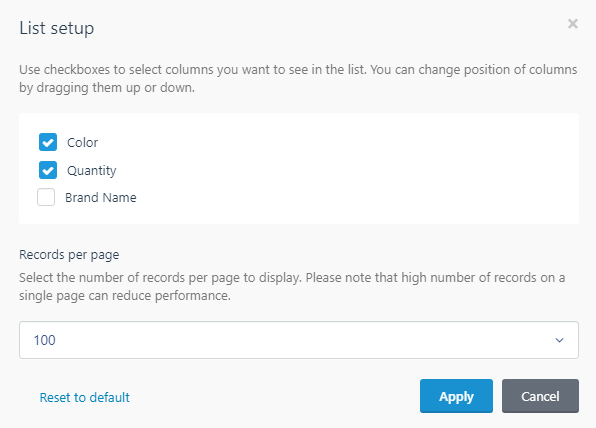
When I do a search October will search all three columns.
I think this is a bug and _October should only search visible column data_ (not invisible column data).
Second issue (probably best for a plugin)
We were thinking more about setting up two different filters on the same web page.
The normal filter row we setup granular filters e.g. show a list of colors to select, e.g.

But also have a second filter being displayed in the search box area, where a user can turn on/off columns.

Above: Search box (not selected)

Above: Search box (selected - opened)
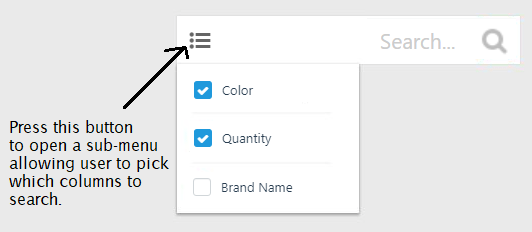
Above: User clicks on the button to open a sub-menu in the search box to pick which columns to search on).
This is what we were thinking of coding...
Also is it possible to connect up two or more filter files via YAML?
e.g.
filter: [ 'config_filter.yaml', 'search_filter.yaml' ]
Or I guess we just need to code this using pure Laravel instead.
ayumi-cloud
on 16 Dec 2019
@ayumi-cloud Limiting the scope of searched columns can be achieved by the searchable option that is defined in the column definition in the columns.yaml file for your list. The column being hidden has no bearing on the search.
 bennothommo
on 16 Dec 2019
bennothommo
on 16 Dec 2019
I think this is a bug and October should only search visible column data (not invisible column data).
I disagree with that. There is the separate searchable property as @bennothommo said which is what you should use if you want a column excluded from search. I occasionally find it useful to include hidden columns in my search.
LukeTowers
on 16 Dec 2019
@bennothommo @LukeTowers thanks, I think I'm mixing things up with sortable as well.
I set my hidden columns to this:
sortable: true
searchable: false
invisible: true
Going to close this issue, thanks for your feedbacks. 👍
ayumi-cloud
on 16 Dec 2019
Related issues
 jvanremoortere
·
3Comments
jvanremoortere
·
3Comments
 d3monfiend
·
3Comments
LukeTowers
·
3Comments
d3monfiend
·
3Comments
LukeTowers
·
3Comments
 m49n
·
3Comments
m49n
·
3Comments
 lukaszbanas-extremecoding
·
3Comments
lukaszbanas-extremecoding
·
3Comments