October: Fix copying of ApplicationException popup messages
I think trying to create a piece of code in October is not as friendly as it could be. With the error messages being displayed using sweet alert vendor package. I can't copy the error message to do a web search to find the solution.
This got me thinking and wanted to open a github issue to try and make things a little bit better.
Solution 1
- Allow the error message to be copy and paste.
Solution 2
- Allow a button to be pressed that will search the internet for the displayed error message.
Example
Before:
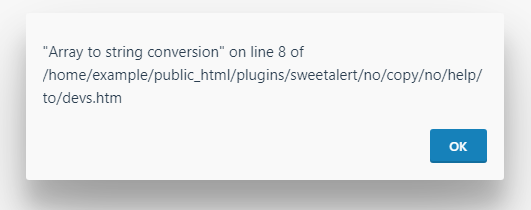
After:
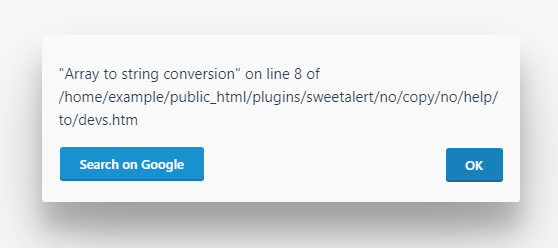
In the case of the 'Search on Google' button the link would be something like this:
<a class="btn btn-primary" href="https://www.google.com/search?q=array+to+string+conversion" rel="noopener noreferrer" target="_blank">Search on Google</a>
Then to make it a bit more customizable allow the user to select their own search link in the settings or config file. For example, someone may want to Search in Stackoverflow, or search in OctoberCMS website or a different search engine etc.
I leave it for people to make suggestions now.
 ghost
ghost
All 14 comments
@ayumihamasaki2019 I think it's a great idea, as long as it's only shown in debug mode.
 bennothommo
on 20 Oct 2019
bennothommo
on 20 Oct 2019
@bennothommo Thanks, yah good point "only shown in debug mode" makes total sense. As it should be shown only to developers and not clients (just expanding your comment if anyone else reads this issue).
Just wondering if October uses a custom file to generate the error messages or it's coming straight out of the javascript vendor file which would be a major issue.
ghost
on 20 Oct 2019
Sorry, not for. Most of errors needs to use brain instead of Google, some of them means something different than error message says. But it's only my opinion.
 Rike-cz
on 20 Oct 2019
Rike-cz
on 20 Oct 2019
@ayumihamasaki2019 The popup is part of the Storm UI library. It's this file in particular that controls nearly all the popups: https://github.com/octobercms/october/blob/master/modules/system/assets/ui/js/popup.js
@Rike-cz I feel it's simply a shortcut to Google, and not necessarily something that is going to completely solve all issues, but it will help to encourage people to be a bit more proactive with errors and perhaps finding if other people have had the same issue.
bennothommo
on 20 Oct 2019
@bennothommo @ayumihamasaki2019 while I think that the "Search on Google" UX is clever and cute, I don't feel like we should be encouraging that behaviour for every error. I think the proper solution to this (which would also solve other related problems) is just to fix that popup so that users can copy and paste the message like they would with anything else.
 LukeTowers
on 20 Oct 2019
LukeTowers
on 20 Oct 2019
More like this is like "Warning that something went wrong" developers should look in error log where they can copy and see more about that error.
 Samuell1
on 21 Oct 2019
Samuell1
on 21 Oct 2019
@LukeTowers to expand on your comment:
My three main issues with the error message popup are as follows:
Can not copy and paste the error - have to go into the dom to copy it.
Add keyboard navigation to the error message popup - you can't close that modal using keyboard controls, you can only close it by mouse clicking. Haven't tested it with touch screen though.
Connection issues (e.g. Cloudflare Server Code) display a bunch of escaped HTML message, it would be nice if the HTML message was passed through something like HTMLPurifier and not show basic HTML escaped.
ghost
on 21 Oct 2019
Not a big fan of this. Maybe link to the log page instead? Also from a UX perspective, the blue button is competing with the OK button. Maybe make it a secondary button or just a link button with the arrow (↗️) that indicates an external link. Just my thoughts.
 drmzio
on 21 Oct 2019
drmzio
on 21 Oct 2019
Totally agree that copy and paste should be available in the popups. I think this issue may have been started because of the new Laravel 6 error page (Ignition), which implements all sorts of features to make it easier to find information on exceptions. @LukeTowers As October gets closer to upgrading to Laravel 6, do we know if we are going to support Ignition?
 LarryBarker
on 31 Oct 2019
LarryBarker
on 31 Oct 2019
@LarBearrr I'm certainly not opposed to it, haven't looked into adding it myself at all. If someone can get it working as a plugin I'm sure I would be willing to take the time to review it for merging.
LukeTowers
on 31 Oct 2019
What's wrong with highting what you're wanting to copy and copying it as normal?
 nizzac
on 5 Nov 2019
nizzac
on 5 Nov 2019
@nizzac as I recall you can't actually do that on that popup for some reason. It's very annoying.
LukeTowers
on 5 Nov 2019
All, please feel free to test #4740 and let me know if this resolves the copy+paste issue for you.
bennothommo
on 6 Nov 2019
Fixed by #4740.
bennothommo
on 16 Nov 2019
Related issues
 mittultechnobrave
·
3Comments
mittultechnobrave
·
3Comments
 atrauzzi
·
3Comments
atrauzzi
·
3Comments
 axomat
·
3Comments
axomat
·
3Comments
 kdoonboli
·
3Comments
kdoonboli
·
3Comments
 SeekAndPwn
·
3Comments
SeekAndPwn
·
3Comments
Most helpful comment
@bennothommo @ayumihamasaki2019 while I think that the "Search on Google" UX is clever and cute, I don't feel like we should be encouraging that behaviour for every error. I think the proper solution to this (which would also solve other related problems) is just to fix that popup so that users can copy and paste the message like they would with anything else.