October: Subdirectories not showing their content when cms.databaseTemplates is enabled
- OctoberCMS Build:
458(upgraded from the backend after install) - PHP Version:
PHP 7.2.20 (cli) (built: Jul 10 2019 16:33:12) ( NTS ) - Database Engine:
5.7.20 MySQL Community Server (GPL) - Plug-ins Installed: October.Demo-v1.0.1
Description:
When enabling the cms.databaseTemplates setting, any Partial, Layout, or Content created in a subdirectory will not appear in the navigation pane of the backend.
Expected Behaviour:
Any component (in the general sense of the word, i.e. Partial, Layout, and Content) with a filename should be visible when placed in a subdirectory and cms.databaseTemplates is enabled. Currently, it doesn't seem to be the case which makes organising them more and more challenging as their number grows.
Steps To Reproduce:
- Install OctoberCMS using composer:
composer create-project october/october myproject - Configure OctoberCMS to work with MySQL: I did it running
php artisan october:install, but simply editingconfig/database.phpshould work just as well. - Connect to the backend and go to "Partials"
- Check that when you create a new partial in a subdir (I used
subdir/test.htm) it appears in the side panel inside its directory, just like it does on the filesystem - Check you can use this partial in the demo layout (I put it right under the
site/headerpartial) - Set
cms.databaseTemplatesto true - Create a new partial
subdir/test2.htm: it should appear in the side panel but actually doesn't, even though it is correctly created in thecms_theme_templatestable and it is perfectly usable in a layout with{% partial 'subdir/test2' %} - Create a third partial not in a subdirectory, say
test3.htm: notice it correctly appears in the side panel and exists only in thecms_theme_templatetable and not on the filesystem (and is also perfectly usable, obviously).
Additional Notes
This can also be reproduced without the October.Demo plug-in (just run php artisan october:fresh), but it requires a bit more work as you have to create the basic components to have something running. Using the Demo plug-in makes the reproduction instructions shorter.
I have taken a quick look at current and past issues and didn't find anything like that, which makes me wonder if I missed anything explicitely documenting this as a known and wanted behaviour, as it is one of the first things I tested.
Any help with this will be greatly appreciated.
Thank you.
 laurentbardin
All 17 comments
@laurentbardin Thank you very much for the detailed replication notes. I've been able to replicate the issue. Will look into a fix now.
 bennothommo
on 28 Sep 2019
bennothommo
on 28 Sep 2019
@bennothommo @laurentbardin It looks like the theme:sync command ignores these paths also... Would like to turn of the databaseTemplates but as the sync command is not working I will lose a lot of partials :(
When specifying the paths to sync, the partial in subdirectory is not found but exists in the database:

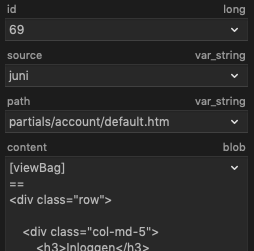
 SebastiaanKloos
on 28 Sep 2019
SebastiaanKloos
on 28 Sep 2019
@bennothommo Short update
$partial = \Cms\Classes\Partial::find('account/default.htm'); returns the correct partial with the correct content. It seems that the Halcyon model is working correctly and handles the subdirectories successfully
https://github.com/octobercms/october/blob/882ca6019c9c1b124e6e3f052b6aec02b6fa826b/modules/cms/controllers/Index.php#L76 dd'ing this will return a list without the subdirectories.
Route::get('debug', function () {
    $theme = \Cms\Classes\Theme::getEditTheme();
    $partials = \Cms\Classes\Partial::listInTheme($theme);

    dd($partials);
});
Returns all partials in theme with the subdirectories
SebastiaanKloos
on 28 Sep 2019
Maybe the issue is caused by the max nest level of 2 in the CMS backend. The key in database templates is 3 levels as the first directory is partials
SebastiaanKloos
on 29 Sep 2019
@SebastiaanKloos @laurentbardin I think I found the root cause. Would you mind trying the fix in https://github.com/octobercms/library/pull/432 and let me know if that works for you?
bennothommo
on 29 Sep 2019
@SebastiaanKloos @laurentbardin I think I found the root cause. Would you mind trying the fix in https://github.com/octobercms/library/pull/432 and let me know if that works for you?
Yes I’ll try it right now!
SebastiaanKloos
on 29 Sep 2019
@bennothommo Your pull request fixes the issue! Thank you!
SebastiaanKloos
on 29 Sep 2019
@SebastiaanKloos Great to hear! Just to cover all bases, would you mind testing the theme:sync command as well and make sure that sees all files now as well?
bennothommo
on 29 Sep 2019
@bennothommo Yes I’ll try that now. Just a sec
SebastiaanKloos
on 29 Sep 2019
@bennothommo It looks like the command still does’nt work...
Even when specifying the path, it still does not work.
SebastiaanKloos
on 29 Sep 2019
@bennothommo It looks like the sync only syncs existing files. When creating new partial with databaseTemplates on, the partial will be added to the database. The file does not exist on the filesystem and is not being synced to the filesystem when running the sync command.
I will debug a bit more to find a solution
SebastiaanKloos
on 29 Sep 2019
@bennothommo I’m sorry for spamming you but I found out what is causing issues with the command. See the following line:
@LukeTowers do you know why files in the db cannot be synced to the filesystem when the file does not exist in the filesystem? When creating a partial while using databaseTemplates, the partial is never created on the filesystem.
When removing the line above, the command works as expected.
SebastiaanKloos
on 29 Sep 2019
@SebastiaanKloos not a problem, thanks for that.
I've rolled in your fix here: #4645
bennothommo
on 30 Sep 2019
@SebastiaanKloos not a problem, thanks for that.
I've rolled in your fix here: #4645
Thank you!
SebastiaanKloos
on 30 Sep 2019
 LukeTowers
on 9 Oct 2019
LukeTowers
on 9 Oct 2019
@bennothommo Thank you for fixing this, much appreciated, and sorry for the lack of feedback during the last two weeks as I was on vacation. Keep up the good work.
laurentbardin
on 14 Oct 2019
Not a problem, @laurentbardin
bennothommo
on 14 Oct 2019
Related issues
 m49n
·
3Comments
m49n
·
3Comments
 jvanremoortere
·
3Comments
jvanremoortere
·
3Comments
 atrauzzi
·
3Comments
atrauzzi
·
3Comments
 SeekAndPwn
·
3Comments
SeekAndPwn
·
3Comments
 EbashuOnHolidays
·
3Comments
EbashuOnHolidays
·
3Comments
Most helpful comment
@SebastiaanKloos @laurentbardin I think I found the root cause. Would you mind trying the fix in https://github.com/octobercms/library/pull/432 and let me know if that works for you?