October: Flickering on Media manager files after latest update
- OctoberCMS Build: ### 458
- PHP Version: 7.3
- Database Engine: MySQL
- Plugins Installed:
Description:
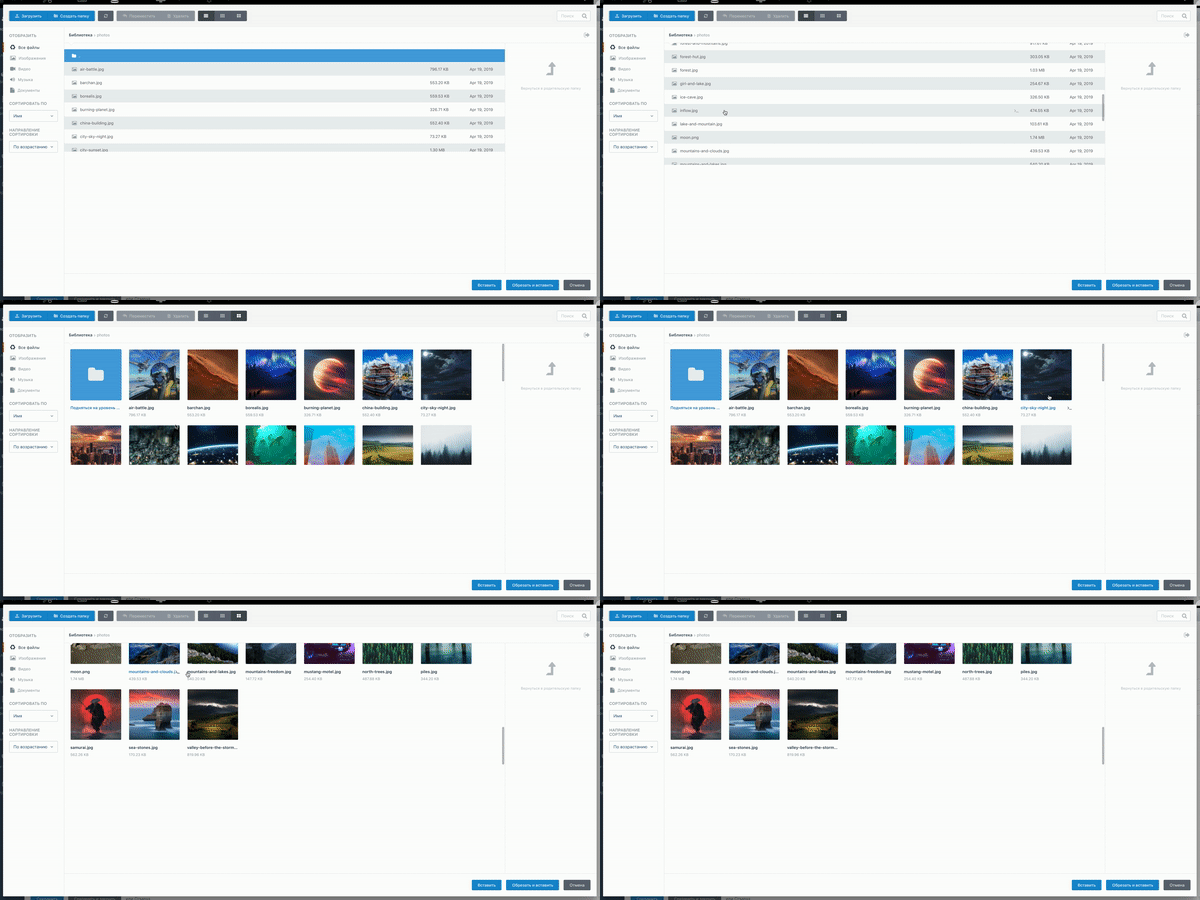
Flickering on Media manager files. If you open Media manager folder with a lot of files and try to scroll down to the last you will see flickering, and you are unable to select any of the files. Something i noticed is that if you resize browser window it stops flickering and is working fine. You can see this issue bellow:

Steps To Reproduce:
Just open Media manager
Create folder and upload many images
Try to scroll down to the latest
Flickering!
 haralake
All 52 comments
This has been reported by a few users on Slack, so bumping up the priority.
 bennothommo
on 6 Sep 2019
bennothommo
on 6 Sep 2019
Thank you @bennothommo . If you have a lot files is impossible to work with media manager so the only quick solution for now is to downgrade.
haralake
on 6 Sep 2019
I'm having this issue on a number of sites - whats the best way to downgrade?
 roojai
on 6 Sep 2019
roojai
on 6 Sep 2019
@roojai If you upgraded via Composer, you can change the October dependencies in composer.json in your root folder to the following:
        "october/rain": "1.0.455",
        "october/system": "1.0.455",
        "october/backend": "1.0.455",
        "october/cms": "1.0.455",
Thanks @bennothommo but not really sure how to do that.
I use 1pilot to manage multiple site upgrades, or I just use the backend plugin updates button.
The "resize browser" fix works well for now
roojai
on 6 Sep 2019

 panakour
on 6 Sep 2019
panakour
on 6 Sep 2019
@bennothommo will look at it as well!
 w20k
on 6 Sep 2019
w20k
on 6 Sep 2019
Same issue here... I thought it was only me :)
 acasar
on 6 Sep 2019
acasar
on 6 Sep 2019
@bennothommo I know what component causes the issue, will dig dipper.
scrollpad (.scrollpad-scrollbar > .drag-handler`) -> is the culprit here.
w20k
on 6 Sep 2019
@w20k in case it helps I've seen this happen on Facebook too just now, except much more aggressively and vertically instead of horizontally on the latest chrome.
 LukeTowers
on 7 Sep 2019
LukeTowers
on 7 Sep 2019
temporary fix
div[data-control="media-manager"] .control-scrollpad {
    position: relative;
    max-height: 500px;
    overflow: hidden;
}
 pavelmgn
on 7 Sep 2019
pavelmgn
on 7 Sep 2019
I personally have been unable to replicate this on Linux running Chrome 76 and Firefox 69.
Is this happening on a particular browser or OS? Is it happening just for the Media tab in the main menu, or the media finder when adding images to a widget? Is there a specific amount of files it needs before the bug manifests?
bennothommo
on 7 Sep 2019
@bennothommo i have windows 10, chrome ver 76.0.3809.132 (Official build), (64 bit). The problem is relevant wherever the media window is used.
pavelmgn
on 7 Sep 2019
Im on the same set up as @pavelmgn. @bennothommo I have noticed that the problem does not occur in media manager itself, but when you access media through a form from another plugin. I find it only effects the lower part of the page (more than 7 files needed in list mode, 4 rows needed in small grid mode, and effects can be seen in second row in large grid mode)
roojai
on 7 Sep 2019
@pavelmgn @roojai would either of you be willing to test it with smooth scrolling disabled in your browser and see if it makes a difference?
bennothommo
on 7 Sep 2019
I use Google Canary and I know the last few months I have seen loads of scrolling bugs and even reported it to Google.
I would be interested to know if you install Google Canary, found here: https://www.google.com/chrome/canary/
And see if the issue still continues? As Google Canary V78 has fixed the scrolling bugs (most of them).
And this issue I saw a few months back when Google Canary was using V76.
Timeline of Chrome errors with scrolling I've seen was like this:
V76 - 100% scrolling errors.
V77 - 50% scrolling errors fixed.
V78 - 90% scrolling errors fixed.
It's even worse on Edge browser, see here: https://github.com/octobercms/october/issues/4417
But I closed that issue down as the Edge project is dead and they switched over to using Chromium now.
[edit] My point is that you need test the issue to see if it's to do with October or Chrome or both.
(I didn't bother reporting it weeks ago as I saw it was to do with Chrome).
 ghost
on 7 Sep 2019
ghost
on 7 Sep 2019
@bennothommo no difference =( With smooth scrolling disabled, the same thing happens.
pavelmgn
on 8 Sep 2019
Seems more Chrome related than OctoberCMS, I am having the same problem on a site that is on build 447
roojai
on 8 Sep 2019
@roojai I'm leaning towards that too, given what I've read about these types of issues with Chrome (I still haven't been able to replicate myself). Just to narrow this issue down further, can you test it with Firefox and let me know if that exhibits the same issue?
bennothommo
on 8 Sep 2019
@bennothommo When I reported this issue to Chrome 2 months ago the Chrome team told me it's an issue with the "hardware acceleration" inside Chrome. Maybe people can try disabling it.
Not sure if this was the tag:
chrome://flags/#disable-accelerated-video-decode
p.s. for me it didn't work on a windows 10. But others said it worked on a MAC.
[edit] The solution decided upon was basically the Chrome hardware acceleration and the windows one had an issue working together. When I saw the gifs here, they look exactly the same as what I saw 2 months ago.
ghost
on 8 Sep 2019
Thanks @ayumihamsaki. @roojai @pavelmgn, could you try @ayumihamsaki's suggestion and see if it makes a difference?
bennothommo
on 9 Sep 2019
I have tested turning off hardware acceleration and there was no change - I am still getting the flashing bug.
I tested MS Edge and no flashing bug evident there.
I tested Google Canary and no flashing bug evident on that browser.
So problem seems to be Chrome build Version 76.0.3809.132 (Official Build) (64-bit) on Windows
roojai
on 9 Sep 2019
Happens on Chrome 76 for Mac too. Other browsers aren't affected.
The culprit here is the browser that is causing this. Solution would be to use a different browser in the meantime until there is an update, I guess.
 drmzio
on 9 Sep 2019
drmzio
on 9 Sep 2019
Cheers all. I'm happy to chalk this up to a Chrome issue. Please let me know if this is affecting a version of Chrome after 76, or another browser, and I'll re-open.
bennothommo
on 9 Sep 2019
macOS, Chrome 76.0.3809.132
October 435
 Grawl
on 10 Sep 2019
Grawl
on 10 Sep 2019
@Grawl Please see https://github.com/octobercms/october/issues/4601#issuecomment-529295047
bennothommo
on 10 Sep 2019
As a workaround I just removed div[data-control="media-manager"] .control-scrollpad{position:absolute;left:0;top:0} from modules/backend/widgets/mediamanager/assets/css/mediamanager.css and now Media Manager modal window have full window scroll instead of files list/grid inner scroll.
Grawl
on 10 Sep 2019
Why is this marked as done? What is a recommended fix? Same problem on MacOS, both in Safari and Chrome, and in Chrome 76 on LinuxOS Ubuntu 16.04, October 458, same with 454, 455 version (different sites using October). What is curious - same project's local copies work just fine.
For MacOS users using other browser (not Safari or Chrome) isn't an option. By the way, it's never an option speaking of clients who just what it work and be stable ;)
I don't know if this is a related issue but in mediamanager dialog window bottom action buttons are missing - "Insert", "Cancel" - it's confusing the users. I mean these http://joxi.ru/DmB8jLPiJa9lKA The buttons are still present in October 454, but missing in 458. If you want to close the mediamanager-popup it's now possible only with Esc button. Not good.
Thank you, @Grawl, it helped to calm down the clients. You saved my day.
 anastasiauz
on 10 Sep 2019
anastasiauz
on 10 Sep 2019
@anastasiauz https://github.com/octobercms/october/issues/4601#issuecomment-529076923
;) Write this in /backend/system/settings/update/october/backend/branding, styles @Grawl If the number of entries is 200? Do you want to see a preview of the bottom picture, scroll down, then come back up? If the image turns out to be wrong, will you come back down again, etc.?
pavelmgn
on 10 Sep 2019
@anastasiauz I closed it because it was a problem introduced by Chrome 76, which we have no control over. I've had no luck with replicating it myself on Ubuntu 18.04 with Chrome or Firefox. We've had reports that the issue is no longer there with Chrome 78 which is still in testing.
If you can demonstrate the issue consistently occurring with a current version of Safari or Firefox, I'll be happy to reopen.
bennothommo
on 10 Sep 2019
@bennothommo I cannot show it because I fixed it for the client's site - the client wasn't happy. And I don't have a Mac. Sorry, no evidence ... Thank you and hope it's indeed a Chrome bug
anastasiauz
on 10 Sep 2019
@anastasiauz for what it's worth, it's been reported that this same issue may have affected Facebook too, so it's not just affecting October :)
bennothommo
on 10 Sep 2019
How about to use Flexbox for layout? I think it must fix this problem.
Grawl
on 11 Sep 2019
@pavelmgn yep, it's a problem with this workaround. You can try to set position: sticky; top : 0 for [data-control="preview-sidebar"]. (I just tried this but with no luck)
Grawl
on 11 Sep 2019
We've got a lot of October sites and clients are complaining. But it is indeed a chrome issue.
There's a quick fix. Just paste this in your Settings > Customize Back-End > Styles tab.
body div[data-control="media-manager"] .control-scrollpad{position:static}
When chrome fixes this bug, just remove it again.
 vangar02
on 11 Sep 2019
vangar02
on 11 Sep 2019
I just set fixed height for scroll wrapper and got October's scroll behaviour without flickering.
So, full workaround looks like this:
modules/backend/widgets/mediamanager/assets/css/mediamanager.css
-div[data-control="media-manager"] .control-scrollpad{position:absolute;left:0;top:0}
-div[data-control="media-manager"] .scroll-wrapper{position:relative}
+div[data-control="media-manager"] .scroll-wrapper{height:calc(100vh - 300px)}
Or you can add following stylesheet to Settings › Customize Back-End › Styles:
div[data-control="media-manager"] .control-scrollpad{position:static}
div[data-control="media-manager"] .scroll-wrapper{height:calc(100vh - 300px)}
body div[data-control="media-manager"] .control-scrollpad{position:static}
Is working for me ok.
div[data-control="media-manager"] .control-scrollpad{position:static}
div[data-control="media-manager"] .scroll-wrapper{height:calc(100vh - 300px)}
Gives me a blank page in media manager
roojai
on 11 Sep 2019
Please tell me what browser you are using to get this issue
Grawl
on 11 Sep 2019
Sorry, I am using chrome Version 76.0.3809.132 (Official Build) (64-bit) on windows
roojai
on 11 Sep 2019
@bennothommo I have just updated my Google Chrome to 77.0.3865.75 version. And I still have the same problem.
 iboved
on 11 Sep 2019
iboved
on 11 Sep 2019
Thanks to Grawl for the CSS needed to fix the issue. The backend updates didn't work for me, but the mediamanager.css file updates did.
As a note for others though, you'll also need to update modules/backend/widgets/mediamanager/assets/less/mediamanager.less
if you use the October less compiler (like we do for our deployment process). If you don't update the less file then if you run "php artisan october:util compile [assets|less]" then the mediamanger.css file will be overwritten.
-    .control-scrollpad {
-       position: absolute;
-        left: 0;
-        top: 0;
-    }

    .scroll-wrapper {
-        position: relative;
+        height: calc(~"100vh - 300px");
    }
Note that the calc has a ~ in there so that the less compiler doesn't try to evaluate the expression at build time. Without it you end up with the wrong css.
 Farrow
on 11 Sep 2019
Farrow
on 11 Sep 2019
@iboved
I have just updated my Google Chrome to 77.0.3865.75 version. And I still have the same problem.
It's reported fixed in Chrome 78.
LukeTowers
on 12 Sep 2019
Latest stable is 77
Grawl
on 18 Sep 2019
@Grawl please try updating to 78 and see if it has been fixed.
LukeTowers
on 19 Sep 2019
Ok PR submitted.
There were two issues causing the error, these are as follows:
The issue was the
positionusingabsoluteand notsticky, which caused a forever scrolling action.Position: stickyhas fixed this issue.The issue here was because the scrollbar javascript in the media manager needs to have the right sidebar displayed and the css was using
display: none, switching it over toopacity: 0allows the javascript to scroll the container. If you set thedisplaytononeyou will see thedata-visibleattribute keep trying to set it totrueand the screen starts flickering! The right sidebar in the media manager is the place where the media file previews are displayed.
Please can some people test out my PR and shout at me - when needed, pr is here: https://github.com/octobercms/october/pull/4632
ghost
on 22 Sep 2019
Just checked for updates and it's still 77
Grawl
on 23 Sep 2019
Chrome update 78 fixed it for me
 SebastiaanKloos
on 23 Oct 2019
SebastiaanKloos
on 23 Oct 2019
I confirm that chrome v.78 has fixed this issue
haralake
on 23 Oct 2019
Great, will leave it open until 460 is released at least
LukeTowers
on 24 Oct 2019
This issue will be closed and archived in 3 days, as there has been no activity in the last 30 days. If this issue is still relevant or you would like to see action on it, please respond and we will get the ball rolling.
![github-actions[bot] picture](https://avatars.githubusercontent.com/in/15368?v=4&s=40) github-actions[bot]
on 29 Nov 2019
github-actions[bot]
on 29 Nov 2019
@LukeTowers Issue still fixed with 78.0.3904.108
SebastiaanKloos
on 6 Dec 2019
⚠️Warning ⚠️ As of December 2019 there is an issue in the Firefox browser with the media manager, see video of the error here: https://youtu.be/Rlq9R3WIDfQ
If you or your clients use Firefox, I suggest adding this commit to fix it: 1e449c8
🔥🔥🔥
 ayumi-cloud
on 8 Dec 2019
ayumi-cloud
on 8 Dec 2019
Related issues
 axomat
·
3Comments
axomat
·
3Comments
 mittultechnobrave
·
3Comments
mittultechnobrave
·
3Comments
 ChVuagniaux
·
3Comments
ChVuagniaux
·
3Comments
 gergo85
·
3Comments
gergo85
·
3Comments
 jvanremoortere
·
3Comments
jvanremoortere
·
3Comments
Most helpful comment
@iboved
It's reported fixed in Chrome 78.