October: Add the ace editor code select feature to the CMS page
I'm probably going to get in trouble for not asking about this in Slack first. But I'm really sure this is a needed feature and most of the code should be set inside October already - so it begs the question why it's not turned on in the first place?
Take this screenshot:

It has javascript in a partial - there is a plugin that allows me to write javascript and other languages direct into October.
The issue I have is that the code editor is displaying the javascript as plain white.
Ace editor allows you to change the code, right now it's hard-coded and set to data-language="twig" can we just add an option an the top of the code to select and change the data-language.
In the screenshot I have drawn a rough idea.
I'm really sure this can't be too hard to add in as most of the code is there already.
Info: https://stackoverflow.com/questions/9154183/cant-set-language-mode-for-ace-editor
File locations
List October contains already:
 ghost
ghost
All 41 comments
@ayumihamsaki I would presume it is locked to Twig because 99% of the time, that is what is being edited, and it was hidden to not confuse casual users. I think a setting to make it available to the user in the Backend Preferences -> Code Editor section might be a good idea, if someone wants to provide a PR for it.
Or better yet, detecting the correct language based on the filetype, if it is not doing that already.
 bennothommo
on 14 Aug 2019
bennothommo
on 14 Aug 2019
@ayumihamsaki @bennothommo I had idea to remove ace editor and use monaco editor, what vscode is using.
 Samuell1
on 14 Aug 2019
Samuell1
on 14 Aug 2019
@ayumihamsaki @bennothommo I had idea to remove ace editor and use monaco editor, what vscode is using.
That looks really great!
 SebastiaanKloos
on 14 Aug 2019
SebastiaanKloos
on 14 Aug 2019
It definitely looks good, but it's also new and in beta, so I'd be wary of sending out to all the October users.
bennothommo
on 14 Aug 2019
@LukeTowers @daftspunk
That editor looks amazing, it says it doesn't work on mobile devices. However, I tested it on an ipad 2 running IOS 9.3.5 and it works fine the only issue I had was the right scrolling you couldn't slide instead you just press the location and it worked. I managed to write code and do everything I needed on the ipad - so it works for mobile devices fine!
With regards to ace editor, @w20k and myself tried to do an update to that editor back in dec 2018 found here: https://github.com/octobercms/october/pull/3951
We had nothing but problems trying to update it and in the end we still didn't find a solution. Ace editor is quite buggy!
With regards to this new editor I think it needs several things to pass:
- Search function.
- Full screen mode.
- License - can October use it?
I would like to close this issue andopen a new issue where people can vote to have this new editor or not?
A side note: All main stream CMS are PWA compatible nowadays. October CMS needs to become PWA compatible. So we need a code editor to work in various modes like:
- PHP/Twig for main.
- JSON for manifest file.
- Javascript for Service worker files.
etc.
ghost
on 14 Aug 2019
@bennothommo
I think a setting to make it available to the user in the Backend Preferences -> Code Editor section might be a good idea, if someone wants to provide a PR for it.
I think that would be quite annoying. For example, I open the first partial and it's HTML code. I open the second partial and it's javascript, I then have to close out of the cms page and go to the Backend Preferences -> Code Editor section to set javascript and go back to the cms page to carry on working with the second partial (js file).
That's why I thought of having the dropdown menu above the code editor (on the cms page) so we could change the coding mode on-the-fly.
I was also thinking we could asign a YAML code to each file (the code at the top of each file), so the CMS code save the code settings for each file and the user doesn't have to keep changing the code type.
For example:
Partial 1
mode: html

Partial 2
mode: javascript
- If blank the default will be Twig.
That's my thoughts.
ghost
on 14 Aug 2019
@ayumihamsaki Monaco editor is used in VSCode and yes it has search.
Samuell1
on 14 Aug 2019
+1 I'm really up for using Monaco editor - great find.
ghost
on 14 Aug 2019
@ayumihamsaki I'm not saying move the Language selector to the user preferences, I'm saying adding a toggle to enable or disable seeing the language selector on the editor.
bennothommo
on 14 Aug 2019
@bennothommo sorry my mis-understanding.
ghost
on 14 Aug 2019
@bennothommo I’m still wondering if it’s worth adding the setting to enable/disable it. When you said “casual users”, I wondered if non-developers actually use the CMS section i.e. ace editor. It would make better sense to enable it by default in this section but allow developers to disable it within the code editor form widget alone using a yaml setting for it since I think that is where a casual user is more likely to use it.
 SaifurRahmanMohsin
on 15 Aug 2019
SaifurRahmanMohsin
on 15 Aug 2019
@SaifurRahmanMohsin I personally don't think it's needed at all. I believe the editor already detects the file type and uses the appropriate language. In @ayumihamsaki's case, I think it's only coming up as plain-text because they're adding raw JavaScript into a HTML file and not surrounding it with a <script> tag, so Ace is assuming it's HTML at the moment.
Nevertheless, if it's something that people want, I'm happy to review and accept a PR for it.
bennothommo
on 15 Aug 2019
@bennothommo
I think it's only coming up as plain-text because they're adding raw JavaScript into a HTML file and not surrounding it with a
If a setting is added I think I would prefer it gets added to the newly created config/develop.php configuration. @bennothommo what are your thoughts on that?
 LukeTowers
on 15 Aug 2019
LukeTowers
on 15 Aug 2019
@LukeTowers I wasn't sure if it was something that should be pushed on all users, as opposed to allowing say a developer to have access to it, but a client or content writer to not have access to it. Maybe it could be a permission?
bennothommo
on 15 Aug 2019
Sorry wanted to ask, would it be a good idea to load the ace editor extension mode files async as per this stackoverflow comment got me thinking: https://stackoverflow.com/questions/9154183/cant-set-language-mode-for-ace-editor
ghost
on 15 Aug 2019
@bennothommo hmm, not sure about that. Permissions aren't really meant to toggle off parts of the interface for cleanlinesses sake alone. I don't see why you'd have a user allowed to edit code but not allowed to change the formatting language for the code editor.
LukeTowers
on 16 Aug 2019
My updated comment about swtiching from Ace to Monaco:
Upgrading to Monaco will be very, very, very _difficult_. You will have to change many files in October and many widgets. Their are many custom ace editor files in October. The change-over will not be easy, you will be looking at roughly 450 - 500 files, needed to be changed or removed. For example you will have to completely re-write the Markdown editor, the Code editor, the Rich editor etc. the list goes on and on. Don't forget that October has many API functions and some of them directly use Ace e.g. the grow and stretch features I'm currently working on, then you got the layout files and styling that are need to be completely changed, e.g. the code editor on the cms page is not the same as the code editor in the plugin form area. Finally you got all the custom coding between the normal field size and the fullscreen modes. Probably closer to 1000 file changes.
We are using Ace version 1.2.6 right now. Looking at Ace version 1.4.5 it's almost the same as Monaco and there are some plugins out there which make ace editor even more like Monaco.
Lastly, backwards compatibility, I was even thinking of having both of them running in October and having an option in the config file to be able to choose which editor you want to use.
ghost
on 31 Aug 2019
p.s. before starting this issue, probably best to finish off this PR first: Update Ace Editor from 1.2.6 to 1.4.5 and emmet.js
ghost
on 31 Aug 2019
@ayumihamsaki You dont need to change anything just to make another formwidget called monacoeditor and make editor working from there then make swap. I mean for now will be to best to make ace stable.
Samuell1
on 31 Aug 2019
@Samuell1 yah that's a good idea.
ghost
on 31 Aug 2019
This issue will be closed and archived in 3 days, as there has been no activity in the last 30 days. If this issue is still relevant or you would like to see action on it, please respond and we will get the ball rolling.
![github-actions[bot] picture](https://avatars.githubusercontent.com/in/15368?v=4&s=40) github-actions[bot]
on 1 Oct 2019
github-actions[bot]
on 1 Oct 2019
@ayumihamasaki2019
LukeTowers
on 2 Oct 2019
Just working on monaco editor, thought I'd add some notes:
Ace Editor (unpacked) size: 44.1Mb
Monaco Editor (unpacked) size: 68.2Mb
The above ace package contains 120 languages, monaco contains about 6, there is another repo allowing me to add more languages - adds more code size.
Ripping out lots of things from Monaco (that aren't needed) and including now 67 languages in total I get the file size down to: 20.4Mb in total.
Just thought I'd post the file size information.
(still in middle of coding it).
Compare link: https://js.libhunt.com/compare-ace-vs-monaco-editor
 ayumi-cloud
on 27 Jan 2020
ayumi-cloud
on 27 Jan 2020
@ayumi-cloud Its MB size of repository with all devs stuff or just compiled code?
Samuell1
on 27 Jan 2020
@Samuell1 complied code - removed all the dev stuff etc.
Got a gif now to demo:
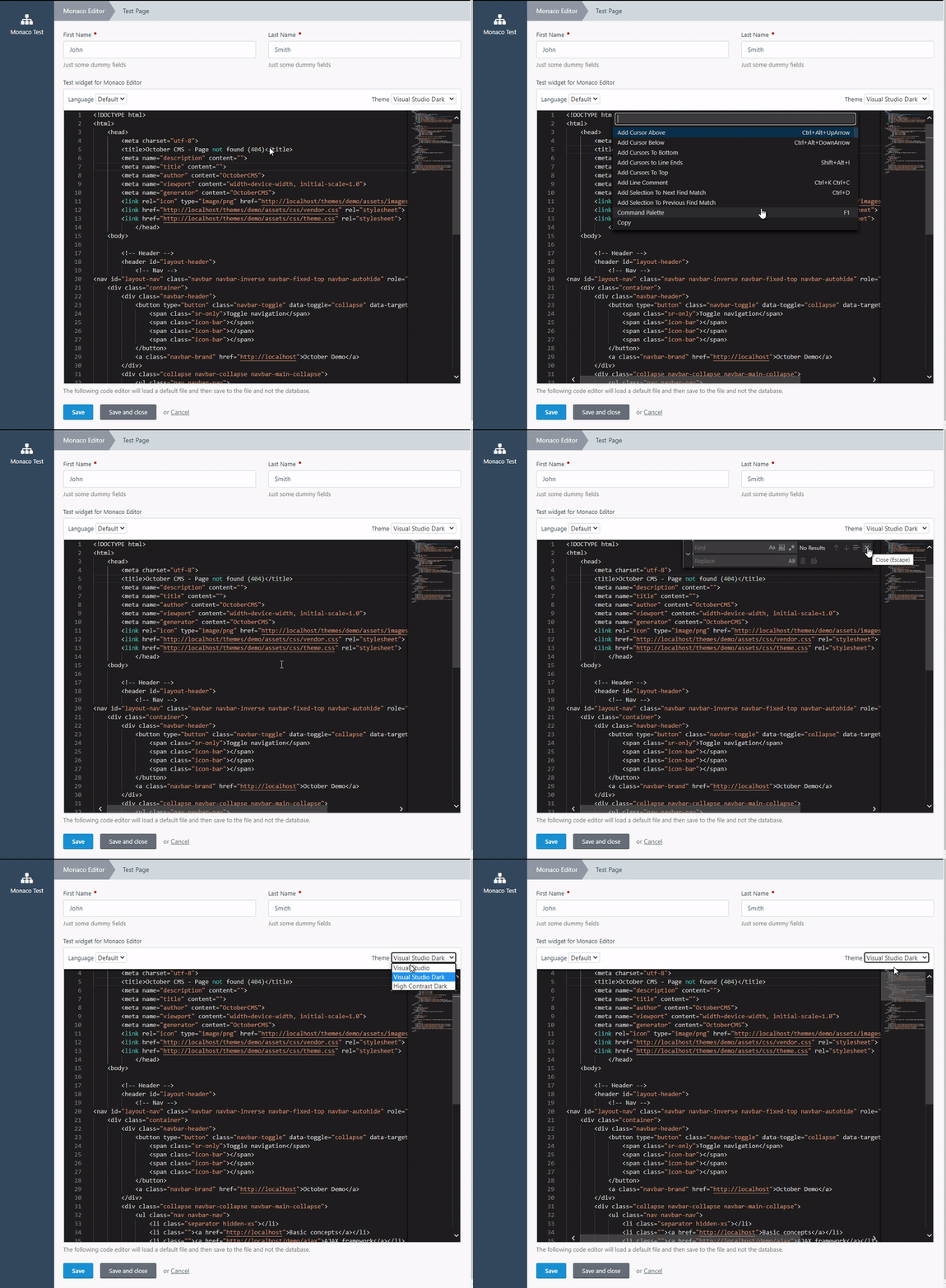
ayumi-cloud
on 28 Jan 2020
YAML options:
Currently setup and working with the widget.
toolbar: false, // true or false (default)
language: 'php', // default php
fontSize: '13', // default 13
lineNumbers: 'on', // off or on (default)
roundedSelection: false, // true or false (default)
scrollBeyondLastLine: false, // true or false (default)
readOnly: false, // true or false (default)
theme: 'vs-dark', // vs or hc-black or vs-dark (default)
minimap: 'true', // false or true (default)
wordWrap: 'wordWrapColumn', // off (default)
wordWrapColumn: 40, // 80 (default)
wordWrapMinified: true, // false or true (default)
wrappingIndent: 'indent', // 'same', 'none' or 'indent' (default)
useShadows: true, // Subtle shadows to the left & top. Defaults to true.
verticalHasArrows: true, // Render vertical arrows. Defaults to false.
horizontalHasArrows: true, // Render horizontal arrows. Defaults to false.
vertical: 'visible', // Accepted values: 'auto', 'visible', 'hidden'. Defaults to 'auto'
horizontal: 'auto', // Accepted values: 'auto', 'visible', 'hidden'. Defaults to 'auto'
verticalScrollbarSize: 17, // Width in pixels for the vertical scrollbar. Defaults to 10 (px).
horizontalScrollbarSize: 17, // Width in pixels for the horizontal scrollbar. Defaults to 10 (px).
arrowSize: 30, // The size of arrows (if displayed). Defaults to 11.
sampleURI: 'acme/example/resources/something.txt', // file location, to load default or placeholder code inside the widget.

size: huge, // Options: tiny, small, large, huge, giant.
span: full, //  auto, left, right, storm, full. Default: full.
commentAbove: 'example', // places a comment above the field.
commentHtml: 'example', // allow HTML markup inside the comment. Options: true, false.
label: 'example', // a name when displaying the form field to the user.
tab: 'example', // assigns the field to a tab.
required: 1, // laces a red asterisk next to the field label to indicate it is required (make sure to setup validation on the model as this is not enforced by the form controller).

type: monacoeditor // fixed widget name.
October handling errors and bugs:
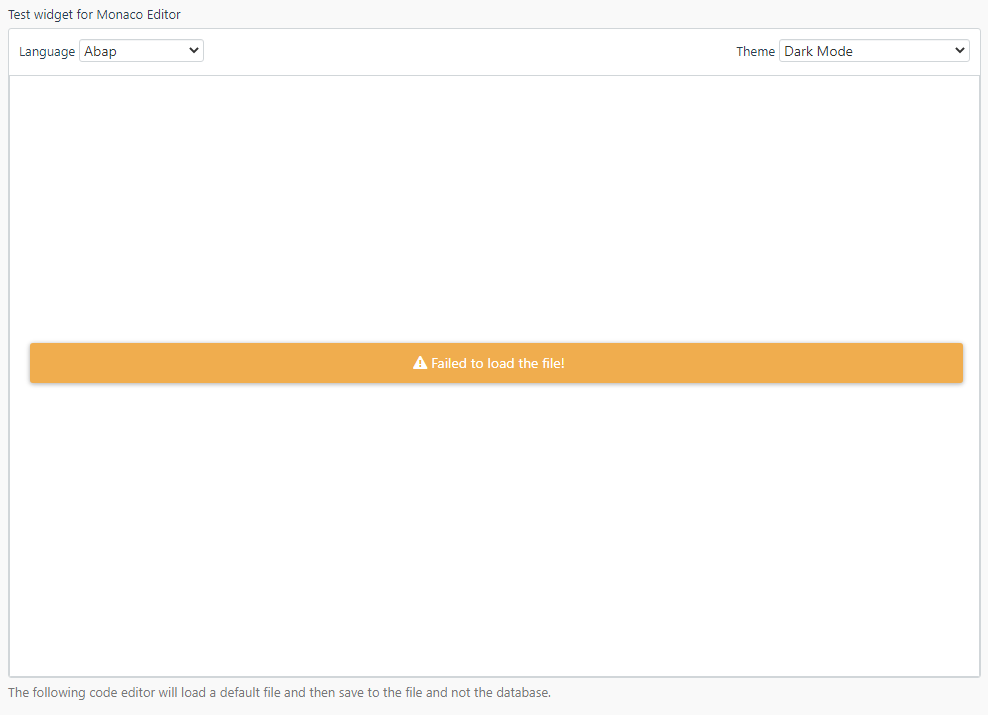
ayumi-cloud
on 28 Jan 2020
@ayumi-cloud is all that stuff in the folder you sent me?
LukeTowers
on 28 Jan 2020
@LukeTowers
Yes, all the above.
Yesterday I added a YAML for the default file location:
sampleURI: '/plugins/ayumi/test/resources/acme-sample.txt'
Also I'm working on some extra things today such as:
YAML:
saveMethod: file | database (default database)
For the widget to load from either the file or database.
[edit] Also updated yaml settings into the following groups:
- General settings
- Styling settings
- Autocomplete settings
- Word wrap settings
- Scrollbar settings
ayumi-cloud
on 29 Jan 2020
Ok, found a very negative feature with Monaco Editor !
If you try to add multiple widgets on the same page you can't have different themes for each one !
Link: https://github.com/microsoft/monaco-editor/issues/1446
Link: https://github.com/microsoft/monaco-editor/issues/338
Microsoft engineers kind of suck, hence why they gave up on Edge and switched to Chromium.
Gonna rip that out of the yaml and into the settings.
ayumi-cloud
on 30 Jan 2020
@ayumi-cloud tbh my thoughts for that widget is that most of those settings would be managed through user preferences anyways, not individual YAML level config.
LukeTowers
on 30 Jan 2020
@LukeTowers
Settings

YAML options
type: monacoeditor
saveMethod: database | file (default database)
fileURI: file location path (when selected saveMethod file it will try to load this file path and if that fails the code editor loads a backup file called default.txt which contains blank)
fontSize: number (default 13)
language: code language, for example, php, css, js, html. Default: php.
size: tiny | small | large | huge | giant
label: string
comment: string
@ayumi-cloud Hmm, some of those should be switched around but I'll take care of that when I review it and turn it into a plugin. Btw, saveMethod shouldn't be something that should be setup on the field config level, it's an implementation detail of how you handle saving the data.
Are you envisioning something like a code editor for all the files on the site from the backend like WP's theme editor with the saveMethod option? It'd help if you could give me an example of how you see that working / what you see it being used for.
LukeTowers
on 31 Jan 2020
@LukeTowers
I need to check wordpress and see what you mean.
So far I done it like this:
    acme-sample:
        span: full
        type: monacoeditor
        saveMethod: 'file'
        fileURI: '/plugins/ayumi/test/resources/acme-sample.txt'
- I forgot to add the
fileURIto my previous comment andsaveMethoddefault is database.
[edit]
saveMethod= database | file (default database)fileURI= file location path (when selectedsaveMethod: fileit will try to load this file path. If that fails the monaco code editor loads a backup file calleddefault.txtwhich is blank). The file path can be anywhere in the cms such as in aplugin,themeorstoragefolder location.
Also I placed it at YAML level to allow multiple options on the same page, e.g.

Save setup so far:
    public function getSaveValue($value)
    {
        // Save to file
        if ($this->config->saveMethod === 'file') {
            // Luke to do

            // ..
        }
        // Save to database
        else {
            return ($value);
        }
    }
p.s. I'll send you the updated files, in 1 - 2 days time.
Of course feel free to change and edit anything you like, right now I keep changing things to try and best fit everyone's needs.
ayumi-cloud
on 31 Jan 2020
@ayumi-cloud sounds good.
LukeTowers
on 1 Feb 2020
Been using Monaco editor for almost a year now in October.
Two main issues with the editor:
When loading the Monaco editor widget in a tab it doesn't show up. To bypass this using a hack method, added some custom javascript to the tabs that run the resize function, to force the widget to get displayed when a user clicks on a tab.
Saving the code in the editor, the editor only saves code that has been updated. If you don't update the code in a widget then that data doesn't get saved. Another hack was added to only save the updated code and bypass the code that hasn't been changed.
Would like to open an issue with the Microsoft github repo on the tabs issue - but the repo has over 400 open issues with little to no comments (so looks like a dead repo to me).
Later, when get some time will try and contact some Microsoft team members to talk about the tabs issue more.
Anyway, upgraded their code to 0.21.2 today.
Thinking of switching the cms page to using a split screen to preview the code output for several code languages. For example, let's say a user is using json they can write the code in the editor on the left hand side of the screen and on the right hand side preview the output.
ayumi-cloud
on 25 Nov 2020
If you add a split screen feature I'd definitely make it a button to toggle between showing and hiding that tab.
LukeTowers
on 25 Nov 2020
@ayumi-cloud I had a look at their repo and, yeah I agree, they've gone really quiet with it. I think this might make it the case where this could be provided as a plugin, but we'll probably keep it out of core as there's not enough support for it. To be fair though, Ace is showing similar activity :man_shrugging:.
Maybe the web-based code editor industry is drying up...
bennothommo
on 26 Nov 2020
Related issues
 jvanremoortere
·
3Comments
jvanremoortere
·
3Comments
 m49n
·
3Comments
m49n
·
3Comments
 atrauzzi
·
3Comments
atrauzzi
·
3Comments
 oppin
·
3Comments
oppin
·
3Comments
 d3monfiend
·
3Comments
d3monfiend
·
3Comments
Most helpful comment
@Samuell1 complied code - removed all the dev stuff etc.
Got a gif now to demo: