Current October CMS functionality doesn't' support auto updates of the themes. It matters when we talk about simple and primitive themes implying additional development or customization for their use.
But what about talking about production ready themes?
We at LOVATA just released our first paid theme Sneakers, which is absolutely ready to use as is in production. It's just a first release that covers only basic needs of the online sellers. We plan to develop that theme and add step-by-step more and more new functionality and it would be great if our customers who use this theme as is can get the updates without difficulties.
We plan to add a huge amount of themes to the marketplace in the near future. Furthermore, each theme will be available in a bundle like the Sneakers Shop Pro Bundle for Shopaholic to start a new online shop in a couple of mouse clicks!
We believe, with the ability to auto-update themes, a new market of ready-made websites opens for October CMS. It can boost marketplace sales a CMS development itself!
Of course for the safety reasons, there must be a way to keep the current theme version safe (backup or updates freeze by default).
 lautsevich
All 16 comments
@lautsevich Do you have any thoughts on how auto-updates will work with themes that have had custom modifications? I would imagine a lot of people generally make changes to themes that they download or purchase - for example, to match their branding requirements or adjust layouts.
 bennothommo
on 2 May 2019
bennothommo
on 2 May 2019
@bennothommo, when we talk about a complex theme with a huge list of functionality we can assume that it covers all of the common needs. Of course, every theme should be customized following the brand guidelines.
As for our first theme, it doesn't have such an option to change the colors at the moment (it will be added in the coming releases). But such an option is presented in TechMarket them for example. But all of the custom graphics can be changed, e.g. logos, icons, favicons, etc.:

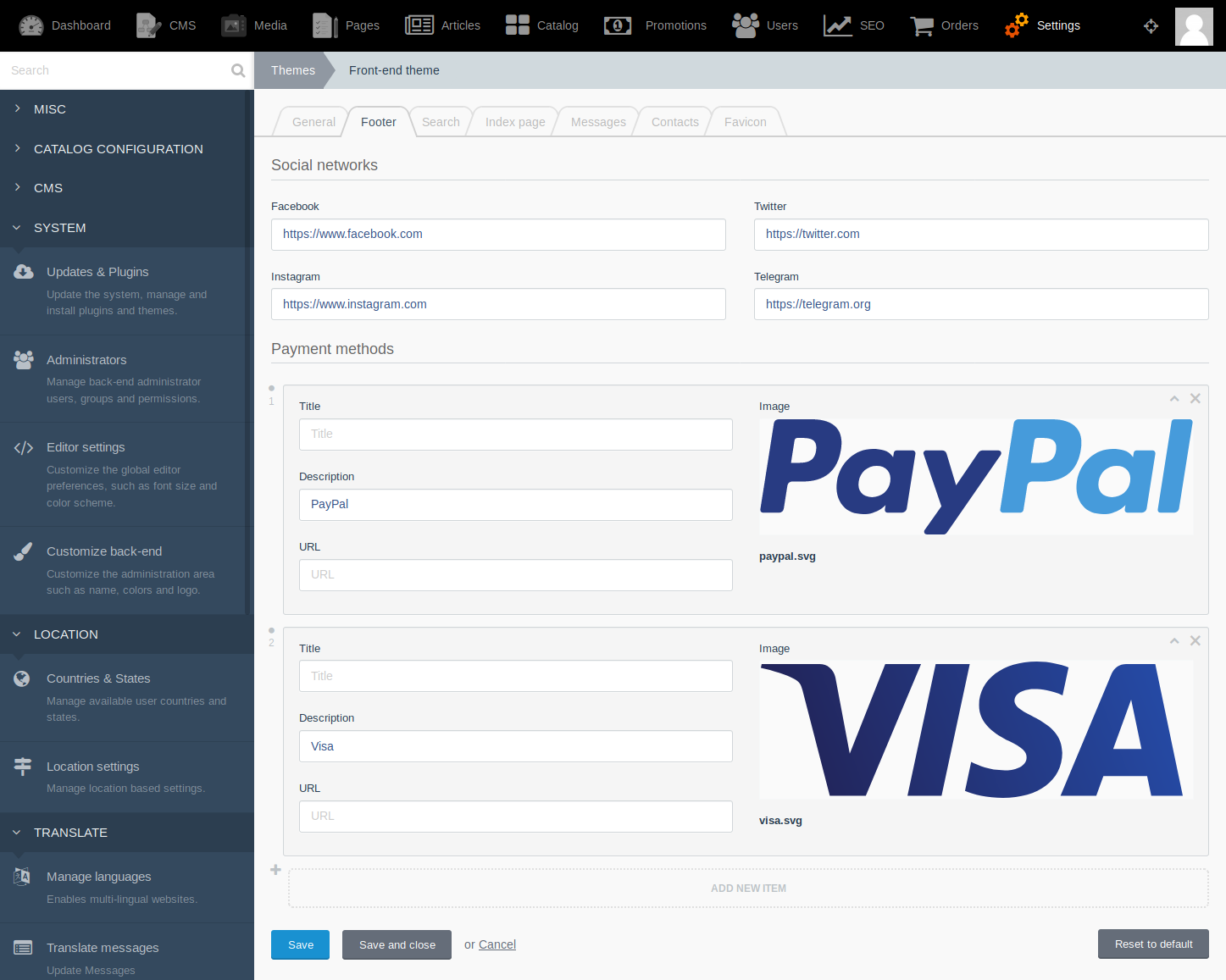
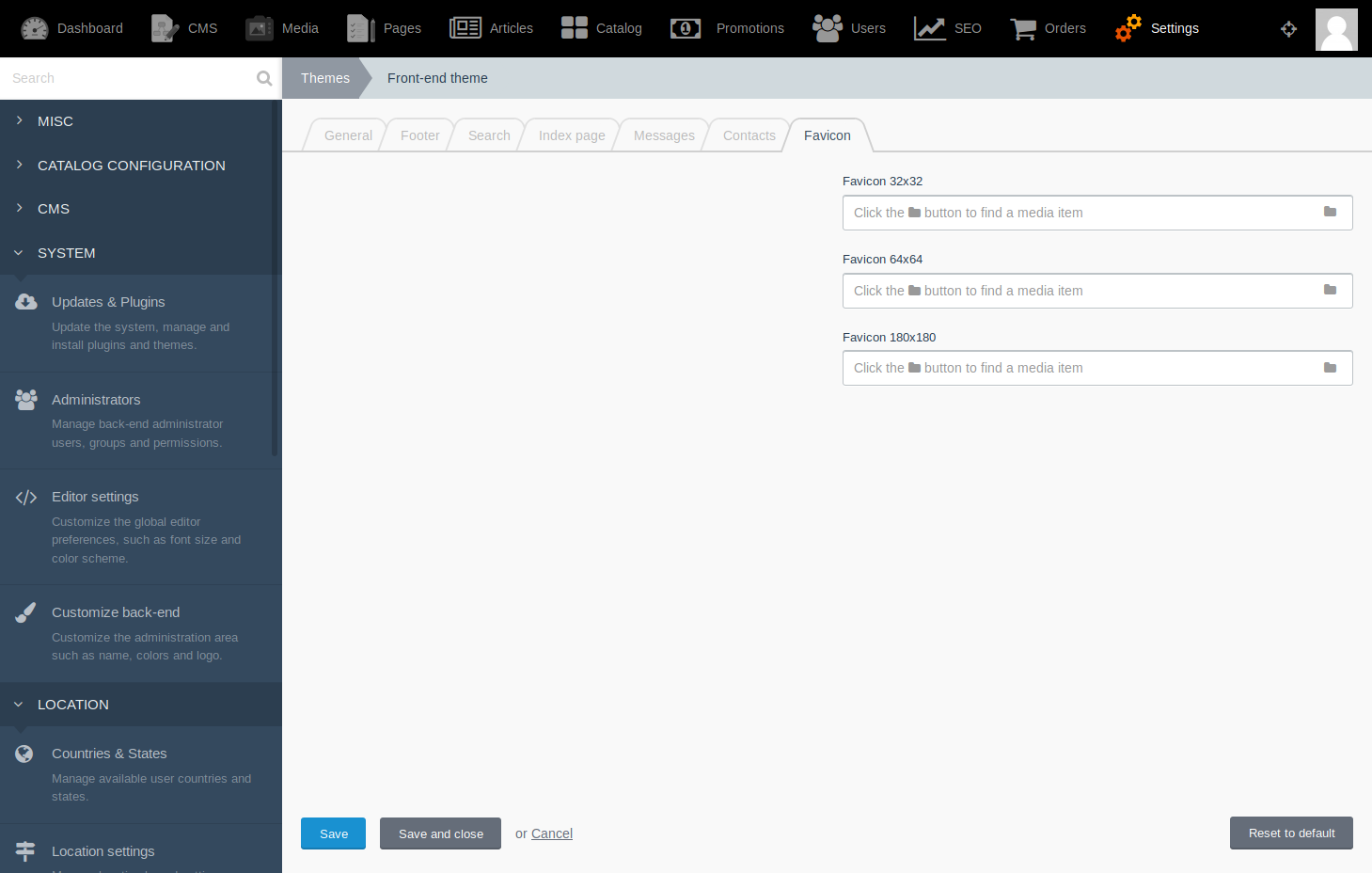
Besides all UI text should be editable through the settings:

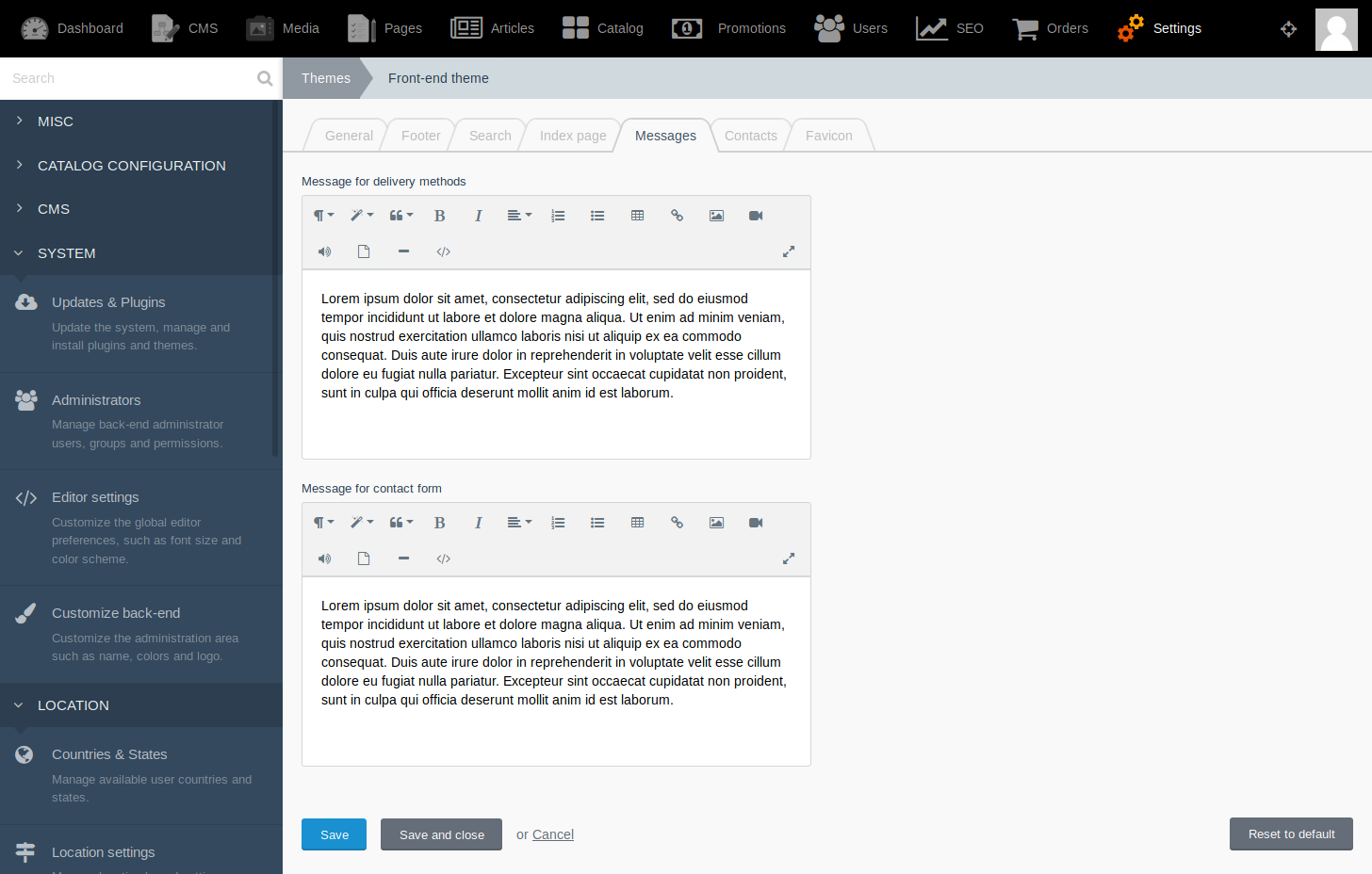

So IMHO the only case when a developer is forced to touch the source code of the theme is the need to change the layout. I agree it's an issue. But. That is another type of customer and for this case, we should have themes backup and updates freeze by default.
Anyway, I believe there's a solution to solve this issue, e.g. theme developer can add to the theme a set of predefined extended areas with the Twig embed tag. Of course, this way you can't make the theme 100% customizable, but it's better than nothing.
Again. When we discuss the customers we should split them into two groups:
- developers
- end-users (sellers)
The auto-update option will be very useful for the second group. The first group isn't forced to switch on auto-update disabled by default for the theme.
lautsevich
on 2 May 2019
Yes, themes should be updatable somehow.
Because currently new theme versions make sense only for those who install the theme from scratch.
Also, october's placeholder and twig's tags for extending/overriding may allow to build customizable themes with almost no changes to its core files.
 GinoPane
on 3 May 2019
GinoPane
on 3 May 2019
The final solution to this would be introducing the concept of child themes in October where every single aspect of the parent theme can be overridden by the child theme. Until that happens, updating themes through the backend can't happen
 LukeTowers
on 4 May 2019
LukeTowers
on 4 May 2019
@LukeTowers I agree.
Coming from WordPress, child themes make it easy to overwrite theme code without modifying the actual theme itself.
 drmzio
on 7 May 2019
drmzio
on 7 May 2019
I'm just getting up to speed on October and I know this has come up before but it seems like the major issue is that content is tied to themes.
I don't think child themes is the proper way to fix this issue (although child themes would be a great addition). I think separating content from themes is the proper way to fix this issue.
So for example, right now my understanding of a typical site structure is:
+ config
+ modules
+ plugins
+ public
+ storage
+ tests
- themes
  - example-theme
    + assets
    + content
    + layouts
    - meta
      + menus
    + pages
    + partials
If you separate content out from themes, you would then be able to change themes without losing core content. Maybe make content a top level directory that contains content, meta, pages, partials, meaning:
+ config
- content
  + content
  - meta
    + menus
  + pages
  + partials
+ modules
+ plugins
...
- themes
  - example-theme
    + assets
    + layouts
Basically the idea is that you treat the above /content directory very carefully but the /themes directory can easily be switched out for other themes and you don't have to worry about losing anything important.
With most other CMS's, you can confidently change out the theme without losing any content. They usually have some typical layouts that every theme provides (like home page, listing page, single page). If the theme has a custom layout and you change to a new theme that doesn't have the custom layout, then the system just falls back to one of the base layouts.
"Themes" has generally referred to "a collection of layouts" but in October it is "a collection of layouts and content". If content is separated from layouts, it will really open up your theme market to a lot of possibilities and solve the issue described here of auto-updates.
For reference, this issue has come up a number of times (mainly in the pages plugin repo) and the issue has usually been closed (one of the previous advocates for separating content from themes was pretty aggressive in their comments). Here is a list of related issues and pull requests:
https://github.com/rainlab/pages-plugin/issues/237
https://github.com/rainlab/pages-plugin/issues/210
https://github.com/rainlab/pages-plugin/issues/100
https://github.com/octobercms/october/issues/3155
https://github.com/octobercms/october/pull/3908
 agraddy
on 10 May 2019
agraddy
on 10 May 2019
@agraddy this is all because OctoberCMS is mostly a flat-file CMS. There's a current work in progress regarding moving of the content into DB instead of keeping data in files. So this will resolve your concerns.
GinoPane
on 10 May 2019
@GinoPane this isn't a flat-file issue. It is a directory structure issue that combines themes and content under one directory. If the directories were structured differently, then it would still be a flat-file CMS but themes (layout and design) would be able to be updated independently of content and pages.
To my knowledge, the work in progress of moving the content to the DB won't fix the issue because it will still fallback to the current directory structure if a DB is not used. So anybody not using a DB would still not be able to auto-update their theme.
agraddy
on 10 May 2019
@agraddy Ah, ok, I see your point. Sounds reasonable.
GinoPane
on 10 May 2019
@agraddy I don't see us moving away from tying the theme content to the theme itself any time soon. A lot of the content stored in a theme is dependent on the theme itself; and in the real world sites change their themes completely very rarely.
All that to say, I'm still convinced that auto updating themes will require child themes before they can exist - and where you put your content has nothing to do with it 😉
See https://github.com/rainlab/pages-plugin/issues/237#issuecomment-282614908 for @daftspunk's thoughts on the design decision.
LukeTowers
on 11 May 2019
@LukeTowers thanks for the quick response! I'm impressed with how quickly you stay on top of the Github issues.
A lot of the content stored in a theme is dependent on the theme itself
I realize I'm asking a lot here and you probably have a lot of other things on your plate, but I don't really understand this. Would it be possible for you to provide an example?
When I'm referring to theme, I'm referring to layout and CSS styling. I'm not aware of too many situations where content is dependent on layout and styling.
in the real world sites change their themes completely very rarely.
We might be defining theme differently but my experience is the complete opposite of this. I see clients update to new themes all the time. Especially after their website starts looking outdated. The whole ThemeForest marketplace is based around easily switching out your theme.
All that to say, I'm still convinced that auto updating themes will require child themes before they can exist - and where you put your content has nothing to do with it 😉
Maybe I'm not understanding how you envision child themes working, but it seems like content location is a very important part of this equation. Lets say your main theme has a Contact Page. You edit the main themes Contact page to add your address. Later on you decide you want some more involved customizations so you create a child theme and add an About Page in your child theme.
You now have some content in the main theme and some content in your child theme. If you auto-update the main theme, then you lose your contact page updates.
The only way I see around this is to make it a requirement that custom content only goes in the child theme which brings us back to the content issue that currently doesn't allow auto theme updates. It seems like it would solve things a lot easier if custom content was moved to its own directory.
See rainlab/pages-plugin#237 (comment) for @daftspunk's thoughts on the design decision.
I did see that comment. He mentioned "skins" which is what I believe we are basically discussing here. I've done a lot of searching in the October ecosystem and haven't seen skins mentioned anywhere else in regards to changing the front end look.
He doesn't provide a lot of thoughts on the design decision. He just says:
Please spend some more time with the platform and it should make more sense. I wish I had more time to explain it, sorry.
This is the one example he provides which could also be achieved with the directory structure I described above:
BTW - This repo https://github.com/octobercms/docs drives the October CMS documentation, it gets cloned to the /content/docs folder inside the theme. We love the simplicity of this approach and wouldn't have it any other way.
Thanks again for your thoughts!
agraddy
on 11 May 2019
@agraddy
I realize I'm asking a lot here and you probably have a lot of other things on your plate, but I don't really understand this. Would it be possible for you to provide an example?
CMS Pages, Partials, & Meta information (menu structure) are all dependent on the theme that they are implemented in the majority of the time.
I see clients update to new themes all the time.
This feels like it's mostly ancedata coming from both of us, but in my experience clients aren't the ones actually changing out the themes, they're paying their developers to take care of that for them.
You now have some content in the main theme and some content in your child theme. If you auto-update the main theme, then you lose your contact page updates.
The idea behind a child theme (as I see it anyways) is that any modifications period go in the child theme. In essence, installing the parent theme is like installing a dependency, you wouldn't ever change anything manually in a dependency.
I feel like a lot of the confusion stems from the different approaches that OctoberCMS takes vs WordPress. OctoberCMS isn't WordPress, it's not made for non-technical people to build their own sites and play around with swapping themes around. It's built for developers to build sites for their clients that they can then hand off and the client can manage the content easily.
Ultimately though the choice is up to you as a developer how you store and structure your content. If you want your content to be independent of your themes, then you can do that, just use a plugin that stores content outside of the theme (for example, in the DB like the blog plugin - or you could even write a plugin that stores content as flat files but outside of the theme). Furthermore, once the DB layer enhancement is merged in you could easily write a plugin that could in a couple of lines share all content files between all themes.
End result is though that we're not going to have a mystical "content" directory that people are supposed to put their pages, partials, menus, or whatever in. The way that the current "themes" are structured is going to be remaining essentially the same and you will as always be able to do whatever you want / need through plugins.
LukeTowers
on 11 May 2019
@LukeTowers Thanks again for the detailed and respectful response. I appreciate projects that have a clear direction and a welcoming community. I think you all have done a great job at that here in the October community. I think the direction you described indicates that this project is not a good fit for what I'm currently looking for, but I do think you have some great momentum moving forward and wish you all the best!
I'll respond to a few of your comments but I think overall it is one of those agree to disagree since we seem to be coming at this from different perspectives.
I see clients update to new themes all the time.
This feels like it's mostly ancedata coming from both of us, but in my experience clients aren't the ones actually changing out the themes, they're paying their developers to take care of that for them.
I agree - we are both dealing in anecdotes. I am a freelancer who specifically focuses on customizations on already built sites so that is more of what I see. I don't typically work on design or theme changes, but I often see that work requested in the marketplaces where I source jobs from. A lot of times clients are requesting help in switching their current theme to another specific theme.
From my understanding, the way October is currently set up, if a client saw a theme in the October marketplace that they wanted to switch to, it would require completely rebuilding their site with the new theme which is much more involved than switching themes on other CMS's.
I feel like a lot of the confusion stems from the different approaches that OctoberCMS takes vs WordPress.
I agree but not just WordPress, I feel like OctoberCMS uses the term "theme" different from just about every other CMS on the market. Here are some other examples of CMS's that allow you to switch out your theme without changing your content:
https://www.drupal.org/project/project_theme
https://www.joomla-monster.com/
https://themes.shopify.com/
https://marketplace.magento.com/themes.html
https://addons.prestashop.com/en/3-templates-prestashop
Ultimately though the choice is up to you as a developer how you store and structure your content.
I agree, but the lack of opionation on the separation of content from theme means that there is no standard that the marketplace can agree on. Like you mentioned, I could create customizations for this, but this customization is not a standard shared with the rest of the community so I wouldn't receive the same benefit.
End result is though that we're not going to have a mystical "content" directory that people are supposed to put their pages, partials, menus, or whatever in.
I do think "mystical" is an unfair representation of what I requested. My request was to simply move the content, meta, pages, and partial directories out of the theme directory into their own directory. There is nothing mystical about that request. In my mind, that would create a clear separation of content from theme.
Thanks again for the great, clear, and detailed communication. I've appreciated the conversation here and I'm sure anyone else looking into OctoberCMS will be able to glean a lot from this thread.
I think moving the content directories would basically automatically fix the auto-update issue described here but it looks like we are coming at this from different perspectives. I wish you all the best!
agraddy
on 11 May 2019
@agraddy
From my understanding, the way October is currently set up, if a client saw a theme in the October marketplace that they wanted to switch to, it would require completely rebuilding their site with the new theme which is much more involved than switching themes on other CMS's.
Not necessarily, you'd basically just have to copy over the relevant content files, make sure they still make sense in the new theme, and use any of the components used in the old theme in the new theme too.
I agree, but the lack of opinionation on the separation of content from theme means that there is no standard that the marketplace can agree on. Like you mentioned, I could create customizations for this, but this customization is not a standard shared with the rest of the community so I wouldn't receive the same benefit.
The customizations I refer to are called "Components", you could think of them as WordPress shortcodes but way more powerful. That's the standard across the OctoberCMS ecosystem for including content managed by plugins into themes, so it still receives the benefit of the ecosystem at large.
I do think "mystical" is an unfair representation of what I requested. My request was to simply move the content, meta, pages, and partial directories out of the theme directory into their own directory. There is nothing mystical about that request. In my mind, that would create a clear separation of content from theme.
Fair enough, "mystical" is perhaps a hyperbolic description of what you're asking for, but I still just don't think it's feasible to have a theme-independent content directory with the way that themes currently are structured in OctoberCMS.
LukeTowers
on 13 May 2019
Hi, I am a little late to the party but I do want to share some thoughts on this separation of content, design and functionality discussion.
In my opinion it is generally a good idea to structurally separate content, design and functionality from a developer's point of view because this keeps things organized but in reality content, design and functionality are very closely related and one cannot be freely changed without affecting the others.
From the perspective of the webdesigner
When designing a website, the designer has to take into account:
- the functionality offered by the site (e.g. blog or gallery)
- the content written for the site (e.g. how much space you need)
From the perspective of the developer
When developing a website, the developer has to take into account:
- the design of the site (e.g. loading screens, lazy-loading animations, ajax feedback)
- the content (e.g. lazy loading images)
From the perspective of the content editor
When writing for a website, the author has to take into account:
- the design of the site (e.g. 1, 2, 3 columns, detail pages or popups, etc.)
- the functionality offered by the site (e.g. a premium 'read more' section
From the perspective of the business owner
- I think we can all agree on the fact that you CANNOT swap content, functionality and design freely between a webshop for sextoys and a webportal for preschools.
- I think we can also all agree on the fact that you CAN keep content and add, remove or change functionality
But can you keep content and swap design? I guess this depends on how much effort you put into optimizing your site for conversion. If you do put a lot of effort into this, you will never be drastically changing designs but rather do some split-testing and tweak them.
Most Wordpress users never do this but almost every high-end corporate or e-commerce site does. In terms of conversion content and design go hand in hand and design goes far beyond "look at this new theme I installed over the weekend".
 briddle
on 15 Sep 2019
briddle
on 15 Sep 2019
This issue will be closed and archived in 3 days, as there has been no activity in the last 30 days. If this issue is still relevant or you would like to see action on it, please respond and we will get the ball rolling.
![github-actions[bot] picture](https://avatars.githubusercontent.com/in/15368?v=4&s=40) github-actions[bot]
on 17 Oct 2019
github-actions[bot]
on 17 Oct 2019
Related issues
 sozonovalexey
·
3Comments
sozonovalexey
·
3Comments
 ChVuagniaux
·
3Comments
ChVuagniaux
·
3Comments
 d3monfiend
·
3Comments
d3monfiend
·
3Comments
 lukaszbanas-extremecoding
·
3Comments
lukaszbanas-extremecoding
·
3Comments
 mittultechnobrave
·
3Comments
mittultechnobrave
·
3Comments
Most helpful comment
@agraddy
CMS Pages, Partials, & Meta information (menu structure) are all dependent on the theme that they are implemented in the majority of the time.
This feels like it's mostly ancedata coming from both of us, but in my experience clients aren't the ones actually changing out the themes, they're paying their developers to take care of that for them.
The idea behind a child theme (as I see it anyways) is that any modifications period go in the child theme. In essence, installing the parent theme is like installing a dependency, you wouldn't ever change anything manually in a dependency.
I feel like a lot of the confusion stems from the different approaches that OctoberCMS takes vs WordPress. OctoberCMS isn't WordPress, it's not made for non-technical people to build their own sites and play around with swapping themes around. It's built for developers to build sites for their clients that they can then hand off and the client can manage the content easily.
Ultimately though the choice is up to you as a developer how you store and structure your content. If you want your content to be independent of your themes, then you can do that, just use a plugin that stores content outside of the theme (for example, in the DB like the blog plugin - or you could even write a plugin that stores content as flat files but outside of the theme). Furthermore, once the DB layer enhancement is merged in you could easily write a plugin that could in a couple of lines share all content files between all themes.
End result is though that we're not going to have a mystical "content" directory that people are supposed to put their pages, partials, menus, or whatever in. The way that the current "themes" are structured is going to be remaining essentially the same and you will as always be able to do whatever you want / need through plugins.