october:up does not run if all cache directories are not present.
- OctoberCMS Build: 447
- PHP Version: 7.3.1
- Database Engine: Mysql 5.7.24
- Plugins Installed: -
Description:
When deploying an OctoberCMS to production I ignore the cache directories to avoid committing garbage to my GIT repository.
If the cms folders are not present when running a:
php artisan october:up
The application will crash stating that "cms/cache" directory does not exist.
The same applies to all directories in the CMS directory.
Steps To Reproduce:
1 - Create a base project with OctoberCMS
2 - Setup your .gitignore file to ignore the "storage/cms" folder
3 - commit your app and push it to your repository
4 - create a new clone based on your repository
5 - run php artisan october:up
 bugzbrown
All 8 comments
Don't gitignore it, the folder already gitignores all of it's contents: https://github.com/captive/captive-cornerstone.captivexm.com/blob/master/storage/cms/cache/.gitignore.
 LukeTowers
on 26 Mar 2019
LukeTowers
on 26 Mar 2019
Hi Luke thanks for the quick reply. When using the installer (as recommended by the site), the folders do not contain .gitignore files in them.
I'll double check again tomorrow with a clean install to be absolutely sure, but folders like storage/cms/cache and storage/cms/combiner don't come with these files. It might be a problem with the installer then.
I'll check back here tomorrow.
bugzbrown
on 26 Mar 2019
@bugzbrown typically the installer is not recommended for technical users that will be using tools like Git or Composer. I recommend you take a look at my gist (https://gist.github.com/LukeTowers/9100845ba50bd53d957da822d06f3b56#file-setupproject-sh) for how I typically setup my own OctoberCMS-based projects
LukeTowers
on 26 Mar 2019
@LukeTowers Great!! I must have gotten the wrong impression about the installer as I felt it was the recommended way to get up and running with October - I had a look at your gist think it's a great starting point for my projects. Thanks for the help & all your hard work!
bugzbrown
on 28 Mar 2019
In order to ignore /storage/cms/combiner do you simply add: /storage/cms/combinerto git ignore? I am also getting an error in my production site -- I assume this is something to do with caching? Thanks in advance!
 mostmojo
on 22 Aug 2020
mostmojo
on 22 Aug 2020
@mostmojo no, you want the directory present but its contents ignored, so you add storage/cms/combiner/.gitignore to your repo with these contents: https://github.com/octobercms/october/blob/develop/storage/cms/combiner/.gitignore
LukeTowers
on 23 Aug 2020
@mostmojo no, you want the directory present but its contents ignored, so you add storage/cms/combiner/.gitignore to your repo with these contents: https://github.com/octobercms/october/blob/develop/storage/cms/combiner/.gitignore
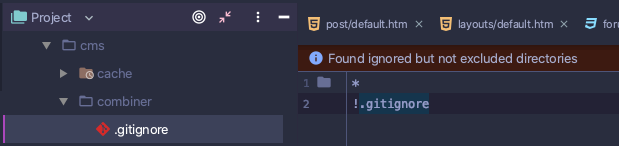
Many thanks for the swift reply Luke. If I've understood correctly, then it should look something like the picture attached above.
mostmojo
on 23 Aug 2020
That's correct @mostmojo
LukeTowers
on 23 Aug 2020
Related issues
 mittultechnobrave
·
3Comments
mittultechnobrave
·
3Comments
 d3monfiend
·
3Comments
d3monfiend
·
3Comments
 sozonovalexey
·
3Comments
sozonovalexey
·
3Comments
 axomat
·
3Comments
mittultechnobrave
·
3Comments
axomat
·
3Comments
mittultechnobrave
·
3Comments