October: Form validation Flash messages X_OCTOBER_ERROR_FIELDS
Error:
X_OCTOBER_ERROR_FIELDS
X_OCTOBER_ERROR_MESSAGE
- OctoberCMS Build: ### 446
- PHP Version: 7.1
- Database Engine: mysql
- Plugins Installed: rainlab.user
Description:
I have seen many examples with form validation messages, even video tutorials, but however, the simple validation is not working for me !
i wanted to customize login and registration page of rainlab.user plugin, and copied the forms/partials from source and edited like this:
<form data-request="onSignin" data-request-validate data-request-flash>
    <div class="row">
        <input name="login" type="text" class="form-control my-2 offset-3 col-6" id="userSigninLogin" placeholder="{{ 'Email'|_ }}" required="" />
        <span class="text-danger" data-validate-for="login"></span>
    </div>
    <div class="row">
        <input name="password" type="password" class="form-control my-2 offset-3 col-6" id="userSigninPassword" placeholder="{{ 'Password'|_ }}" required="" />
        <span class="text-danger" data-validate-for="password"></span>
    </div>

    <button type="submit" class="btn btn-success btn-sm my-2" data-attach-loading>{{ "Sign in"|_ }}</button>
</form>
Am I missing something ??
Steps To Reproduce:
Copy partials from rainlab.user plugin to themes/partials and edit.
Actual Result:
The loading icon in the button is showing up after click, but no validation error message shows for a specific form field.
Also, i try to get the flash message by setting Flash message, still no error flashes.
For now, i just came up with a single static error flash message for the user, like this:
    public function onSignin()
    {
        try {
            return $this->account->onSignin();
        }
        catch(Exception $e) {
            $m = $e->getMessage();
            $m = "Неправильный email или пароль!";
            Flash::error($m);
        }
    }
Please, help
 BahodurSaidov
All 10 comments
Github issues really isn't the place for questions like this. Please use one of the many other avenues available instead of submitting new issues for your questions.
Forum: https://octobercms.com/forum
StackOverflow: https://stackoverflow.com/questions/tagged/octobercms
IRC: #october on Freenode or https://octobercms.com/chat
Slack: https://octobercms-slack.herokuapp.com/
 LukeTowers
on 17 Jan 2019
LukeTowers
on 17 Jan 2019
@LukeTowers Thank you for info, but by following the official documentation i am not able to solve the issue. It might be a bug in new release ?
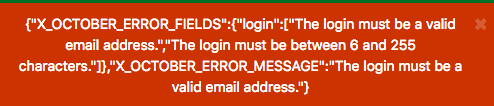
Here is what actual flash I get when using validations:

BahodurSaidov
on 19 Jan 2019
@w20k could you look into the above?
LukeTowers
on 19 Jan 2019
Why no updates? I am still stuck, seeing such messages is just security risk ! Here another login sample without any editing to user plugin:
BahodurSaidov
on 23 Jan 2019
After searching so many blogs and forums, found the issue!
i run npm outdated and got jquery 1.9.1 1.12.4 3.3.1 then run npm update jquery.
Re-run npm outdated and got jquery 1.12.4 1.12.4 3.3.1.
Now works as expected.
I think you guys should mention jquery version somewhere, at least in github repo !!!
BahodurSaidov
on 23 Jan 2019
@BahodurSaidov where do you recommend we include that information? @ayumihamsaki what do you think about listing our dependency versions in the readme?
LukeTowers
on 23 Jan 2019
@LukeTowers
Hi just quickly read through this issue, to get a background idea of the issue.
what do you think about listing our dependency versions in the readme?
I think a bad idea to add it into the readme file.
I would be happier to suggest creating a new .md file for all the dependency versions something like: dependencies.md and mentioning this new file in the readme.md under a small section. This way keeps everything tidy and organized and makes it easier for future updating. That's my thoughts.
 ghost
on 24 Jan 2019
ghost
on 24 Jan 2019
@ayumihamsaki sure, that sounds reasonable. Could you do some research and see how other projects handle similar setups?
LukeTowers
on 24 Jan 2019
@LukeTowers might be something like md file as mentioned, but as for me, i was searching for package.json and bower.json files, since nobody use a project without package managers nowadays...
You could separate only frontend dependencies with npm or bower... but as per documentation style, md files could go better...
BahodurSaidov
on 24 Jan 2019
So I will do two things:
- Research and see how to best write up the documentation for the dependencies version lists.
- Research and see how to best to add a dependencies file for October's package manager.
I will open a new issue for this and go from there.
ghost
on 24 Jan 2019
Related issues
 sozonovalexey
·
3Comments
sozonovalexey
·
3Comments
 m49n
·
3Comments
m49n
·
3Comments
 axomat
·
3Comments
axomat
·
3Comments
 EbashuOnHolidays
·
3Comments
EbashuOnHolidays
·
3Comments
 kdoonboli
·
3Comments
kdoonboli
·
3Comments
Most helpful comment
After searching so many blogs and forums, found the issue!
i run
npm outdatedand gotjquery 1.9.1 1.12.4 3.3.1then runnpm update jquery.Re-run
npm outdatedand gotjquery 1.12.4 1.12.4 3.3.1.Now works as expected.
I think you guys should mention jquery version somewhere, at least in github repo !!!