October: Backend pages wont open for new administrators
- OctoberCMS Build: 446
- PHP Version: 7.2.10
- Database Engine: Mysql
- Plugins Installed: October Demo, RedirectToHTTPS
Description:
Newly created administrators have trouble accessing pages in the backend.
Steps To Reproduce:
- Created new administrator from CMS as a Developer with Super User.
- Login with new administrator account.
- Browse to CMS -> Pages
- Clicking on a page name does absolutely nothing.
- Checking any checkbox next to page names (ones for multiple deleting) fixes the problem.
- Inspecting the page shows following errors:
Uncaught TypeError: Cannot read property 'setActiveItem' of undefined
jquery.min.js?v446:2 jQuery.Deferred exception: Cannot read property 'setActiveItem' of undefined TypeError: Cannot read property 'setActiveItem' of undefined
Uncaught TypeError: Cannot read property 'goTo' of undefined

 Morsusy2k
All 60 comments
@Morsusy2k did you try deleting the cache and performing a hard reload in Chrome? (Right click on the reload button when the inspector is open)
 LukeTowers
on 11 Jan 2019
LukeTowers
on 11 Jan 2019
@LukeTowers Yes, tried everything that came to mind. (same thing happens with my local environment and on the live too)
Tried on other PC (on which I have never loaded the site) same thing happens.
Morsusy2k
on 11 Jan 2019
@Morsusy2k does this happen with the RedirectToHTTPS plugin removed?
LukeTowers
on 11 Jan 2019
@LukeTowers Removed all plugins on local environment the problem is still there.
Just noticed, when I do Empty Cache and Hard Reload the page it works fine until I reload the page.
Just tried making a clean install on linux virtual machine (php 7.3). Problem still occurs.
Morsusy2k
on 11 Jan 2019
Weird. @w20k could you look into this when you have a chance?
LukeTowers
on 11 Jan 2019
I have the same problem. CMS is totally unusable ATM.
I have the same problem with the superuser.
Installed with me are Oktober Demo and Pages.
What i noticed is if i add a new page. Then i can access the pages in CMS.
This doesnt work in Pages tho.
 therealfly
on 11 Jan 2019
therealfly
on 11 Jan 2019
@LukeTowers, will look at it, today. Nope - couldn't reproduce it, yet... With clean install & upgrade. Nothing.
@therealfly, @Morsusy2k - have you tried recompiling assets? php artisan october:util compile assets. Also, do you have an icon to load unsafe scripts?
 w20k
on 11 Jan 2019
w20k
on 11 Jan 2019
@w20k Just tried recompiling assets no change to the issue.
There is nothing that indicates unsafe scripts :/
Morsusy2k
on 11 Jan 2019
@Morsusy2k, could you zip your application? Remove all configs or .env files and post a link here? Or make a repo with your setup.
Will try to find the cause then.
w20k
on 11 Jan 2019
Hi Denis,
I will but it will be in 12 hours (different timezone) its running on a local machine at work so i will do it.
Greetings from the Netherlands
Johan
Sent from Mailhttps://go.microsoft.com/fwlink/?LinkId=550986 for Windows 10
From: Denis Denisov notifications@github.com
Sent: Friday, January 11, 2019 10:08:26 PM
To: octobercms/october
Cc: therealfly; Mention
Subject: Re: [octobercms/october] Backend pages wont open for new administrators (#4048)
@Morsusy2khttps://github.com/Morsusy2k, quick quest. Could you zip your application? Remove all configs or .env files and post a link here? Or make a repo with your setup.
Will try to find the cause then.
—
You are receiving this because you were mentioned.
Reply to this email directly, view it on GitHubhttps://github.com/octobercms/october/issues/4048#issuecomment-453656922, or mute the threadhttps://github.com/notifications/unsubscribe-auth/AMMfGF3c-JFqRuhb293mIBRnx3oRcCBjks5vCP1KgaJpZM4Z6lKb.
therealfly
on 11 Jan 2019
I have same problem. @w20k Are you using "disable cache" in DevTools? When cache is disabled, there is no error. When you enable it, first reading of CMS or staticPages is ok, second and other triggers error.
Problem is this line, something destroy $.oc.sideNav object (or is not created) actually.
 Rike-cz
on 12 Jan 2019
Rike-cz
on 12 Jan 2019
@Morsusy2k, @Rike-cz, @therealfly - monkey patch v0.5; Try using the old jquery, seems like, there is a bug in the code related to the new version.
Will inform you fellows, when the fix will be on the way.
For now use: https://code.jquery.com/jquery-2.2.4.min.js
w20k
on 12 Jan 2019
@w20k I am glad that there is an idea of where the problem is. Thank you so much for looking into this. Can you point us newbs out to how can we change core jQuery version?
Morsusy2k
on 12 Jan 2019
@Morsusy2k, just paste the code from a link (^) to modules/backend/asstes/js/vendor/jquery.min.js. Worked for me...might be something, else for you. Test it with your build and comment, if it worked.
Thanks!
w20k
on 12 Jan 2019
@w20k Hmm the error changed:
Uncaught TypeError: e.event.addProp is not a function

And not even the checkbox 'workaround' works anymore, not even + Add button.
Morsusy2k
on 12 Jan 2019
@Morsusy2k, forgot one more thing 😄Remove everything from migrate.
modules/backend/asstes/js/vendor/jquery-migrate.min.js
w20k
on 12 Jan 2019
@w20k It works! Are there any side effects? If I update the CMS does this get overridden?
Thank you so much. Great support. :D
Morsusy2k
on 12 Jan 2019
@Morsusy2k it will. That's why it's called monkey patch 😄
Don't think so.
I'll dig deeper to get this working in the next release - no worries.
w20k
on 12 Jan 2019
@w20k Works for me to! Thanks a lot!
Rike-cz
on 12 Jan 2019
This works for my related Rainlab Pages Plugin issue found here: https://github.com/rainlab/pages-plugin/issues/375
 gavatwork
on 14 Jan 2019
gavatwork
on 14 Jan 2019
I'm having a similar issue on a fresh installation of build 446. Firefox behaves pretty strange. When trying to edit a cms page I get the following error:
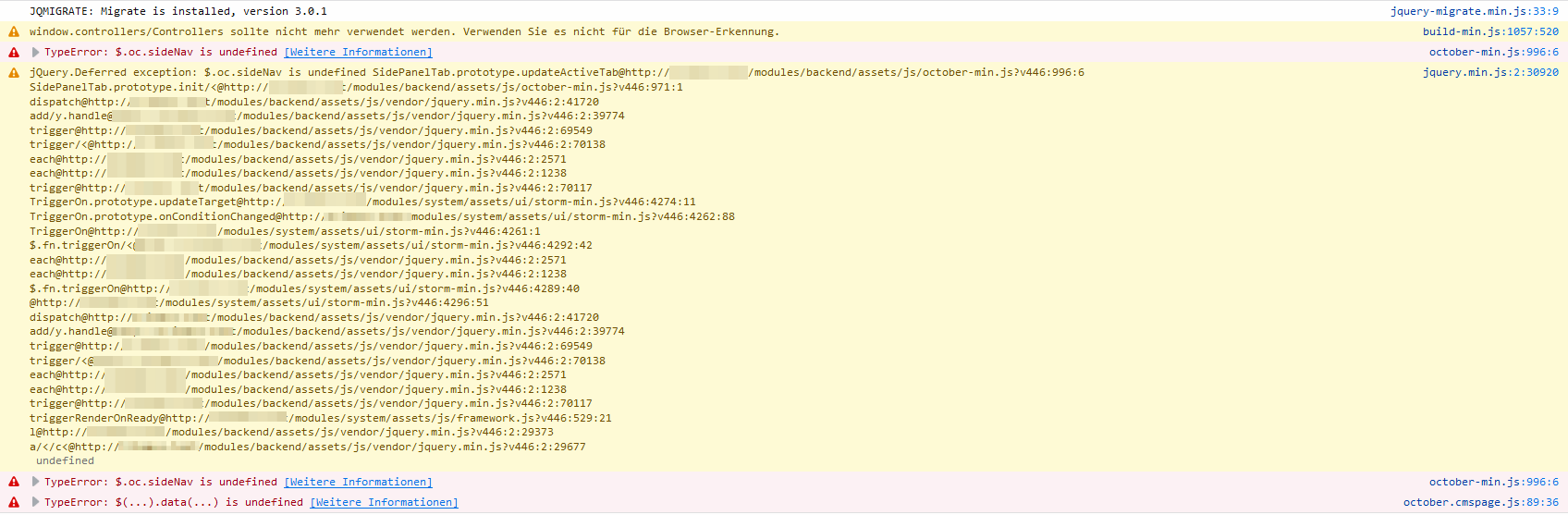
After reloading the page with Ctrl + F5 everything works. On the next page load however the problem occurs again until I hit Ctrl + F5.
I also had a customer call in that was unable to edit a static page in Edge. It was also on build 446 that was updated a few days earlier.
 tobias-kuendig
on 26 Jan 2019
tobias-kuendig
on 26 Jan 2019
@tobias-kuendig you could downgrade jquery to 2.x version and remove jquery-migrate.
The only thing that I've found if you change this line (october.sidepaneltab.js):
// DATA-API
    // ============

    $(window).on('load', function() {
        $('[data-control=layout-sidepanel]').sidePanelTab()
    })
To
// DATA-API
    // ============

    $(document).ready(function() {
        $('[data-control=layout-sidepanel]').sidePanelTab()
    })
It starts working again... Not a best possible solution and 99% could break something else 😄
w20k
on 26 Jan 2019
Hi @w20k, any updates on this issue?
Have a lot of IE users complaining over here ;-)
 adrenth
on 18 Feb 2019
adrenth
on 18 Feb 2019
Hi, @adrenth don't think it's related to IE, might be a different issue.
Have you tried my monkey patch (^see my comments)?
If you'd love to be my guinea pig, I could test a few things on you 😄
w20k
on 18 Feb 2019
Thanks for your quick response. Figured the source of this issue might be related to the recent updated libraries.
Currently downloading a Windows 7 image with IE 11 pre-installed. This is a setup from one of our clients which reported the issue to us.
Will try the monkey fix. And let you know my findings.
adrenth
on 18 Feb 2019
@adrenth thanks a lot for a quick response, as well :)
If there would be active testers (don't use CMS a lot, lately). I might try out few fixes, but didn't have time to continue, yet.
This fix might work... but could cause other issues.
The only thing that I've found if you change this line (october.sidepaneltab.js):
// DATA-API
    // ============

    $(window).on('load', function() {
        $('[data-control=layout-sidepanel]').sidePanelTab()
    })
To
// DATA-API
    // ============

    $(document).ready(function() {
        $('[data-control=layout-sidepanel]').sidePanelTab()
    })
@w20k I can confirm it works, I changed the october.sidepaneltab.js and it worked. So this is definately a monkey fix ;-)
However:
$(window).on('load')works on IE Edge$(window).on('load')does not work on IE 11 (Windows 7)$(document).ready()do work on IE Edge and IE 11
adrenth
on 18 Feb 2019
@adrenth You could try clearing the cache and refreshing the page with "ctrl | cmd + r".
And don't use an option in dev tools: Disable cache.... Should come back, I guess 😄 Or maybe it's fixed with the latest release, need to check.
w20k
on 18 Feb 2019
At first I couldn't get it to work on IE11 (Win 7), other browsers seem to work fine.
1) I tried clearing the cache using the Developer Tools in IE11, did not see any 304 requests, only 200.
2) Reloaded the page and it didn't work.
3) Requested another page in the backend and then navigated back to /backend/rainlab/pages/ and then it worked.
adrenth
on 18 Feb 2019
What's the recommend course of action here?
LukeTowers
on 18 Feb 2019
@LukeTowers will look at it once again, at the end of the week. And comment, what would be the best option to fix it.
w20k
on 18 Feb 2019
Hi @w20k, hope you are doing well. Any progress on this issue?
adrenth
on 28 Feb 2019
Hi @adrenth, sadly - nope. But hopefully will have a minute to deal with that on weekends.
w20k
on 28 Feb 2019
@w20k tried your monkey patch and it's not working for me on Qutebrowser or Qupzilla.
In all cases (with or without your patch), forcing the page reload (ctrl-shift-r) allows the pages to be opened. When I move to a different backend menu and comeback, it breaks again until I force the page refresh...
 mjauvin
on 1 Mar 2019
mjauvin
on 1 Mar 2019
@mjauvin have you tried both patches?
First, is to revert jQuery back to 2.x (https://code.jquery.com/jquery-2.2.4.min.js) and remove content from jquery-migrate.min.js.
Second, is to use $(document).ready...
w20k
on 1 Mar 2019
@w20k I confirm, reverting back to jquery 2.2.4 and removing jquery-migrate does solve the problem.
mjauvin
on 1 Mar 2019
@ayumihamsaki what do you think about this issue? Any ideas, why 3.x version does the loading of window differently (or maybe caches, or faster 😄)
w20k
on 1 Mar 2019
@w20k just had a quick read through. This is the first I heard about this issue (I don't use Rainlab Pages Plugin - I created my own plugins). Ah you said the words caching and that october.sidepaneltab.js both I complained about months ago. Just don't say about drag n drop tabs!
I find some things strange in the above comments though.
Morsusy2k was trying to use two different versions of jquery migrate at the same time, you should not use the 3.0.0+ version use the 3.0.1 only.
adrenth is saying Edge works but not IE11, did you look at the Modernizr Upgrade as october.sidepaneltab.js uses it quite heavily and as there is an issue with browsers that may be an issue as well.
$(window).on('load')works on IE Edge$(window).on('load')does not work on IE 11 (Windows 7)$(document).ready()do work on IE Edge and IE 11
My thoughts would be to check the Modernizr and update the october.sidepaneltab.js
Ok that's my thoughts but I not even looked at any code yet. I can take a look in a few days time, right now just in the middle of coding something quite large.
 ghost
on 1 Mar 2019
ghost
on 1 Mar 2019
It's too stupid to be true... 😄
@tobias-kuendig - your's FF bug could be fixed with a single line of code. If you could test this out would be awesome ;)
File: october.sidenav.js
Change this
$(document).ready(function(){
        $('[data-control="sidenav"]').sideNav()
})
To this:
$(window).on('load', function(){
        $('[data-control="sidenav"]').sideNav()
})
Cant' reproduce in the latest dev build the same issue with chrome and new users... Hm...Any testers to help me out? :)
w20k
on 2 Mar 2019
@w20k, patching ./modules/backend/assets/js/october.sidenav.js and running php artisan october:util compile js seems to fix the issue in Firefox :+1:
tobias-kuendig
on 4 Mar 2019
@w20k, patching
./modules/backend/assets/js/october.sidenav.jsand runningphp artisan october:util compile jsseems to fix the issue in Firefox 👍
I confirm this is working with FF dev. Thank you!
 marcomessa
on 5 Mar 2019
marcomessa
on 5 Mar 2019
@w20k is that a fix that can be implemented in core? Does it break anything else? Does it require changing the jQuery version?
LukeTowers
on 6 Mar 2019
@w20k applied your fix - https://github.com/octobercms/october/issues/4048#issuecomment-464681943 to sidepaneltab.js and recompiled the js assets (php artisan october:util compile js) and it fixes the problem.
mjauvin
on 6 Mar 2019
@w20k Fixed in Opera too!
Rike-cz
on 6 Mar 2019
@LukeTowers yes it is for the core. Not sure, I hope it doesn't, but will run more tests. What it does, It changes the loading order of sidenav. So that it would be loaded at the same time as a sidebar.
Nope - nothing to do with our JQuery upgrade.
Will make a PR.
w20k
on 6 Mar 2019
Having the same issue with Chrome 72 and IE 11 on Windows 7 Enterprise but don't have this issue with Chrome 72 on Mac.
Reverting back to jquery 2.2.4 and removing jquery-migrate code does solve the problem for Windows.
 damianlewis
on 13 Mar 2019
damianlewis
on 13 Mar 2019
@damianlewis - what about this fix https://github.com/octobercms/october/issues/4048#issuecomment-468933242?
w20k
on 13 Mar 2019
@w20k Fix #4048 worked on Chrome but didn't resolve the issue for IE 11. I've reverted back to the original fix.
damianlewis
on 15 Mar 2019
That's sad, can't test with IE11 😄 Need to find a hack for that!
w20k
on 15 Mar 2019
@w20k You could download a free Windows image from Microsoft site: https://developer.microsoft.com/en-us/microsoft-edge/tools/vms/
adrenth
on 15 Mar 2019
Thanks, @adrenth!
w20k
on 15 Mar 2019
It's too stupid to be true... 😄
@tobias-kuendig - your's FF bug could be fixed with single line of code. If you could test this out would be awesome ;)File:
october.sidenav.js
Change this$(document).ready(function(){ $('[data-control="sidenav"]').sideNav() })To this:
$(window).on('load', function(){
        $('[data-control="sidenav"]').sideNav()
})
Cant' reproduce in the latest dev build the same issue with chrome and new users... Hm...Any testers to help me out? :)
@w20k I am at October build 447 and I was experiencing the sidenav.js error (only on Firefox). This fix works great for FF, will see if it affects IE users at all
 tfprado
on 25 Mar 2019
tfprado
on 25 Mar 2019
This issue occurs after I delete a page. Clearing cms cache and doing Chrome hard reload fixes it for me.
 zigi05
on 27 Mar 2019
zigi05
on 27 Mar 2019
It's too stupid to be true... 😄
@tobias-kuendig - your's FF bug could be fixed with single line of code. If you could test this out would be awesome ;)File:
october.sidenav.js
Change this$(document).ready(function(){ $('[data-control="sidenav"]').sideNav() })To this:
$(window).on('load', function(){
        $('[data-control="sidenav"]').sideNav()
})
Cant' reproduce in the latest dev build the same issue with chrome and new users... Hm...Any testers to help me out? :)
This fixed this issue in Firefox for me and didn't affect Chrome or IE.
Internet Explorer Version 11.253.17763.0 Works
Chrome Version 73.0.3683.86 Works
Firefox Quantum Version 66.0.2 Works
 nizzac
on 28 Mar 2019
nizzac
on 28 Mar 2019
Fixes my issue in QuteBrowser (based on chromium), finally!
mjauvin
on 28 Mar 2019
It's too stupid to be true... 😄
@tobias-kuendig - your's FF bug could be fixed with a single line of code. If you could test this out would be awesome ;)File:
october.sidenav.js
Change this$(document).ready(function(){ $('[data-control="sidenav"]').sideNav() })To this:
$(window).on('load', function(){
        $('[data-control="sidenav"]').sideNav()
})
Cant' reproduce in the latest dev build the same issue with chrome and new users... Hm...Any testers to help me out? :)
I've tried this fix again and can confirm that it doesn't work for OctoberCMS build 447 when using IE 11.0.9600.19266 on Windows 7 Enterprise.
damianlewis
on 28 Mar 2019
@damianlewis do you have any errors?
Could you also try adding this line to the head (modules/backend/layouts/_head.htm):<meta http-equiv="x-ua-compatible" content="IE=edge">
w20k
on 28 Mar 2019
@w20k after adding the <meta http-equiv="x-ua-compatible" content="IE=edge"> meta tag, these are the errors from IE 11 when loading the /backend/cms page.
SCRIPT5007: Unable to get property 'setActiveItem' of undefined or null reference
File: october-min.js, Line: 996, Column: 6
SCRIPT5007: Unable to get property 'setActiveItem' of undefined or null reference
File: jquery.min.js, Line: 2, Column: 31040
This is the error when clicking on a page link in the CMS section.
SCRIPT5007: Unable to get property 'goTo' of undefined or null reference
File: october.cmspage.js, Line: 89, Column: 10
This should be fixed by 288d9543afb5f856a03f03b68dca96e4ed1f410a available in Build 449+
 daftspunk
on 28 Mar 2019
daftspunk
on 28 Mar 2019
The HTTP Header:
<meta http-equiv="x-ua-compatible" content="IE=edge">
Is a dead HTTP Header and Microsoft have dropped support for it a few years ago. They say not to use it by the way.
Likewise with the chrome one:
<meta http-equiv="X-UA-Compatible" content="IE=edge,chrome=1" />
I wouldn't recommend to use it.
ghost
on 18 Apr 2019
Related issues
 lukaszbanas-extremecoding
·
3Comments
lukaszbanas-extremecoding
·
3Comments
 SeekAndPwn
·
3Comments
SeekAndPwn
·
3Comments
 Flynsarmy
·
3Comments
Flynsarmy
·
3Comments
 m49n
·
3Comments
m49n
·
3Comments
 dunets
·
3Comments
dunets
·
3Comments
Most helpful comment
@w20k, patching
./modules/backend/assets/js/october.sidenav.jsand runningphp artisan october:util compile jsseems to fix the issue in Firefox :+1: