October: Quick notice of a broken mediafinder version from 443 to 446 when upgrading
First of all, I would like to announce that my English is not good.
I don't know if upgrading the version caused a broken mediafinder. Today (06.01.2019), I received an automatic notification of a version update recommendation. Fortunately, my second project is in the development phase. Then other plugins that use the mediafinder will not display the image in the backend. Image link is broken. For example, the media url should be "http: //localhost/KAAR/storage/app/media/assets/more_image.jpg", but all links point to double root:
"http://localhost/KAAR/KAAR/.../.../etc /..."
I also looked at the mediamanager, then the download url is also broken. Screenshots speak better for themselves:

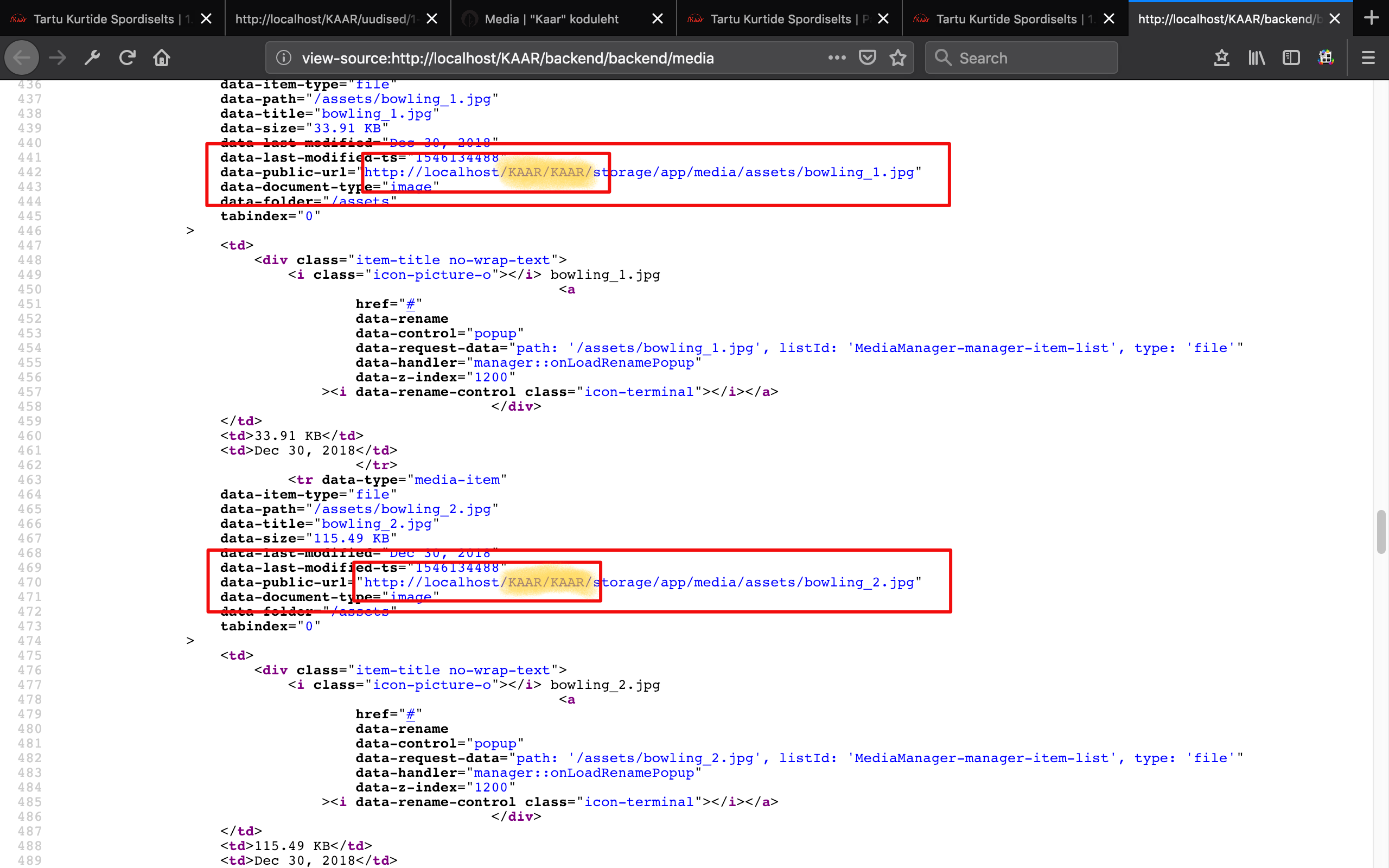
I do not know if the failure of the mediafinder is related to the upgrade? I want to listen to you!
 kukrik
All 15 comments
@kukrik, couldn't yet reproduce your issue. Will try with a subfolder.
 w20k
on 7 Jan 2019
w20k
on 7 Jan 2019
My development on the server has several projects, so this project is in the "KAAR" folder. All other things work well, no problem. Only the image url is incorrect. There have been no problems until version 443.
Today I was thinking for a moment and raised the root of this project, then the url of the picture is correct and shows.
Today I made a clean installation for another project "OCTOBER" and wanted to see how the image link looks like. Same problem: "http://localhost/OCTOBER/OCTOBER/storage/app/media/assets/more_image.jpg".
This means that after the upgrade, only the correct url of the image can be seen on the root. But this is not normal, there may be multiple subfolders on the production server. What's going to happen then?
I searched and found the places that show the wrong way. These are "$imageUrl" and "$publicUrl". Certainly, they give a good hint to find other classe ...
I'll hear you. I am already concerned that this project cannot be continued.
kukrik
on 8 Jan 2019
I did another test and another level below: root->TEST->another_test.
The result is "http://localhost/TEST/another_test/TEST/another_test/storage/app/media/more_image.jpg".
I hope this test will give you a hint of where the problem is.
I look forward to your thoughts and suggestions.
kukrik
on 8 Jan 2019
@kukrik, could you also try, just to be 100% sure where to look. Try the same thing root->TEST->another_test with .443 build?
Thanks a lot for your help!
w20k
on 8 Jan 2019
How do I make a clean installation with build 443? Every new installation follows the latest versions in real time.
I use every project with a new installation, I use the installation wizard: https://octobercms.com/docs/setup/installation.
My previous project is in build 443. I copied it to another folder for testing. The image url is correct on the front end, but I cant log in to backend.
@w20k, does it give an idea of where a bug can be? Second, don't you want to try a new installation and try the same thing like root->some-test or root->some-test->another-test?
kukrik
on 8 Jan 2019
@kukrik, I will, but most probably later today. Thanks for helping!
w20k
on 8 Jan 2019
Hi, I was thinking and doing one sample, I exchanged the build 446 in the folder modules->system against build 443 in the foldermodules>system.
And it works now.
I'm a new boy here since the summer of 2018. I can't find a specific cause that causes this error.
@LukeTowers, I hope this tip will give you a specific hint about what changes have earlier been made to this folder.
I'll listen to you!
kukrik
on 8 Jan 2019
@kukrik, @LukeTowers - found the cause here.
MediaLibrary.php (https://github.com/octobercms/october/blob/26173486d39cdf4312535ecf247e3d7a161713b4/modules/system/classes/MediaLibrary.php#L542)
Commit: https://github.com/octobercms/october/commit/bd2f14d510308a3131cd64fa27d24db1e055fe7c
PR: https://github.com/octobercms/october/pull/3536
Will create PR or we could ask commiter to look at this new issue.
@adsa95, could you look at this issue with subfolders?
$fullPath = $this->storagePath.implode("/", array_map("rawurlencode", explode("/", $path)));

$this->storagePath.$path;
@kukrik what is your link policy and your app_url set to?
 LukeTowers
on 8 Jan 2019
LukeTowers
on 8 Jan 2019
The problem actually occurs in the next line: Url::to($fullPath). Because $fullPath is relative to the domain root (due to $this->storagePath being so if not using S3 etc), and when not given a full URL Url::to() adds the schema and full root path again (incl subdomain) and it gets duplicated.
I suggest we make $this->storagePath only be relative to the application root, and then the application root relative to domain root will be added in Url::to(), this applies no matter the link policy. Since $this->storagePath originates in the config where it should be set relative to the application root in the config, the fix is as simple as removing these three rows that add the application root to the variable:
I've done a quick test with this this using the Media Viewer and all different link policys, with and without subfolder and it seems to work as intended.
In this class $this->storagePath is only used in getPathUrl() so this should not affect any other featurs of the MediaLibrary class, and when using S3 etc $this->storagePath will be a qualified URL it would not be affected by the lines above and also passes through Url::to() without modification, hence it should not be affected either.
 adsa95
on 8 Jan 2019
adsa95
on 8 Jan 2019
@adsa95 that sounds good to me, are you able to add a unit tests with various combinations of link policies and app urls to make sure that this stays fixed?
LukeTowers
on 8 Jan 2019
@kukrik what is your link policy and your app_url set to?
@LukeTowers, hmmmm, I can't say anything about the first question. @adsa95 explained his comment, I understand it...
The second question is clear, I have config->app.php:'url' => 'http://localhost/KAAR/'.
Where did I make a mistake?
kukrik
on 8 Jan 2019
@LukeTowers unfortunately I won't be able to produce any tests, but I can make a PR with my proposed fix.
@kukrik I don't think you made any mistake. cms.linkPolicy is a config value set in config/cms.php which affects links generated with Url::to(). Check the config file to see the different options.
adsa95
on 9 Jan 2019
@adsa95, could you make PR to fix it? I'll look at the testing part if you don't have time. Ping me on your PR.
Thanks!
w20k
on 12 Jan 2019
I Can confirm that the #4055 solution of removing the
_if (!starts_with($this->storagePath, ['//', 'http://', 'https://'])) {
$this->storagePath = Request::getBasePath() . $this->storagePath;
}_
(I have just // commented those lines out)
from modules/system/classes/MediaLibrary.php on line 76 - 78 fixed the issue.
This issue is also anoing if is present in the Rainlab Pages Plugin because you can't change the image in the design view mode. This fix also applied to this Page Plugin Bug.
I can confirm also that this Bug is only present in the last October CMS 446 Build, case confirmed by updating from 443 (old website on subfolder installation with tested no Media Library problems) to 446 and the problems showed up.
Thank you all for the fix and we are waiting for a update release with another Build that has this BUG fixed by default.
Cheers.
 RempadDesign
on 22 Jan 2019
RempadDesign
on 22 Jan 2019
Related issues
 mittultechnobrave
·
3Comments
mittultechnobrave
·
3Comments
mittultechnobrave
·
3Comments
mittultechnobrave
·
3Comments
 SeekAndPwn
·
3Comments
SeekAndPwn
·
3Comments
 atrauzzi
·
3Comments
atrauzzi
·
3Comments
 gergo85
·
3Comments
gergo85
·
3Comments
Most helpful comment
The problem actually occurs in the next line:
Url::to($fullPath). Because$fullPathis relative to the domain root (due to$this->storagePathbeing so if not using S3 etc), and when not given a full URLUrl::to()adds the schema and full root path again (incl subdomain) and it gets duplicated.I suggest we make
$this->storagePathonly be relative to the application root, and then the application root relative to domain root will be added inUrl::to(), this applies no matter the link policy. Since$this->storagePathoriginates in the config where it should be set relative to the application root in the config, the fix is as simple as removing these three rows that add the application root to the variable:https://github.com/octobercms/october/blob/064daa2d2ecbb92d7d4ef058315c989e54c1aa87/modules/system/classes/MediaLibrary.php#L76-L78
I've done a quick test with this this using the Media Viewer and all different link policys, with and without subfolder and it seems to work as intended.
In this class
$this->storagePathis only used ingetPathUrl()so this should not affect any other featurs of the MediaLibrary class, and when using S3 etc$this->storagePathwill be a qualified URL it would not be affected by the lines above and also passes throughUrl::to()without modification, hence it should not be affected either.