October: Custom font-family and colours in the richeditor
Hello,
There is a possibility to add custom font family in the richeditor just for a theme? And collors also?
Thank you!
 AndreeaMb
All 12 comments
It is not possible to add custom fonts. :(
 gergo85
on 9 Aug 2018
gergo85
on 9 Aug 2018
@gergo85 why not?
 LukeTowers
on 9 Aug 2018
LukeTowers
on 9 Aug 2018
@AndreeaMb do you mean just for backend display or to have a button that would apply a class to selected text which you could then use in the frontend to change its font-family?
LukeTowers
on 9 Aug 2018
To have a button that would apply a class to selected text which you could then use in the frontend to change its font-family?
AndreeaMb
on 9 Aug 2018
I didn't find how to extend the font family dropdown menu in the editor.
gergo85
on 9 Aug 2018
@AndreeaMb @gergo85 see https://gist.github.com/LukeTowers/78e60848003ba6ec91b08e810ba0ac54 and https://github.com/octobercms/october/issues/2078 for information on how to extend the richeditor to have custom buttons. Note: neither of these links are step by step guides, you'll have to use them and the Froala documentation to figure out how to customize it as you require.
LukeTowers
on 9 Aug 2018
It's OK. I have already made custom button. I think the original font family dropdown cannot be modified.
gergo85
on 9 Aug 2018
@gergo85 can you help me to do this, step by step using an example please? I am beginner and I do not know exactly how to do it.
Thank you
AndreeaMb
on 26 Sep 2018
I implemented the custom button feature in the Paste Content plugin.
Add the following namespace to the Plugin.php:
use Backend\FormWidgets\RichEditor;Extend the Plugin.php with the following lines:
public function boot()
{
RichEditor::extend(function($widget) {
$widget->addJs('/plugins/authorname/pluginname/assets/js/froala.my.plugin.js');
});
}
- The source code of javascript file is something like:
(function($) {
$.oc.richEditorButtons.splice(0, 0, 'mypluginname');
$.FroalaEditor.RegisterCommand('mypluginname', {
title: 'My title',
type: 'dropdown',
icon: '<i class="icon-clipboard"></i>',
html: function() {
if ($.oc.mypluginname) {
var html = '<ul class="fr-dropdown-list">';
html += '<li><a class="fr-command" data-cmd="mypluginname" data-param1="myvalue" title="First item"><i class="icon-file-text"></i> First item</a></li>';
return html + '</ul>';
}
else {
return '<div style="padding:10px;">No data</div>';
}
},
undo: true,
focus: true,
refreshAfterCallback: true,
callback: function(cmd, val) {
this.html.insert(val);
}
});
})(jQuery);
I didn't test this code, but it is a good example how to extend the build-in editor.
gergo85
on 2 Oct 2018
It's OK. I have already made custom button. I think the original font family dropdown cannot be modified.
file: plugin.php , public function boot(), add :
\Backend\Classes\Controller::extend(function($controller) {
    $controller->addJs('/plugins/you/yourplugin/assets/js/extend-richeditor.js');
});
In the new created file \plugins\you\yourplugin\assets\js\extend-richeditor.js:
+function ($) {
    var Plugins = {
        init: function () {
            $.FroalaEditor.DEFAULTS = $.extend($.FroalaEditor.DEFAULTS, {
                fontFamily: {
                    'Montserrat, sans-serif;': 'Montserrat',
                    'Oswald, sans-serif;': 'Oswald',
                    'Droid Serif, serif': 'Droid Serif',
                }
            });
        }
    };
    $(document).on('render', function () {
        Plugins.init();
    });
}(jQuery);
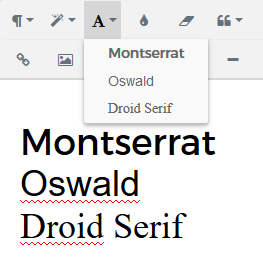
and voila!
 damsfx
on 5 Oct 2018
damsfx
on 5 Oct 2018
@damsfx I have this error 'Uncaught TypeError: Cannot read property 'DEFAULTS' of undefined'...I do not see where I am wrong...do you have any ideea?
AndreeaMb
on 12 Oct 2018
@AndreeaMb It's look like you don't have the editor instantiate.
In your browser console try to see if $.FroalaEditor command give you something.
I'm not an expert of FroalaEditor, just had to do it for a project, I've see the documentation and 2~3 topics, and done it without errors.
I'm sorry, no time to investigate more with you.
damsfx
on 20 Oct 2018
Related issues
 EbashuOnHolidays
·
3Comments
EbashuOnHolidays
·
3Comments
 kdoonboli
·
3Comments
kdoonboli
·
3Comments
 SeekAndPwn
·
3Comments
SeekAndPwn
·
3Comments
 ChVuagniaux
·
3Comments
ChVuagniaux
·
3Comments
 m49n
·
3Comments
m49n
·
3Comments
Most helpful comment
file: plugin.php , public function boot(), add :

\Backend\Classes\Controller::extend(function($controller) {
    $controller->addJs('/plugins/you/yourplugin/assets/js/extend-richeditor.js');
});
In the new created file
\plugins\you\yourplugin\assets\js\extend-richeditor.js:+function ($) { var Plugins = { init: function () { $.FroalaEditor.DEFAULTS = $.extend($.FroalaEditor.DEFAULTS, { fontFamily: { 'Montserrat, sans-serif;': 'Montserrat', 'Oswald, sans-serif;': 'Oswald', 'Droid Serif, serif': 'Droid Serif', } }); } }; $(document).on('render', function () { Plugins.init(); }); }(jQuery);and voila!