For me, the upgrade to build 420 (L5.5) errors out with the following message:
"SQLSTATE[42000]: Syntax error or access violation: 1064 You have an error in your SQL syntax; check the manual that corresponds to your MySQL server version for the right syntax to use near '(0) null, `updated_at` timestamp(0) null) default character set utf8 collate utf' at line 1 (SQL: create table `system_mail_partials` (`id` int unsigned not null auto_increment primary key, `name` varchar(255) null, `code` varchar(255) null, `content_html` text null, `content_text` text null, `is_custom` tinyint(1) not null default '0', `created_at` timestamp(0) null, `updated_at` timestamp(0) null) default character set utf8 collate utf8_unicode_ci engine = InnoDB)" on line 647 of /var/www/vendor/laravel/framework/src/Illuminate/Database/Connection.php
 alxy
alxy
All 11 comments
I think I found the root cause for this bug. I was using MySQL 5.5. After upgrading to MySQL 5.7 the issue was gone and I was able to perform the update. There might be some changes in the migration code generator regarding charsets that caused this issue. We will have to wait for the L5.5 release to review the exact system requirements.
alxy
on 1 Aug 2017
I have a similar problem. I have mysql 5.6 and I can't install some plugins that use columns of type json
But in my case, I don't have way to update mysql to 5.7, because the server is Ubuntu 15.10 :(
 alvaro-canepa
on 1 Aug 2017
alvaro-canepa
on 1 Aug 2017
@alvaro-canepa Shouldn't Laravel be telling the MySQL driver to create columns of type text when told to create columns of type json?
 LukeTowers
on 1 Aug 2017
LukeTowers
on 1 Aug 2017
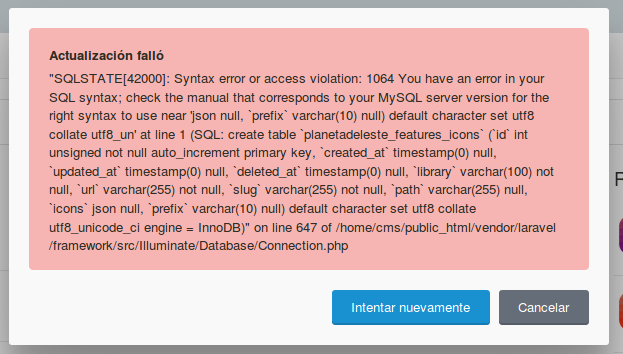
@LukeTowers I have a testing CMS with build 420. And when I try to install the PlanetaDelEste.Features plugin, MYSQl prompt this error:
alvaro-canepa
on 1 Aug 2017
@alvaro-canepa Hi. There is no OctoberCMS error. Plugin try to use json column type, which appeared, into MySQL 5.7.
Above you wrote that you have MySQL 5.6.
 Samorai
on 1 Aug 2017
Samorai
on 1 Aug 2017
@Samorai I think this is a L5.5 issue, not OC. Because the plugin that I try to install, is writed by me. But using an old build of OC. And work fine, json column are treated like text in L5.1. (sorry my english)
alvaro-canepa
on 1 Aug 2017
It is a Laravel issue. Since 5.2 they switched to using MySQL's native type json instead of text. Perhaps October should add a check for unsupported versions of MySQL in the MySQL grammar for json column types. @daftspunk any thoughts on that approach?
This is also something that could be accomplished within your own plugin via the following:
if ((DB::connection()->getPdo()->getAttribute(PDO::ATTR_DRIVER_NAME) == 'mysql') && version_compare(DB::connection()->getPdo()->getAttribute(PDO::ATTR_SERVER_VERSION), '5.7.8', 'ge')) {
    $table->json('settings');
} else {
    $table->text('settings');
}
I had same issue while testing the build 420, I solved it by upgrading to MySQL 5.7 on XAMPP windows and now I can use json - here a link if anyone needs it
 rajakhoury
on 2 Aug 2017
rajakhoury
on 2 Aug 2017
Hi,
This is the error I receive when trying to update to 420:
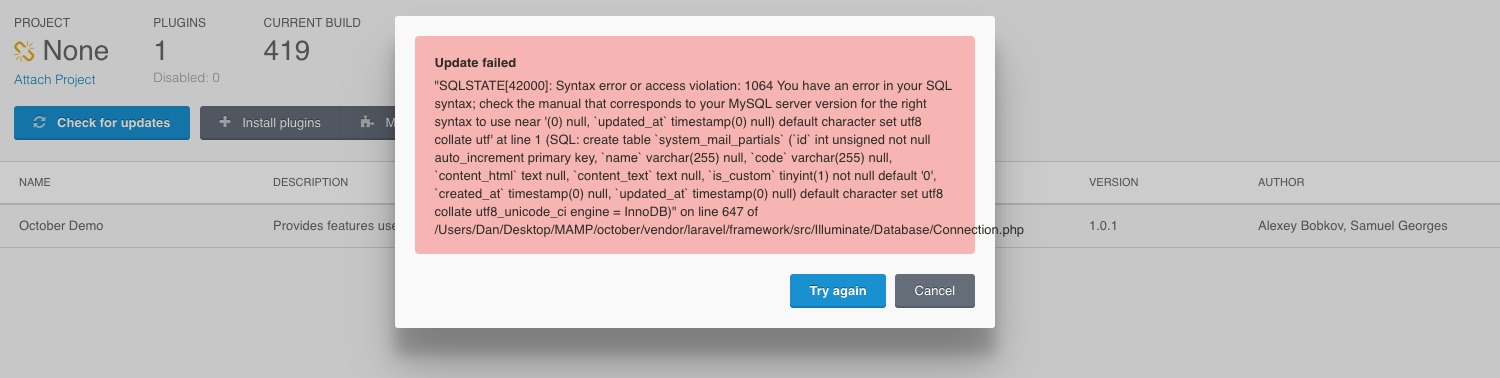
This is from a clean install from 419.
 DanielHitchen
on 11 Aug 2017
DanielHitchen
on 11 Aug 2017
@DanielHitchen This is precisely the error I was getting. Try upgrading your MySQL version, as it as it solved the error for me.
alxy
on 13 Aug 2017
This is Laravel just being Laravel. If you use json type in your work you must specify that it requires MySQL 5.7+ or above. We don't use json anywhere in the core or in our plugins.
 daftspunk
on 2 Sep 2017
daftspunk
on 2 Sep 2017
Related issues
 jvanremoortere
·
3Comments
jvanremoortere
·
3Comments
 m49n
·
3Comments
m49n
·
3Comments
 atrauzzi
·
3Comments
atrauzzi
·
3Comments
 dunets
·
3Comments
LukeTowers
·
3Comments
dunets
·
3Comments
LukeTowers
·
3Comments
Most helpful comment
It is a Laravel issue. Since 5.2 they switched to using MySQL's native type
jsoninstead oftext. Perhaps October should add a check for unsupported versions of MySQL in the MySQL grammar forjsoncolumn types. @daftspunk any thoughts on that approach?This is also something that could be accomplished within your own plugin via the following:
source