Obs-studio: Access Violation when reloading a Python script if it calls script_path multiple times
Platform
Operating system and version: Windows
OBS Studio version: Development build [5ba2d59b3ca665c696d22bd354b9ce0d2f33684c]
Expected Behavior
OBS Should not crash
Current Behavior
Unhandled exception at 0x000000005FCE57C2 (python36.dll) in obs64.exe: 0xC0000005: Access violation reading location 0x0000000000010000. occurred
Steps to Reproduce
- Save this code block as a python script and import it
import obspython as obs

def script_properties():
    properties = obs.obs_properties_create()
    obs.obs_properties_add_button(properties, "test", "Test It", testbtn)
    return properties

def testbtn(properties, property):
    print(script_path())
    print(script_path())
    print(script_path())
- Click the Test It button (Opening the Script Log is not required)
- Reload the script
- Exception is thrown
Additional information
printing script_path() once or twice did not cause an issue. The script uses 3 calls to immediately trigger the crash requirement. Reducing this to one call and pressing the button three times will produce similar results
 Scrxtchy
All 7 comments
In my own project, I realised I didn't require the use of the script directory. But as I finished work I was able to look into this a little more.
I replaced the __script_dir__ variable being used just in case it was relevant.
Replacing it with a dummy (but well used __file__ variable caused it to still crash, but many of the errors where handled within python. It did take more than 3 times to crash. Logs from OBS logs are submitted below. Path names have been redacted
18:27:55.225: [Python: obs_test.py] /path/to/script/Temp\obs_test.py
18:27:55.226: [Python: obs_test.py] /path/to/script/Temp\obs_test.py
18:27:55.227: [Python: obs_test.py] /path/to/script/Temp\obs_test.py
18:28:10.212: [Python] Python failure in load_python_script:190:
18:28:10.305: [Python: obs_test.py] Traceback (most recent call last):
18:28:10.312: [Python: obs_test.py]   File "C:\bin\python36\lib\imp.py", line 315, in reload
18:28:10.337: [Python: obs_test.py]     return importlib.reload(module)
18:28:10.344: [Python: obs_test.py]   File "C:\bin\python36\lib\importlib\__init__.py", line 166, in reload
18:28:10.363: [Python: obs_test.py]     _bootstrap._exec(spec, module)
18:28:10.373: [Python: obs_test.py]   File "<frozen importlib._bootstrap>", line 618, in _exec
18:28:10.382: [Python: obs_test.py]   File "<frozen importlib._bootstrap_external>", line 674, in exec_module
18:28:10.392: [Python: obs_test.py]   File "<frozen importlib._bootstrap_external>", line 780, in get_code
18:28:10.407: [Python: obs_test.py]   File "<frozen importlib._bootstrap_external>", line 832, in get_data
18:28:10.423: [Python: obs_test.py] FileNotFoundError: [Errno 2] No such file or directory: '/path/to/script/Temp\\obs_test.py'
18:29:03.683: [Python: obs_test.py] /path/to/script/Temp\obs_test.py
18:29:03.687: [Python: obs_test.py] /path/to/script/Temp\obs_test.py
18:29:03.692: [Python: obs_test.py] /path/to/script/Temp\obs_test.py
18:29:05.311: [Python] Python failure in load_python_script:190:
18:29:05.318: [Python: obs_test.py] Traceback (most recent call last):
18:29:05.324: [Python: obs_test.py]   File "C:\bin\python36\lib\imp.py", line 315, in reload
18:29:05.329: [Python: obs_test.py]     return importlib.reload(module)
18:29:05.335: [Python: obs_test.py]   File "C:\bin\python36\lib\importlib\__init__.py", line 166, in reload
18:29:05.341: [Python: obs_test.py]     _bootstrap._exec(spec, module)
18:29:05.348: [Python: obs_test.py]   File "<frozen importlib._bootstrap>", line 618, in _exec
18:29:05.355: [Python: obs_test.py]   File "<frozen importlib._bootstrap_external>", line 674, in exec_module
18:29:05.361: [Python: obs_test.py]   File "<frozen importlib._bootstrap_external>", line 780, in get_code
18:29:05.368: [Python: obs_test.py]   File "<frozen importlib._bootstrap_external>", line 832, in get_data
18:29:05.375: [Python: obs_test.py] FileNotFoundError: [Errno 2] No such file or directory: '/path/to/script/Temp\\obs_test.py'
18:29:11.267: [Python: obs_test.py] /path/to/script/Temp\obs_test.py
18:29:11.275: [Python: obs_test.py] /path/to/script/Temp\obs_test.py
18:29:11.287: [Python: obs_test.py] /path/to/script/Temp\obs_test.py
18:29:11.428: [Python: obs_test.py] /path/to/script/Temp\obs_test.py
18:29:11.433: [Python: obs_test.py] /path/to/script/Temp\obs_test.py
18:29:11.438: [Python: obs_test.py] /path/to/script/Temp\obs_test.py
18:29:11.688: [Python: obs_test.py] /path/to/script/Temp\obs_test.py
18:29:11.694: [Python: obs_test.py] /path/to/script/Temp\obs_test.py
18:29:11.700: [Python: obs_test.py] /path/to/script/Temp\obs_test.py
18:29:15.419: [Python] Python failure in load_python_script:190:
18:29:15.427: [Python: obs_test.py] Traceback (most recent call last):
18:29:15.433: [Python: obs_test.py]   File "C:\bin\python36\lib\imp.py", line 315, in reload
18:29:15.442: [Python: obs_test.py]     return importlib.reload(module)
18:29:15.449: [Python: obs_test.py]   File "C:\bin\python36\lib\importlib\__init__.py", line 166, in reload
18:29:15.458: [Python: obs_test.py]     _bootstrap._exec(spec, module)
18:29:15.467: [Python: obs_test.py]   File "<frozen importlib._bootstrap>", line 618, in _exec
18:29:15.476: [Python: obs_test.py]   File "<frozen importlib._bootstrap_external>", line 674, in exec_module
18:29:15.485: [Python: obs_test.py]   File "<frozen importlib._bootstrap_external>", line 758, in get_code
18:29:15.494: [Python: obs_test.py]   File "<frozen importlib._bootstrap_external>", line 842, in path_stats
18:29:15.504: [Python: obs_test.py]   File "<frozen importlib._bootstrap_external>", line 82, in _path_stat
18:29:15.512: [Python: obs_test.py] ValueError: stat: embedded null character in path
I did a little bit more investigation with the breakpoint debugger and locals, but then I realised I am not well familiar with most of the scripting interface and how it interops with importlib to be of any use
Scrxtchy
on 19 May 2020
Hi @Scrxtchy, how did you manage to install obspython module?
I tried installing it in my system but it throws an error...
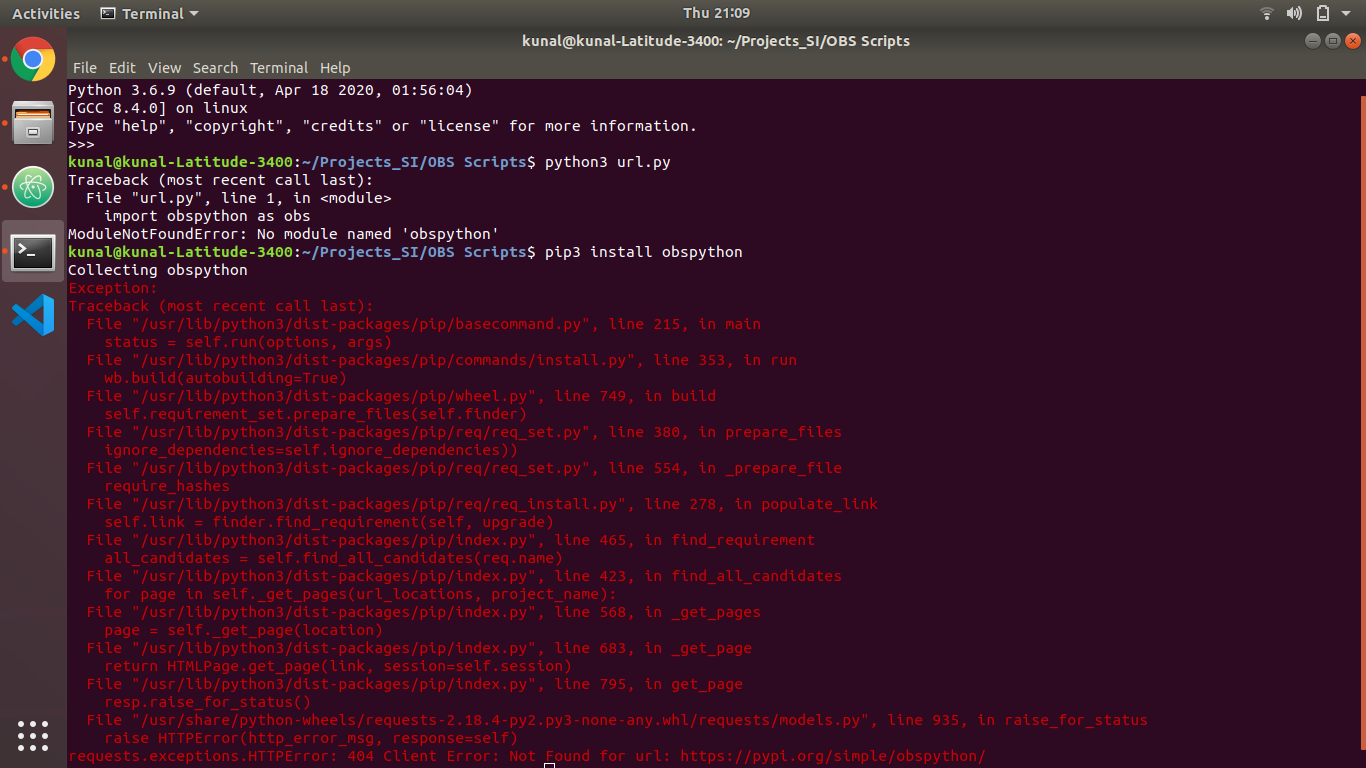
my end goal is to do Livestream to youtube(or any other source) from URL as an input, it would be very helpful if you could help me through this too.
Thank You.
 kunal-ml
on 24 Jul 2020
kunal-ml
on 24 Jul 2020
@kunal-ml Python scripts are not designed to be used outside of OBS, and therefore obspython is not accessible outside of OBS. You need to add the script to OBS via Tools -> Scripts -> +
 WizardCM
on 24 Jul 2020
WizardCM
on 24 Jul 2020
@WizardCM ok, I added the script provided by OBS named as url-text.py.
What to do next, how to stream it to source and overlay some text or graphics?
I have never used this software before please help me through this.
Thank You
kunal-ml
on 24 Jul 2020
@kunal-ml the bug tracker is not a place for obs support, please seek support elsewhere, such as with guides, forums or the discord
https://obsproject.com/help
Scrxtchy
on 24 Jul 2020
I managed to trace this issue with the help of the python source files and the pdb.
It lead me to this discussion on stackoverflow, and also pointed to https://github.com/python/cpython/pull/2695
While this was backported, the included python3 and python36.lib files in the deps predate this patch.
/mnt/d/Scratch/Documents/Git/obs-studio/other/depspath$ ls -lgGR | grep -i python
-rwxrwxrwx 1   316080 Jul  8  2017 python36.lib
-rwxrwxrwx 1   168622 Jul  8  2017 python3.lib
drwxrwxrwx 1  4096 Apr 10 18:56 python
./include/python:
-rwxrwxrwx 1 22911 Jun 18  2017 Python-ast.h
-rwxrwxrwx 1  3064 Jun 18  2017 Python.h
-rwxrwxrwx 1  6979 Jun 18  2017 pythonrun.h
drwxrwxrwx 1  4096 Apr 10 18:56 python
./swig/Lib/python:
-rwxrwxrwx 1  2355 Jan 28  2017 pythonkw.swg
-rwxrwxrwx 1  2035 Jan 28  2017 python.swg
-rwxrwxrwx 1 211889 Jan 28  2017 python.cxx
I believe the solution here would be to update these, it can remain on 3.6 if necessary, the fix was backported to 3.4
Scrxtchy
on 16 Aug 2020
As of b2d42c069b67b2a4515eaffaf5cedbb50d412921 I cannot replicate the issue
Scrxtchy
on 14 Sep 2020
Related issues
 gxalpha
·
9Comments
gxalpha
·
9Comments
 b3ck
·
10Comments
b3ck
·
10Comments
 dapetcu21
·
8Comments
dapetcu21
·
8Comments
 Tandolf
·
3Comments
Tandolf
·
3Comments
 MVMORADIA
·
6Comments
MVMORADIA
·
6Comments