Obs-studio: [BUG] The window gets stuck when I choose a file
Platform
Operating system and version: Linux Ubuntu Mate 18.04
OBS Studio version: 25.0.3
Expected Behavior
Select a file: image or video for a plugin and the selecting window closes.
Current Behavior
The file selection window remains stuck and does not close after file selection and results in OBS crashing after a few minutes or I have to kill it.
Steps to Reproduce
Video here: https://drive.google.com/file/d/1XQmexV0QKGK-XS7oYiM15B7z9b2zkANe/view?usp=sharing
- Select a picture or video for media source or picture source plugin.
- Double click or put the Open button on your file choosen.
- The window stay on.
- OBS will stay running like that or will crash after minutes (core dumped).
Additional information
Installed from the official repository: http://ppa.launchpad.net/obsproject/obs-studio
Thats not happened before 25.x.
Can reproduce the issue: 2/3 times on 2 PCs (Ubuntu 18.04 too)
 maxdrash
All 38 comments
Please provide the full log output and backtrace of the crash.
 Fenrirthviti
on 5 Apr 2020
Fenrirthviti
on 5 Apr 2020
After more investigation, this is fully related to the mate file manager who call systemd-hostnamed for inspecting neighbour network to find shared storage (it seems), and stuck the mate window.
Cross tested with blackbox wm: no problem
I'll do my search at mate side, thank you.
Edit: Thats not a problem related to Mate.
maxdrash
on 5 Apr 2020
So to confirm, you're having this issue in the MATE file manager, even without OBS?
 WizardCM
on 5 Apr 2020
WizardCM
on 5 Apr 2020
Yes because i haven't the issue with blackbox.
maxdrash
on 5 Apr 2020
I confirm this behaviour also with Xubuntu 18.04 and OBS v25.0.3 installed from PPA.
 turbostar190
on 6 Apr 2020
turbostar190
on 6 Apr 2020
On XFCE too ?
The issue isn't reproductible with blackbox but i need to use Mate, I don't know how to produce new trace, the loging from OBS don't write any error and gdb say: Reading symbols from obs...(no debugging symbols found)...done.
maxdrash
on 6 Apr 2020
Same crash on Debian bullseye and ubuntu 19.10
 koreanfan
on 6 Apr 2020
koreanfan
on 6 Apr 2020
I couldn't reproduce a crash with MATE, only a mild hang in the file dialog when clicking Open. Once the Properties for the source are saved, the dialog goes away and OBS continues working.
I'll experiment further.
WizardCM
on 6 Apr 2020
I recorded a video of what happens. The video ends with the crash of OBS when I force close the file picker window.
Video: https://youtu.be/nOGIFJtd2f8
Verbose log: obs_log.txt
turbostar190
on 6 Apr 2020
Exactly the same problem you can watch on my video with Mate desktop.
What can we do to help developers to fix this problem ?
maxdrash
on 6 Apr 2020
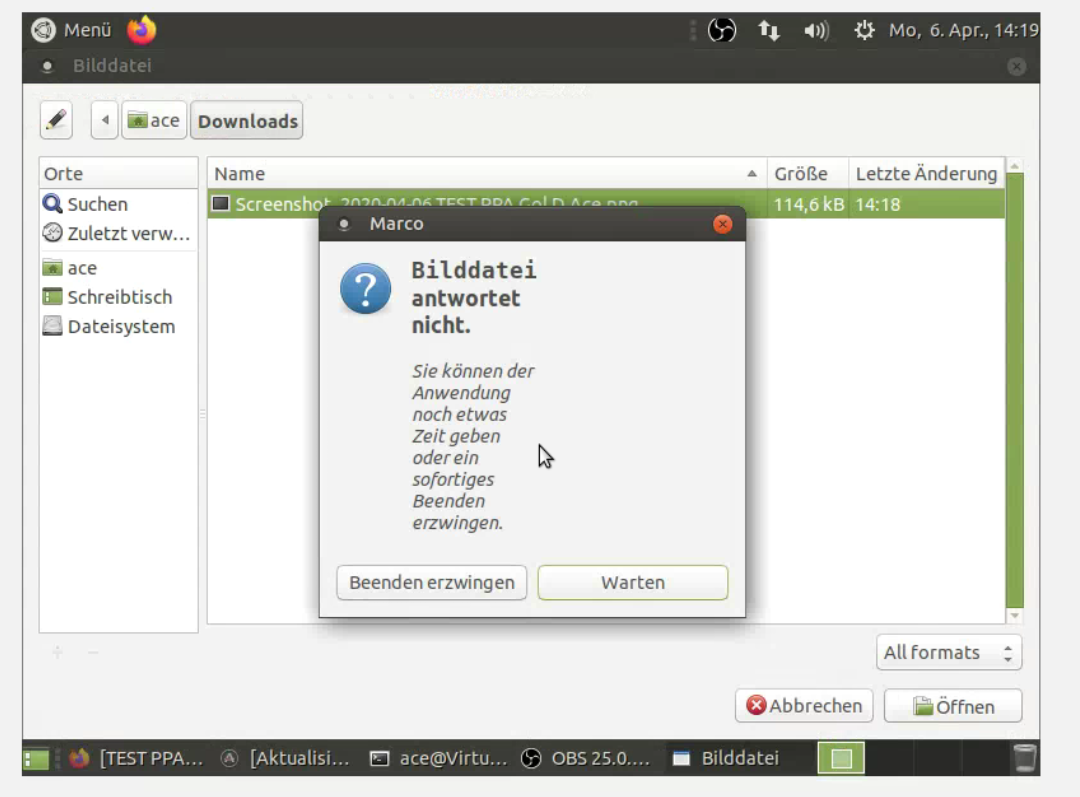
Can reproduce this as well on Ubuntu MATE 18.04.
Marco starts to hang (did take 2 tries).
 Gol-D-Ace
on 6 Apr 2020
Gol-D-Ace
on 6 Apr 2020
Same problem with 25.0.4 installed from ppa.
maxdrash
on 8 Apr 2020
The solution will probably be that the file picker will be replaced with the Qt one.
Gol-D-Ace
on 8 Apr 2020
I've build OBS 25.0.4 from master branch and i can't reproduce the problem.
The file picker is working nice by this way.
Issue seems coming from the ppa build only.
maxdrash
on 8 Apr 2020
The solution will probably be that the file picker will be replaced with the Qt one.
I was thinking this too, but honestly, considering how pretty much any manual build of this doesn't have the issue compared to the PPA so far, then something really wonky is the matter. I'm spinning up my own development environment for this to try to fix the issue (and at the very least, just build my own OBS to bypass the bug for now.)
 HarleyLorenzo
on 8 Apr 2020
HarleyLorenzo
on 8 Apr 2020
I've build OBS 25.0.4 from master branch and i can't reproduce the problem.
The file picker is working nice by this way.
Issue seems coming from the ppa build only.
Are you also compiling the browser source?
@maxdrash
The issue is probably coming from libcef and GTK both using the glib event loop. If you don't compile the browser source the issue will probably not show up.
If you get no issues even with the browser source then please let us know.
Note that it can take a while / multiple tries until it happens.
Gol-D-Ace
on 10 Apr 2020
Exactly, the issue comes with browser source builded with OBS (tested with a build who does not include browser source and no problem).
How to reproduce the crash:
Open OBS builded with browser source.
Add browser source into a scene.
Close properties of browser source.
Open properties of media source
Crash
logs:
Apr 10 22:13:08 maxime-pc org.mate.panel.applet.BriskMenuFactory[1597]: info: ------------------------------------------------
Apr 10 22:13:08 maxime-pc org.mate.panel.applet.BriskMenuFactory[1597]: info: Loaded scenes:
Apr 10 22:13:08 maxime-pc org.mate.panel.applet.BriskMenuFactory[1597]: info: - scene 'Scène':
Apr 10 22:13:08 maxime-pc org.mate.panel.applet.BriskMenuFactory[1597]: info:     - source: 'Source média' (ffmpeg_source)
Apr 10 22:13:08 maxime-pc org.mate.panel.applet.BriskMenuFactory[1597]: info: ------------------------------------------------
Apr 10 22:13:13 maxime-pc org.mate.panel.applet.BriskMenuFactory[1597]: Attempted path: share/obs/obs-studio/images/overflow.png
Apr 10 22:13:13 maxime-pc org.mate.panel.applet.BriskMenuFactory[1597]: Attempted path: /usr/share/obs/obs-studio/images/overflow.png
Apr 10 22:13:13 maxime-pc org.mate.panel.applet.BriskMenuFactory[1597]: info: User added source 'Navigateur' (browser_source) to scene 'Scène'
Apr 10 22:13:16 maxime-pc kernel: **[ 4137.104821] CrBrowserMain[16645]: segfault at 9 ip 00007fda2a5f17dc sp 00007fd9bec9bd10 error 4 in libglib-2.0.so.0.5600.4[7fda2a588000+114000]**
Apr 10 22:16:53 maxime-pc org.mate.panel.applet.BriskMenuFactory[1597]: info: ------------------------------------------------
Apr 10 22:16:53 maxime-pc org.mate.panel.applet.BriskMenuFactory[1597]: info: Loaded scenes:
Apr 10 22:16:53 maxime-pc org.mate.panel.applet.BriskMenuFactory[1597]: info: - scene 'Scène':
Apr 10 22:16:53 maxime-pc org.mate.panel.applet.BriskMenuFactory[1597]: info:     - source: 'Source média' (ffmpeg_source)
Apr 10 22:16:53 maxime-pc org.mate.panel.applet.BriskMenuFactory[1597]: info:     - source: 'Navigateur' (browser_source)
Apr 10 22:16:53 maxime-pc org.mate.panel.applet.BriskMenuFactory[1597]: info: ------------------------------------------------
Apr 10 22:16:54 maxime-pc org.mate.panel.applet.BriskMenuFactory[1597]: Attempted path: share/obs/obs-studio/images/overflow.png
Apr 10 22:16:54 maxime-pc org.mate.panel.applet.BriskMenuFactory[1597]: Attempted path: /usr/share/obs/obs-studio/images/overflow.png
Apr 10 22:16:54 maxime-pc org.mate.panel.applet.BriskMenuFactory[1597]: info: adding 46 milliseconds of audio buffering, total audio buffering is now 46 milliseconds (source: Mic/Aux)
Apr 10 22:17:00 maxime-pc kernel: [ 4360.360938] CrBrowserMain[16885]: segfault at 556f00000001 ip 00007ffb0df10666 sp 00007ffabdf074c0 error 4 in libgtk-x11-2.0.so.0.2400.32[7ffb0dcc9000+435000]
Two different crash with libglib-2.0.so and libgtk-x11-2.0
maxdrash
on 10 Apr 2020
I think I was getting the same crash with the file browser until I changed my Qt theme to be something other than the GTK compatibility one. Essentially I just changed the following in my global profile (/etc/profile.d/qt.sh):
export QT_QPA_PLATFORMTHEME="gtk2"
To this:
export QT_QPA_PLATFORMTHEME="qt5ct"
And then the crashing when using the file selector in OBS stopped. I think I ran "qt5ct" first to select a theme as well. Can anyone confirm if this is the same issue?
 fatalgoth
on 11 Apr 2020
fatalgoth
on 11 Apr 2020
The OBS PPA should now use the workaround mentioned above (qt5ct)
You don't need to run qt5ct first.
Qt widgets are the default when using qt5ct.
Gol-D-Ace
on 11 Apr 2020
Ok it works !
QT makes OBS little different but why not if it works.
Thank you.
maxdrash
on 12 Apr 2020
Unfortunately this workaround created issues on qt based distros / window managers like KDE.
On some distros it isn't even possible to install obs anymore because qt5ct isn't available.
If you want your native controls back you need to uninstall qt5ct
sudo apt remove qt5ct
Gol-D-Ace
on 12 Apr 2020
The OBS PPA should now use the workaround mentioned above (qt5ct)
You don't need to run qt5ct first.
Qt widgets are the default when using qt5ct.
This PPA update has caused my browser plugin in to disappear, or at least no longer work.
HarleyLorenzo
on 12 Apr 2020
Yes we unfortunately had to remove the browser source for now because we don't have a solution that works for everyone without breaking stuff.
You might want to run
sudo apt remove qt5ct
You can always compile OBS Studio yourself if you need the browser source (keep qt5ct installed in that case at least on standard Ubuntu flavor)
Gol-D-Ace
on 12 Apr 2020
I install new obs 25.0.5-28 on debian bullseye and i have this bug when i try pick image source for image plugin. But when i use obs 25.0.4 there where no trouble with open dialog for search image-plugin. Seems this bug was fixed in 25.0.4 version
koreanfan
on 12 Apr 2020
If i understand
You added qt5ct for windowing OBS 25.0.4-0obsproject2-bionic on PPA.
You made a rollback to GTK for 25.0.4-0obsproject3-bionic and removed browser source on PPA.
Theses conflict choices are not easy to do, i know.
But that make some problems, i don't know one person who don't use browser source, a solution have to be find to promote browser source again without conflicts with gtk (or use QT with adaptation or else)
maxdrash
on 12 Apr 2020
As we don't have a solution and for my purpose, i stay on 25.0.4-0obsproject1-bionic with export QT_QPA_PLATFORMTHEME="qt5ct" to be able to use a full setup of OBS with browser and no crashs because of GTK.
maxdrash
on 12 Apr 2020
Same bug here:
- OBS 20.0.7, compiled here with browser source.
- Debian 10 Buster x64
- Mate Desktop.
mario@debian:~$ dpkg -s mate-desktop
Package: mate-desktop
Status: install ok installed
Priority: optional
Section: x11
Installed-Size: 107
Maintainer: Debian+Ubuntu MATE Packaging Team debian-mate@lists.debian.org
Architecture: amd64
Multi-Arch: foreign
Version: 1.20.4-2
Replaces: mate-desktop-gnome
Depends: hicolor-icon-theme, libmate-desktop-2-17 (>= 1.10.0), mate-desktop-common (= 1.20.4-2), libatk1.0-0 (>= 1.12.4), libc6 (>= 2.4), libcairo-gobject2 (>= 1.10.0), libcairo2 (>= 1.2.4), libgdk-pixbuf2.0-0 (>= 2.22.0), libglib2.0-0 (>= 2.28.0), libgtk-3-0 (>= 3.0.0), libpango-1.0-0 (>= 1.14.0), libpangocairo-1.0-0 (>= 1.14.0), libstartup-notification0 (>= 0.2), libxrandr2
Recommends: mate-user-guide
Suggests: mate-desktop-environment
Breaks: mate-desktop-gnome
Description: Library with common API for various MATE modules
The MATE component mate-desktop contains the libmate-desktop library, the
mate-about program, as well as some desktop-wide documents.
...(more)
 MarioMey
on 21 Apr 2020
MarioMey
on 21 Apr 2020
Thank you for removing my message, the anomalies I had to have correct operation of OBS-studio 25.07 on ubuntu 18.04 bionic are therefore useless.
 crujp100
on 26 Apr 2020
crujp100
on 26 Apr 2020
Your comments had nothing to do with this report. If you are having issues, please use the Discord support channel.
Fenrirthviti
on 26 Apr 2020
I ran into this problem too, now on FC32 with 25.0.8, but earlier too, on FC31 with a git clone from about two weeks ago.
This is a series of steps as a workaround, for those who build obs from source and want to use the browser plugin:
Run
qt5ct:sudo dnf install qt5ct
qt5ctSet the environment variable (without this, the workaround does not work):
export QT_QPA_PLATFORMTHEME="qt5ct"
Re-compile the browser plugin:
cd /path/to/obs/build
cd plugins/obs-browser
make clean
cd ../..
make
make install
Tada! No more crashes on opening files.
Of course, this is not a solution, looks like the browser plugin needs to be modified - but it does work well for now!
 arjenpdevries
on 3 May 2020
arjenpdevries
on 3 May 2020
I ran into this problem too, now on FC32 with 25.0.8, but earlier too, on FC31 with a git clone from about two weeks ago.
This is a series of steps as a workaround, for those who build obs from source and want to use the browser plugin:
1. Run `qt5ct`:
   sudo dnf install qt5ct
   qt5ct

2. Set the environment variable (without this, the workaround does not work):
   export QT_QPA_PLATFORMTHEME="qt5ct"

3. Re-compile the browser plugin:
   cd /path/to/obs/build
   cd plugins/obs-browser
   make clean
   cd ../..
   make
   make install
Tada! No more crashes on opening files.
Of course, this is not a solution, looks like the browser plugin needs to be modified - but it does work well for now!
I run my OBS on QT5 since @Gol-D-Ace and @fatalgoth provided this solution but it's only a workaround.
Any news about GTK and OBS + browser ?
maxdrash
on 7 May 2020
Unfortunately nobody has looked further into it yet.
You can check https://github.com/obsproject/obs-browser/issues/219
which is the main issue for this bug.
Gol-D-Ace
on 7 May 2020
For me this workaround causes issues when trying to adjust webcam (Logitech C922) settings from the properties window. I'm able to work around that by setting them using v4l2 directly from the command line, but then opening the properties window again and cancelling tries to overwrite them again which can be a little annoying.
The webcam settings issue combined with the fact that for some reason JACK sources don't seem to work in the official PPA made me try building from source, which fixed both of those issues... until I tried adding local file browser sources. I spent hours in a debugger before realizing it could even be related to the CEF plugin since the crash was usually happening in the WidgetInfo::PathChanged function, and it happened when opening any file dialogue, not just the ones in the browser source properties window.
Building from source at least fixes my JACK issue (I don't know that that's even OBS's fault and not Ubuntu's/Snap's -- I've already had audio issues with other packages), and I'm guessing the webcam settings issue isn't a priority since the real solution is fixing the browser plugin?
 Waridley
on 20 May 2020
Waridley
on 20 May 2020
Another easy workaround could be asking the user to enter the file path. Next to it could be a question mark sign with a tooltip explaining that they have to enter the path to the file manually, because of a bug. This would be a permanent solution, but is should be working fine though. The Browser source is probably one of the most used sources, and would be great to be able to use it, until this problem gets solved.
 isti03
on 24 May 2020
isti03
on 24 May 2020
Yeah, it is actually extremely frustrating that I can't just paste a file path into the text box anyway. Even if the file chooser were working properly, I would still want that feature.
Waridley
on 26 May 2020
Yeah, it is actually extremely frustrating that I can't just paste a file path into the text box anyway. Even if the file chooser were working properly, I would still want that feature.
I agree, the text box not accepting manual file path input is definitely lacking here. That would be a sufficient workaround to this bug.
 billyjbryant
on 20 Jun 2020
billyjbryant
on 20 Jun 2020
@cg2121 pulled request for solution
https://github.com/obsproject/obs-studio/pull/3177
maxdrash
on 17 Jul 2020
OBS 26.0.0-rc1 tested from official PPA unstable.
GTK was replaced by QT5 officially.
Issue solved.
maxdrash
on 8 Sep 2020
Related issues
 MVMORADIA
·
6Comments
MVMORADIA
·
6Comments
 Marocco2
·
9Comments
Marocco2
·
9Comments
 tenleftfingers
·
3Comments
tenleftfingers
·
3Comments
 JonnyHaystack
·
3Comments
JonnyHaystack
·
3Comments
 dapetcu21
·
8Comments
dapetcu21
·
8Comments
Most helpful comment
Unfortunately nobody has looked further into it yet.
You can check https://github.com/obsproject/obs-browser/issues/219
which is the main issue for this bug.