Objectbox-java: Crash on ObjectBox initialization. java.lang.UnsatisfiedLinkError
Issue Basics
App crashes when we initialize ObjectBox
- ObjectBox version (are using the latest version?): 2.1.0
- Reproducibility: occurs on some user devices, we could not reproduce it
Reproducing the bug
Description
We initialize the BoxStore on app start when initializing a Dagger graph. And some users experience crash from the start. Just logs in Crashlytics
Code
BoxStore boxStore = MyObjectBox.builder()
        .androidContext(appContext)
        .name("db_v2")
        .build();
    if (BuildConfig.DEBUG) {
      new AndroidObjectBrowser(boxStore).start(appContext);
    }
    return boxStore;
Logs & stackstraces
> Fatal Exception: java.lang.UnsatisfiedLinkError
> dalvik.system.PathClassLoader[DexPathList[[zip file "/data/app/com.vyng.android-1/base.apk"],nativeLibraryDirectories=[/vendor/lib, /system/lib]]] couldn't find "libobjectbox.so"

> Fatal Exception: java.lang.UnsatisfiedLinkError: dalvik.system.PathClassLoader[DexPathList[[zip file "/data/app/com.vyng.android-1/base.apk"],nativeLibraryDirectories=[/vendor/lib, /system/lib]]] couldn't find "libobjectbox.so"
>        at java.lang.Runtime.loadLibrary(Runtime.java:366)
>        at java.lang.System.loadLibrary(System.java:988)
>        at io.objectbox.internal.NativeLibraryLoader.(NativeLibraryLoader.java:71)
>        at io.objectbox.BoxStore.(BoxStore.java:189)
>        at io.objectbox.BoxStoreBuilder.build(BoxStoreBuilder.java:352)
>        at com.vyng.android.di.modules.AppModule.boxStore(AppModule.java:95)
>        at com.vyng.android.di.modules.AppModule_BoxStoreFactory.proxyBoxStore(AppModule_BoxStoreFactory.java:34)
>        at com.vyng.android.di.modules.AppModule_BoxStoreFactory.provideInstance(AppModule_BoxStoreFactory.java:25)
>        at com.vyng.android.di.modules.AppModule_BoxStoreFactory.get(AppModule_BoxStoreFactory.java:21)
>        at com.vyng.android.di.modules.AppModule_BoxStoreFactory.get(AppModule_BoxStoreFactory.java:8)
>        at dagger.internal.DoubleCheck.get(DoubleCheck.java:47)
>        at com.vyng.android.di.modules.AppModule_ChannelDataRepositoryFactory.provideInstance(AppModule_ChannelDataRepositoryFactory.java:152)
>        at com.vyng.android.di.modules.AppModule_ChannelDataRepositoryFactory.get(AppModule_ChannelDataRepositoryFactory.java:109)
>        at com.vyng.android.di.modules.AppModule_ChannelDataRepositoryFactory.get(AppModule_ChannelDataRepositoryFactory.java:26)
>        at dagger.internal.DoubleCheck.get(DoubleCheck.java:47)
>        at com.vyng.android.video.cache.di.CacheModule_CacheWatcherFactory.provideInstance(CacheModule_CacheWatcherFactory.java:80)
>        at com.vyng.android.video.cache.di.CacheModule_CacheWatcherFactory.get(CacheModule_CacheWatcherFactory.java:58)
>        at com.vyng.android.video.cache.di.CacheModule_CacheWatcherFactory.get(CacheModule_CacheWatcherFactory.java:16)
>        at dagger.internal.DoubleCheck.get(DoubleCheck.java:47)
>        at com.vyng.android.di.components.DaggerAppComponent.injectVyngApplication(DaggerAppComponent.java:1632)
>        at com.vyng.android.di.components.DaggerAppComponent.inject(DaggerAppComponent.java:1427)
>        at com.vyng.android.VyngApplication.initAppComponent(VyngApplication.java:343)
>        at com.vyng.android.VyngApplication.onCreate(VyngApplication.java:137)
>        at android.app.Instrumentation.callApplicationOnCreate(Instrumentation.java:1012)
>        at android.app.ActivityThread.handleBindApplication(ActivityThread.java:4631)
>        at android.app.ActivityThread.access$1500(ActivityThread.java:151)
>        at android.app.ActivityThread$H.handleMessage(ActivityThread.java:1374)
>        at android.os.Handler.dispatchMessage(Handler.java:102)
>        at android.os.Looper.loop(Looper.java:135)
>        at android.app.ActivityThread.main(ActivityThread.java:5348)
>        at java.lang.reflect.Method.invoke(Method.java)
>        at java.lang.reflect.Method.invoke(Method.java:372)
>        at com.android.internal.os.ZygoteInit$MethodAndArgsCaller.run(ZygoteInit.java:947)
>        at com.android.internal.os.ZygoteInit.main(ZygoteInit.java:742)
Entities
Not relevant.
Misc
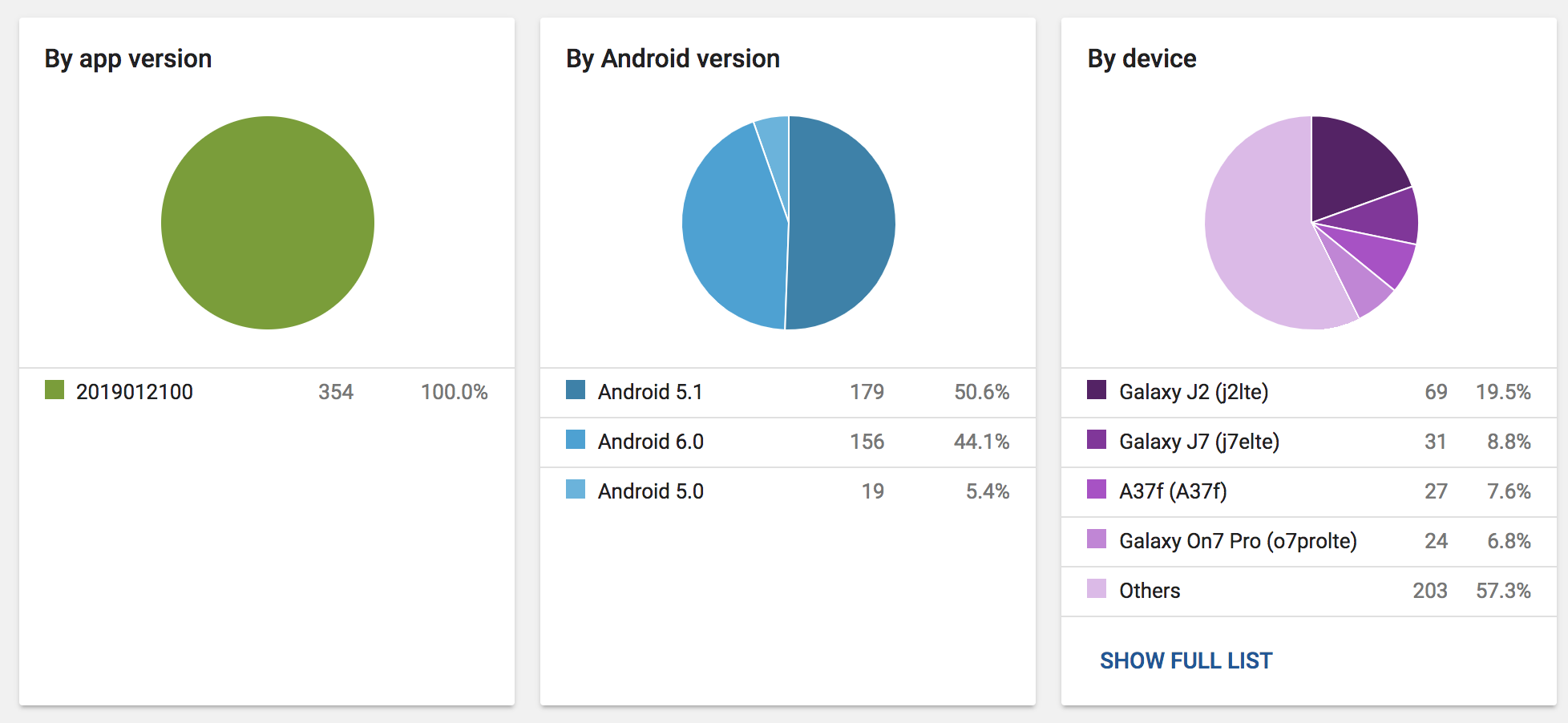
A screenshot from Crashlytics with device manufacturers and OS versions:
https://ibb.co/hb3SSq
 Gaket
Gaket
All 79 comments
Did you try to google the issue? I found this article I think it can help you. I would love to hear if this fixed your problem since I am about to release an app with ObjectBox in it to a big user base
 abdurahmanadilovic
on 12 Nov 2018
abdurahmanadilovic
on 12 Nov 2018
ObjectBox ships arm64-v8a, armabi-v7a and x86_64 as well as x86. That should cover most devices if you do not manually exclude those in your Gradle build file.
Check if your APK does not exclude some of them.
@Gaket Can you find out what processor/architecture those Xolo and Samsung devices are using? Or maybe just the exact models?
Background: Since #441 the library falls back to loading the Android native lib (libobjectbox.so) on failure. But based on above stack trace it correctly tries to load the Android lib on the first try, but just can't find it.
-ut
 greenrobot-team
on 12 Nov 2018
greenrobot-team
on 12 Nov 2018
@abdurahmanadilovic, thanks for pointing the article. I've heard about such issue previously. But it looks like it's not the case because the issue happens on armv7 and armv8 devices too, for example here are some from top:
Samsung SM-J200G (arm-v7)
Samsung SM-J210F (arm-v7)
Samsung SM-G610F (arm-v8)
Micromax Q402+ (arm-v7)
Micromax Q409
Xiaomi MI MAX
Xiaomi Redmi Note 4
And other phones from these manufacturers, Motorola, Lenovo...
Here is an updated screenshot with manufacturers:
https://ibb.co/ngwk9f
@greenrobot-team, I've checked the release build, it contains all 4 variants that you've mentioned. We use Android App Bundles to ship the build, I'll recheck the config too.
However, not all the users on that phones have this problem. We have much more of them who don't crash. If the problem would be in the way how we configure a build, all of them should start crashing, shouldn't they?
And we have some test devices that are in the list of models experiencing crashes but we don't have that issue. As I remember, we got such logs from our tester only once, but reinstallation helped in that case, so we couldn't check what actually happened.
Gaket
on 13 Nov 2018
@Gaket Thanks for the info, I am just curious, what is the ratio between the users who don't crash vs the user who do? In my app I don't have the App bundles enabled, could that be the issue in your case? Can you disable App Bundles after you have enabled them?
abdurahmanadilovic
on 15 Nov 2018
@abdurahmanadilovic, in the last week ~13% of all the active users on Samsung J2 got the crash. As I said earlier, our testers caught it once but it disappeared after reinstall. That's the top phone for the crashes.
Number 2 (amount of crashes) -Samsung J7 - just about 1,5% of users.
Number 3 (amount of crashes) - Samsung Galaxy On7 SM-G600FY - ~15% of users.
So, overall, numbers are pretty high.
About the AppBundles, as I know, it is impossible to roll them back to the usual APK.
Gaket
on 15 Nov 2018
@abdurahmanadilovic You cannot disable App Bundles after you have enabled them.
For reference this is the breakdown of the most recent bundle that went live. Shows the .so in all folders except mips. Which would probably be good to remove mips from our list of supported architectures.

 jarrodholliday
on 17 Nov 2018
jarrodholliday
on 17 Nov 2018
So reading between the lines here, it is possible that the affected devices are those that have received an APK built from an App Bundle? Can you correlate that the crashes start at the time you started using App Bundles?
Side note: we have crash logs for an old school APK-based app in the store, but are not seeing similar crashes (at least I can't find any).
The only other defining thing here is the use of Dagger, but I wouldn't see how that come into play here.
-ut
greenrobot-team
on 19 Nov 2018
Update: Tried to deploy to emulator (x86) and Galaxy S7 edge (arm64_v8a) with Deploy: APK from app bundle run configuration. Also verified using the bundletool.
java -jar bundletool-all-0.7.0.jar build-apks --connected-device --bundle=app.aab --output=app.apks
All looking good. :/
-ut
greenrobot-team
on 19 Nov 2018
@greenrobot-team, we use App Bundles for months and Google Play definitely sends the same bundle to the same device model. And our data shows that only some users (up to 15%) on particular devices, so it should not be the problem.
Gaket
on 19 Nov 2018
@greenrobot-team, we introduced the use of App Bundles on build 2.2.3.10 at Aug 5, 2018, 8:17 PM.
Crashes for this have been seen as far back as build version 2.0.1.9 released on Nov 13, 2017, 8:32 AM. That release was using a universal apk and we later switched to using abi split apks which this issue also shows up on.
Let me know if there is any other information we can provide that you think might help pin this down.
jarrodholliday
on 20 Nov 2018
@greenrobot-team
I'm experiencing the same issue for my app.
Last 7 days there are 1,320 crash reports.
java.lang.UnsatisfiedLinkError:
  at java.lang.Runtime.loadLibrary0 (Runtime.java:1011)
  at java.lang.System.loadLibrary (System.java:1660)
  at io.objectbox.internal.NativeLibraryLoader.<clinit> (NativeLibraryLoader.java:71)
  at io.objectbox.internal.NativeLibraryLoader.checkUnpackLib (NativeLibraryLoader.java)
  or                     .ensureLoaded (NativeLibraryLoader.java)
  at io.objectbox.BoxStore.<init> (BoxStore.java:189)
  at io.objectbox.BoxStoreBuilder.a (BoxStoreBuilder.java:352)
  at com.xitlabs.bridge.utils.ApplicationClass.onCreate (ApplicationClass.java:35)
  at android.app.Instrumentation.callApplicationOnCreate (Instrumentation.java:1123)
  at android.app.ActivityThread.handleBindApplication (ActivityThread.java:6461)
  at android.app.ActivityThread.-wrap2 (Unknown Source)
  at android.app.ActivityThread$H.handleMessage (ActivityThread.java:1969)
  at android.os.Handler.dispatchMessage (Handler.java:109)
  at android.os.Looper.loop (Looper.java:166)
  at android.app.ActivityThread.main (ActivityThread.java:7377)
  at java.lang.reflect.Method.invoke (Method.java)
  at com.android.internal.os.RuntimeInit$MethodAndArgsCaller.run (RuntimeInit.java:469)
  at com.android.internal.os.ZygoteInit.main (ZygoteInit.java:963)
1,317 of them occurred on Huawei P20 Pro and the rest on Huawei P10.
The P20 Pro has the same chipset as my own phone Kirin970 and I'm not experiencing any issues.
So I'm unable to reproduce the issue.
Any help would be appreciated.
Would adding implementation "io.objectbox:objectbox-android:$objectboxVersion" or ndk {
abiFilters "armeabi", "armeabi-v7a"
}
Help in any way?
 elmalote
on 20 Nov 2018
elmalote
on 20 Nov 2018
OK, there is a great medium post about this which basically points to two issues:
- the Android installation process is flawed and sometimes does not correctly copy the native library,
- users try to install an APK copied from an incompatible device (think APK mirror) which runs another platform. This can happen if you use ABI splits or App Bundles so there are different APKs of your app out there.
To solve 1. the developers created their own native library loading code, based on something similar done for Chromium. It's called ReLinker.
@greenrobot We should look into switching to this if possible.
edit: even https://developer.android.com/training/articles/perf-jni#native-libraries mentions ReLinker, but only for "older versions of Android".
-ut
greenrobot-team
on 20 Nov 2018
I've considered Relinker a long time ago, but came to the conclusion that it only fixes old Android issues. Android > 4.0 should work. Maybe I was wrong? Do we have some evidence that it will improve the situation? Should we just "try"?
 greenrobot
on 20 Nov 2018
greenrobot
on 20 Nov 2018
Oh, didn't notice that this is from 2015... The above report shows crashes for Android 5 and up (L+).
The workaround code in Chromium is restricted to K-.
However, it appears they are using android:extractNativeLibs="false" (M+) to prevent Android from extracting the library and using it directly from the APK. Details in this post.
This seems to avoid issues with extracting a native library, because it simply isn't done.
Edit: even Android Studio recommends android:extractNativeLibs="false" if it finds a System.loadLibrary() call. Though for size reasons.
-ut
greenrobot-team
on 26 Nov 2018
We decided to add the android:extractNativeLibs="false" flag to the objectbox-android and objectbox-android-objectbrowser manifests.
This means it will get added to your AndroidManifest.xml automatically (check the Merged Manifest tab) if you add ObjectBox to your project.
You can override the value by adding
android:extractNativeLibs="true"
tools:replace="android:extractNativeLibs"
to the application tag in your manifest.
-ut
greenrobot-team
on 27 Nov 2018
Oh..I have got this crash too, following is crash log:
Fatal Exception: java.lang.UnsatisfiedLinkError
Couldn't load objectbox from loader dalvik.system.PathClassLoader[DexPathList[[zip file "/data/app/com.internet.radio.fm.podcast-1.apk", zip file "/data/data/com.internet.radio.fm.podcast/code_cache/secondary-dexes/com.internet.radio.fm.podcast-1.apk.classes2.zip", zip file "/data/data/com.internet.radio.fm.podcast/code_cache/secondary-dexes/com.internet.radio.fm.podcast-1.apk.classes3.zip"],nativeLibraryDirectories=[/data/app-lib/com.internet.radio.fm.podcast-1, /vendor/lib, /system/lib, /system/lib/arm]]]: findLibrary returned null
java.lang.Runtime.loadLibrary (Runtime.java:355)
java.lang.System.loadLibrary (System.java:525)
io.objectbox.internal.NativeLibraryLoader. (SourceFile:65)
io.objectbox.BoxStore. (SourceFile:186)
io.objectbox.BoxStoreBuilder.build (SourceFile:352)
com.fm.db.ObjectBoxMgr.init (SourceFile:35)
 EdisonLiao
on 21 Dec 2018
EdisonLiao
on 21 Dec 2018
Did anyone have android:extractNativeLibs="false" set in the manifest AND experienced such crashes on an Android 6.0+ device?
greenrobot
on 30 Dec 2018
We just published 2.3.0 with android:extractNativeLibs="false" - please let us know if that helps with the issue.
greenrobot
on 30 Dec 2018
Thank you, next release is in ~2 weeks. Will get back to you with results.
вс, 30 дек. 2018 г. в 13:21, Markus Junginger notifications@github.com:
We just published 2.3.0 with android:extractNativeLibs="false" - please
let us know if that helps with the issue.—
You are receiving this because you were mentioned.
Reply to this email directly, view it on GitHub
https://github.com/objectbox/objectbox-java/issues/605#issuecomment-450571153,
or mute the thread
https://github.com/notifications/unsubscribe-auth/AEQltChQOZehH9tEPwbXi2hYLLNAhRKyks5u-OgigaJpZM4YVJxG
.
Gaket
on 3 Jan 2019
Unfortunately, the problem still persists on ObjectBox version 2.3.1
Gaket
on 18 Jan 2019
@Gaket Did you verify that android:extractNativeLibs="false" got added to AndroidManifest.xml? Does it still affect Android 6+ devices, or only 5- (where the flag does have no effect)?
Do you know if users sideload your app APK? When using App Bundles I suppose the Play Store will produce multiple APKs which do not contain native code for all architectures. If those are then installed on an incompatible device...
-ut
greenrobot-team
on 21 Jan 2019
@greenrobot-team, yes, I've checked the manifest of the prod apk and it is there. We use bundles but I don't think there should be any difference in Android Manifest.
This issue has 10,358 crashes affecting 3,376 users in the last month. All the Android versions, mostly, Android 5.
We will try to check the theory about unsupported architectures.
Gaket
on 22 Jan 2019
@Gaket Thanks for coming back to us. It would be very interesting to us what happens if you could filter for only the current version in Crashlytics.
greenrobot
on 22 Jan 2019
@greenrobot & @greenrobot-team, thank you for your patience. I understand, that information is pretty scarce.
Unfortunately, it looks like neither Fabric nor Firebase don't allow us to specify the app version to get detailed info only for selected ones.
Only a small part of users (15%-20%) migrated to the new version, so it's too early to tell if the crash rate became lower. For now, we have some hundreds of crashes on that userbase in the last three days and there are at least some of them on Android 6+ according to logs.



Gaket
on 23 Jan 2019
Thanks for the additional info! We will prioritize this (starting next Monday).
greenrobot
on 23 Jan 2019
Found the data in Vitals. The logs are slightly different, it is logged as 2 different crashes.

java.lang.UnsatisfiedLinkError:
  at java.lang.Runtime.loadLibrary0 (Runtime.java:1011)
  at java.lang.System.loadLibrary (System.java:1657)
  at io.objectbox.a.d.<clinit> (NativeLibraryLoader.java:71)
  at io.objectbox.a.d.a (Unknown Source)
  at io.objectbox.BoxStore.<init> (BoxStore.java:189)
  at io.objectbox.b.a (BoxStoreBuilder.java:352)
  at com.vyng.android.a.a (BoxStoreFactory.java:15)
  at com.vyng.android.di.modules.a.b (AppModule.java:111)
  at com.vyng.android.di.modules.j.c (AppModule_BoxStoreFactory.java:34)
  at com.vyng.android.di.modules.j.a (AppModule_BoxStoreFactory.java:25)
  at com.vyng.android.di.modules.j.a (AppModule_BoxStoreFactory.java:21)
  at com.vyng.android.di.modules.j.get (AppModule_BoxStoreFactory.java:8)
  at dagger.a.a.get (DoubleCheck.java:47)
  at com.vyng.android.di.modules.k.a (AppModule_ChannelDataRepositoryFactory.java:166)
  at com.vyng.android.di.modules.k.a (AppModule_ChannelDataRepositoryFactory.java:119)
  at com.vyng.android.di.modules.k.get (AppModule_ChannelDataRepositoryFactory.java:28)
  at dagger.a.a.get (DoubleCheck.java:47)
  at com.vyng.android.video.cache.a.d.a (CacheModule_CacheWatcherFactory.java:80)
  at com.vyng.android.video.cache.a.d.a (CacheModule_CacheWatcherFactory.java:58)
  at com.vyng.android.video.cache.a.d.get (CacheModule_CacheWatcherFactory.java:16)
  at dagger.a.a.get (DoubleCheck.java:47)
  at com.vyng.android.di.a.b.b (DaggerAppComponent.java:2085)
  at com.vyng.android.di.a.b.a (DaggerAppComponent.java:1860)
  at com.vyng.android.VyngApplication.q (VyngApplication.java:440)
  at com.vyng.android.VyngApplication.onCreate (VyngApplication.java:214)
  at android.app.Instrumentation.callApplicationOnCreate (Instrumentation.java:1124)
  at android.app.ActivityThread.handleBindApplication (ActivityThread.java:5789)
  at android.app.ActivityThread.-wrap1 (Unknown Source)
  at android.app.ActivityThread$H.handleMessage (ActivityThread.java:1680)
  at android.os.Handler.dispatchMessage (Handler.java:106)
  at android.os.Looper.loop (Looper.java:164)
  at android.app.ActivityThread.main (ActivityThread.java:6545)
  at java.lang.reflect.Method.invoke (Native Method)
  at com.android.internal.os.RuntimeInit$MethodAndArgsCaller.run (RuntimeInit.java:438)
  at com.android.internal.os.ZygoteInit.main (ZygoteInit.java:857)
java.lang.UnsatisfiedLinkError:
  at java.lang.Runtime.loadLibrary (Runtime.java:367)
  at java.lang.System.loadLibrary (System.java:1076)
  at io.objectbox.a.d.<clinit> (NativeLibraryLoader.java:71)
  at io.objectbox.BoxStore.<init> (BoxStore.java:189)
  at io.objectbox.b.a (BoxStoreBuilder.java:352)
  at com.vyng.android.a.a (BoxStoreFactory.java:15)
  at com.vyng.android.di.modules.a.b (AppModule.java:111)
  at com.vyng.android.di.modules.j.c (AppModule_BoxStoreFactory.java:34)
  at com.vyng.android.di.modules.j.a (AppModule_BoxStoreFactory.java:25)
  at com.vyng.android.di.modules.j.a (AppModule_BoxStoreFactory.java:21)
  at com.vyng.android.di.modules.j.get (AppModule_BoxStoreFactory.java:8)
  at dagger.a.a.get (DoubleCheck.java:47)
  at com.vyng.android.di.modules.k.a (AppModule_ChannelDataRepositoryFactory.java:166)
  at com.vyng.android.di.modules.k.a (AppModule_ChannelDataRepositoryFactory.java:119)
  at com.vyng.android.di.modules.k.get (AppModule_ChannelDataRepositoryFactory.java:28)
  at dagger.a.a.get (DoubleCheck.java:47)
  at com.vyng.android.video.cache.a.d.a (CacheModule_CacheWatcherFactory.java:80)
  at com.vyng.android.video.cache.a.d.a (CacheModule_CacheWatcherFactory.java:58)
  at com.vyng.android.video.cache.a.d.get (CacheModule_CacheWatcherFactory.java:16)
  at dagger.a.a.get (DoubleCheck.java:47)
  at com.vyng.android.di.a.b.b (DaggerAppComponent.java:2085)
  at com.vyng.android.di.a.b.a (DaggerAppComponent.java:1860)
  at com.vyng.android.VyngApplication.q (VyngApplication.java:440)
  at com.vyng.android.VyngApplication.onCreate (VyngApplication.java:214)
  at android.app.Instrumentation.callApplicationOnCreate (Instrumentation.java:1037)
  at android.app.ActivityThread.handleBindApplication (ActivityThread.java:6422)
  at android.app.ActivityThread.access$1800 (ActivityThread.java:229)
  at android.app.ActivityThread$H.handleMessage (ActivityThread.java:1887)
  at android.os.Handler.dispatchMessage (Handler.java:102)
  at android.os.Looper.loop (Looper.java:148)
  at android.app.ActivityThread.main (ActivityThread.java:7325)
  at java.lang.reflect.Method.invoke (Native Method)
  at com.android.internal.os.ZygoteInit$MethodAndArgsCaller.run (ZygoteInit.java:1230)
  at com.android.internal.os.ZygoteInit.main (ZygoteInit.java:1120)
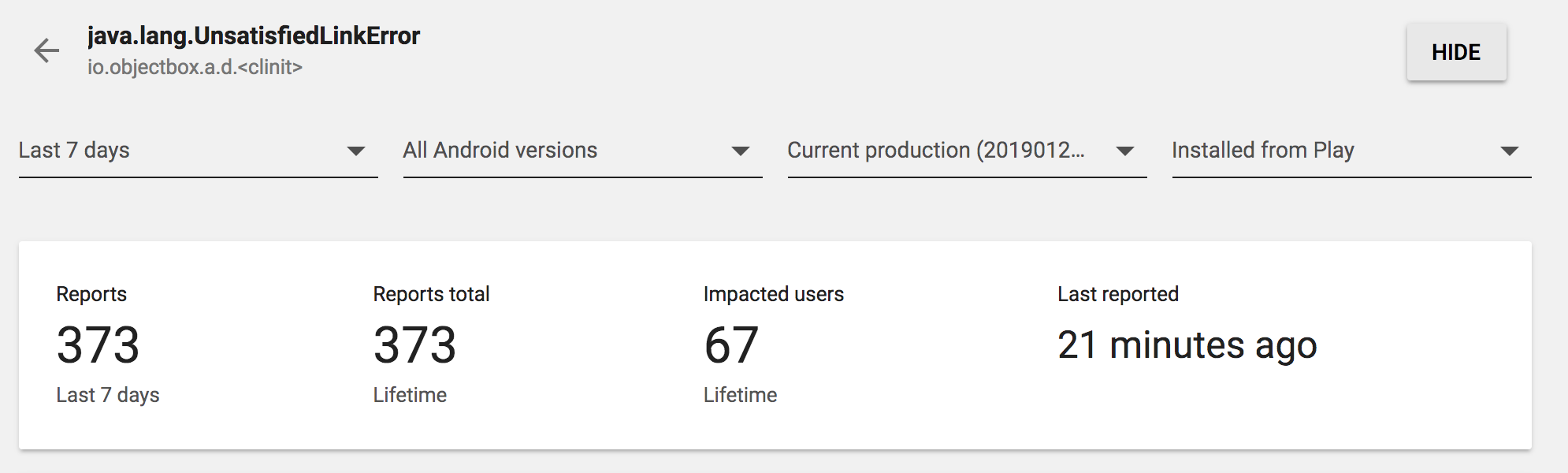
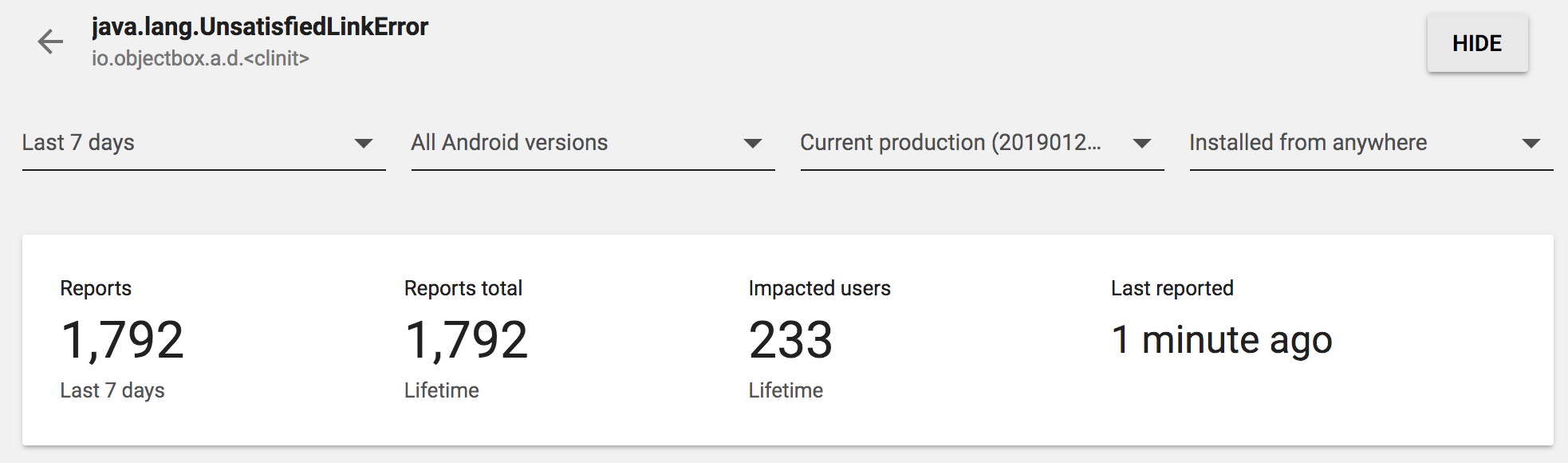
Another piece of info. Again, the data is from the latest release, ~2 days ago. Please, pay attention to the rightmost filter - source of installation. The rate of Play installs / all installs is much lower than of a couple another bugs that I've checked. But we have some problems on Play installs too
Gaket
on 23 Jan 2019
Side note: we see UnsatisfiedLinkError also for one of our apps trying to load the native library of Fabric Crashlytics (probably because it's loaded before ObjectBox loads its). Android 8.1 and mostly 9.0 and mostly Huawei devices. But for less than 0,01% (all via Google Play).
Starting to wonder whether this is manufacturer specific (they might have own installer code) as Google's devices seem not to be affected.
-ut
greenrobot-team
on 28 Jan 2019
Same issue of @Gaket And this is from a Google Device, a Nexus 6P @greenrobot-team

 botty87
on 28 Jan 2019
botty87
on 28 Jan 2019
Update to version 2.3.4 ~2.3.2 (use 2.3.3 which restores Android 4.x support)~ which includes support for ReLinker.
https://github.com/KeepSafe/ReLinker/
ReLinker will try to load the native library normally, but if that fails tries to extract it from the APK and load it itself. We tested this "workaround loading" on an emulator and real device without issues.
By default ObjectBox will load the native library as before. To use ReLinker you need to add ReLinker to your dependencies:
implementation 'com.getkeepsafe.relinker:relinker:1.3.1'
To enable debug logging for ReLinker you can pass a custom ReLinkerInstance when building BoxStore:
boxStore = MyObjectBox.builder()
    .androidContext(App.this)
    .androidReLinker(ReLinker.log(new ReLinker.Logger() {
        @Override
        public void log(String message) { Log.d(TAG, message); }
    }))
    .build();
If this works out we will add ReLinker to the objectbox-android dependencies by default. So let us know if the above fixes the UnsatisfiedLinkErrors.
App Bundles
If users sideload your app they may only install the base APK and not all required config APKs. Instead of detecting if all required APKs are present you can disable splitting App Bundles by ABI:
android {
    bundle {
        abi {
            // This property is set to true by default.
            enableSplit = false
        }
    }
}
https://issuetracker.google.com/issues/111233819#comment8
https://developer.android.com/studio/projects/dynamic-delivery#disable_config_apks
Note about sideloading: "Some users sideload APKs [...]. These installs can unfortunately still appear as Play installs since this data can easily be spoofed"
https://issuetracker.google.com/issues/111233819#comment12
ProGuard
If you are using ProGuard make sure to add a rule to keep ReLinker classes and methods as ObjectBox only accesses them via reflection:
-keep class com.getkeepsafe.relinker.** { *; }
Multidex
If you are using multidex make sure that ReLinker and ObjectBox are in the primary dex file. E.g. add a file with the above rule and then configure it as multiDexKeepProguard:
android {
    buildTypes {
        release {
            multiDexKeepProguard file('multidex-config.pro')
            ...
        }
    }
}
// and in the file multidex-config.pro
-keep class com.getkeepsafe.relinker.** { *; }
https://developer.android.com/studio/build/multidex#keep
-Uwe
greenrobot-team
on 5 Feb 2019
I just want give some info, may be useful for fix this.
Case:1
I initialized objectbox in Application class (onCreate()).
But queries begin in MainActivity (onCreate()).
UnsatisfiedLinkError NOT occurred.
Case:2
I initialized objectbox & queries begin in Application class (onCreate()).
UnsatisfiedLinkError occurred.
Objectbox version: 2.3.1
 jpvs0101
on 10 Feb 2019
jpvs0101
on 10 Feb 2019
@jpvs0101 Thanks. Can you please try the fix mentioned in https://github.com/objectbox/objectbox-java/issues/605#issuecomment-460539359 and report back?
-ut
greenrobot-team
on 12 Feb 2019
@jpvs0101 Thanks. Can you please try the fix mentioned in #605 (comment) and report back?
-ut
I will try...
jpvs0101
on 13 Feb 2019
PS.: 2.3.2 introduced a bug (#656) affecting Android 4.3 or lower. This got fixed in 2.3.3; in case you want to test it in live apps we'd recommend to do the update.
greenrobot
on 14 Feb 2019
Luckily, we support Android 5+. The build is in internal testing, next week we should get data from prod.
Oops, closed the issue by a mistake. Returned it back for now.
Gaket
on 14 Feb 2019
@greenrobot-team I have tried 2.3.2 with re-linker, i published my app as production, but it seems like the same crash issue continues.... :(
jpvs0101
on 25 Feb 2019
@jpvs0101 Can you share a stack trace and what devices are affected? Maybe in comparison to the previous version? -ut
greenrobot-team
on 26 Feb 2019
I'm also seeing this issue. Below are stack traces and devices for ObjectBox v2.3.3 and v2.1.0.
Here's a stacktrace from a Nexus 5X (Android 6.0.1), OB v2.3.3:
Fatal Exception: java.lang.UnsatisfiedLinkError: dalvik.system.PathClassLoader[DexPathList[[zip file "/data/app/com.my.app-1/base.apk"],nativeLibraryDirectories=[/data/app/com.my.app-1/lib/arm, /vendor/lib, /system/lib]]] couldn't find "libobjectbox-jni.so"
       at java.lang.Runtime.loadLibrary(Runtime.java:367)
       at java.lang.System.loadLibrary(System.java:1076)
       at io.objectbox.internal.NativeLibraryLoader.<clinit>(NativeLibraryLoader.java:79)
       at io.objectbox.BoxStore.<init>(BoxStore.java:197)
       at io.objectbox.BoxStoreBuilder.build(BoxStoreBuilder.java:383)
       at com.my.app.application.MyAppApplication.onCreate(MyAppApplication.java:68)
       at android.app.Instrumentation.callApplicationOnCreate(Instrumentation.java:1013)
       at android.app.ActivityThread.handleBindApplication(ActivityThread.java:4711)
       at android.app.ActivityThread.-wrap1(ActivityThread.java)
       at android.app.ActivityThread$H.handleMessage(ActivityThread.java:1405)
       at android.os.Handler.dispatchMessage(Handler.java:102)
       at android.os.Looper.loop(Looper.java:148)
       at android.app.ActivityThread.main(ActivityThread.java:5421)
       at java.lang.reflect.Method.invoke(Method.java)
       at com.android.internal.os.ZygoteInit$MethodAndArgsCaller.run(ZygoteInit.java:726)
       at com.android.internal.os.ZygoteInit.main(ZygoteInit.java:616)
And a Defy Mini (Android 5.0.2), OB v2.1.0:
Fatal Exception: java.lang.UnsatisfiedLinkError: dalvik.system.PathClassLoader[DexPathList[[zip file "/data/app/com.my.app-1/base.apk"],nativeLibraryDirectories=[/vendor/lib, /system/lib]]] couldn't find "libobjectbox.so"
       at java.lang.Runtime.loadLibrary(Runtime.java:366)
       at java.lang.System.loadLibrary(System.java:989)
       at io.objectbox.internal.NativeLibraryLoader.<clinit>(NativeLibraryLoader.java:71)
       at io.objectbox.internal.NativeLibraryLoader.ensureLoaded(NativeLibraryLoader.java)
       at io.objectbox.BoxStore.<init>(BoxStore.java:189)
       at io.objectbox.BoxStoreBuilder.build(BoxStoreBuilder.java:352)
       at com.my.app.application.MyAppApplication.onCreate(MyAppApplication.java:64)
       at android.app.Instrumentation.callApplicationOnCreate(Instrumentation.java:1011)
       at android.app.ActivityThread.handleBindApplication(ActivityThread.java:4518)
       at android.app.ActivityThread.access$1500(ActivityThread.java:144)
       at android.app.ActivityThread$H.handleMessage(ActivityThread.java:1339)
       at android.os.Handler.dispatchMessage(Handler.java:102)
       at android.os.Looper.loop(Looper.java:135)
       at android.app.ActivityThread.main(ActivityThread.java:5221)
       at java.lang.reflect.Method.invoke(Method.java)
       at java.lang.reflect.Method.invoke(Method.java:372)
       at com.android.internal.os.ZygoteInit$MethodAndArgsCaller.run(ZygoteInit.java:899)
       at com.android.internal.os.ZygoteInit.main(ZygoteInit.java:694)
And a Google Pixel (Android 9), OB v2.1.0:
Fatal Exception: java.lang.UnsatisfiedLinkError: dalvik.system.PathClassLoader[DexPathList[[zip file "/system/framework/org.apache.http.legacy.boot.jar", zip file "/data/app/com.my.app-BU8P2qqD3OJotFicAK49EA==/base.apk"],nativeLibraryDirectories=[/data/app/com.omy.app-BU8P2qqD3OJotFicAK49EA==/lib/arm64, /system/lib64, /vendor/lib64]]] couldn't find "libobjectbox.so"
       at java.lang.Runtime.loadLibrary0(Runtime.java:1012)
       at java.lang.System.loadLibrary(System.java:1669)
       at io.objectbox.internal.NativeLibraryLoader.<clinit>(NativeLibraryLoader.java:71)
       at io.objectbox.internal.NativeLibraryLoader.ensureLoaded(Unknown Source)
       at io.objectbox.BoxStore.<init>(BoxStore.java:189)
       at io.objectbox.BoxStoreBuilder.build(BoxStoreBuilder.java:352)
       at com.my.app.application.MyAppApplication.onCreate(MyAppApplication.java:64)
       at android.app.Instrumentation.callApplicationOnCreate(Instrumentation.java:1154)
       at android.app.ActivityThread.handleBindApplication(ActivityThread.java:5871)
       at android.app.ActivityThread.access$1100(ActivityThread.java:199)
       at android.app.ActivityThread$H.handleMessage(ActivityThread.java:1650)
       at android.os.Handler.dispatchMessage(Handler.java:106)
       at android.os.Looper.loop(Looper.java:193)
       at android.app.ActivityThread.main(ActivityThread.java:6669)
       at java.lang.reflect.Method.invoke(Method.java)
       at com.android.internal.os.RuntimeInit$MethodAndArgsCaller.run(RuntimeInit.java:493)
       at com.android.internal.os.ZygoteInit.main(ZygoteInit.java:858)
And a SM-J600G (Android 8.0), OB v2.1.0:
Fatal Exception: java.lang.UnsatisfiedLinkError: dalvik.system.PathClassLoader[DexPathList[[zip file "/data/app/com.my.app-xbd9y7iLMRdq3GC569WEog==/base.apk"],nativeLibraryDirectories=[/data/app/com.my.app-xbd9y7iLMRdq3GC569WEog==/lib/arm, /system/lib, /vendor/lib]]] couldn't find "libobjectbox.so"
       at java.lang.Runtime.loadLibrary0(Runtime.java:1011)
       at java.lang.System.loadLibrary(System.java:1657)
       at io.objectbox.internal.NativeLibraryLoader.<clinit>(NativeLibraryLoader.java:71)
       at io.objectbox.internal.NativeLibraryLoader.ensureLoaded(Unknown Source)
       at io.objectbox.BoxStore.<init>(BoxStore.java:189)
       at io.objectbox.BoxStoreBuilder.build(BoxStoreBuilder.java:352)
       at com.my.app.application.MyAppApplication.onCreate(MyAppApplication.java:54)
       at android.app.Instrumentation.callApplicationOnCreate(Instrumentation.java:1125)
       at android.app.ActivityThread.handleBindApplication(ActivityThread.java:6062)
       at android.app.ActivityThread.-wrap1(Unknown Source)
       at android.app.ActivityThread$H.handleMessage(ActivityThread.java:1764)
       at android.os.Handler.dispatchMessage(Handler.java:105)
       at android.os.Looper.loop(Looper.java:164)
       at android.app.ActivityThread.main(ActivityThread.java:6944)
       at java.lang.reflect.Method.invoke(Method.java)
       at com.android.internal.os.Zygote$MethodAndArgsCaller.run(Zygote.java:327)
       at com.android.internal.os.ZygoteInit.main(ZygoteInit.java:1374)
 cknight
on 26 Feb 2019
cknight
on 26 Feb 2019
@cknight Please try the fix suggested in the above comment and report back. -ut
greenrobot-team
on 26 Feb 2019
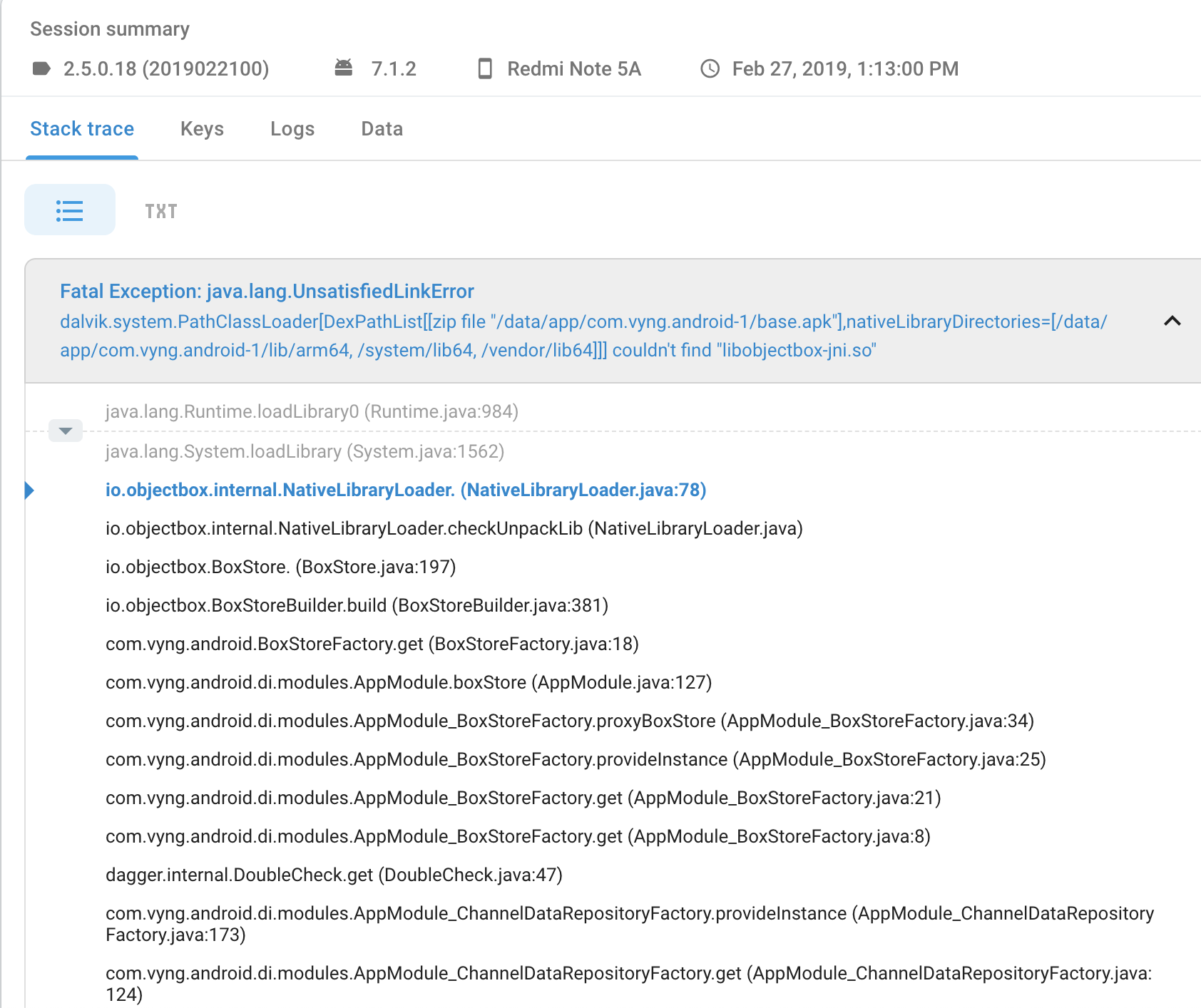
Unfortunately, the problem still appears on different OS versions, including Android 7.
7.0
Galaxy S6 Edge
7.1.2
Redmi Y1
5.1.1
Lenovo K5
6.0.1
SM-G610F
Fatal Exception: java.lang.UnsatisfiedLinkError: dalvik.system.PathClassLoader[DexPathList[[zip file "/data/app/com.vyng.android-1/base.apk"],nativeLibraryDirectories=[/data/app/com.vyng.android-1/lib/arm64, /system/lib64, /vendor/lib64]]] couldn't find "libobjectbox-jni.so"
       at java.lang.Runtime.loadLibrary0(Runtime.java:984)
       at java.lang.System.loadLibrary(System.java:1562)
       at io.objectbox.internal.NativeLibraryLoader.(NativeLibraryLoader.java:78)
       at io.objectbox.internal.NativeLibraryLoader.checkUnpackLib(NativeLibraryLoader.java)
       at io.objectbox.BoxStore.(BoxStore.java:197)
       at io.objectbox.BoxStoreBuilder.build(BoxStoreBuilder.java:381)
       at com.vyng.android.BoxStoreFactory.get(BoxStoreFactory.java:18)
       at com.vyng.android.di.modules.AppModule.boxStore(AppModule.java:127)
       at com.vyng.android.di.modules.AppModule_BoxStoreFactory.proxyBoxStore(AppModule_BoxStoreFactory.java:34)
       at com.vyng.android.di.modules.AppModule_BoxStoreFactory.provideInstance(AppModule_BoxStoreFactory.java:25)
       at com.vyng.android.di.modules.AppModule_BoxStoreFactory.get(AppModule_BoxStoreFactory.java:21)
       at com.vyng.android.di.modules.AppModule_BoxStoreFactory.get(AppModule_BoxStoreFactory.java:8)
       at dagger.internal.DoubleCheck.get(DoubleCheck.java:47)
       at com.vyng.android.di.modules.AppModule_ChannelDataRepositoryFactory.provideInstance(AppModule_ChannelDataRepositoryFactory.java:173)
       at com.vyng.android.di.modules.AppModule_ChannelDataRepositoryFactory.get(AppModule_ChannelDataRepositoryFactory.java:124)
       at com.vyng.android.di.modules.AppModule_ChannelDataRepositoryFactory.get(AppModule_ChannelDataRepositoryFactory.java:29)
       at dagger.internal.DoubleCheck.get(DoubleCheck.java:47)
       at com.vyng.android.video.cache.di.CacheModule_CacheWatcherFactory.provideInstance(CacheModule_CacheWatcherFactory.java:80)
       at com.vyng.android.video.cache.di.CacheModule_CacheWatcherFactory.get(CacheModule_CacheWatcherFactory.java:58)
       at com.vyng.android.video.cache.di.CacheModule_CacheWatcherFactory.get(CacheModule_CacheWatcherFactory.java:16)
       at dagger.internal.DoubleCheck.get(DoubleCheck.java:47)
       at com.vyng.android.di.components.DaggerAppComponent.injectVyngApplication(DaggerAppComponent.java:2354)
       at com.vyng.android.di.components.DaggerAppComponent.inject(DaggerAppComponent.java:2116)
       at com.vyng.android.VyngApplication.initAppComponent(VyngApplication.java:457)
       at com.vyng.android.VyngApplication.onCreate(VyngApplication.java:225)
       at android.app.Instrumentation.callApplicationOnCreate(Instrumentation.java:1025)
       at android.app.ActivityThread.handleBindApplication(ActivityThread.java:5548)
       at android.app.ActivityThread.-wrap2(ActivityThread.java)
       at android.app.ActivityThread$H.handleMessage(ActivityThread.java:1627)
       at android.os.Handler.dispatchMessage(Handler.java:102)
       at android.os.Looper.loop(Looper.java:163)
       at android.app.ActivityThread.main(ActivityThread.java:6393)
       at java.lang.reflect.Method.invoke(Method.java)
       at com.android.internal.os.ZygoteInit$MethodAndArgsCaller.run(ZygoteInit.java:933)
       at com.android.internal.os.ZygoteInit.main(ZygoteInit.java:823)
1) I think it was mentioned at least in some of the linked article; but I'm not sure if we explicitly asked about other native libraries yet. So for anyone getting this, are there other ".so" files included in your apk?
2) I've also read about app launchers like Parallel Space; which can cause this unless the users install an additional 64 bit support app. So if you have the chance to find out if your users use a (potentially buggy) app launcher, that would be great.
greenrobot
on 28 Feb 2019
@Gaket Looks like an improvement as the stack trace is different now.
It indicates that checkUnpackLib was called, which should never happen on an Android device.
The odd thing is that the source code lines do not match for NativeLibraryLoader.java:78. If the device is not Android NativeLibraryLoader.java:79 should be next instead.
Regardless, the main issue is that the load calls there are guarded by a try-catch on UnsatisfiedLinkError. So even if Android detection is wrong, the code should still try to load with ReLinker.
https://github.com/objectbox/objectbox-java/blob/V2.3.3/objectbox-java/src/main/java/io/objectbox/internal/NativeLibraryLoader.java#L77-L90
-ut
greenrobot-team
on 4 Mar 2019
Sorry, partially wrong: this can happen if !android && isLinux is false. Then the code just re-throws the UnsatisfiedLinkError.
So it might be that those devices are detected neither as Android or Linux.
-ut
greenrobot-team
on 4 Mar 2019
By using ReLinker with 2.3.3, this issue would disappear, but another UnsatisfiedLinkError would occur sometimes when I'm trying to delete the db. So I'm facing a dilemma of using ReLinker to solve so-library issue but causing db deletion failure or not using ReLinker to keep everything stay the same but so-library for objectbox sometimes could not be found.
org.greenrobot.eventbus.EventBusException: Invoking subscriber failed
    at org.greenrobot.eventbus.EventBus.handleSubscriberException(EventBus.java:527)
    at org.greenrobot.eventbus.EventBus.invokeSubscriber(EventBus.java:509)
    at org.greenrobot.eventbus.EventBus.invokeSubscriber(EventBus.java:501)
    at org.greenrobot.eventbus.AsyncPoster.run(AsyncPoster.java:46)
    at java.util.concurrent.ThreadPoolExecutor.runWorker(ThreadPoolExecutor.java:1112)
    at java.util.concurrent.ThreadPoolExecutor$Worker.run(ThreadPoolExecutor.java:587)
    at java.lang.Thread.run(Thread.java:818)
Caused by: java.lang.UnsatisfiedLinkError: No implementation found for long[] io.objectbox.query.Query.nativeFindKeysUnordered(long, long) (tried Java_io_objectbox_query_Query_nativeFindKeysUnordered and Java_io_objectbox_query_Query_nativeFindKeysUnordered__JJ)
    at io.objectbox.query.Query.nativeFindKeysUnordered(Native Method)
    at io.objectbox.query.Query$5.call(Query.java:245)
    at io.objectbox.query.Query$5.call(Query.java:242)
    at io.objectbox.Box.internalCallWithReaderHandle(Box.java:626)
    at io.objectbox.query.Query.findIds(Query.java:242)
    at io.objectbox.query.Query.findLazy(Query.java:255)
    at com.xxx.aaa.bbb(bbb.java:307)
    at java.lang.reflect.Method.invoke(Native Method)
    at java.lang.reflect.Method.invoke(Method.java:372)
    at org.greenrobot.eventbus.EventBus.invokeSubscriber(EventBus.java:507)
    ... 5 more
 minstrelsy
on 13 Mar 2019
minstrelsy
on 13 Mar 2019
I've had my first crash report since adding the relinker library as suggested, a rooted Defy Mini, Android 5.0.2:
Fatal Exception: java.lang.UnsatisfiedLinkError
dalvik.system.PathClassLoader[DexPathList[[zip file "/data/app/com.my.app-1/base.apk"],nativeLibraryDirectories=[/vendor/lib, /system/lib]]] couldn't find "libobjectbox-jni.so"
java.lang.Runtime.loadLibrary (Runtime.java:366)
java.lang.System.loadLibrary (System.java:989)
io.objectbox.internal.NativeLibraryLoader.(NativeLibraryLoader.java:79)
io.objectbox.internal.NativeLibraryLoader.ensureLoaded (NativeLibraryLoader.java)
io.objectbox.BoxStore.(BoxStore.java:197)
io.objectbox.BoxStoreBuilder.build (BoxStoreBuilder.java:383)
com.my.app.application.MyAPP.onCreate (MyAppApplication.java:68)
android.app.Instrumentation.callApplicationOnCreate (Instrumentation.java:1011)
android.app.ActivityThread.handleBindApplication (ActivityThread.java:4518)
android.app.ActivityThread.access$1500 (ActivityThread.java:144)
android.app.ActivityThread$H.handleMessage (ActivityThread.java:1339)
android.os.Handler.dispatchMessage (Handler.java:102)
android.os.Looper.loop (Looper.java:135)
android.app.ActivityThread.main (ActivityThread.java:5221)
java.lang.reflect.Method.invoke (Method.java)
java.lang.reflect.Method.invoke (Method.java:372)
com.android.internal.os.ZygoteInit$MethodAndArgsCaller.run (ZygoteInit.java:899)
com.android.internal.os.ZygoteInit.main (ZygoteInit.java:694)
cknight
on 13 Mar 2019
@cknight Yeap, that looks like https://github.com/objectbox/objectbox-java/issues/605#issuecomment-469167140 See below.
@minstrelsy This looks like a separate issue. Can you create a separate issue for that and share more details (affected device model and software)?
We are preparing a fix that tries to load the Android library if the device is detected as neither Android or Linux. In addition with some improved exception messages possibly helping us refine our checks.
-Uwe
greenrobot-team
on 18 Mar 2019
Not sure if you still need this, but a few more crashes:
ZTE BLADE A110, not rooted (stack trace below) and a vivo X9, rooted
Fatal Exception: java.lang.UnsatisfiedLinkError
dalvik.system.PathClassLoader[DexPathList[[zip file "/data/app/com.my.app.free-1/base.apk"],nativeLibraryDirectories=[/vendor/lib64, /system/lib64]]] couldn't find "libobjectbox-jni.so"
java.lang.Runtime.loadLibrary (Runtime.java:367)
java.lang.System.loadLibrary (System.java:988)
io.objectbox.internal.NativeLibraryLoader.(NativeLibraryLoader.java:79)
io.objectbox.BoxStore.(BoxStore.java:197)
io.objectbox.BoxStoreBuilder.build (BoxStoreBuilder.java:383)
cknight
on 18 Mar 2019
2.3.4 was released with a fix for devices not identifying as Android. Also, we added extra info to the exception in case there are still issues.
@cknight Please try the new version. The stack is inline with what we suspect what is happening. Details: https://github.com/objectbox/objectbox-java/blob/V2.3.3/objectbox-java/src/main/java/io/objectbox/internal/NativeLibraryLoader.java#L88 rethrows the error from L79. Right, @greenrobot-team ?
greenrobot
on 20 Mar 2019
@greenrobot Great, I'll give it a test, thanks for your help. Do I still need the relinker dependency with 2.3.4?
cknight
on 20 Mar 2019
@cknight Yes, you need to have your own dependency to relinker; we do not set the dependency in our aar (yet). If you can test using affected devices directly: it would be great to know the result with and without relinker.
greenrobot
on 21 Mar 2019
First crash on 2.3.4 (with relinker), Nexus 5X, rooted, Android 6.0.1:
Fatal Exception: java.lang.LinkageError
Loading ObjectBox native library failed: vendor=The Android Project,os=linux,arch=null,android=true,linux=true
io.objectbox.internal.NativeLibraryLoader.(NativeLibraryLoader.java:108)
io.objectbox.BoxStore.(BoxStore.java:197)
io.objectbox.BoxStoreBuilder.build (BoxStoreBuilder.java:383)
com.my.application.MyApplication.onCreate (MyApplication.java:79)
android.app.Instrumentation.callApplicationOnCreate (Instrumentation.java:1013)
android.app.ActivityThread.handleBindApplication (ActivityThread.java:4711)
android.app.ActivityThread.-wrap1 (ActivityThread.java)
android.app.ActivityThread$H.handleMessage (ActivityThread.java:1405)
android.os.Handler.dispatchMessage (Handler.java:102)
android.os.Looper.loop (Looper.java:148)
android.app.ActivityThread.main (ActivityThread.java:5421)
java.lang.reflect.Method.invoke (Method.java)
com.android.internal.os.ZygoteInit$MethodAndArgsCaller.run (ZygoteInit.java:726)
com.android.internal.os.ZygoteInit.main (ZygoteInit.java:616)
Caused by java.lang.UnsatisfiedLinkError
dalvik.system.PathClassLoader[DexPathList[[zip file "/data/app/com.my.application-1/base.apk"],nativeLibraryDirectories=[/data/app/com.my.application-1/lib/arm, /vendor/lib, /system/lib]]] couldn't find "libobjectbox-jni.so"
java.lang.Runtime.loadLibrary (Runtime.java:367)
java.lang.System.loadLibrary (System.java:1076)
io.objectbox.internal.NativeLibraryLoader.(NativeLibraryLoader.java:85)
io.objectbox.BoxStore.(BoxStore.java:197)
io.objectbox.BoxStoreBuilder.build (BoxStoreBuilder.java:383)
com.my.application.MyApplication.onCreate (MyApplication.java:79)
android.app.Instrumentation.callApplicationOnCreate (Instrumentation.java:1013)
android.app.ActivityThread.handleBindApplication (ActivityThread.java:4711)
android.app.ActivityThread.-wrap1 (ActivityThread.java)
android.app.ActivityThread$H.handleMessage (ActivityThread.java:1405)
android.os.Handler.dispatchMessage (Handler.java:102)
android.os.Looper.loop (Looper.java:148)
android.app.ActivityThread.main (ActivityThread.java:5421)
java.lang.reflect.Method.invoke (Method.java)
com.android.internal.os.ZygoteInit$MethodAndArgsCaller.run (ZygoteInit.java:726)
com.android.internal.os.ZygoteInit.main (ZygoteInit.java:616)
cknight
on 23 Mar 2019
@cknight Thanks, that's interesting! Based on this stack trace it appears that loadLibraryAndroid() returns false. It only does this if it can not detect ReLinker.
- How do you add ReLinker to your project?
- edit: are you using ProGuard which might remove ReLinker from your APK?
- Do you pass a
Contextto theMyObjectBoxbuilder?
-Uwe
greenrobot-team
on 25 Mar 2019
Updated the instructions to add ReLinker with instructions when using ProGuard.
https://github.com/objectbox/objectbox-java/issues/605#issuecomment-460539359
-Uwe
greenrobot-team
on 25 Mar 2019
@greenrobot No, I don't think I'm using proguard. I've run the following command on my APK (extracted from my aab):
dexdump classes.dex |grep keepsafe
And get this output:
Class descriptor  : 'Lcom/getkeepsafe/relinker/ApkLibraryInstaller$ZipFileInZipEntry;'
    #0              : (in Lcom/getkeepsafe/relinker/ApkLibraryInstaller$ZipFileInZipEntry;)
    #1              : (in Lcom/getkeepsafe/relinker/ApkLibraryInstaller$ZipFileInZipEntry;)
    #0              : (in Lcom/getkeepsafe/relinker/ApkLibraryInstaller$ZipFileInZipEntry;)
        0x0000 - 0x0008 reg=0 this Lcom/getkeepsafe/relinker/ApkLibraryInstaller$ZipFileInZipEntry;
  Class descriptor  : 'Lcom/getkeepsafe/relinker/BuildConfig;'
    #0              : (in Lcom/getkeepsafe/relinker/BuildConfig;)
    #1              : (in Lcom/getkeepsafe/relinker/BuildConfig;)
    #2              : (in Lcom/getkeepsafe/relinker/BuildConfig;)
    #3              : (in Lcom/getkeepsafe/relinker/BuildConfig;)
    #4              : (in Lcom/getkeepsafe/relinker/BuildConfig;)
    #5              : (in Lcom/getkeepsafe/relinker/BuildConfig;)
    #0              : (in Lcom/getkeepsafe/relinker/BuildConfig;)
        0x0000 - 0x0004 reg=0 this Lcom/getkeepsafe/relinker/BuildConfig;
  Class descriptor  : 'Lcom/getkeepsafe/relinker/MissingLibraryException;'
    #0              : (in Lcom/getkeepsafe/relinker/MissingLibraryException;)
        0x0000 - 0x0004 reg=0 this Lcom/getkeepsafe/relinker/MissingLibraryException;
  Class descriptor  : 'Lcom/getkeepsafe/relinker/R;'
    #0              : (in Lcom/getkeepsafe/relinker/R;)
        0x0000 - 0x0004 reg=0 this Lcom/getkeepsafe/relinker/R;
  Class descriptor  : 'Lcom/getkeepsafe/relinker/ReLinker$LibraryInstaller;'
    #0              : (in Lcom/getkeepsafe/relinker/ReLinker$LibraryInstaller;)
etc.
I add the relinker library as standard in my App build.gradle:
android {
    compileSdkVersion 28
    defaultConfig {
        applicationId 'com.my.application'
        minSdkVersion 21
        targetSdkVersion 28
        versionCode 78
        versionName "1.0.29"
        testInstrumentationRunner "androidx.test.runner.AndroidJUnitRunner"
        vectorDrawables.useSupportLibrary = true
        multiDexEnabled true
        javaCompileOptions {
            annotationProcessorOptions {
                arguments = ["resourcePackageName": android.defaultConfig.applicationId]
            }
        }
    }
    buildTypes {
        release {
            minifyEnabled false
            proguardFiles getDefaultProguardFile('proguard-android.txt'), 'proguard-rules.pro'
            resValue "bool", "DEBUG", "false"
        }
        debug {
            minifyEnabled false
            resValue "bool", "DEBUG", "true"
        }
    }
    flavorDimensions "default"
    productFlavors {
        free {
            applicationIdSuffix ".free"
            versionNameSuffix "-free"
            resValue "string", "app_name", "My Application Free"
            resValue "bool", "SHOW_ADS", "true"
        }
        paid {
            versionNameSuffix "-paid"
            resValue "string", "app_name", "My Application"
            resValue "bool", "SHOW_ADS", "false"
        }
    }
    compileOptions {
        sourceCompatibility JavaVersion.VERSION_1_8
        targetCompatibility JavaVersion.VERSION_1_8
    }
}
def AAVersion = '4.6.0' //https://github.com/androidannotations/androidannotations/wiki/ReleaseNotes
dependencies {
    implementation fileTree(include: ['*.jar'], dir: 'libs')
    implementation 'androidx.multidex:multidex:2.0.1'
    implementation 'androidx.appcompat:appcompat:1.1.0-alpha03'
    implementation 'androidx.cardview:cardview:1.0.0'
    implementation 'com.google.android.material:material:1.1.0-alpha04'
    implementation 'androidx.constraintlayout:constraintlayout:2.0.0-alpha3'
    implementation 'com.google.android.gms:play-services-maps:16.1.0'
    implementation 'androidx.legacy:legacy-support-v4:1.0.0'
    implementation 'androidx.vectordrawable:vectordrawable:1.1.0-alpha01'
    testImplementation 'junit:junit:4.12'
    androidTestImplementation 'androidx.test:runner:1.1.1'
    androidTestImplementation 'androidx.test.espresso:espresso-core:3.1.1'
    annotationProcessor "org.androidannotations:androidannotations:$AAVersion"
    annotationProcessor "io.objectbox:objectbox-processor:$objectboxVersion"
    implementation "org.androidannotations:androidannotations-api:$AAVersion"
    implementation 'com.loopj.android:android-async-http:1.4.9'
    implementation 'com.jakewharton.threetenabp:threetenabp:1.0.5'
    implementation 'com.android.volley:volley:1.1.0'
    implementation 'org.osmdroid:osmdroid-android:6.0.1'
    implementation 'com.google.android.gms:play-services-location:16.0.0'
    freeImplementation 'com.google.android.gms:play-services-ads:17.2.0'
    freeImplementation 'com.google.android.ads.consent:consent-library:1.0.7'
    implementation 'com.google.code.gson:gson:2.8.4'
    implementation 'com.nostra13.universalimageloader:universal-image-loader:1.9.5'
    implementation 'com.google.android:flexbox:0.3.2'
    implementation 'konifar:fab-transformation:1.0.0'
    implementation 'com.firebase:firebase-jobdispatcher:0.8.5'
    implementation 'com.github.PhilJay:MPAndroidChart:v3.0.3'
    implementation 'com.luckycatlabs:SunriseSunsetCalculator:1.2'
    implementation 'com.google.firebase:firebase-core:16.0.8'
    implementation 'com.crashlytics.sdk.android:crashlytics:2.9.9'
    implementation 'com.google.firebase:firebase-perf:16.2.4'
    implementation 'com.getkeepsafe.relinker:relinker:1.3.1'
    /* Added for ObjectBox NativeLibrary error */
    testImplementation('org.threeten:threetenbp:1.3.2') {
        exclude group: 'com.jakewharton.threetenabp', module: 'threetenabp'
    }
    debugImplementation "io.objectbox:objectbox-android-objectbrowser:$objectboxVersion"
    releaseImplementation "io.objectbox:objectbox-android:$objectboxVersion"
}
apply plugin: 'io.objectbox'
apply plugin: 'io.fabric'
apply plugin: 'com.google.gms.google-services'
Finally, I initialize ObjectBox in the onCreate() of my MyApplication class (which extends androidx.multidex.MultiDexApplication) as follows:
boxStore = MyObjectBox.builder().androidContext(MyApplication.this).build();
cknight
on 25 Mar 2019
@cknight OK, so it is a multidex issue.
Try to declare the ObjectBox and ReLinker classes as required in the primary DEX file.
https://developer.android.com/studio/build/multidex#keep
Note: As your minSdkVersion is 21 there is no need to use implementation 'androidx.multidex:multidex:2.0.1' and MultiDexApplication. Just multiDexEnabled true is enough.
https://developer.android.com/studio/build/multidex#mdex-gradle
Edit: again updated the instructions with hints for multidex. https://github.com/objectbox/objectbox-java/issues/605#issuecomment-460539359
-Uwe
greenrobot-team
on 26 Mar 2019
@greenrobot-team, do you think a config with these classes should be enough?
com/getkeepsafe/relinker/ReLinker.class
com/getkeepsafe/relinker/ReLinkerInstance.class
com/getkeepsafe/relinker/SystemLibraryLoader.class
io/objectbox/BoxStoreBuilder.class
io/objectbox/BoxStoreFactory.class
io/objectbox/BoxStore.class
io/objectbox/Box.class
io/objectbox/Cursor.class
io/objectbox/internal/NativeLibraryLoader.class
com/vyng/android/BoxStoreFactory.class
com/vyng/android/model/MyObjectBox.class
We have about 6,6k monthly crashes and that's a top one in our userbase. Let's hope the multidex config helps, it looks like it can be it, according to docs. The only question is which classes should be saved.
Gaket
on 4 Apr 2019
We've updated the configs according to suggestions above. ObjectBox is still our top crash sourse. Unfortunately, we are going to move to some other db solution when we have some time for this.
Gaket
on 10 Apr 2019
It might be a bug in App Bundles itself unrelated to ObjectBox; see https://issuetracker.google.com/issues/109448556 and https://issuetracker.google.com/issues/111233819. So, maybe, this is something Google has to fix?
@cknight and others affected by this: are you using App Bundles?
greenrobot
on 10 Apr 2019
This is an interesting comment left for our friends at Realm, who seem to be fighting the same issue: https://github.com/realm/realm-java/issues/5977#issuecomment-470103539:
Note that users in India, Africa have much higher tendency to "share" apk files due to the cost and speed of bandwidth there.
@Gaket Do you have a chance to check countries?
greenrobot
on 10 Apr 2019
@greenrobot Yes, I am using app bundles. My latest release follows the multidex recommendations posted in a previous comment here, however I may be doing something wrong as some ObjectBox classes are being put into classes2.dex, despite having -keep class io.objectbox.** { *; } in my multidex-config.pro file. All keepsafe relinker classes are in the primary dex however (classes.dex).
For additional info, one of my apps has around 40k active users. Since 1st April, the issue is affecting 6 users with 18 crash events. Play Console shows most, but not all, crashes occurring when installed from a non-Play Store source. As my app is only available on the Play Store, I'm guessing people are side loading it. Finally, no user of my app has reported this issue yet.
cknight
on 11 Apr 2019
When using App Bundles, as mentioned before (https://github.com/objectbox/objectbox-java/issues/605#issuecomment-456017404), and users sideload an incompatible APK options are limited.
I suppose it's possible to catch the exception and show a message to users explaining the app is incompatible with their device. And to get it directly from Google Play? Or even explain how to share an APK from a compatible device with the same architecture?
@greenrobot @Gaket is using App Bundles (Ctrl+F App Bundles) and for Play vs Non-Play see https://github.com/objectbox/objectbox-java/issues/605#issuecomment-456798363
-Uwe
greenrobot-team
on 11 Apr 2019
Update: Use the official solution from Google instead to detect incorrect app installations when using App Bundles. https://developer.android.com/guide/app-bundle/sideload-check
Original: Potential workaround for App Bundles: apparently you can configure App Bundles to not split by ABI. This is also suggested by one of the Google engineers as an alternative to detecting if all required split APKs are present.
https://issuetracker.google.com/issues/111233819#comment8
https://developer.android.com/studio/projects/dynamic-delivery#disable_config_apks
android {
    bundle {
        abi {
            // This property is set to true by default.
            enableSplit = false
        }
    }
}
Quote about sideloading: "Some users sideload APKs and only install the base APK without the config splits. These installs can unfortunately still appear as Play installs since this data can easily be spoofed"
https://issuetracker.google.com/issues/111233819#comment12
Edit: updated https://github.com/objectbox/objectbox-java/issues/605#issuecomment-460539359.
-Uwe
greenrobot-team
on 11 Apr 2019
It might be a bug in App Bundles itself unrelated to ObjectBox; see https://issuetracker.google.com/issues/109448556 and https://issuetracker.google.com/issues/111233819. So, maybe, this is something Google has to fix?
@cknight and others affected by this: are you using App Bundles?
Nope, I am not using app bundles. Also followed suggestions. But still facing this issue.
jpvs0101
on 12 Apr 2019
@cknight Did disabling the ABI split (https://github.com/objectbox/objectbox-java/issues/605#issuecomment-482122356) help in your case?
greenrobot
on 14 Apr 2019
@jpvs0101 As asked previously, could you share a stack trace and what devices are affected?
Are you using ProGuard or Multidex? See https://github.com/objectbox/objectbox-java/issues/605#issuecomment-460539359
Are you using split APKs (similar to App Bundles): try to not split by ABI to avoid issues with sideloading.
Also make sure to test with ObjectBox 2.3.4.
-Uwe
greenrobot-team
on 15 Apr 2019
@jpvs0101 As asked previously, could you share a stack trace and what devices are affected?
My stack traces are similar to already shared above!
Are you using ProGuard or Multidex? See #605 (comment)
Already done!
Are you using split APKs (similar to App Bundles): try to not split by ABI to avoid issues with sideloading.
Nope!
Also make sure to test with ObjectBox 2.3.4.
Yeah...
jpvs0101
on 16 Apr 2019
@jpvs0101 You can produce this only with the live app, right? The issue shows in Crashlytics or Google Play Console? What's the crash rate (e.g. % users, % sessions). Any devices/countries affected more than others? Or anything else that looks "suspicious" in your error reporting?
That seem to be a really tough nut to crack; I'd like to offer a video (screen sharing) call if you are affected. Please email me at (my first name) [at] (objectbox) [dot] (io) if you are interested.
greenrobot
on 16 Apr 2019
In addition to the suggestions in https://github.com/objectbox/objectbox-java/issues/605#issuecomment-460539359 here is a code snippet on how to guard the build() call and display an activity with an info message (e.g. to direct the user to download from Google Play, report the error, etc.):
// guard the build call and set some flag (here setting the boxStore field null)
try {
    boxStore = MyObjectBox.builder()
            .androidContext(context.getApplicationContext())
            .build();
} catch (LinkageError e) {
    boxStore = null;
    Log.e(App.TAG, "Failed to load ObjectBox: " + e.getMessage());
}


// then for example in the main activity check the flag in onCreate and
// direct to an info/error message without the app crashing:
if (ObjectBox.get() == null) {
    startActivity(new Intent(this, ErrorActivity.class));
    finish();
    return;
}
I tested this also with our example. See https://github.com/objectbox/objectbox-examples/commit/e3af09d91181eea11db8959ceddf360f7b35a602 Keep in mind that you may need additional guards in your app if you use ObjectBox in your Application class or other places before the error activity is shown.
-Uwe
greenrobot-team
on 30 Apr 2019
There is now a docs page for these issues.
https://docs.objectbox.io/android/app-bundle-and-split-apk
-Uwe
greenrobot-team
on 28 May 2019
So I've been having this problem as well, and nothing here seemed to fix it. Finally I overrode the extractNativeLibs from object box in my own manifest and that finally fixed it.
<application
        tools:replace="android:extractNativeLibs"
        android:extractNativeLibs="true"
Prior to this there were no .so files in the /lib/arm directory in app's data space. After this the so files were extracted there, and the eventual System.loadLibrary() call worked.
The loadLibraryAndroid() method still fails on my app, but the catch all System.loadLibrary() works with the extracted .so files.
Edit: I should note that this occurred during an upgrade from OB 2.2.0 to 2.3.4. We were compiling with SDK 21 and min SDK of 21. I moved to compile SDK of 28 due to OB requiring the extractNativeLibs tag, and that's when this issue arose.
 grammesm
on 6 Jun 2019
grammesm
on 6 Jun 2019
@grammesm Can you reliably reproduce this? If yes, can you share a small example project that does? If sharing code to the public is a concern you can also email it to me (uwe AT objectbox.io).
Note: setting extractNativeLibs to false will avoid extracting native libraries out of the APK, instead they are loaded directly from there (to save space, to deliver smaller app updates). So you will not see them inside the app folder. See https://docs.objectbox.io/faq#how-much-does-objectbox-add-to-my-apk-size for details.
-Uwe
greenrobot-team
on 18 Jun 2019
Update for Android App Bundles: With the Play Core library Google now provides an official, easy solution to detect if an app is incorrectly installed and direct the user to fix the problem (e.g download the app from Google Play). I recommend using this instead of the workaround suggested above as it handles any broken installs due to sideloading when using App Bundle.
Also updated docs in that regard.
https://docs.objectbox.io/android/app-bundle-and-split-apk#app-bundle-and-split-apks
-Uwe
greenrobot-team
on 8 Jul 2019
In addition to the suggestions in #605 (comment) here is a code snippet on how to guard the
build()call and display an activity with an info message (e.g. to direct the user to download from Google Play, report the error, etc.):// guard the build call and set some flag (here setting the boxStore field null) try { boxStore = MyObjectBox.builder() .androidContext(context.getApplicationContext()) .build(); } catch (LinkageError e) { boxStore = null; Log.e(App.TAG, "Failed to load ObjectBox: " + e.getMessage()); } // then for example in the main activity check the flag in onCreate and // direct to an info/error message without the app crashing: if (ObjectBox.get() == null) { startActivity(new Intent(this, ErrorActivity.class)); finish(); return; }I tested this also with our example. See objectbox/objectbox-examples@e3af09d Keep in mind that you may need additional guards in your app if you use ObjectBox in your Application class or other places before the error activity is shown.
-Uwe
Worked well, no crash report after using this method. I didn't checked Google official way!
jpvs0101
on 9 Jul 2019
Just got 2 same crashes from our app installed from Google Play running Samsung Galaxy J2 Core (j2corelte), Android 8.1 and Google Pixel (sailfish), Android 7.1. We are using Android App Bundle and detecting sideload as described here
java.lang.LinkageError:
  at io.objectbox.internal.NativeLibraryLoader.<clinit> (NativeLibraryLoader.java:108)
  at io.objectbox.internal.NativeLibraryLoader.ensureLoaded (NativeLibraryLoader.java)
  at io.objectbox.BoxStore.<init> (BoxStore.java:197)
  at io.objectbox.BoxStoreBuilder.build (BoxStoreBuilder.java:383)
  at com.ourapp.sdk.SdkInitProvider.onCreate (SdkInitProvider.java:48)
  at android.content.ContentProvider.attachInfo (ContentProvider.java:1751)
  at android.content.ContentProvider.attachInfo (ContentProvider.java:1726)
  at android.app.ActivityThread.installProvider (ActivityThread.java:5855)
  at android.app.ActivityThread.installContentProviders (ActivityThread.java:5447)
  at android.app.ActivityThread.handleBindApplication (ActivityThread.java:5386)
  at de.robv.android.xposed.XposedBridge.invokeOriginalMethodNative (Native Method)
  at de.robv.android.xposed.XposedBridge.handleHookedMethod (XposedBridge.java:360)
  at android.app.ActivityThread.handleBindApplication (<Xposed>)
  at android.app.ActivityThread.-wrap2 (ActivityThread.java)
  at android.app.ActivityThread$H.handleMessage (ActivityThread.java:1546)
  at android.os.Handler.dispatchMessage (Handler.java:102)
  at android.os.Looper.loop (Looper.java:154)
  at android.app.ActivityThread.main (ActivityThread.java:6121)
  at java.lang.reflect.Method.invoke (Native Method)
  at com.android.internal.os.ZygoteInit$MethodAndArgsCaller.run (ZygoteInit.java:889)
  at com.android.internal.os.ZygoteInit.main (ZygoteInit.java:779)
  at de.robv.android.xposed.XposedBridge.main (XposedBridge.java:107)
Caused by: java.lang.UnsatisfiedLinkError:
  at java.lang.Runtime.loadLibrary0 (Runtime.java:984)
  at java.lang.System.loadLibrary (System.java:1562)
  at io.objectbox.internal.NativeLibraryLoader.<clinit> (NativeLibraryLoader.java:85)
 VladKorzun
on 19 Aug 2019
VladKorzun
on 19 Aug 2019
@VladKorzun Thanks for reporting. de.robv.android.xposed.XposedBridge.main looks like at least that device is rooted, so all bets are off. Does this occur on non-rooted devices, too?
greenrobot-team
on 19 Aug 2019
@greenrobot-team nice catch, I didn't notice that. This crash log comes from production, we can't reproduce it on our test devices, so will keep my eye on it. Thank you!
VladKorzun
on 19 Aug 2019
Hello, everyone! We were able to find the roots of this crash. It happens when users come to the app not from the play store build but from apk, that was extracted from bundle build directly. In this case, app could miss some resources, folders, etc. Here is a more detailed explanation for another crash with the same root https://stackoverflow.com/questions/50471888/android-app-bundle-introduces-resource-not-found-crash-in-android-app
 shamtay
on 25 Sep 2019
shamtay
on 25 Sep 2019
@shamtay cough https://objectbox.io/app-bundle-and-sideloading-how-to-prevent-crashes/ cough
Edit: latest info about this at https://docs.objectbox.io/android/app-bundle-and-split-apk.
Thanks for the update though!
greenrobot-team
on 30 Sep 2019
I guess with the latest changes to Google Play devices which do not longer allow installs of split APKs, improvements to App Bundle, the try-catch suggested in the docs (https://docs.objectbox.io/android/app-bundle-and-split-apk) and the ReLinker support this is good to close.
Should this continue to be an issue (and I bet there are more device-specific native library loading bugs), feel free to create a new issue!
greenrobot-team
on 4 Aug 2020
Related issues
 F0F1
·
5Comments
F0F1
·
5Comments
 atiartalukdar
·
3Comments
atiartalukdar
·
3Comments
 Onheiron
·
6Comments
Onheiron
·
6Comments
 thanhhai08sk
·
3Comments
thanhhai08sk
·
3Comments
 GerritDeMeulder
·
4Comments
GerritDeMeulder
·
4Comments
Most helpful comment
@shamtay cough https://objectbox.io/app-bundle-and-sideloading-how-to-prevent-crashes/ cough
Edit: latest info about this at https://docs.objectbox.io/android/app-bundle-and-split-apk.
Thanks for the update though!