Nylas-mail: Unread counts are inaccurate, sometimes negative
Hi there, awesome work. Thank you very much.
I found this curiosity, I've marked a bunch of emails as read and I got a negative email count ^_^. So I have one unread email on my favor! jaja.
Check this out:

Cheers! and thanks again :)
ps. I'm running Linux, Elementary OS Freya (based on Ubuntu 14.04.3), if it serves for something.
 rhoconlinux
All 32 comments
hey @rhoconlinux thanks for reporting this! what version of N1 are you running?
 jstejada
on 18 Dec 2015
jstejada
on 18 Dec 2015
Hi @jstejada! Here is the version I'm running. Apparently the issue is somehow linked to the "mark as read" feature in massive emails.
Cheers,

rhoconlinux
on 19 Dec 2015
@rhoconlinux is this happening in the latest version?
 grinich
on 8 Jan 2016
grinich
on 8 Jan 2016
A user is still seeing an unread count bug on Version 0.3.43-b95f1f7 (0.3.43-b95f1f7)
8 emails reported unread in N1 Inbox.
0 emails reported unread on corresponding Gmail inbox.
Attempting to select unread via "* u" did not do anything.
Marking unread emails as read in "All Mail" view didn't change the Inbox count.
 emorikawa
on 14 Jan 2016
emorikawa
on 14 Jan 2016
I have the version 0.3.45-3b5880e on Ubuntu and my Inbox still displays -1
 smnbgn
on 23 Jan 2016
smnbgn
on 23 Jan 2016
Version 0.4.5-b0ec335 on OS X Yosemite 10.10.3 still has this issue. I've got a count of -4 on my Inbox.
When this happened, somehow there were two N1 instances running. I only noticed the second instance once I had finished reading my emails. It was showing 0 unread, while the one I used to read the 4 new emails was now showing -4. I can't replicate that scenario since I can't find a way to open a second instance myself.
Maybe the second instance somehow started because of a fluke, because what I did different this time was to check _"Reopen windows when logging back in"_ when I had previously shut down the computer and when I booted the system the next day two instances were open, but that's just speculation.
 BogdanBartis
on 9 Feb 2016
BogdanBartis
on 9 Feb 2016
Hi,
I have version 0.4.5-b0ec335 running on linux ubuntu 15.10, and I also have a wrong unread messages count on one of my gmail inboxes. Says i have 23 unread, but that's not the case.
Just installed N1 yesterday and thin it's quite nice, but that kinda ruins it.
Any ideas?
 bastienSTP
on 18 Feb 2016
bastienSTP
on 18 Feb 2016
Hi
I'm having this issue as well (noticed it today, first time I've had this issue).
Earlier this week I had the same thing @BogdanBartis had: I had two N1 instances running at the same time. I can't recall seeing the negative count before the two instances.
After I re-link my account again, the negative count is gone. But this isn't a good and permanent solution of course.
I'm on OSX Yosemite with the latest version of N1 ( 0.4.5-b0ec335 ).
I didn't see any errors in the activity window, if that helps.
 Yerlix
on 19 Feb 2016
Yerlix
on 19 Feb 2016
Same problem here, I don't know how to reproduce... but I've got 1 unread mail in my gmail-account and there are no unread mails. Removing and adding the account doesn't solve the problem. I'm on 0.4.9-575c091.
 rvinke
on 26 Feb 2016
rvinke
on 26 Feb 2016
@rvinke What solved it for me was to completely remove the ~/.nylas directory (this applies to OSX and Linux, I don't know where N1 stores its data on Windows). The directory will be recreated on the next run and you'll have to link your account again.
BogdanBartis
on 26 Feb 2016
@BogdanBartis That does indeed solve the problem for now. Thanks!
rvinke
on 26 Feb 2016
It's still happening to me often.

 vpakg
on 1 Mar 2016
vpakg
on 1 Mar 2016
Oh sorry. I thought this was fixed in recent version.
 mbilker
on 11 Mar 2016
mbilker
on 11 Mar 2016
Even deleting my ~/.nylas folder and starting from scratch does not fix the issue. My Gmail account always indicates at least one unread message, even when there are no unreads.
 fonnesbeck
on 11 Mar 2016
fonnesbeck
on 11 Mar 2016
Note that removing the Gmail account and adding it again as a new account adds increments the incorrect unread count. It now reads 2 unread messages, even though my inbox is completely empty.
fonnesbeck
on 14 Mar 2016
I can report this running from master and it only appears to occur on 2 of my Gmail accounts, but not my third.
mbilker
on 14 Mar 2016
Can you grab your API token from the console and run the following:
curl -u <your_access_token>: "https://api.nylas.com/threads?in=inbox&view=count"
Note the colon after <your_access_token>
This should give the actual count. If it's off from what N1 is showing, we have a sync consistency issue somewhere...
grinich
on 14 Mar 2016
@grinich That command shows a value very off from N1, but not the same as the number of threads + unread counter. My number of messages in my inbox for one account is 1 and the unread counter shows 1 message unread, but the JSON from that requests says count: 6.
mbilker
on 14 Mar 2016
if you leave off the view=count do you see more than one thread?
grinich
on 14 Mar 2016
@grinich It shows messages that are in my trash, but the Sync Engine reports them in both Inbox and Trash.
mbilker
on 14 Mar 2016
It does show the one thread that is in my Inbox though, and the other messages would be part of one thread.
mbilker
on 14 Mar 2016
Opening N1 this morning, I noticed that the count has corrected itself.
fonnesbeck
on 14 Mar 2016
I too still have the issue of -1 unread emails.
Running Version 0.4.14-53cd69b (0.4.14-53cd69b).
 jeroenverdonk
on 15 Mar 2016
jeroenverdonk
on 15 Mar 2016
I'm also having issues with unread count, although the behavior does not seem consistent. Sometimes the count is too high (alerts for unread emails but no unread emails present), sometimes too low (including negative counts), and sometimes just fine. Sometimes the visible count changes while I'm working within the program (such as, when I switch between multiple accounts, the numbers appear and disappear or change, even though I'm not reading any new emails). Puzzling.
 J-Shan
on 15 Mar 2016
J-Shan
on 15 Mar 2016
The unread counts were back to zero a few days ago (after @grinich posted the curl command), but now it is back to being incorrect. The emails shown in N1 match the ones shown in Inbox/Gmail and label change actions do propagate between N1 and Google.
mbilker
on 15 Mar 2016
After a few days use, the problem appears to come and go. It was correct for a day, and now it is back to being off by one again (again on Gmail).
fonnesbeck
on 15 Mar 2016
I've done some debugging using the API-call, and there was one message that had these parameters:
{
    "account_id": "<snip>",
    "draft_ids": [],
    "first_message_timestamp": 1458086907,
    "has_attachments": false,
    "id": "6r43qs3<snip>",
    "labels": [
      {
        "display_name": "Belangrijk",
        "id": "3297q0sk95brpji5oxd8198q8",
        "name": "important"
      },
      {
        "display_name": "Inbox",
        "id": "4cl4jy7l2e98lgn4q5uipp92o",
        "name": "inbox"
      },
      {
        "display_name": "Prullenbak",
        "id": "bw2ueyxagqh43lpwnov592avh",
        "name": "trash"
      }
    ],
    "last_message_received_timestamp": 1458086907,
    "last_message_sent_timestamp": null,
    "last_message_timestamp": 1458086907,
    "message_ids": [
      "47ivtrm7w<snip>"
    ],
    "object": "thread",
    "participants": [
      {
        "email": "<snip>",
        "name": ""
      },
      {
        "email": "<snip>",
        "name": "<snip>r"
      }
    ],
    "snippet": "<snip>",
    "starred": false,
    "subject": "<snip>",
    "unread": true,
    "version": 4
  },
after marking this mail as read in the trash, the counter went back to 0.
rvinke
on 16 Mar 2016
Yes, that worked for me too. If I mark all my messages in the trash as read, the inbox unread count is corrected.
fonnesbeck
on 16 Mar 2016
Hey folks! Happy to announce that we've finally fixed this in 0.4.16, which was pushed to production a few minutes ago. Grab the update and let us know if you still run into the problem!
 bengotow
on 19 Mar 2016
bengotow
on 19 Mar 2016
@bengotow the latest update still has never solved my unread accurate.
the outlook.com email is inbox zero but there's 1 on my N1.
 Perthz
on 25 Mar 2016
Perthz
on 25 Mar 2016
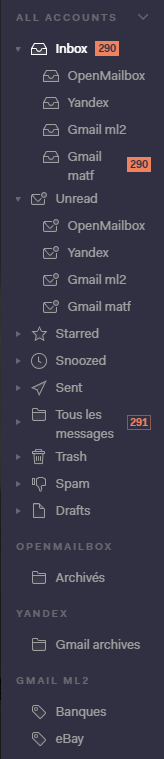
I have the same issue too, with the last version of N1. I initially had thousands of unread e-mails in Gmail, so I created a filter to set all unread message as read, but N1 still shows 290 unread e-mails after that. I checked on the webmail and there are no unread e-mails. Weirdly, the "Unread" category of N1 shows nothing.
 Kabouik
on 22 May 2016
Kabouik
on 22 May 2016
Same issue here. See the side-by-side of Nylas vs. GMail.

 alrightjones
on 18 Jun 2016
alrightjones
on 18 Jun 2016
Related issues
 PhillipTaylor
·
3Comments
PhillipTaylor
·
3Comments
 gerardcuadras-zz
·
3Comments
gerardcuadras-zz
·
3Comments
 winks
·
4Comments
winks
·
4Comments
 petrk94
·
4Comments
petrk94
·
4Comments
 purefan
·
3Comments
purefan
·
3Comments
Most helpful comment
Yes, that worked for me too. If I mark all my messages in the trash as read, the inbox unread count is corrected.