After upgrade to nx 10.0.* webstorm start importing modules as below
Current Behavior

Expected Behavior

Steps to Reproduce
Just create new workspace and use with webstorm
Environment
nx version : 10.0.7
react
 czaplej
All 6 comments
That is something you have to configure in your IDE, not something that is actionable by the nx team. Maybe you have turned on the setting to always use relative imports?
 zaunermax
on 4 Aug 2020
zaunermax
on 4 Aug 2020
@zaunermax it works before update nx. Nothing in the webstorm was changed
OK i found the issue.
After upgrade tsconfig.json was replace for tsconfig.base.json. Webstorm default look for tsconfig.json. It would be nice to have tsconfig.json
{
  "extends": "./tsconfig.base.json"
}
Beacuse new users can be confused why it's not working.
czaplej
on 4 Aug 2020
This is happening in VSCode too. Even after create the tsconfig.json in the root project.
 nestorvanz
on 5 Aug 2020
nestorvanz
on 5 Aug 2020
I think it depends on how you have your IDEs configured. If it is configured to search for a root tsconfig file, then this will break. Though most of the time (and also webstorm by default, I use 2020.2) IDEs will search for the most relevant and nearest tsconfig file to the file that's being checked. Due to the fact that every app and lib has a standard tsconfig in it's root, IDEs should handle that just fine. The tsconfig in the root of the apps and libs extend the base tsconfig.
zaunermax
on 6 Aug 2020
If you're not on the latest version of Webstorm (as of this comment 2020.2) you might have to add tsconfig.base.json into your file types (Settings > Editor > File Types), like so:
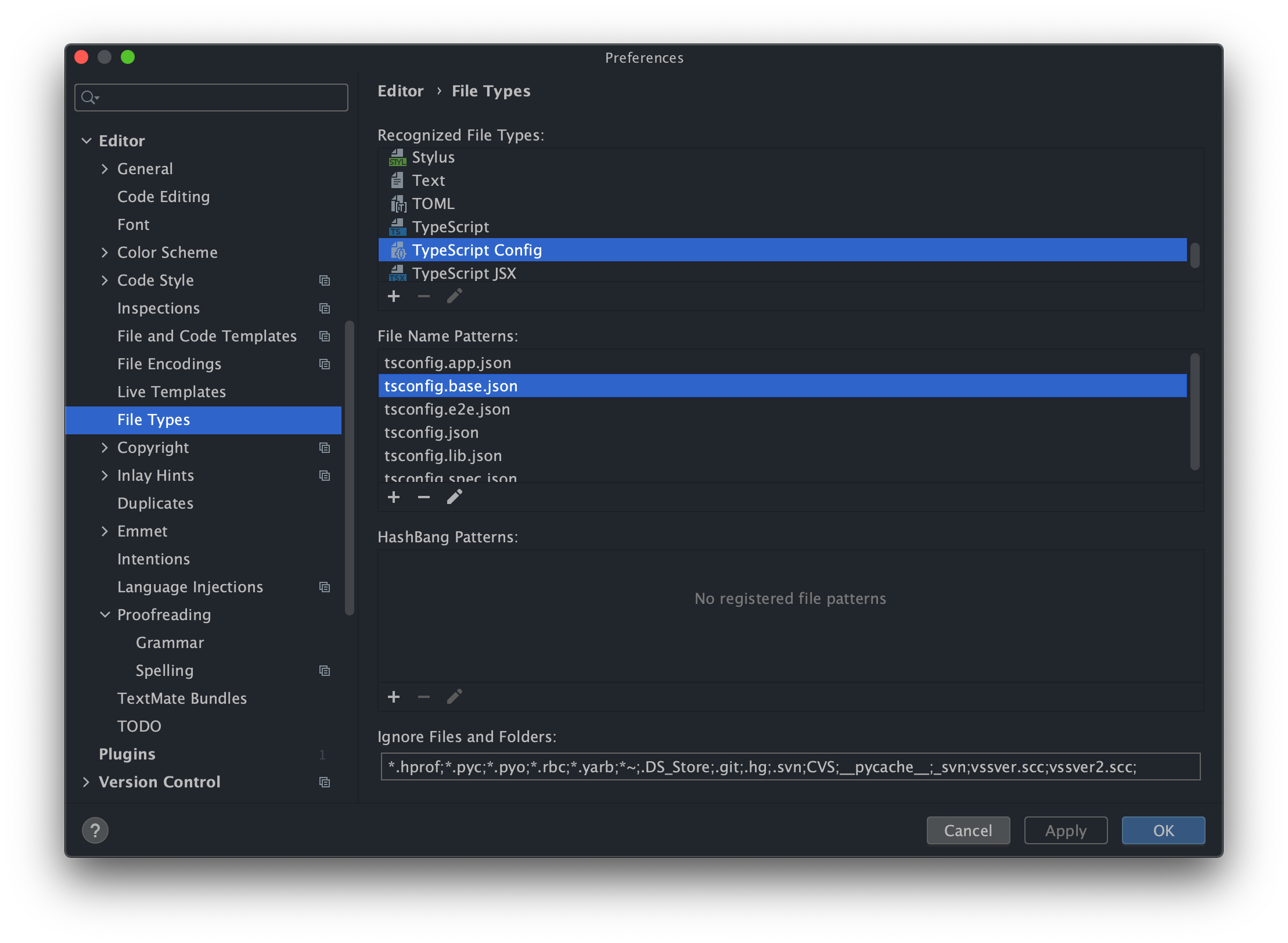
Again, this should already be the default with the latest version of Webstorm (and even VS Code)
 Cammisuli
on 7 Aug 2020
Cammisuli
on 7 Aug 2020
Folks. I'm going to close this as the issue is the latest version of Webstorm and isn't actionable on the Nx side.
 vsavkin
on 7 Aug 2020
vsavkin
on 7 Aug 2020
Related issues
 jasedwards
·
3Comments
jasedwards
·
3Comments
 jon301
·
3Comments
jon301
·
3Comments
 about-code
·
3Comments
about-code
·
3Comments
 elliotmendiola
·
3Comments
elliotmendiola
·
3Comments
 zachnewburgh
·
3Comments
zachnewburgh
·
3Comments
Most helpful comment
Folks. I'm going to close this as the issue is the latest version of Webstorm and isn't actionable on the Nx side.