Nx: NX 10 upgrade error: Root tsconfig.json does not exist
Current Behavior
When running through the nx update process to v10, I experience an error when running yarn nx migrate --run-migrations=migrations.json
➜  rx-store git:(feature/nx-10-upgrade) ✗ yarn nx migrate --run-migrations=migrations.json
yarn run v1.22.4
$ nx migrate --run-migrations=migrations.json
Running migration @nrwl/workspace:add-default-branch-to-nx-json
Successfully finished @nrwl/workspace:add-default-branch-to-nx-json
---------------------------------------------------------
Running migration @nrwl/workspace:solution-tsconfigs
Root tsconfig.json does not exist
/Volumes/Development/rx-store/node_modules/yargs/yargs.js:1109
      else throw err
           ^

Error: Command failed: ./node_modules/.bin/tao migrate --run-migrations=migrations.json
    at checkExecSyncError (child_process.js:630:11)
    at Object.execSync (child_process.js:666:15)
    at Object.handler (/Volumes/Development/rx-store/node_modules/@nrwl/workspace/src/command-line/nx-commands.js:77:21)
    at Object.runCommand (/Volumes/Development/rx-store/node_modules/yargs/lib/command.js:235:44)
    at Object.parseArgs [as _parseArgs] (/Volumes/Development/rx-store/node_modules/yargs/yargs.js:1022:30)
    at Object.get [as argv] (/Volumes/Development/rx-store/node_modules/yargs/yargs.js:965:21)
    at Object.initLocal (/Volumes/Development/rx-store/node_modules/@nrwl/cli/lib/init-local.js:24:13)
    at Object.<anonymous> (/Volumes/Development/rx-store/node_modules/@nrwl/cli/bin/nx.js:12:18)
    at Module._compile (internal/modules/cjs/loader.js:1138:30)
    at Object.Module._extensions..js (internal/modules/cjs/loader.js:1158:10) {
  status: 1,
  signal: null,
  output: [ null, null, null ],
  pid: 10275,
  stdout: null,
  stderr: null
}
error Command failed with exit code 1.
info Visit https://yarnpkg.com/en/docs/cli/run for documentation about this command.
Expected Behavior
The migration to successfully run.
Steps to Reproduce
https://github.com/rx-store/rx-store/tree/feature/nx-10-upgrade
git clone https://github.com/rx-store/rx-store
git checkout feature/nx-10-upgrade
yarn nx migrate --run-migrations=migrations.json
This issue may not be prioritized if details are not provided to help us reproduce the issue.
Failure Logs
Environment
 kylecannon
All 14 comments
Is there a tsconfig.json in the root of your workspace? Are you running the command from where you usually run commands?
 FrozenPandaz
on 21 Jul 2020
FrozenPandaz
on 21 Jul 2020
According to the branch I do not. I did set up this nx workspace from not but a couple days ago so I wanted to make you aware that the migration isn't working as intended. I pasted the repository in the main description with the branch that's having issues if you're interested.
And yes I'm running it from the workspace root.
kylecannon
on 21 Jul 2020
Same problem here, the migration tool renamed "tsconfig.json" to "tsconfig.base.json" and we now have complains upon most of the commands: ENOENT: no such file or directory, stat /tsconfig.json
 DenysVuika
on 23 Jul 2020
DenysVuika
on 23 Jul 2020
The workaround we have is to restore the tsconfig.json and put the following content:
{
    "extends": "./tsconfig.base.json"
}
Anyway, the migration tool corrupts the projects, so needs some fixes I think.
DenysVuika
on 23 Jul 2020
@DenysVuika It's quite possible that other areas of the repo reference tsconfig.json. If there's an area that you think we can add to the migration, please let me know.
@kylecannon according to the branch's last commit: https://github.com/rx-store/rx-store/commit/5a4d565468a5ad487ffac170acf4967e3ae90a79, it seems like that is a successful migration. Are you running the migration again for some reason?
FrozenPandaz
on 23 Jul 2020
It ran a partial migration. It errored out. If you run it again it will
give you the same Error message.
On Thu, Jul 23, 2020 at 8:21 AM Jason Jean notifications@github.com wrote:
@DenysVuika https://github.com/DenysVuika It's quite possible that
other areas of the repo reference tsconfig.json. If there's an area that
you think we can add to the migration, please let me know.@kylecannon https://github.com/kylecannon according to the branch's
last commit: rx-store/rx-store@5a4d565
https://github.com/rx-store/rx-store/commit/5a4d565468a5ad487ffac170acf4967e3ae90a79,
it seems like that is a successful migration. Are you running the migration
again for some reason?—
You are receiving this because you were mentioned.Reply to this email directly, view it on GitHub
https://github.com/nrwl/nx/issues/3380#issuecomment-663068774, or
unsubscribe
https://github.com/notifications/unsubscribe-auth/AAGT5CUJW7RVN7UHKCZPP7TR5BIPDANCNFSM4PD3IHEQ
.>
Thanks,
Kyle Cannon
The contents of this email are intended for the named addressee only, and
may contain confidential and privileged information. Any unauthorized
review, use, disclosure or distribution is prohibited. If you received it
in error please notify us immediately and then destroy it.
kylecannon
on 23 Jul 2020
@FrozenPandaz I think the only code that references is the @nrwl/workspace file-utils.ts
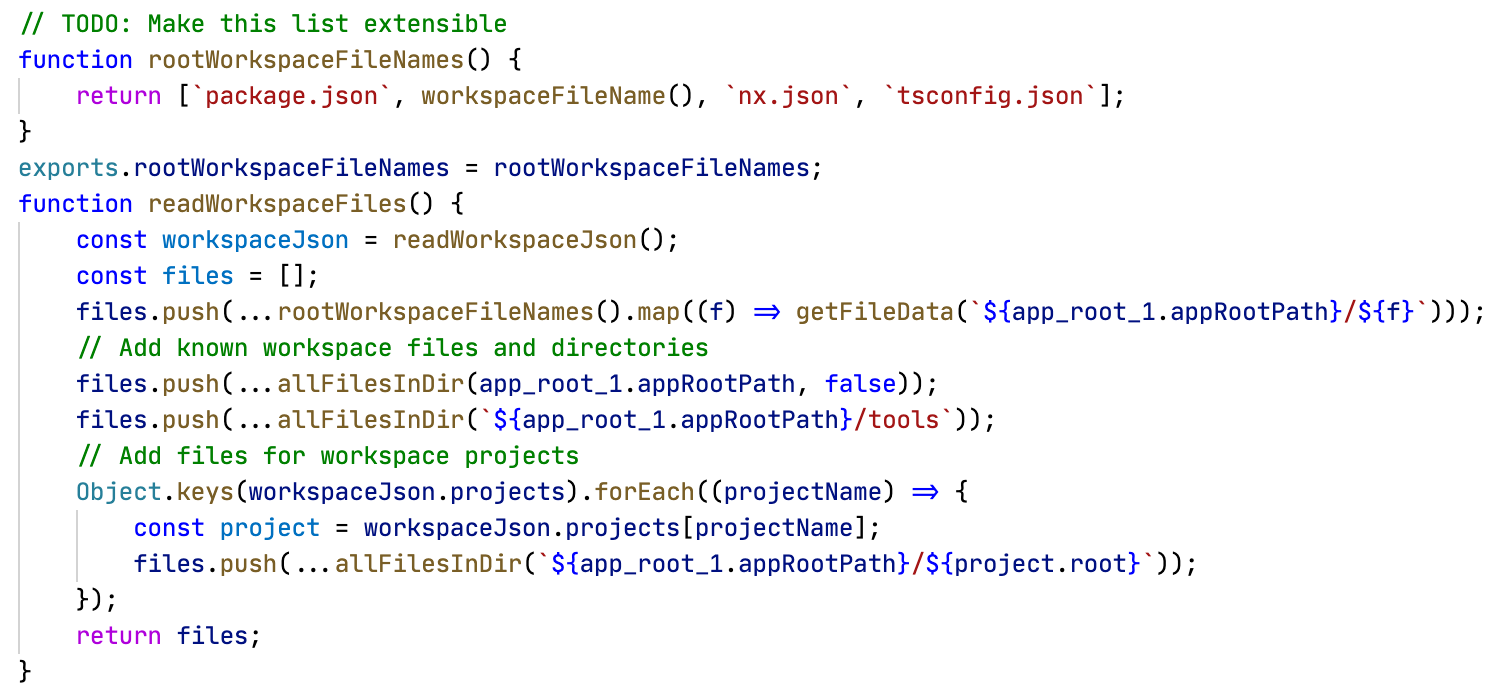
I guess that's in the 10.0.1. From what I know it is fixed in 10.0.4, but I cannot upgrade from 10.0.1 to 10.0.4 because nx complains that tsconfig.json is missing.
DenysVuika
on 23 Jul 2020
@kylecannon Thanks for adding the branch. I gave it a run locally and this is the error where it fails:
Running migration @angular/core:migration-v10-missing-injectable
Could not find any tsconfig file. Cannot add the "@Injectable" decorator to providers which don't have that decorator set.
I'm not sure what the issue is but I think the issue should be reported to https://github.com/angular/angular since their migration is the one that's failing? I've run the migration on other Angular projects and do not get the error so I suspect it's a certain project in your repo. Unfortunately, the error does not help much.
In the meantime, since the first 3 migrations ran successfully, you can remove them from the migrations.json before running again. Also, because that migration fails, you can comment it out for now.
@DenysVuika You can't update from 10.0.1 to 10.0.4 because it's running the migration for 10.0.0? Please open a separate issue if that is the case.
FrozenPandaz
on 23 Jul 2020
I faced the same problem from 9.4.3 to 10.0.4.
 Tatamethues
on 24 Jul 2020
Tatamethues
on 24 Jul 2020
yes same here ... also the workaround above to create a new tsconfig and extend baseline ... does not work due second step of migration is to delete the tsconfig... making it circular ... needs to be fixed in order to run migration
 abcfoundry
on 27 Jul 2020
abcfoundry
on 27 Jul 2020
Unfortunately, I think the only workaround here is to skip the migration and apply it manually. You can do so by removing it from the list in migrations.json if you are using nx migrate.
If you are having issues with the @angular/core migration, please open an issue on https://github.com/angular/angular. If there are other issues please report them separately.
FrozenPandaz
on 31 Jul 2020
@FrozenPandaz skipping the following:
 {
      "version": "10.0.0-beta",
      "description": "Missing @Injectable and incomplete provider definition migration. As of Angular 9, enforcement of @Injectable decorators for DI is a bit stricter and incomplete provider definitions behave differently. Read more about this here: https://v9.angular.io/guide/migration-injectable",
      "factory": "./migrations/missing-injectable/index",
      "package": "@angular/core",
      "name": "migration-v10-missing-injectable"
    },
    {
      "version": "10.0.0-beta",
      "description": "ModuleWithProviders migration. As of Angular 10, the ModuleWithProviders type requires a generic. This migration adds the generic where it is missing. Read more about this here: https://v10.angular.io/guide/migration-module-with-providers",
      "factory": "./migrations/module-with-providers/index",
      "package": "@angular/core",
      "name": "migration-v10-module-with-providers"
    },
    {
      "version": "10.0.0-beta",
      "description": "Undecorated classes with Angular features migration. In version 10, classes that use Angular features and do not have an Angular decorator are no longer supported. Read more about this here: https://v10.angular.io/guide/migration-undecorated-classes",
      "factory": "./migrations/undecorated-classes-with-decorated-fields/index",
      "package": "@angular/core",
      "name": "migration-v10-undecorated-classes-with-decorated-fields"
    },
does help. however, it errors out at the update angular to 10
```Successfully finished @nrwl/workspace:solution-tsconfigs
Running migration @nrwl/workspace:migrate-eslintrc-tsconfig
Successfully finished @nrwl/workspace:migrate-eslintrc-tsconfig
Running migration @nrwl/angular:update-10-0-0
Updating @angular/cli to 10.0.0
internal/modules/cjs/loader.js:969
throw err;
^
Error: Cannot find module '/Volumes/Development/rx-store/node_modules/@angular/cli/bin/ng'
at Function.Module._resolveFilename (internal/modules/cjs/loader.js:966:15)
at Function.Module._load (internal/modules/cjs/loader.js:842:27)
at Function.executeUserEntryPoint [as runMain] (internal/modules/run_main.js:71:12)
at internal/main/run_main_module.js:17:47 {
code: 'MODULE_NOT_FOUND',
requireStack: []
}
@angular/cli migration failed, see above.
/Volumes/Development/rx-store/node_modules/yargs/yargs.js:1109
else throw err
^
Error: Command failed: ./node_modules/.bin/tao migrate --run-migrations=migrations.json
at checkExecSyncError (child_process.js:630:11)
at Object.execSync (child_process.js:666:15)
at Object.handler (/Volumes/Development/rx-store/node_modules/@nrwl/workspace/src/command-line/nx-commands.js:77:21)
at Object.runCommand (/Volumes/Development/rx-store/node_modules/yargs/lib/command.js:235:44)
at Object.parseArgs [as _parseArgs] (/Volumes/Development/rx-store/node_modules/yargs/yargs.js:1022:30)
at Object.get [as argv] (/Volumes/Development/rx-store/node_modules/yargs/yargs.js:965:21)
at Object.initLocal (/Volumes/Development/rx-store/node_modules/@nrwl/cli/lib/init-local.js:24:13)
at Object.
at Module._compile (internal/modules/cjs/loader.js:1138:30)
at Object.Module._extensions..js (internal/modules/cjs/loader.js:1158:10) {
status: 1,
signal: null,
output: [ null, null, null ],
pid: 10601,
stdout: null,
stderr: null
}
error Command failed with exit code 1.
info Visit https://yarnpkg.com/en/docs/cli/run for documentation about this command.
So there is definitely an issue when you first initialize an nx workspace in this order:
npx create-nx-workspace@^9.0.0 --preset=react
yarn add -D @nrwl/angular@^9.0.0
yarn nx g @nrwl/angular:application --prefix app
yarn update && yarn
yarn nx migrate --run-migrations=migrations.json
```
reason: when an nx workspace is initialized for a react application initially, @angular/cli is never installed so therefor the migration fails.
I hope this helps.
kylecannon
on 1 Aug 2020
Thanks @kylecannon, this helped a bunch!
FrozenPandaz
on 14 Aug 2020
Renaming tsconfig.base.json to tsconfig.json every time the migration fails solves this problem.
 jpidelatorre
on 24 Sep 2020
jpidelatorre
on 24 Sep 2020
Related issues
 zachnewburgh
·
3Comments
zachnewburgh
·
3Comments
 about-code
·
3Comments
about-code
·
3Comments
 zpydee
·
3Comments
zpydee
·
3Comments
 markphip
·
3Comments
markphip
·
3Comments
 Koslun
·
3Comments
Koslun
·
3Comments
Most helpful comment
The workaround we have is to restore the
tsconfig.jsonand put the following content:Anyway, the migration tool corrupts the projects, so needs some fixes I think.