Nx: [BUG] Nx NextJS Runtime config variables are "undefined" while running production build
Prerequisites
- [x] I am running the latest version
- [x] I checked the documentation (nx.dev) and found no answer
- [x] I checked to make sure that this issue has not already been filed
- [x] I'm reporting the issue to the correct repository (not related to React, Angular or any dependency)
Expected Behavior
In NextJs apps that is bootstrapped via NX NextJs schematics based on instructions specified here, the
_publicRuntimeConfig_ variables specified in _next.config.js_ should be available in _getInitialProps_ during runtime both in production and dev mode as specified in orignal nextjs documentation here.
Similar project bootstrapped via create-next-app works perfectly where _publicRuntimeConfig_ variables specified in _next.config.js_ are. available in _getInitialProps_ during runtime both in production and dev mode.
Current Behavior
Nextjs app that is created via Nx Nextjs schematics gives _undefined_ for _publicRuntimeConfig_ accessed in _getInitialProps_ during runtime of production build but in development mode it works perfectly
next.config.js
module.exports = {
  serverRuntimeConfig: {
    // Will only be available on the server side
    mySecret: 'secret',
    secondSecret: process.env.SECOND_SECRET // Pass through env variables
  },
  publicRuntimeConfig: {
    // Will be available on both server and client
    staticFolder: '/static'
  }
};
getInitialProps
import getConfig from 'next/config';
const { publicRuntimeConfig } = getConfig();
...
Index.getInitialProps = async ctx => {
  console.log('I am here');
  console.log(publicRuntimeConfig.staticFolder); // Undefined when running prod build
  return {};
};
Failure Information (for bugs)
Steps to Reproduce
Please provide detailed steps for reproducing the issue.
- clone repo
- Change directory to code directory
- run
npm install - run
npm start tuskdesk - Open http://localhost:4200/ in your browser
- You will see run time config variables consoled in terminal like below

- Now run
npm run build tuskdeskto create a production build - Run a custom command
npm run start-prod:nextjsIn short it copies dist file to root and run next app (There could be a better way, I am not sure) - Open http://localhost:3000 in browser
- You will see as contrast to previous output variables are consoled as undefined like below

Context
NX Report
@nrwl/angular : Not Found
  @nrwl/cli : 9.0.4
  @nrwl/cypress : 9.0.4
  @nrwl/eslint-plugin-nx : 9.0.4
  @nrwl/express : Not Found
  @nrwl/jest : 9.0.4
  @nrwl/linter : 9.0.4
  @nrwl/nest : Not Found
  @nrwl/next : 9.0.4
  @nrwl/node : Not Found
  @nrwl/react : 9.0.4
  @nrwl/schematics : Not Found
  @nrwl/tao : 9.0.4
  @nrwl/web : 9.0.4
  @nrwl/workspace : 9.0.4
  typescript : 3.7.5
Other
As I tried to reproduce the issue in bare bone NextJs setup but it works perfectly there. To reproduce follow below steps
- Clone repo
- Change directory to code directory
- run
npm install - For _Dev Mode_ run
npm run dev - Go to http://localhost:3000 and you will see runtime variables in terminal like below
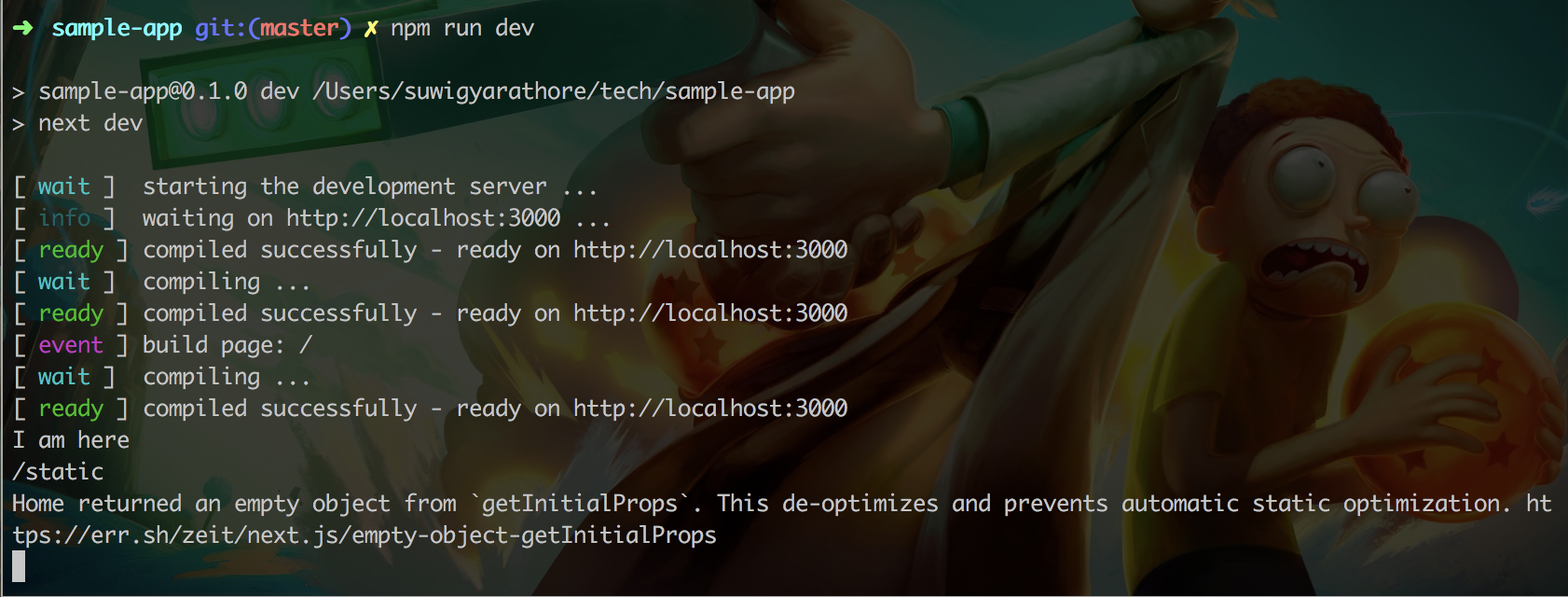
- For _Prod Mode_ run
npm run buildandnpm run start - Go to http://localhost:3000 and you will see runtime variables in terminal like below

 suwigyarathore
All 3 comments
The issue is resolved. I was missing coping of next.config.js also while moving dist output to root.
_Instead of this_
"start-prod:nextjs": "rm -rf .next && mv dist/apps/tuskdesk .next && node ./node_modules/.bin/next start"
_Do this_
"start-prod:nextjs": "rm -rf .next && mv dist/apps/tuskdesk .next && cp apps/tuskdesk/next.config.js next.config.js && node ./node_modules/.bin/next start"
_Suggestion_
When next.config.js was missing while running the next start command, a descriptive error message could be helpful. Instead, it was using the default next.config with empty fields
suwigyarathore
on 2 Mar 2020
Ok, this was a total pain due to it kinda just failing silently. Took me a while to realise it was NX and not something wrong with the underlying next/config and build cycle. Thank you @suwigyarathore .
 chasevida
on 30 Oct 2020
chasevida
on 30 Oct 2020
Just ran into this as well and spent a few hours trying to find the issue. Thanks @suwigyarathore
 chronark
on 15 Nov 2020
chronark
on 15 Nov 2020
Related issues
 danieldanielecki
·
3Comments
danieldanielecki
·
3Comments
 SWGeekPD
·
3Comments
SWGeekPD
·
3Comments
 zachnewburgh
·
3Comments
zachnewburgh
·
3Comments
 Svancara
·
3Comments
Svancara
·
3Comments
 elliotmendiola
·
3Comments
elliotmendiola
·
3Comments
Most helpful comment
The issue is resolved. I was missing coping of next.config.js also while moving dist output to root.
_Instead of this_
"start-prod:nextjs": "rm -rf .next && mv dist/apps/tuskdesk .next && node ./node_modules/.bin/next start"_Do this_
"start-prod:nextjs": "rm -rf .next && mv dist/apps/tuskdesk .next && cp apps/tuskdesk/next.config.js next.config.js && node ./node_modules/.bin/next start"_Suggestion_
When next.config.js was missing while running the next start command, a descriptive error message could be helpful. Instead, it was using the default next.config with empty fields