Nx: support for nestjs compiler plugins (e.g. for swagger)
I would like to use a nestjs compiler plugin (e.g. described in https://trilon.io/blog/nestjs-swagger-4-whats-new for generation of swagger definition)
How can I do this with nx?
 maku
maku
All 35 comments
That has nothing todo with nx.
Use it like it is described in the documentation of nestjs and you are fine.
 creadicted
on 5 Dec 2019
creadicted
on 5 Dec 2019
@creadicted Sorry I don't get you. nestjs is "managed" by nx. The build process is executed via "ng...". So we are not using the "Nest CLI" and the nestjs docu says that the way to go is to have a custom webpack configuration in combination with ts-loader...
maku
on 5 Dec 2019
@maku Ok I am sorry you were right.
I researched a bit and run in a rabbit hole.
I used a custom webpack.config.js for the project
_angular.json_
"projects": {
"api": {
"architect": {
"build": {
"builder": "@nrwl/node:build",
"options": {
"webpackConfig": "apps/api/webpack.config.js"
},
checked what will be injected in there and extended it with the getCustomTransformers
_webpack.config.js_
module.exports = function(webpackConfig, context) {
webpackConfig.module = {
rules: [
{
test: /\.(j|t)sx?$/,
loader: 'ts-loader',
options: {
configFile: context.options.tsConfig,
transpileOnly: true,
experimentalWatchApi: true,
getCustomTransformers: (program) => ({
before: [require('@nestjs/swagger/plugin').before({}, program)]
}),
}
}
]
};
return webpackConfig;
};
But I will now get errors:
Module build failed (from ./node_modules/ts-loader/index.js):
TypeError: Cannot read property 'getTypeChecker' of undefined
at ControllerClassVisitor.visit (\node_modules\@nestjs\swagger\dist\plugin\visitors\controller-class.visitor.js:12:37)
I am not sure if this is because of something else that is conflicted or some decorators that I missed.
If I have a bit more time I can test it with a blank project. I super unfamiliar with ts-loader and webpack but I thought I give it a try.
creadicted
on 5 Dec 2019
This is an interesting way of generating API configuration.
I'm not too familiar with doing this either but you may want to make sure you're on the same version of typescript that's used by the nest cli.
If someone can figure out a good config for customWebpack, we can create a plugin similar to our @nrwl/react/plugins/babel plugin.
 FrozenPandaz
on 6 Dec 2019
FrozenPandaz
on 6 Dec 2019
@FrozenPandaz @creadicted
I have managed to get a bit further in configuring the plugin with custom webpack config.
Pretty much the same setup as with @creadicted
workspace.json
"build": {
"builder": "@nrwl/node:build",
"options": {
"outputPath": "dist/apps/auth-rights-api",
"main": "apps/auth-rights-api/src/main.ts",
"tsConfig": "apps/auth-rights-api/tsconfig.app.json",
"assets": ["apps/auth-rights-api/src/assets"],
"webpackConfig": "./apps/auth-rights-api/webpack.config.js"
},
"configurations": {
"production": {
"optimization": true,
"extractLicenses": true,
"inspect": false,
"fileReplacements": [
{
"replace": "apps/auth-rights-api/src/environments/environment.ts",
"with": "apps/auth-rights-api/src/environments/environment.prod.ts"
}
]
}
}
},
webpack.config.js
const CopyPlugin = require('copy-webpack-plugin');
const GeneratePackageJsonPlugin = require('generate-package-json-webpack-plugin');
const path = require('path');
const packageJson = require('../../package.json');
/**
* Extend the default Webpack configuration from nx / ng.
*/
const getCustomTransformers = program => ({
before: [require('@nestjs/swagger/plugin').before({}, program)]
});
module.exports = (config, context) => {
// Extract output path from context
const {
options: { outputPath, sourceRoot }
} = context;
const newRules = config.module.rules.map(rule => {
if (rule.loader === 'ts-loader') {
return {
...rule,
options: {
...rule.options,
getCustomTransformers
}
};
}
return rule;
});
// Install additional plugins
config.plugins = config.plugins || [];
config.plugins.push(...extractRelevantNodeModules(outputPath));
config.plugins.push(
new CopyPlugin([
{ from: path.join(sourceRoot, '../', '.production.env'), to: path.join(outputPath, '.production.env') }
])
);
config.module.rules = newRules;
return config;
};
/**
* This repository only contains one single package.json file that lists the dependencies
* of all its frontend and backend applications. When a frontend application is built,
* its external dependencies (aka Node modules) are bundled in the resulting artifact.
* However, it is not the case for a backend application (for various valid reasons).
* Installing all the production dependencies would dramatically increase the size of the
* artifact. Instead, we need to extract the dependencies which are actually used by the
* backend application. We have implemented this behavior by complementing the default
* Webpack configuration with additional plugins.
*
* @param {String} outputPath The path to the bundle being built
* @returns {Array} An array of Webpack plugins
*/
function extractRelevantNodeModules(outputPath) {
return [copyYarnLockFile(outputPath), generatePackageJson()];
}
/**
* Copy the Yarn lock file to the bundle to make sure that the right dependencies are
* installed when running `yarn install`.
*
* @param {String} outputPath The path to the bundle being built
* @returns {*} A Webpack plugin
*/
function copyYarnLockFile(outputPath) {
return new CopyPlugin([{ from: 'yarn.lock', to: path.join(outputPath, 'yarn.lock') }]);
}
/**
* Generate a package.json file that contains only the dependencies which are actually
* used in the code.
*
* @returns {*} A Webpack plugin
*/
function generatePackageJson() {
const implicitDeps = [
'class-transformer',
'class-validator',
'@nestjs/platform-express',
'rxjs',
'reflect-metadata',
'tslib'
];
const dependencies = implicitDeps.reduce((acc, dep) => {
acc[dep] = packageJson.dependencies[dep];
return acc;
}, {});
const basePackageJson = {
dependencies
};
const pathToPackageJson = path.join(__dirname, '../../package.json');
return new GeneratePackageJsonPlugin(basePackageJson, pathToPackageJson);
}
My webpack config does a bit more. But the important part is newRules.
I have successfully added getCustomTransformers but when I try to run it i get following error.
openapi.ApiResponse({ status: 201 }),
^
ReferenceError: openapi is not defined
at Module../apps/auth-rights-api/src/app/auth/auth.controller.ts (/home/netrunner/tp/dist/apps/auth-rights-api/main.js:156:5)
at __webpack_require__ (/home/netrunner/tp/dist/apps/auth-rights-api/webpack:/webpack/bootstrap:19:1)
at Module../apps/auth-rights-api/src/app/auth/auth.module.ts (/home/netrunner/tp/dist/apps/auth-rights-api/main.js:185:74)
at __webpack_require__ (/home/netrunner/tp/dist/apps/auth-rights-api/webpack:/webpack/bootstrap:19:1)
at Module../apps/auth-rights-api/src/app/app.module.ts (/home/netrunner/tp/dist/apps/auth-rights-api/main.js:103:75)
at __webpack_require__ (/home/netrunner/tp/dist/apps/auth-rights-api/webpack:/webpack/bootstrap:19:1)
at Module../apps/auth-rights-api/src/main.ts (/home/netrunner/tp/dist/apps/auth-rights-api/main.js:512:73)
at __webpack_require__ (/home/netrunner/tp/dist/apps/auth-rights-api/webpack:/webpack/bootstrap:19:1)
at Object.0 (/home/netrunner/tp/dist/apps/auth-rights-api/main.js:946:18)
at __webpack_require__ (/home/netrunner/tp/dist/apps/auth-rights-api/webpack:/webpack/bootstrap:19:1)
I suspect that openapi is missing from the bundle that webpack produces. It would be great if nx could be extended a bit more easily overall. Similar to how composing of wepback config works with ``
 djedlajn
on 6 Dec 2019
djedlajn
on 6 Dec 2019
Hi @FrozenPandaz, I success with Webpack build on NestJS app but still have problem with uglify it for production. Is there any small tip here to overcome it?
 quanganh206
on 31 Dec 2019
quanganh206
on 31 Dec 2019
Hi @FrozenPandaz, I success with Webpack build on NestJS app but still have problem with uglify it for production. Is there any small tip here to overcome it?
@quanganh206 Can you share how you succeeded?
creadicted
on 14 Jan 2020
Chiming in here. I've configured my webpack like @djedlajn and still get:
TypeError: Cannot read property 'getTypeChecker' of undefined
at ControllerClassVisitor.visit (/Users/mchpatr/playground/parm/node_modules/@nestjs/swagger/dist/plugin/visitors/controller-class.visitor.js:12:37)
Here's my webpack.config with some differences from @djedlajn's
// webpack.config.ts
/**
* Extend the default Webpack configuration from nx / ng.
* this webpack.config is used w/ node:build builder
* see angular.json greenroom-rest-api
*/
module.exports = (config, context) => {
// Install additional plugins
console.log('loading plugins')
addSwagger(config);
return config;
};
/**
* Adds nestjs swagger plugin
*
* nestjs swagger: https://docs.nestjs.com/recipes/swagger#plugin
* ts-loader: https://github.com/Igorbek/typescript-plugin-styled-components#ts-loader
*
* Someone else has done this, see:
* https://github.com/nrwl/nx/issues/2147
*/
const addSwagger = (config) => {
const rule = config.module.rules
.find(rule => rule.loader === 'ts-loader');
if (!rule)
throw new Error('no ts-loader rule found');
rule.options = {
...rule.options,
getCustomTransformers: (program) => ({
before: [require('@nestjs/swagger/plugin').before({
classValidatorShim: true,
}, program)]
}),
};
}
Changing the typescript version to match that of nestjs/nest-cli did not fix the issue.
I was able to add program = ts.createProgram([sourceFile.fileName], {}); to controller-class.visitor and model-class.vistor and then I ran into the same openapi is not defined issue.
 prmichaelsen
on 17 Feb 2020
prmichaelsen
on 17 Feb 2020
Believe it or not, I figured it out.
const webpack = require('webpack');
// ...
config.plugins = [
...(config.plugins || []),
new webpack.ProvidePlugin({
'openapi': '@nestjs/swagger',
})
]
// ...
The global openapi object is not defined which causes the error. You can use a webpack shim to define it: https://webpack.js.org/guides/shimming/
I'm still curious how @djedlajn managed to fix the TypeError: Cannot read property 'getTypeChecker' of undefined.
prmichaelsen
on 17 Feb 2020
Ok, final working solution. It's probably sinful, but here you go nonetheless.
The main problem seems to be that nx isn't passing the program to the plugins. To get around this, I just created the program myself in my webpack.config.ts like so:
const program = ts.createProgram([
  path.join(__dirname, 'main.ts')
], {});
So the final webpack.config.ts is:
const path = require('path');
const webpack = require('webpack');
const ts = require('typescript');

/**
 * Extend the default Webpack configuration from nx / ng.
 * this webpack.config is used w/ node:build builder
 * see angular.json greenroom-rest-api
 */
module.exports = (config, context) => {
  // Install additional plugins
  console.log('loading plugins')

  addSwagger(config);

  config.plugins = [
    ...(config.plugins || []),
    new webpack.ProvidePlugin({
      'openapi': '@nestjs/swagger',
    })
  ]

  return config;
};

/**
 * Adds nestjs swagger plugin
 *
 * nestjs swagger: https://docs.nestjs.com/recipes/swagger#plugin
 * ts-loader: https://github.com/Igorbek/typescript-plugin-styled-components#ts-loader
 * getCustomTransformers: https://github.com/TypeStrong/ts-loader#getcustomtransformers
 *
 * Someone else has done this, see:
 * https://github.com/nrwl/nx/issues/2147
 */
const addSwagger = (config) => {
  const rule = config.module.rules
    .find(rule => rule.loader === 'ts-loader');
  if (!rule)
    throw new Error('no ts-loader rule found');
  rule.options = {
    ...rule.options,
    getCustomTransformers: () => {
      const program = ts.createProgram([
        path.join(__dirname, 'main.ts')
      ], {});
      return {
        before: [require('@nestjs/swagger/plugin').before({
          classValidatorShim: true,
        }, program)]
      };
    },
  };
}
And angular.json:
// angular.json
//...
        "build": {
          "builder": "@nrwl/node:build",
          "options": {
            "outputPath": "dist/apps/greenroom-rest-api",
            "main": "apps/greenroom-rest-api/src/main.ts",
            "tsConfig": "apps/greenroom-rest-api/tsconfig.app.json",
            "assets": ["apps/greenroom-rest-api/src/assets"],
            "webpackConfig": "apps/greenroom-rest-api/webpack.config.ts"
          },
//...
Hi there,
Here's my webpack.config.js:
const swaggerPlugin = require('@nestjs/swagger/plugin');
module.exports = config => {
const rule = config.module.rules.find(rule => rule.loader === 'ts-loader');
if (!rule) throw new Error('no ts-loader rule found');
rule.options.getCustomTransformers = program => ({
before: [
swaggerPlugin.before(
{
dtoFileNameSuffix: ['.dto.ts', '.ro.ts', '.entity.ts']
},
program
)
]
});
return config;
};
It looks like it work but the generated Swagger documentation is missing a lot of information. It doesn't even seem to bother about the dtoFileNameSuffix option.
Has anyone managed to get this fully working?
 fwoelffel
on 26 Feb 2020
fwoelffel
on 26 Feb 2020
See my comment above, it is working.
prmichaelsen
on 26 Feb 2020
See my comment above, it is working.
Thanks for you answer @prmichaelsen. Sadly, I'm getting the exact same results with your code (which was my starting point). Are you absolutely sure your solution is taking the given options in account? I mean classValidatorShim is true by default, maybe you should try with false and see if it remove the descriptions inferred from class-validator.
I'm in the process of migrating my app to a nx workspace. The Swagger plugin was working perfectly fine when the app was built through the NestJS' CLI.
fwoelffel
on 26 Feb 2020
I will give it another try. Mine was working using it with classValidatorShim.
prmichaelsen
on 27 Feb 2020
Thank you for the inspiration! I did this, which is safer in my opinion. However, I could not get it to work as it should so far...
const CopyPlugin = require('copy-webpack-plugin');
const GeneratePackageJsonPlugin = require('generate-package-json-webpack-plugin');
const path = require('path');
const packageJson = require('./package.json');
const swaggerPlugin = require('@nestjs/swagger/plugin');
const webpack = require('webpack');
/**
* Extend the default Webpack configuration from nx / ng.
*/
module.exports = (config, context) => {
// Extract output path from context
const {
options: { outputPath },
} = context;
installNestSwaggerPlugin(config);
// Install additional plugins
config.plugins = config.plugins || [];
config.plugins.push(...extractRelevantNodeModules(outputPath));
config.plugins.push(new webpack.ProvidePlugin({
'openapi': '@nestjs/swagger',
}));
return config;
};
/**
* Add NestJS Swagger plugin.
* - NestJS Swagger: https://docs.nestjs.com/recipes/swagger#plugin
* - ts-loader: https://github.com/Igorbek/typescript-plugin-styled-components#ts-loader
* - getCustomTransformers: https://github.com/TypeStrong/ts-loader#getcustomtransformers
* - Someone else has done this: https://github.com/nrwl/nx/issues/2147
*/
const installNestSwaggerPlugin = config => {
const rule = config.module.rules.find(rule => rule.loader === 'ts-loader');
if (!rule) {
throw new Error('Could not install NestJS Swagger plugin: no ts-loader rule found!');
}
const decorated = rule.options && rule.options.getCustomTransformers;
const decorator = program => {
const customTransformers = (decorated && decorated(...args)) || {};
const before = customTransformers.before || [];
before.push(swaggerPlugin.before({
classValidatorShim: true,
}, program));
customTransformers.before = before;
return customTransformers;
};
rule.options = rule.options || {};
rule.options.getCustomTransformers = decorator;
};
/**
* This repository only contains one single package.json file that lists the dependencies
* of all its frontend and backend applications. When a frontend application is built,
* its external dependencies (aka Node modules) are bundled in the resulting artifact.
* However, it is not the case for a backend application (for various valid reasons).
* Installing all the production dependencies would dramatically increase the size of the
* artifact. Instead, we need to extract the dependencies which are actually used by the
* backend application. We have implemented this behavior by complementing the default
* Webpack configuration with additional plugins.
*
* @param {String} outputPath The path to the bundle being built
* @returns {Array} An array of Webpack plugins
*/
function extractRelevantNodeModules(outputPath) {
return [copyYarnLockFile(outputPath), generatePackageJson()];
}
/**
* Copy the Yarn lock file to the bundle to make sure that the right dependencies are
* installed when running `yarn install`.
*
* @param {String} outputPath The path to the bundle being built
* @returns {*} A Webpack plugin
*/
function copyYarnLockFile(outputPath) {
return new CopyPlugin([{ from: 'yarn.lock', to: path.join(outputPath, 'yarn.lock') }]);
}
/**
* Generate a package.json file that contains only the dependencies which are actually
* used in the code.
*
* @returns {*} A Webpack plugin
*/
function generatePackageJson() {
const implicitDeps = [
'class-transformer',
'class-validator',
'@nestjs/platform-express',
'reflect-metadata',
'swagger-ui-express',
];
const dependencies = implicitDeps.reduce((acc, dep) => {
acc[dep] = packageJson.dependencies[dep];
return acc;
}, {});
const basePackageJson = {
dependencies,
};
const pathToPackageJson = path.join(__dirname, 'package.json');
return new GeneratePackageJsonPlugin(basePackageJson, pathToPackageJson);
}
 thomas-jakemeyn
on 6 Mar 2020
thomas-jakemeyn
on 6 Mar 2020
I might not have a very sophisticated models but I was able to get the plugin to work just fine.
// custom-webpack.config.js
const tsAutoMapperPlugin = require('@nartc/automapper-transformer-plugin').default; // my own custom plugin
const swaggerPlugin = require('@nestjs/swagger/plugin');
module.exports = (config, context) => {
for (const rule of config.module.rules) {
if (rule.loader !== 'ts-loader') {
continue;
}
rule.options.getCustomTransformers = program => ({
before: [
swaggerPlugin.before(
{
dtoFileNameSuffix: ['.model.ts']
},
program
),
tsAutoMapperPlugin(program).before
]
});
}
return config;
};
// angular.json
{
"build": {
"builder": "@nrwl/node:build",
"options": {
"outputPath": "dist/apps/api",
"main": "apps/api/src/main.ts",
"tsConfig": "apps/api/tsconfig.app.json",
"assets": ["apps/api/src/assets"],
"webpackConfig": "custom-webpack.config.js"
},
}
// test.model.ts
export class Test {
foo: string;
bar: number;
}
// webpack result
/***/ "./apps/api/src/app/test.model.ts":
/*!****************************************!*\
!*** ./apps/api/src/app/test.model.ts ***!
\****************************************/
/*! exports provided: Test */
/***/ (function(module, __webpack_exports__, __webpack_require__) {
"use strict";
__webpack_require__.r(__webpack_exports__);
/* harmony export (binding) */ __webpack_require__.d(__webpack_exports__, "Test", function() { return Test; });
class Test {
static _OPENAPI_METADATA_FACTORY() { // what swagger plugin produces
return { foo: { required: true, type: () => String }, bar: { required: true, type: () => Number } };
}
static __NARTC_AUTOMAPPER_METADATA_FACTORY() { // what my plugin produces
return { foo: () => String, bar: () => Number };
}
}
 nartc
on 11 Mar 2020
nartc
on 11 Mar 2020
I tried to use your solution @prmichaelsen. It did compile and serve the project, however when I go on the documentation, it doesn't seem that the plugin had some effect.
For example, it doesn't automatically shows the returned entity from the controller or it doesn't bind the enums type in the entity files. Does somebody know why ?
 BrucePauker
on 23 Mar 2020
BrucePauker
on 23 Mar 2020
Hi,
I may have found a solution for people who can't make the proposed solutions work properly (@BrucePauker).
After several days of trying to make the NESTJS graphql plugin work with NX using the different solutions proposed above, without success. I realized that Nx passes the transpileOnly: true option to ts-loader so the graphql plugin worked but didn't change any decorators.
I passed the transpileOnly option to false when I added my plugin to the custom webpack configuration and :tada: !
 nicolrem
on 6 Apr 2020
nicolrem
on 6 Apr 2020
@nicolrem Can u share your solutions please?
 jakubnavratil
on 15 May 2020
jakubnavratil
on 15 May 2020
@trubit I just add a custom webpack config like this:
const path = require('path');
const ts = require('typescript');
/**
* Adds nestjs grapqhl plugin
*
* Someone else has done this, see:
* https://github.com/nrwl/nx/issues/2147
*/
const addGraphqlPlugin = (config) => {
const rule = config.module.rules.find((rule) => rule.loader === 'ts-loader');
if (!rule) throw new Error('no ts-loader rule found');
rule.options = {
...rule.options,
getCustomTransformers: (program) => {
return {
before: [require('@nestjs/graphql/plugin').before({}, program)],
};
},
transpileOnly: false, // Required because if true, plugin can't work properly
};
};
/**
* Extend the default Webpack configuration from nx / ng to add Nestjs' graphql plugin and disable transpileOnly option.
* this webpack.config is used w/ node:build builder
*/
module.exports = (config, context) => {
console.log('Loading additional plugins...');
addGraphqlPlugin(config);
return config;
};
Ok, final working solution. It's probably sinful, but here you go nonetheless.
The main problem seems to be that
nxisn't passing theprogramto the plugins. To get around this, I just created the program myself in mywebpack.config.tslike so:const program = ts.createProgram([ path.join(__dirname, 'main.ts') ], {});So the final
webpack.config.tsis:const path = require('path'); const webpack = require('webpack'); const ts = require('typescript'); /** * Extend the default Webpack configuration from nx / ng. * this webpack.config is used w/ node:build builder * see angular.json greenroom-rest-api */ module.exports = (config, context) => { // Install additional plugins console.log('loading plugins') addSwagger(config); config.plugins = [ ...(config.plugins || []), new webpack.ProvidePlugin({ 'openapi': '@nestjs/swagger', }) ] return config; }; /** * Adds nestjs swagger plugin * * nestjs swagger: https://docs.nestjs.com/recipes/swagger#plugin * ts-loader: https://github.com/Igorbek/typescript-plugin-styled-components#ts-loader * getCustomTransformers: https://github.com/TypeStrong/ts-loader#getcustomtransformers * * Someone else has done this, see: * https://github.com/nrwl/nx/issues/2147 */ const addSwagger = (config) => { const rule = config.module.rules .find(rule => rule.loader === 'ts-loader'); if (!rule) throw new Error('no ts-loader rule found'); rule.options = { ...rule.options, getCustomTransformers: () => { const program = ts.createProgram([ path.join(__dirname, 'main.ts') ], {}); return { before: [require('@nestjs/swagger/plugin').before({ classValidatorShim: true, }, program)] }; }, }; }And
angular.json:// angular.json //... "build": { "builder": "@nrwl/node:build", "options": { "outputPath": "dist/apps/greenroom-rest-api", "main": "apps/greenroom-rest-api/src/main.ts", "tsConfig": "apps/greenroom-rest-api/tsconfig.app.json", "assets": ["apps/greenroom-rest-api/src/assets"], "webpackConfig": "apps/greenroom-rest-api/webpack.config.ts" }, //...
This works for me. Thanks
 lifeofdubem
on 29 May 2020
lifeofdubem
on 29 May 2020
Yeah but it seem to only work for the swagger plugin what about "@nestjs/graphql/plugin" ?
 MaazDev
on 10 Jun 2020
MaazDev
on 10 Jun 2020
It works, based on this https://github.com/nrwl/nx/issues/2147#issuecomment-629971846
jakubnavratil
on 10 Jun 2020
It works, based on this #2147 (comment)
My mistake, after more testing, it does not work.
- You need to overwrite
transpileOnlyand set it to false - its does not resolve types properly without it - I'm getting error in compilation, because graphql plugin generates wrong paths - filed issue here: https://github.com/nestjs/graphql/issues/965
jakubnavratil
on 15 Jun 2020
@trubit Your solution works fine on Windows env.
I didn't encounter this error because I work on Mac env.
nicolrem
on 22 Jun 2020
I strongly advise NOT to implement this solution!
Ok, final working solution. It's probably sinful, but here you go nonetheless.
The main problem seems to be that
nxisn't passing theprogramto the plugins. To get around this, I just created the program myself in mywebpack.config.tslike so:const program = ts.createProgram([ path.join(__dirname, 'main.ts') ], {});So the final
webpack.config.tsis:const path = require('path'); const webpack = require('webpack'); const ts = require('typescript'); /** * Extend the default Webpack configuration from nx / ng. * this webpack.config is used w/ node:build builder * see angular.json greenroom-rest-api */ module.exports = (config, context) => { // Install additional plugins console.log('loading plugins') addSwagger(config); config.plugins = [ ...(config.plugins || []), new webpack.ProvidePlugin({ 'openapi': '@nestjs/swagger', }) ] return config; }; /** * Adds nestjs swagger plugin * * nestjs swagger: https://docs.nestjs.com/recipes/swagger#plugin * ts-loader: https://github.com/Igorbek/typescript-plugin-styled-components#ts-loader * getCustomTransformers: https://github.com/TypeStrong/ts-loader#getcustomtransformers * * Someone else has done this, see: * https://github.com/nrwl/nx/issues/2147 */ const addSwagger = (config) => { const rule = config.module.rules .find(rule => rule.loader === 'ts-loader'); if (!rule) throw new Error('no ts-loader rule found'); rule.options = { ...rule.options, getCustomTransformers: () => { const program = ts.createProgram([ path.join(__dirname, 'main.ts') ], {}); return { before: [require('@nestjs/swagger/plugin').before({ classValidatorShim: true, }, program)] }; }, }; }And
angular.json:// angular.json //... "build": { "builder": "@nrwl/node:build", "options": { "outputPath": "dist/apps/greenroom-rest-api", "main": "apps/greenroom-rest-api/src/main.ts", "tsConfig": "apps/greenroom-rest-api/tsconfig.app.json", "assets": ["apps/greenroom-rest-api/src/assets"], "webpackConfig": "apps/greenroom-rest-api/webpack.config.ts" }, //...
To anyone who uses this solution, note that what you're doing is a complete mess, avoid it!
When calling
ts.createProgramyou are creating a new TS compilation process which is one of the highest resource consumers within the entire webpack process. All CLI's out there make effort to share the program when doing work, creating a new one is not a good design, and medium to large projects it will not scale!The new
programcreated and the actual runningprogramcreated byts-loaderdoes not share resources.
That is, all nodes are different, for example themain.tsSourceFile node in each program is different even tough they are logically identical. It actually means you are "transforming" objects from different program and TS will have to clone them in to the original program.
Anyways, this is not recommended, it will not scale for you!
 shlomiassaf
on 28 Jul 2020
shlomiassaf
on 28 Jul 2020
I don't like being the guy to "bump" issues but I got a taste of the Swagger plugin w/Nest and am now itching to get something working properly. While I may not fully understand, would what's required be similar to Angular's custom builder @angular-builders/custom-webpack:browser? And I suppose by "properly" I mean in a way that scales or would be considered best practice (per @shlomiassaf comment)
https://docs.nestjs.com/openapi/cli-plugin#using-the-cli-plugin
 METACEO
on 1 Aug 2020
METACEO
on 1 Aug 2020
(not directly related to this Nx/Nest/Swagger issue, but I was able to navigate around another Nest/Swagger issue using a "fileReplacement" approach. Someone may stubble into this issue and be able to benefit with this workaround https://github.com/nrwl/nx/issues/3322#issuecomment-667462473 )
METACEO
on 2 Aug 2020
@shlomiassaf and what do you recommend instead? i.e. for me this is the only workaround that works right now...
 tmtron
on 24 Aug 2020
tmtron
on 24 Aug 2020
Hi @FrozenPandaz it would be awesome create an specific _builder_ for NestJS projects.
I'm not familiarized with Nx Builders but I could help you on how Nest compiler works.
Waiting for your reply :)
 rjlopezdev
on 30 Aug 2020
rjlopezdev
on 30 Aug 2020
Ok, final working solution. It's probably sinful, but here you go nonetheless.
The main problem seems to be that
nxisn't passing theprogramto the plugins. To get around this, I just created the program myself in mywebpack.config.tslike so:.....
const addSwagger = (config) => {
const rule = config.module.rules
.find(rule => rule.loader === 'ts-loader');
if (!rule)
throw new Error('no ts-loader rule found');
rule.options = {
...rule.options,
getCustomTransformers: () => {
const program = ts.createProgram([
  path.join(__dirname, 'main.ts')
], {});
return {
before: [require('@nestjs/swagger/plugin').before({
classValidatorShim: true,
}, program)]
};
},
};
}
```
It seems that this is not working anymore since nx has added the temp folder:
This change works for me:
const addSwagger = config => {
  const rule = config.module.rules.find(rule => rule.loader);
  if (!rule) throw new Error('no ts-loader rule found');
My initial tests with the Swagger plugin seems to work fine with the following webpack config:
module.exports = (config, _context) => {
  const tsLoader = config.module.rules.find((r) => r.loader.includes('ts-loader'));

  if (tsLoader) {
    tsLoader.options.transpileOnly = false;
    tsLoader.options.getCustomTransformers = (program) => {
      return { before: [require('@nestjs/swagger/plugin').before({}, program)] };
    };
  }

  return config;
};
This is with @nestjs/swagger v4.6.1 and @nrwl/workspace v10.2.1.
 rrjohnson85
on 13 Oct 2020
rrjohnson85
on 13 Oct 2020
Ok, final working solution. It's probably sinful, but here you go nonetheless.
The main problem seems to be that
nxisn't passing theprogramto the plugins. To get around this, I just created the program myself in mywebpack.config.tslike so:const program = ts.createProgram([ path.join(__dirname, 'main.ts') ], {});So the final
webpack.config.tsis:const path = require('path'); const webpack = require('webpack'); const ts = require('typescript'); /** * Extend the default Webpack configuration from nx / ng. * this webpack.config is used w/ node:build builder * see angular.json greenroom-rest-api */ module.exports = (config, context) => { // Install additional plugins console.log('loading plugins') addSwagger(config); config.plugins = [ ...(config.plugins || []), new webpack.ProvidePlugin({ 'openapi': '@nestjs/swagger', }) ] return config; }; /** * Adds nestjs swagger plugin * * nestjs swagger: https://docs.nestjs.com/recipes/swagger#plugin * ts-loader: https://github.com/Igorbek/typescript-plugin-styled-components#ts-loader * getCustomTransformers: https://github.com/TypeStrong/ts-loader#getcustomtransformers * * Someone else has done this, see: * https://github.com/nrwl/nx/issues/2147 */ const addSwagger = (config) => { const rule = config.module.rules .find(rule => rule.loader === 'ts-loader'); if (!rule) throw new Error('no ts-loader rule found'); rule.options = { ...rule.options, getCustomTransformers: () => { const program = ts.createProgram([ path.join(__dirname, 'main.ts') ], {}); return { before: [require('@nestjs/swagger/plugin').before({ classValidatorShim: true, }, program)] }; }, }; }And
angular.json:// angular.json //... "build": { "builder": "@nrwl/node:build", "options": { "outputPath": "dist/apps/greenroom-rest-api", "main": "apps/greenroom-rest-api/src/main.ts", "tsConfig": "apps/greenroom-rest-api/tsconfig.app.json", "assets": ["apps/greenroom-rest-api/src/assets"], "webpackConfig": "apps/greenroom-rest-api/webpack.config.ts" }, //...
This isn't working for responses schemas. To pick up the successful response, I need to add a @ApiOkResponse({ type: GetFooDto }) decorator. Without the decorator, I end up with this:
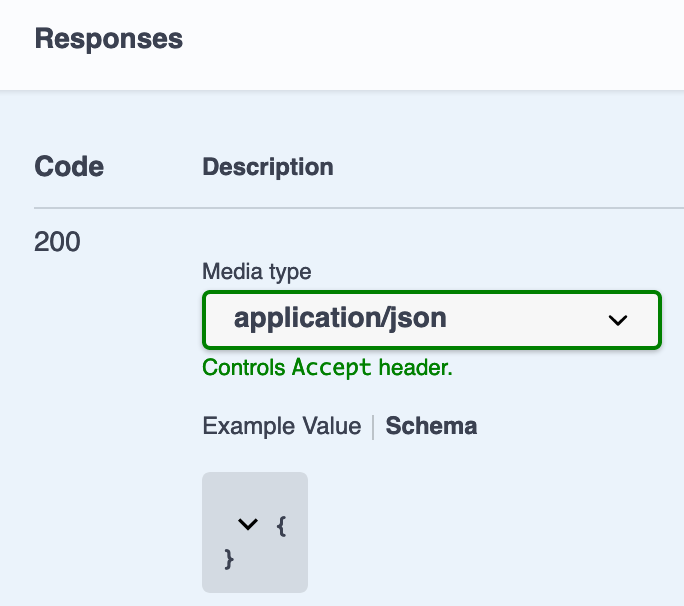
[EDIT]:
I fixed my issue, and possibly addressed @shlomiassaf's concerns, by consuming the program argument in getCustomTransformers:
rule.options = {
    ...rule.options,
    transpileOnly: false,
    getCustomTransformers: (program) => {
      return {
        before: [
          require('@nestjs/swagger/plugin').before(
            {},
            program
          ),
        ],
      };
    },
  };
 goodoldneon
on 18 Oct 2020
goodoldneon
on 18 Oct 2020
Hi all,
I was wondering if someone could share a working config or example project as I am still struggling to get it to work after following the steps above.
Thanks in advanced
 SSmale
on 10 Nov 2020
SSmale
on 10 Nov 2020
my working custom webpack config:
_NOTE:_ Please, note that your filenames must have one of the suffixes defined in
dtoFileNameSuffixin order to be analysed by the plugin.
const webpack = require('webpack');

const SwaggerPluginOptions = {
  dtoFileNameSuffix: ['.dto.ts', '.entity.ts', '.view.ts'],
  classValidatorShim: true,
  introspectComments: true
};

module.exports = (config, _context) => {
  config.module.rules
    .filter((rule) => rule.loader.includes('ts-loader'))
    .forEach((tsRule) => {
      tsRule.options = {...tsRule.options};
      tsRule.options.transpileOnly = false;
      tsRule.options.getCustomTransformers = addSwaggerPluginTransformer(tsRule.options.getCustomTransformers);
    });

  config.plugins = [...(config.plugins || []), new webpack.ProvidePlugin({
    openapi: '@nestjs/swagger',
  })];
  return config;
};


function addSwaggerPluginTransformer(prevGetCustomTransformers) {
  return (program) => {
    const customTransformers = {...(prevGetCustomTransformers? prevGetCustomTransformers(program) : undefined)};
    customTransformers.before = [
      require('@nestjs/swagger/plugin').before(SwaggerPluginOptions, program),
      ...(customTransformers.before || [])
    ];
    return customTransformers;
  }
}
 gms1
on 3 Jan 2021
gms1
on 3 Jan 2021
Related issues
 jasedwards
·
3Comments
jasedwards
·
3Comments
 olakara
·
3Comments
olakara
·
3Comments
 zachnewburgh
·
3Comments
zachnewburgh
·
3Comments
 elliotmendiola
·
3Comments
elliotmendiola
·
3Comments
 zpydee
·
3Comments
zpydee
·
3Comments
Most helpful comment
Ok, final working solution. It's probably sinful, but here you go nonetheless.
The main problem seems to be that
nxisn't passing theprogramto the plugins. To get around this, I just created the program myself in mywebpack.config.tslike so:So the final
webpack.config.tsis:And
angular.json: