Nx: I still get error while creating a workspace.
I still get error while creating a workspace.
I am using Windows 64 bit machine and tried using both cmd as well as powershell but got the same error. Is this a system-specific issue?
Here is the error message:
The system cannot find the path specified.
(node:15996) UnhandledPromiseRejectionWarning: Error: Command failed: "C:\Users\arind\AppData\Local\Temp\tmp-15996jzdCey8YUMhM\node_modules.bin\ng" new full-stack-practice --preset="angular-nest" --appName="sample-app" --style="scss" --collection=@nrwl/workspace
at checkExecSyncError (child_process.js:629:11)
at Object.execSync (child_process.js:666:13)
at createApp (C:\Users\arind\AppData\Roaming\npm-cache_npx\15996\node_modules\create-nx-workspace\bin\create-nx-workspace.js:356:21)
at determineCli.then.cli (C:\Users\arind\AppData\Roaming\npm-cache_npx\15996\node_modules\create-nx-workspace\bin\create-nx-workspace.js:74:21)
at process._tickCallback (internal/process/next_tick.js:68:7)
(node:15996) UnhandledPromiseRejectionWarning: Unhandled promise rejection. This error originated either by throwing inside of an async function without a catch block, or by rejecting a promise which was not handled with .catch(). (rejection id: 2)
(node:15996) [DEP0018] DeprecationWarning: Unhandled promise rejections are deprecated. In the future, promise rejections that are not handled will terminate the Node.js process with a non-zero exit code.
_Originally posted by @arindamdawn in https://github.com/nrwl/nx/issues/1461#issuecomment-554246539_
 arindamdawn
All 12 comments
Hi @arindamdawn, thanks for raising this issue. Can you provide a little more info? What exact command are you running here?
What versions of npm and node do you have?
 jdpearce
on 15 Nov 2019
jdpearce
on 15 Nov 2019
The command that I am running is npx create-nx-workspace@latest myorg
My node version is 10.16.0
My npm version is 6.13.0
arindamdawn
on 18 Nov 2019

arindamdawn
on 18 Nov 2019
Sorry, @arindamdawn I can't replicate this. I think @FrozenPandaz came across something similar recently though - it may have something to do with the way double quotes are handled in certain versions of powershell.
Can you try running this in cmd instead?
jdpearce
on 18 Nov 2019
Hi, @jdpearce I tried this in cmd as well. However, I get the same error. Here is an attached screenshot

As an alternative, can I create a fresh angular project using angular cli and then add '@nrwl/workspace'. Then add the other necessary packages for frontend and backend?
arindamdawn
on 18 Nov 2019
I get very similar behaviour, just trying to create my 1st workspace
[error] Error: Could not find module "@nrwl/workspace" from "F:\\".
    at Object.resolve (C:\Program Files (x86)\Nodist\bin\node_modules\@angular\cli\node_modules\@angular-devkit\core\node\resolve.js:154:11)
    at NodeModulesEngineHost._resolvePackageJson (C:\Program Files (x86)\Nodist\bin\node_modules\@angular\cli\node_modules\@angular-devkit\schematics\tools\node-module-engine-host.js:28:21)
    at NodeModulesEngineHost._resolveCollectionPath (C:\Program Files (x86)\Nodist\bin\node_modules\@angular\cli\node_modules\@angular-devkit\schematics\tools\node-module-engine-host.js:69:40)
    at NodeModulesEngineHost.createCollectionDescription (C:\Program Files (x86)\Nodist\bin\node_modules\@angular\cli\node_modules\@angular-devkit\schematics\tools\file-system-engine-host-base.js:115:27)
    at SchematicEngine._createCollectionDescription (C:\Program Files (x86)\Nodist\bin\node_modules\@angular\cli\node_modules\@angular-devkit\schematics\src\engine\engine.js:147:40)
    at SchematicEngine.createCollection (C:\Program Files (x86)\Nodist\bin\node_modules\@angular\cli\node_modules\@angular-devkit\schematics\src\engine\engine.js:140:43)
    at NewCommand.getCollection (C:\Program Files (x86)\Nodist\bin\node_modules\@angular\cli\models\schematic-command.js:128:35)
    at NewCommand.initialize (C:\Program Files (x86)\Nodist\bin\node_modules\@angular\cli\models\schematic-command.js:44:37)
    at process._tickCallback (internal/process/next_tick.js:68:7)
    at Function.Module.runMain (internal/modules/cjs/loader.js:745:11)
I'm runing node 10.15.0 with npm 6.13.1
Windows 10 x64
command line run : npx create-nx-workspace@latest algotec-web-workspace
answered 'empty' and 'Angular CLI" to the prompts
I tried to install @nrwl/workspace globally first (using npm i -g) and then it worked.
I guess you forgot to add this to the dependencies
 nadavsinai
on 24 Nov 2019
nadavsinai
on 24 Nov 2019
This actually sounds like it could be an npx issue. Possibly related to this? https://github.com/npm/npm/issues/17869
jdpearce
on 2 Dec 2019
I was getting a similar error -- it turned out I had some existing (older) @angular dependencies in the project folder where I was trying to create a new workspace. I removed them all, re-ran the command and it worked perfectly.
 markgoho
on 23 Dec 2019
markgoho
on 23 Dec 2019
Hi, sorry about this.
This was mislabeled as stale. We are testing ways to mark _not reproducible_ issues as stale so that we can focus on actionable items but our initial experiment was too broad and unintentionally labeled this issue as stale.
 FrozenPandaz
on 29 May 2020
FrozenPandaz
on 29 May 2020
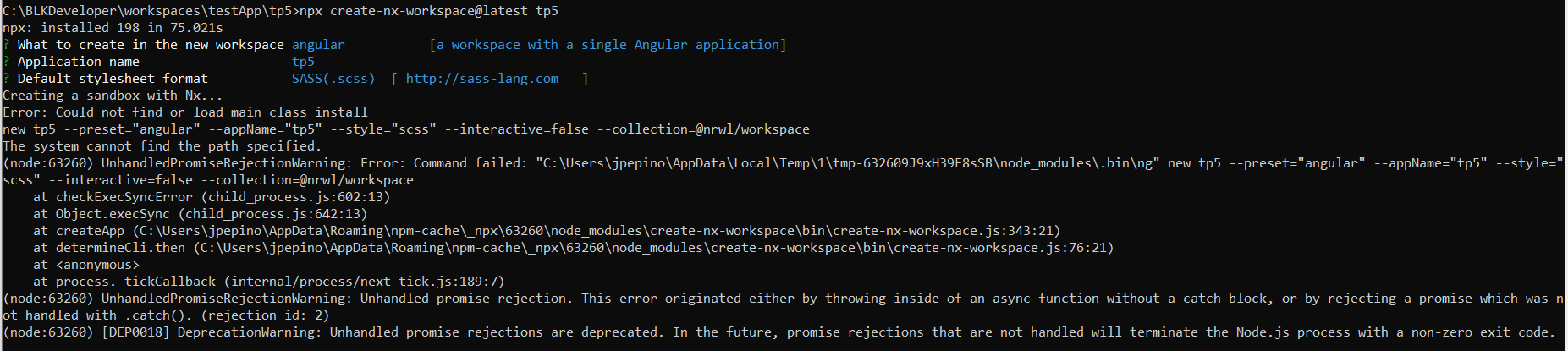
I'm having the same issue, has there been any possible solutions?
 jvpepino
on 6 Jun 2020
jvpepino
on 6 Jun 2020
This issue has been automatically marked as stale because it hasn't had any recent activity. It will be closed in 14 days if no further activity occurs.
If we missed this issue please reply to keep it active.
Thanks for being a part of the Nx community! 🙏
![github-actions[bot] picture](https://avatars2.githubusercontent.com/in/15368?v=4&s=40) github-actions[bot]
on 6 Jul 2020
github-actions[bot]
on 6 Jul 2020
Closed because this is stale. Please create a new issue if you continue to run into this issue.
FrozenPandaz
on 14 Aug 2020
Related issues
 Svancara
·
3Comments
Svancara
·
3Comments
 elliotmendiola
·
3Comments
elliotmendiola
·
3Comments
 sukei
·
3Comments
sukei
·
3Comments
 kmkatsma
·
3Comments
kmkatsma
·
3Comments
 ZempTime
·
3Comments
ZempTime
·
3Comments