Context
I upgraded my project from Angular 7 to Angular 8 yesterday using
ng update @angular/cli @angular/core
Everything worked fine.
I saw the Nx 8 announcement and tried running
npm run update
After installing the dependencies and completing a few migration steps, the process exited with the below error.
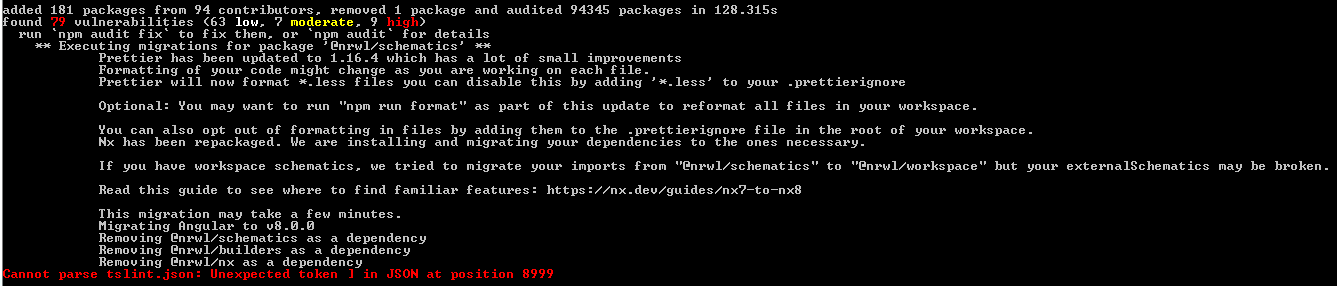
The migration steps logged
Removing @nrwl/schematics as a dependency
Removing @nrwl/builders as a dependency
Removing @nrwl/nx as a dependency
My package json now has:
"@nrwl/nx": "7.8.6" under dependencies
and
"@nrwl/builders": "8.0.0",
"@nrwl/schematics": "8.0.0" under devDependencies
I am not sure if the process completed successfully or it failed to remove these packages as I can still see them in my package.json.
 ajayambre
All 12 comments
I've experienced a similar issue, but I'm still investigating. In my case it didn't give me the error on the tslint.json but rather in node_modules/@angular/pwa/node_modules/@schematics/angular/workspace/files/package.json (version @angular/pwa: "^0.12.2"`) which looks like this:
{
  "name": "<%= utils.dasherize(name) %>",
  "version": "0.0.0",
  "scripts": {
    "ng": "ng",
    "start": "ng serve",
    "build": "ng build",
    "test": "ng test",
    "lint": "ng lint",
    "e2e": "ng e2e"
  },
  "private": true,
  "dependencies": {
    "@angular/animations": "<%= latestVersions.Angular %>",
    "@angular/common": "<%= latestVersions.Angular %>",
    "@angular/compiler": "<%= latestVersions.Angular %>",
    "@angular/core": "<%= latestVersions.Angular %>",
    "@angular/forms": "<%= latestVersions.Angular %>",
    "@angular/platform-browser": "<%= latestVersions.Angular %>",
    "@angular/platform-browser-dynamic": "<%= latestVersions.Angular %>",
    "@angular/router": "<%= latestVersions.Angular %>",
    "core-js": "^2.5.4",
    "rxjs": "<%= latestVersions.RxJs %>",
    "tslib": "<%= latestVersions.TsLib %>",
    "zone.js": "<%= latestVersions.ZoneJs %>"
  },
  "devDependencies": {
    "@angular/cli": "<%= '~' + version %>",
    "@angular/compiler-cli": "<%= latestVersions.Angular %>",
    "@angular/language-service": "<%= latestVersions.Angular %>",
    "@types/node": "~8.9.4",<% if (!minimal) { %>
    "@types/jasmine": "~2.8.8",
    "@types/jasminewd2": "~2.0.3",
    "codelyzer": "~4.5.0",
    "jasmine-core": "~2.99.1",
    "jasmine-spec-reporter": "~4.2.1",
    "karma": "~3.1.1",
    "karma-chrome-launcher": "~2.2.0",
    "karma-coverage-istanbul-reporter": "~2.0.1",
    "karma-jasmine": "~1.1.2",
    "karma-jasmine-html-reporter": "^0.2.2",
    "protractor": "~5.4.0",<% } %>
    "ts-node": "~7.0.0",
    "tslint": "~5.11.0",
    "typescript": "<%= latestVersions.TypeScript %>"
  }
}
Probably cannot parse the <%=... strings, but I wonder why the migration process wants to do that 🤔
//Update
I tried to remove the pwa package, but now it fails at the node_modules/@schematics/angular/workspace/files/package.json level with the very same error message
 juristr
on 30 May 2019
juristr
on 30 May 2019
Thank you for reporting these issues!
@ajayambre can you please provide a repro of the issue? From the description, I think if you create a new workspace and copy in the tslint.json, the issue should be present.
npx [email protected] update-bug
@juristr Can you please provide a repro so I can take a look? I don't know why those files would be looked at.
 FrozenPandaz
on 30 May 2019
FrozenPandaz
on 30 May 2019
@FrozenPandaz Strangely, if I create a new NX setup (using the command u provided), and then update to v8 using npm run update I get this error
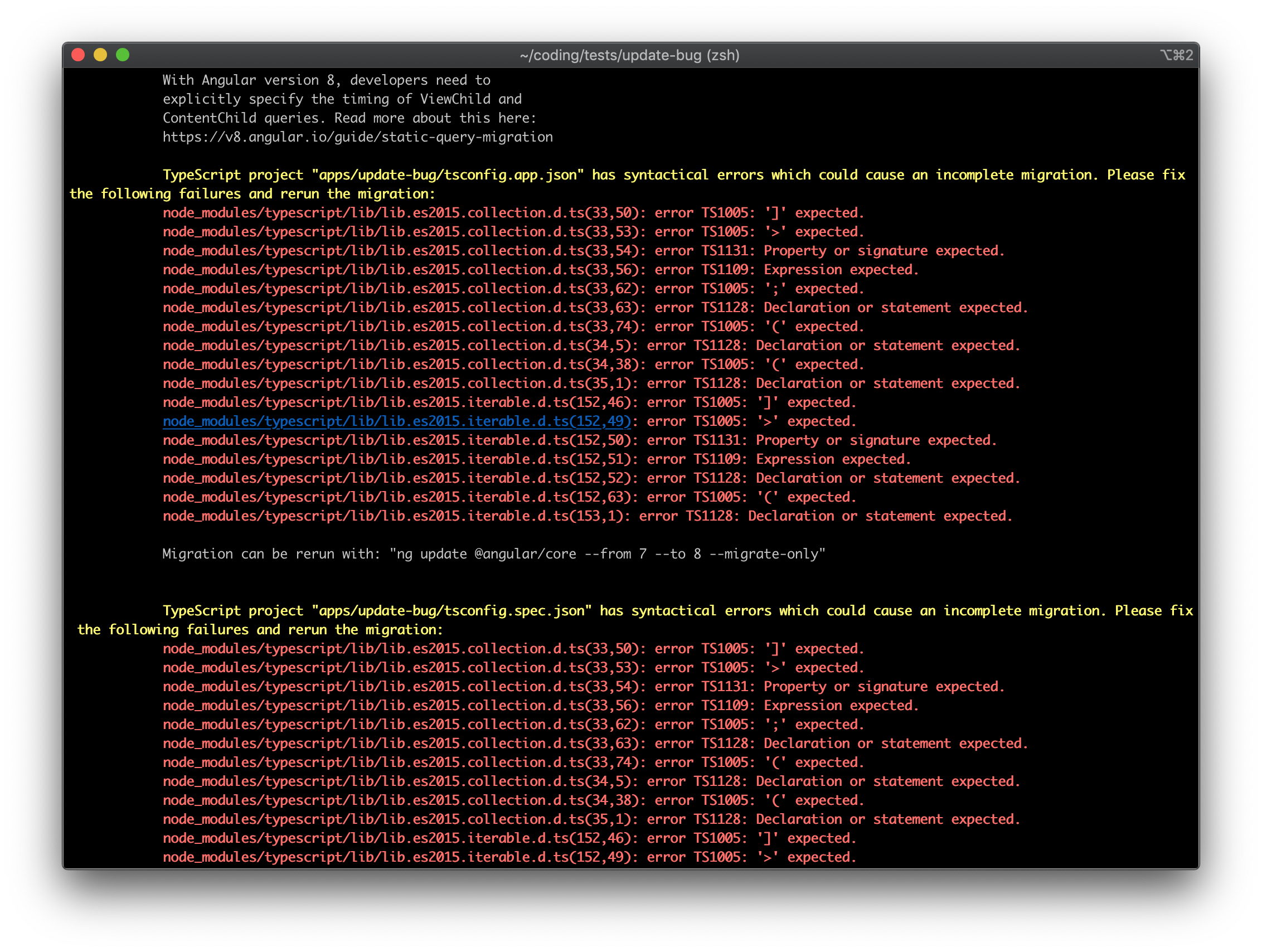
Can you reproduce that? the tsconfig.app.json looks good though:
{
  "extends": "./tsconfig.json",
  "compilerOptions": {
    "outDir": "../../dist/out-tsc",
    "types": []
  },
  "exclude": ["src/test-setup.ts", "**/*.spec.ts"],
  "include": ["**/*.ts"]
}
It is strange isn't it :(
Issue: https://github.com/nrwl/nx/issues/1423
Fix (for now): Run yarn update @angular/core which would run ng update @nrwl/schematics @angular/core.
Better solution is waiting on @angular/cli but coming soon.
EDIT: The solution is now published in 8.0.1
FrozenPandaz
on 31 May 2019
@FrozenPandaz Thank you for the reply.
I followed your steps to create a new workspace
npx [email protected] update-bug
and copied my tslint.json file.
I am able to reproduce the same issue.

What is strange though is that my tslint.json file has only 315 lines in it but the error says Cannot parse tslint.json: Unexpected token ] in JSON at position 8999.
Attaching my tslint.json file below as a .txt file as Github does not allow to attach JSON files.
tslint.json.txt
@juristr I also got the same error when i created a new workspace and tried to update it keeping the default tslint.json file.
TypeScript project "apps/update-bug/tsconfig.app.json" has syntactical errors which could cause an incomplete migration. Please fix the following failures and rerun the migration:
ajayambre
on 31 May 2019
@ajayambre Thank you so much!
On line 301: you have a trailing comma which is makes it a malformed JSON.
Please fix that and see if the migration succeeds.
FrozenPandaz
on 31 May 2019
I just upgraded a big App with no hassle, thanks @FrozenPandaz
 matheo
on 1 Jun 2019
matheo
on 1 Jun 2019
@FrozenPandaz a minor detail is missing in the update schematic:
/tslint.json has a reference to node_modules/@nrwl/schematics/src/tslint and it needs to be updated to node_modules/@nrwl/workspace/src/tslint
Edit: actually I'm not sure about this because I upgraded the package without the schematic, and now, running it again manually with ng update @nrwl/schematics --from 7 --to 8 --migrate-only got the files updated!
The new @nrwl packages look beautiful!
matheo
on 1 Jun 2019
@juristr @ajayambre
There should be a lot of improvements to migrating so if you are still having issues can you please try again?
FrozenPandaz
on 5 Jun 2019
Awesome, thx Jason. Gonna try & let u know
juristr
on 6 Jun 2019
@FrozenPandaz I was able to resolve the JSON error after I removed the extra , from line 301. Thanks.
I deleted the entire node_modules folder and then the npm run update was able to get past all the nrwl steps but finally failed on Upgrading the @angular/cli step.
Since I had already updated my code using the @angular/cli, I ignored this error and moved on.
On running ng serve, I started getting #1416 DataPersistance Error.
I tried setting the [email protected] and then it started compiling but failed at runtime.
I have removed the DataPersistance code for now and I am able to run my project.
ajayambre
on 6 Jun 2019
Cool. It seems like this issue is mostly resolved now so I will close this issue. If you run into any more issues, please create a new issue with specific details!
FrozenPandaz
on 7 Jun 2019
Related issues
 olakara
·
3Comments
olakara
·
3Comments
 SWGeekPD
·
3Comments
SWGeekPD
·
3Comments
 Koslun
·
3Comments
Koslun
·
3Comments
 Svancara
·
3Comments
Svancara
·
3Comments
 vimalraj-a
·
3Comments
vimalraj-a
·
3Comments
Most helpful comment
I've experienced a similar issue, but I'm still investigating. In my case it didn't give me the error on the
tslint.jsonbut rather innode_modules/@angular/pwa/node_modules/@schematics/angular/workspace/files/package.json(version @angular/pwa: "^0.12.2"`) which looks like this:Probably cannot parse the
<%=...strings, but I wonder why the migration process wants to do that 🤔//Update
I tried to remove the pwa package, but now it fails at the
node_modules/@schematics/angular/workspace/files/package.jsonlevel with the very same error message