Nx: NestJS: Provide builders for ts-node (serve) and standard tsc (build) - options to exclude webpack
- [x] I am running the latest version
- [x] I checked the documentation and found no answer
- [x] I checked to make sure that this issue has not already been filed
- [x] I'm reporting the issue to the correct repository (not related to Angular, AngularCLI or any dependency)
Expected Behavior
Hi, I wonder if its possible to provide builders for the following scenerios.
NG SERVE - using ts-node, currently libraries added via external tsconfig paths are not able to be debugged using vs code for example - ts node supports use of tsconfig paths and i have another project - non nx - and debuggging seems to work there. I also think it would be easier for debugging nestjs applications. Retaining full use of the NG CLI but underneath running ts-node.
NG BUILD - using standard TSC to build the projest into the dist, so you end up with multiple .js files - not a bundle. I having quite a few issues with the project working once its built and working from the dist directory. Having separate files would make it easy to debug and understand. In the bundle I dont know whats been added or not. I have an open issue on nest for a similar problem. https://github.com/nestjs/nest/issues/1937
I just thinking giving these options to developers would be the icing on the cake :-) Nestjs using ts-node while NG SERVE and using standard tsc (typescript compiler) to multiple files on NG BUILD
Current Behavior
Everythingis bundled into a bundle file, works great for angular but nestjs would benefit from the above.
Context
Please provide any relevant information about your setup:
- version of Nx used 7.7
u.
 iangregsondev
All 11 comments
currently libraries added via external tsconfig paths are not able to be debugged using vs code for example
Can you elaborate on this please?
We can create these, however, I think webpack offers some other features such as replacements, working with other types of files.
 FrozenPandaz
on 5 Apr 2019
FrozenPandaz
on 5 Apr 2019
Sure .... so I have some external libraries that I publish to a private npm repository... They are in a different location. While I am developing, I use tsconfig paths so I can test my libraries integrating with nest. So I attach a vs code debugger i.e
  "configurations": [
    {
      "type": "node",
      "request": "attach",
      "name": "Vault-API",
      "port": 5880,
      "sourceMaps": true,
      "cwd": "${workspaceFolder}/vault-api",
      "restart": true
    }
  ]
and sure enough, i can place break points in my code that is under the api/apps.
I also place a breakpoint in one of my libraries located under nest-common, at run time, i can debug my ts files but when it gets to the libraries then(nest-common) then the JS file is being debugged not the TS file.
I hope that makes sense. here is the example directory structure
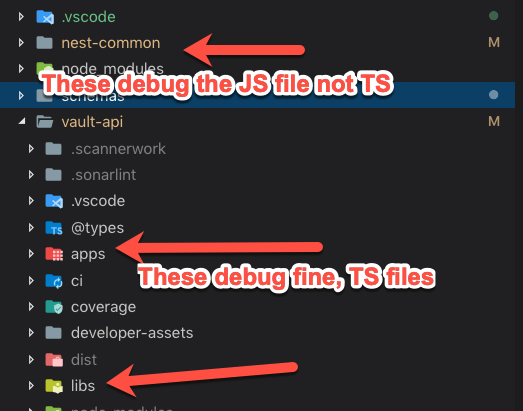
and here is my main tsconfig, as you can see i am pointing one of the libs with scope PRIME to nest-common, this is temporary while i develop it
 "paths": {
      "*": ["./@types/*"],
      "@vault-ws/feature/health": ["libs/feature/health/src"],
      "@prime/nest-correlation": ["../nest-common/libs/nest-correlation/src/index.ts"],
      "@vault-ws/feature/security": ["libs/feature/security/src"],
Maybe its because it can't find the sourcemaps at runtime ?
Not sure.
iangregsondev
on 6 Apr 2019
@FrozenPandaz offering ts-node/TSC based builders will fulfill needs for most of the nodeJS frameworks. we still love replacements for config. i guess we can get this capability without WebPack. bundling can be opt-in option, if developers want to bundle with webpack or rollup
 xmlking
on 9 Apr 2019
xmlking
on 9 Apr 2019
Hello guys I think I have made just the package that you needed
This is a builder that uses ts-node , nodemon , and tsc to give you two type of builders for dev and production checkout it out here
Also tsconfig paths are used by default inside the builders
https://github.com/abdoolly/ts-node-builder
Thanks and hope it helps :D
 abdoolly
on 25 Oct 2019
abdoolly
on 25 Oct 2019
@abdoolly I appreciate your work and thanks for providing the alternate builder.
@vsavkin @FrozenPandaz
Has there been any progress on allowing tsc based builders? I can make my project work using the alternate builder but it feels like this functionality really belongs in the NX builder.
My use case is NX workspace with an Angular frontend and NestJS backend. Both applications must be deployed to an on-prem installation of Pivotal CloudFoundry. I also must use the nodejs buildpack and cannot supply a custom docker image.
The issue is the webpack based builder is incompatible with Cloudfoundry's nodejs buildpack.
I have tried every combination of tsconfig settings and the modules will not load properly [1]. I would be happy to try another combination if you have any suggestions. But AFAIK the tsc compiler must have these options [2] and the webpack builder disabled.
When testing a project that uses only the nest-cli, the webpack based build can easily be disabled and everything "just works". Providing the ability to select NestJS's tsc builder provides a much better developer experience compared to installing the alternate builder.
The example based on the NestJS cli monorepo config can be found here
and the nx workspace using the ts-node-builder is here.
- webpack based NestJS startup error
   2020-01-07T18:54:34.00-0500 [APP/PROC/WEB/0] ERR internal/modules/cjs/loader.js:800
   2020-01-07T18:54:34.00-0500 [APP/PROC/WEB/0] ERR     throw err;
   2020-01-07T18:54:34.00-0500 [APP/PROC/WEB/0] ERR     ^
   2020-01-07T18:54:34.00-0500 [APP/PROC/WEB/0] ERR Error: Cannot find module '/home/vcap/app/dist/apps/hello/main.js'
   2020-01-07T18:54:34.00-0500 [APP/PROC/WEB/0] ERR     at Function.Module._resolveFilename (internal/modules/cjs/loader.js:797:15)
   2020-01-07T18:54:34.00-0500 [APP/PROC/WEB/0] ERR     at Function.Module._load (internal/modules/cjs/loader.js:690:27)
   2020-01-07T18:54:34.00-0500 [APP/PROC/WEB/0] ERR     at Function.Module.runMain (internal/modules/cjs/loader.js:1047:10)
   2020-01-07T18:54:34.00-0500 [APP/PROC/WEB/0] ERR     at internal/main/run_main_module.js:17:11 {
   2020-01-07T18:54:34.00-0500 [APP/PROC/WEB/0] ERR   code: 'MODULE_NOT_FOUND',
   2020-01-07T18:54:34.00-0500 [APP/PROC/WEB/0] ERR   requireStack: []
   2020-01-07T18:54:34.00-0500 [APP/PROC/WEB/0] ERR }
- tsconfig.json
{
  "compilerOptions": {
    "module": "commonjs",
    "target": "es2017",
    "esModuleInterop": true,
    ...
    }
}
 dopsonbr
on 8 Jan 2020
dopsonbr
on 8 Jan 2020
@vsavkin @FrozenPandaz any progress or plan to include this kind of builder in NX?, exists some problems with NestJS + TypeORM and webpack, like https://github.com/nrwl/nx/issues/803 and https://github.com/nrwl/nx/issues/1393 for example
 gperdomor
on 7 Feb 2020
gperdomor
on 7 Feb 2020
This is also a critical requirement for modules that dynamically import the contents of entire directories ... example node express with routing-controllers
 ashbrener
on 13 Mar 2020
ashbrener
on 13 Mar 2020
Having similar issues using dynamic imports in Node.js applications. Using webpack causes an insane amount of issues, due to replacing imports with his own internal methods. A more simplistic TSC based builder would be really nice, like it is available for the library schematic, just for applications with devmode, inspect, etc.
 iammathew
on 28 Mar 2020
iammathew
on 28 Mar 2020
Hello @khayalan-mathew
you can check out my builder https://github.com/abdoolly/ts-node-builder made exactly for the issue you are having
and if you find anything missing or not working as expected please raise me an issue,
Thanks.
abdoolly
on 29 Mar 2020
@FrozenPandaz @vsavkin @xmlking @iangregsondev
It could be related.
Is there any chance to use .ts extension for
"customServerPath": "next.server.ts" config option for next.js instead of .js to make it work?
It doesn't seem I can reuse libs dependencies without publishing them.
Any workarounds with custom webpack config? If so, could you provide an example. Can't wrap my head around it.
Thanks
 vladimir-barsuchenko
on 22 May 2020
vladimir-barsuchenko
on 22 May 2020
For what it's worth, I've had success using run-commands with ts-node-dev, or tsc directly. At least in some use cases, I haven't felt the need for a specialised builder. This might be an option that works in some cases, although I'm not denying the ergonomics of specialised builders.
Example:
    ...
    "serve": {
        "builder": "@nrwl/workspace:run-commands",
        "options": {
            "parallel": false,
            "commands": [
                {
                    "command": "npm run ts-node-dev apps/demo/src/app/main.ts"
                }
            ]
        }
    }
   ...
And in package.json, for convenience:
{
    "scripts": {
        "ng": "ng",
        "ts-node-dev": "TS_NODE_PROJECT=tsconfig.node.json ts-node-dev -r tsconfig-paths/register"
    }
}
tsconfig.node.json contains:
{
    "extends": "./tsconfig.json",
    "compilerOptions": {
        "module": "commonjs",
        "esModuleInterop": true
    }
}
 studds
on 27 May 2020
studds
on 27 May 2020
Related issues
 dereklin
·
3Comments
dereklin
·
3Comments
 vimalraj-a
·
3Comments
vimalraj-a
·
3Comments
 olakara
·
3Comments
olakara
·
3Comments
 joelmuskwe
·
3Comments
joelmuskwe
·
3Comments
 zachnewburgh
·
3Comments
zachnewburgh
·
3Comments
Most helpful comment
@FrozenPandaz offering
ts-node/TSCbasedbuilderswill fulfill needs for most of the nodeJS frameworks. we still lovereplacementsfor config. i guess we can get this capability without WebPack. bundling can be opt-in option, if developers want to bundle withwebpackorrollup